Doddle: Draw 3D Effects on Video — A One-Time-Purchase AR Creation Tool

Doddle turns your phone camera into a 3D paintbrush, making AR creation a minutes-long short-video workflow.
Doddle is an iOS app that turns your phone camera into a 3D paintbrush, letting users draw and anchor lines in real space while recording video to create pseudo-3D effects. It offers three core features — 3D brush, automatic drawing playback, and portrait video export — greatly lowering the barrier to AR effects creation. Priced free to start with a $6.99 one-time Pro purchase, it stands out in a subscription-heavy tool market. It earned 75 upvotes and ranked 7th for the day on Product Hunt, hitting short-video creators' need for lightweight creative tools. The article also notes that its effectiveness depends on lighting and tracking stability, with line drift in complex scenes being a common challenge for such apps — professional fine compositing still requires traditional toolchains.
On Product Hunt, an iOS app called Doddle has drawn attention with its unique positioning of "drawing in the world." It turns your phone camera into a 3D paintbrush, letting you "pin" lines directly into real space while recording video.
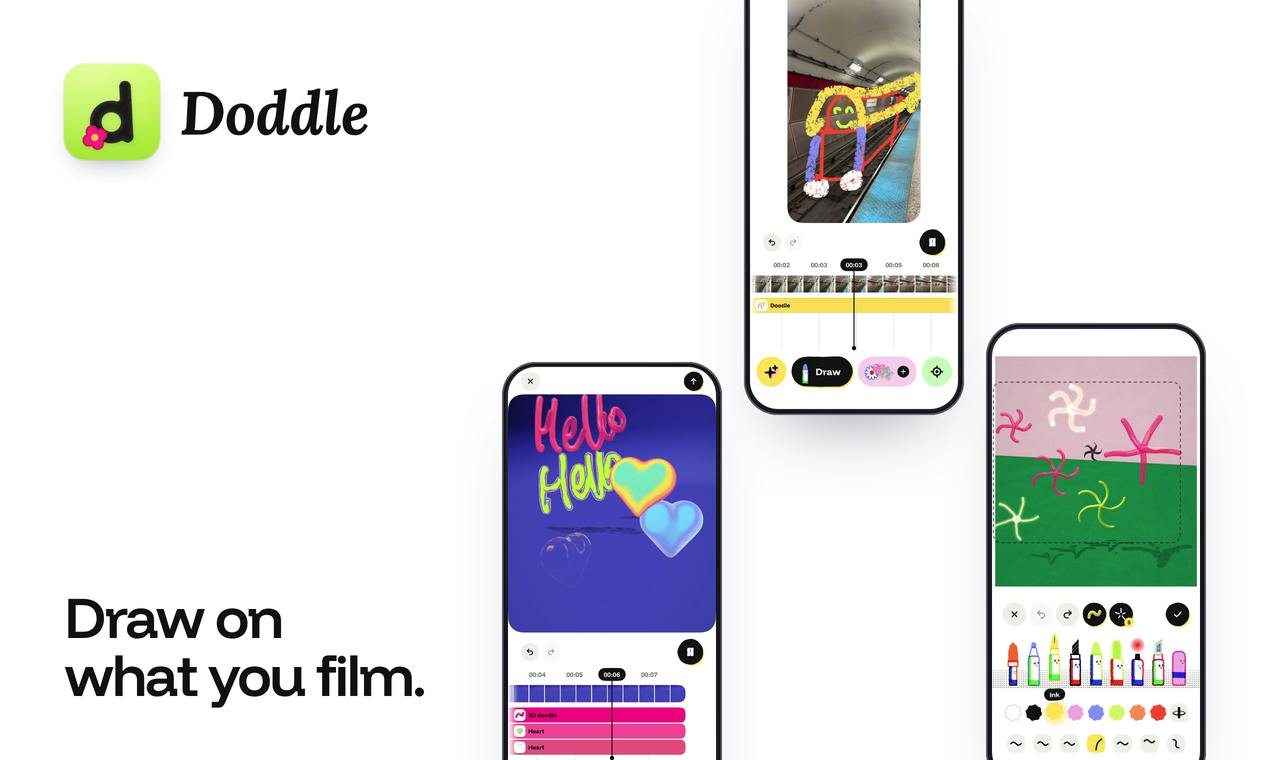
From "Shooting Video" to "Doodling in the World"
The core experience of Doddle is intuitive: record a few steps as you walk, then paint lines in the air or on walls as if drawing, and those lines stay exactly where you drew them. The lines remain spatially anchored as the camera moves, creating a pseudo-3D visual effect.
It requires no complex modeling or post-production software — the entire creative process happens in the moment of filming. For creators who want to quickly produce eye-catching short videos, this "what you see is what you draw" interaction lowers the barrier to creating AR effects.
Key Features Breakdown
Doddle offers several design choices that reduce the difficulty of creation:
- 3D paintbrush: Choose from different brush styles to paint in the air, with lines fixed in three-dimensional space rather than stuck to the screen.
- Automatic drawing playback: The app can "watch" the lines draw themselves, eliminating the hassle of manual frame-by-frame work — ideal for process showcase content.
- Portrait video export: Output videos are directly compatible with mobile short-video platforms, no secondary cropping needed.
Combined, these features point to a clear use case: creating creative short videos with a sense of space in the fewest possible steps.
The pseudo-3D visual effect relies on visual SLAM (Simultaneous Localization and Mapping) technology: the camera continuously extracts feature points from the scene as it moves, estimating its own position and orientation changes in space to build a sparse 3D environment map. Doddle anchors the user's drawn lines in this map's coordinate system, so the lines maintain relatively fixed spatial positions as the camera moves. This also explains why lines tend to drift in complex scenes — when the image lacks texture, lighting changes abruptly, or motion is too fast, feature point tracking can be lost or mismatched, causing localization errors to accumulate and lines to deviate from their original positions.
"Automatic drawing playback" is not simply reverse or sped-up video playback; instead, based on the user's preset brush paths and timing parameters, the app re-renders the line generation process after recording is complete. Implementation typically requires recording the 3D spatial coordinates, drawing timestamps, and brush attributes of each stroke, then interpolating frame-by-frame output along the timeline. This mechanism lets creators first draw at normal speed, then display the "lines growing by themselves" effect at a faster pace — eliminating tedious manual frame-by-frame animation and avoiding the uneven lines caused by shaky hands.
Pricing Strategy: Free to Start, One-Time Purchase
Doddle follows a "Free to start" model, with the Pro version priced at $6.99 as a one-time purchase. In a tool app market flooded with subscriptions, this pricing feels notably restrained.
For casual users who just want to try AR drawing, the free version is enough to determine whether it suits their creative habits; for creators who need full functionality, a one-time outlay of under $7 carries almost no decision burden. This pricing approach also hints at the development team's judgment about the product's positioning — it's more of a lightweight creative tool than a professional productivity suite requiring ongoing payment.
The difference between one-time purchase and subscription isn't just payment frequency — it's the relationship model between product and user. Subscriptions require the product to continuously deliver new value to sustain renewals, often pushing teams to keep layering on features; one-time purchase is closer to traditional software sales, where revenue is directly tied to user scale and developers tend to build the core experience complete in one go. For lightweight tools like AR drawing — with clearly defined feature boundaries and perhaps not-so-frequent use — one-time purchase lowers the user's decision threshold and psychological burden, but it also means the team lacks sustained cash flow to support subsequent updates, and long-term maintenance cadence may be less stable than that of subscription products.
Market Feedback and Competitive Position
On Product Hunt, Doddle received 75 upvotes and 3 comments, ranking 7th for the day. This is a mid-to-upper result among tool products, indicating it has hit a nerve with some users' interests but hasn't yet sparked explosive discussion.
In terms of category, Doddle sits at the intersection of AR creation tools and short-video editing. The market has 3D tracking and compositing software for professional creators, as well as a plethora of filter-based short-video apps, but products like Doddle that integrate "spatial drawing" directly into the filming workflow are rare. Its differentiation lies in simplification: it doesn't pursue film-grade precision, but lets ordinary people draw a line floating in the air within minutes.
Who It's For, and Who It's Not For
Doddle is best suited for short-video content creators, social media managers, and educators who want to add visual aids to classes or presentations. Its low barrier means no need to learn the basics of 3D software — just pick up your phone and try.
Objectively speaking, the effectiveness of AR spatial drawing is affected by lighting, camera tracking stability, and other conditions; line drift in complex scenes is a common challenge for this type of app. Doddle's output quality is most reliable in simple scenes, and professional production requiring fine compositing still needs to rely on traditional toolchains.
Summary
Doddle liberates AR creation from professional software with a "3D paintbrush" and puts it into the phone camera. With free-to-start, $6.99 one-time purchase pricing, plus portrait output and automatic playback — designs that fit short-video habits — it makes for a lightweight creative tool worth trying. It won't replace professional effects software, but it does make "drawing in the world" within easy reach.
Related articles

Prompt Engineering for Beginners: From Writing Prompts to Engineering Thinking
Starting from the essence and four functions of prompts, this article systematically explains the six-step process, four success criteria, learning value, and practical limitations of prompt engineering to help you build a complete understanding.

Anthropic Launches Nasdaq IPO: AI Giant's Listing and Risk Disclosures
Anthropic officially launches its Nasdaq IPO under ticker ANT, with market valuation expected to potentially exceed SpaceX's record. The prospectus devotes nearly 100 pages to AI risks, while first-half revenue grew over 14x but net losses widened sharply, reigniting the AI bubble debate.

Rust cURL Clone Uses 4,832 unsafe Blocks—Is the Memory Safety Myth Broken?
A Rust cURL clone uses 4,832 unsafe keywords, challenging Rust's memory safety narrative. We analyze what unsafe really means, compare Fil-C, and examine rewrite motives.