Does AI Get Dumber the Longer You Chat? How Claude Code and Cursor Manage Context

Long context isn't a capacity problem but one of outdated and conflicting information—organize context by task.
The article points out that the root cause of declining model performance as context grows isn't insufficient window capacity, but the mixing of old and new information, with outdated information mistaken as a basis, causing "remembered things to conflict with each other." It proposes four solutions: using an Agent status bar to compress the process into a state the model can read directly; verifying whether state is outdated via search plus reading, enabling on-demand loading; using the Sub-Agent pattern to isolate the exploration process and return only result summaries; and using commands like Compact to compress long history by task, with the criterion being whether information affects the next decision. The core idea is to organize context around the current task and help the model focus on the "now."
Why does AI get "dumber" as context grows longer?
Many people assume that as long as the model's window is big enough, a conversation can go on forever without problems. But in reality: the longer the context, the worse the model may perform at using the information in it—and it can start making mistakes even before hitting the window limit.
The context usage percentage shown in the UI only tells you "how much more it can hold," not "whether the information already in there is still valid." Information being present doesn't mean it's still useful. When old and new information are mixed together, the model has to decide which to trust—and once it decides wrong, outdated information gets treated as the basis for its answer.

This is the core dilemma of long-conversation Agents: it's not that they can't remember, but that the things they remember conflict with each other.
Context Window refers to the maximum number of tokens a large model can receive in a single inference pass, including the system prompt, conversation history, tool return results, and all other content. Early models typically had windows of only 4K–8K tokens; today's mainstream models have expanded to 128K or even millions. However, window size only represents "how much it can hold," not "how well it can use it." The industry uses the term "Context Rot" to describe this phenomenon: as input grows longer, the model's retrieval and reasoning accuracy for information in the middle positions declines, making it prone to ignoring key details or being misled by contradictory old information. This is related to the dilution effect of the Transformer's attention mechanism over long sequences—attention weights get spread thin across a large number of irrelevant tokens, so the truly important information doesn't receive enough attention. Therefore, simply expanding the window cannot solve the reliability problem in long conversations; how to organize context is the key.
Solution 1: Give the Agent a "status bar" instead of making it scroll through chat history
A common industry approach is to consolidate information scattered across history into a state the model can use directly right now. Otherwise, the model has to dig through history and re-infer where the task stands at every step.
One implementation is an Agent status bar—placing the current state in context and continuously updating it as the task progresses.
Take Claude Code fixing a login issue as an example: you ask it to first list a plan, then execute it item by item—investigate the cause, modify the code, run tests. After doing this whole chain of operations, how does it know what step it's on?
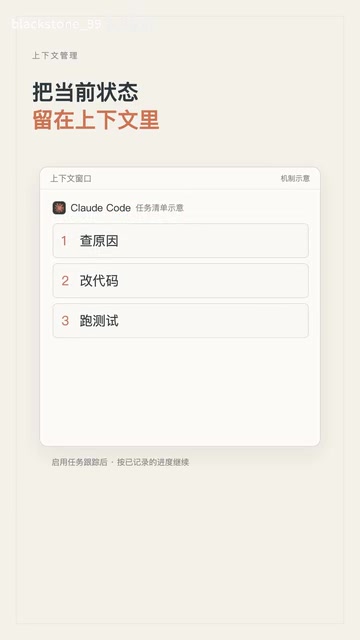
Once the task checklist is enabled, progress is recorded separately and updated as execution proceeds. The model just reads the checklist and knows: the cause has been investigated, the code is being modified, and tests haven't run yet. It doesn't need to re-infer the next step from the entire conversation.
The principle behind this is: compress the "process" into a "state," so that every decision is based on the current snapshot rather than the entire history.
Solution 2: State may be outdated—verify on the spot with "search + read"
The recorded state itself may be inaccurate. What then? When needed, go search and read the original materials to confirm the actual situation.
This is what Cursor does: first search the code, then read the relevant files to see whether the actual situation matches what was recorded.
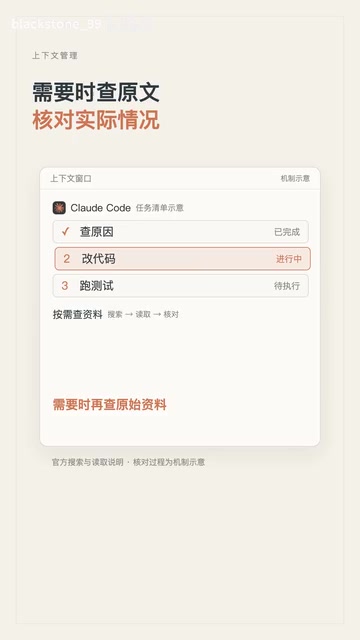
This approach has two benefits: it can check whether records are outdated, and it avoids stuffing all materials into context from the start. Load on demand rather than hoarding in advance.
Lazy Loading / Just-in-Time Retrieval is a context strategy that contrasts with "hoarding in advance": instead of stuffing all potentially relevant materials into the window at the start, it retrieves them via search, file reading, tool calls, etc. when the model determines they're needed. This idea borrows from the concept of lazy evaluation in software engineering. Common implementations include vector retrieval in Retrieval-Augmented Generation (RAG), and Agent tool calls (such as grep, file reading, web scraping). Its advantages: information density in the window stays high, reducing distraction from irrelevant content; and every read fetches the latest data, naturally avoiding outdated state. The cost is increased interaction rounds and latency, so a trade-off is needed between "preloading" and "pulling on demand."
Solution 3: Isolate the exploration process—the Sub-Agent pattern
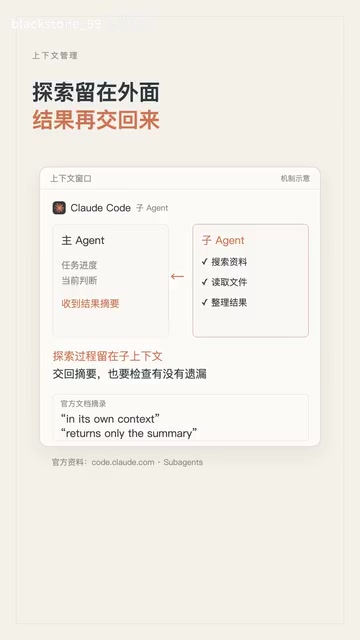
If an independent task still requires looking up a lot of material, you can isolate the exploration process. Claude Code's Sub-Agents work in their own context and, when done, return only a summary of results to the main Agent, which doesn't have to read the entire process.
But the handoff must avoid omitting important information—the quality of the summary determines whether isolation is safe. This is also where the Sub-Agent pattern needs the most design: isolate the process, not the conclusions.
Sub-Agent is a multi-agent collaboration architecture: the main Agent delegates a subtask to an independent Agent instance, which has its own context window and tool permissions, independently completes search, reading, reasoning, and other processes, and finally returns only conclusions or summaries to the main Agent. The core value of this pattern is context isolation—the large amount of intermediate results generated during the Sub-Agent's exploration (trial and error, irrelevant file contents, verbose logs) won't pollute the main Agent's context, thereby keeping the main context concise and focused. Unlike "tool calling," a Sub-Agent has autonomous planning and multi-step execution capabilities, more like an assistant sent out to investigate. The design difficulty lies in the handoff protocol: the summary must retain the key information needed for decisions, otherwise isolation becomes information loss.
Solution 4: Compress long history by task—the key is judging "whether it affects the next step"
What to do with long history that has already accumulated? Compress it by task.
Claude Code's Compact command lets you specify what to focus on during compression. The criterion is clear: Will this piece of information affect the next decision? If yes, it needs to be retained.
However, requesting retention doesn't mean compression will never omit anything—compression is always lossy, and that's a reality this approach must accept.
Context Compaction / Summarization refers to using the model to condense old content into shorter summaries and replace the original records when the conversation history exceeds an ideal length, thereby freeing up window space. Compression can be lossy: details, wording, and intermediate reasoning steps may all be discarded, keeping only conclusions and key facts. Task-based compression further emphasizes "relevance"—rather than uniformly compressing all history, it judges around the current task goal which information must be retained and which can be discarded. The criterion is usually "whether this piece of information will affect the next decision." Common risks of compression include: summaries omitting key constraints, losing user preferences, and mistakenly deleting unfinished to-do items. Therefore, in practice it's often paired with explicit recording mechanisms like "status bars," managing the structured state that must be retained separately from the compressible conversation history.
This approach can be summarized in one sentence
Organize context around the current task: let the model see the current state directly; look things up when details are needed; compress history by task when it gets too long. Whatever each step needs, prepare information around that step.
For ordinary users, this means: rather than complaining that the model "gets dumber after chatting for a while," actively help it maintain a clear task state—clarify the current goal, clean up irrelevant information promptly, and have it re-confirm facts at key moments. The essence of context management is helping the model focus its attention on the "now."
Related articles

Chain of Thought Isn't Just for AI: How Humans Can Use CoT to Improve Thinking Quality
Chain of Thought isn't just a prompt trick for large models. Starting from a Hacker News discussion, this article analyzes why CoT works for human thinking too, breaks down actionable ways to transfer it, and highlights the key differences between human CoT and machine CoT.
Cloudflare Teams Up with OpenAI: Closi…
Cloudflare Teams Up with OpenAI: Closing the Loop from Vulnerability Discovery to Defense with AI
Cloudflare uses OpenAI Daybreak to investigate security vulnerabilities and generate reviewable remediation plans, while developers use Codex to boost coding efficiency and quality.

Orca Multi-Agent Orchestration in Practice: A Guide to Parallel Collaboration with Claude and Codex
Orca is Stable AI's free open-source agent workbench supporting 34 agents like Claude Code and Codex in parallel. Learn its Git worktree isolation, multi-model orchestration, and mobile management.