Doubao Agent's 3 Core Skills Tested: From a Product Photo to a Complete Marketing Campaign

Doubao Agent's 3 built-in Skills turn a product photo and brief into a full, style-consistent marketing campaign.
This article tests Doubao AI's Agent and Skill features across three real creative and marketing scenarios, revealing why results vary so dramatically between users. The Creative Design Skill converts a product photo and feature brief into a cohesive set of posters and detail pages. The Creative Video Skill uses a plan-first approach to maintain visual consistency when going from static to motion. The Marketing Planning Skill then inherits context from earlier steps to produce a complete 90-day launch plan. Cross-device sync and Cloud PC execution round out a seamless, uninterrupted workflow.
Why Do Results Vary So Drastically When Using the Same Doubao?
Most people still think of AI assistants like Doubao as tools for simple tasks — "write me some copy" or "summarize this article." But the reality is that the same tool can produce wildly different results depending on who's using it. Some users barely get past basic copywriting, while others are cranking out commercial-grade jewelry designs, polished campaign posters, and fully structured marketing plans.
The gap usually has nothing to do with the tool itself — it comes down to whether you're using Agents and Skills. According to hands-on demos from Bilibili creators, Doubao Agent has a built-in set of pre-trained Skills that can handle a wide range of everyday business tasks. Because these are pre-trained capability modules, you don't need to write complex prompts to get high-quality output.
In this piece, we'll do a full breakdown of three Skills focused on visual and video creation — walking through the actual workflow and final results — to see exactly how Doubao Agent turns a vague business requirement into a ready-to-execute deliverable.
Creative Design Skill: One Document → a Full Set of Commercial Assets
Imagine a real-world scenario: you're a small brand owner launching a new product. The hardest part isn't the product itself — it's producing everything that goes with the launch: product shots, detail pages, posters, short videos. Doing it yourself is time-consuming, and outsourcing risks delays.
That's where the Creative Design Skill comes in. The workflow is straightforward: open the Doubao workspace, select the Creative Design Skill, upload a white-background product photo and a feature brief document, then describe the target product and your preferred visual style.
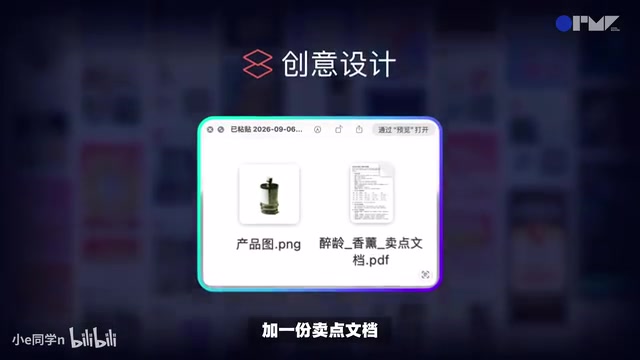
The Skill reads the feature brief, independently plans the asset types, and determines the generation sequence. From a single document, it can generate a complete set of long-format images, product detail pages, and posters. In testing, the four product images it produced featured magazine-quality lighting and white space handling. Each of the three asset formats had distinct composition and layout — not just color swaps — while maintaining consistent visual style throughout, all anchored to the same product identity.
The biggest value here: users don't need to write elaborate camera angle prompts or style descriptions upfront, because the Skill already has a mature visual creation framework built in.
Creative Video Skill: Static to Motion Without Style Breaks
Once you have flat assets, the natural next step is turning static materials into video. This is also where things most often go wrong — converting static to motion tends to cause style inconsistencies, and if you're pulling images from different sources to re-edit, the visual tone can easily drift.

The Creative Video Skill takes a plan-first, generate-second approach. You provide images or copy and describe the style you want. The Skill first produces a written description of the video's format, style, camera movements, and more — you review and confirm the direction before any video is actually generated. This "text plan before footage" step effectively prevents costly misdirection and wasted generation resources.
In the live demo, the creator pulled three hero visuals directly from the previously generated posters, invoked the Creative Video Skill, and made two core requests: ensure the atmosphere and layout matched the posters, and first describe in text what each of the three videos would look like before generating any footage.

The final videos matched the posters in color palette, atmosphere, and layout — a genuine through-line from image to video. Taking the same content and the same visual identity from stills all the way to motion is something most AI video tools currently struggle to deliver — true style consistency.
Marketing Planning Skill: Turning Vague Briefs Into Actionable Plans
If the first two Skills handle asset production, the third one handles strategic coordination. Think of it as a pocket marketing director: it doesn't just generate topic ideas or a content calendar — it can generate, rewrite, and refine a complete marketing plan, turning fuzzy business goals into concrete, executable action items.
All you need to do is describe your marketing scenario and objectives, then provide product information or existing assets. The Skill will work through strategy, content, channel planning, and execution sequencing, then deliver everything as a document — ready for reporting, pitching, or breaking down into tasks.

What's especially powerful is its context inheritance. Since the earlier conversation already included product analysis and a full set of generated assets, the creator simply asked the Skill to read the entire conversation history — picking up the product selling points, brand tone, visual direction, and business materials — and continue from there to build a new product launch marketing plan.
In practice, the Skill positioned the product as a "New Chinese-Style Object Aesthetics Fragrance," mapped the three asset sets (Bamboo Dew, Tea Companion, Pine Smoke) to distinct lifestyle scenarios, then output a content matrix, platform responsibilities, and a 90-day launch timeline — including post-launch repurchase strategies and performance review checkpoints. At this point, the earlier posters and videos were no longer standalone assets — they were woven into a complete marketing plan. From feature brief to static posters to motion video to full marketing campaign: the entire project had been linked together, step by step.
Cross-Device Sync and Cloud PC: A Workflow That Never Breaks
Beyond the three Skills themselves, Doubao Agent has two additional practical capabilities worth highlighting.
The first is cross-device continuity. In the demo, the creator was mid-task on desktop when they needed to leave unexpectedly. They opened the same task on their phone, checked the video text plan, confirmed with a "continue generating" reply, and the workflow picked up seamlessly. For anyone who regularly handles work in fragmented time slots, this is a genuine productivity upgrade.
The second is Cloud PC task execution. For tasks like data collection, platform processing, file handling, or anything that needs to run for a long time and consume significant local resources, the Cloud PC is the better fit. Tasks run continuously in the cloud — even if you're away from your computer, you can check progress and results from your phone.
Takeaway: Knowing How to Use Agents and Skills Is the Real Differentiator
Same Doubao, same interface — the difference almost always comes down to whether you're taking advantage of Agents and Skills. These three Skills share a common set of traits: pre-trained and production-ready, no complex prompting required, and consistent style from start to finish. They compress what would normally require a multi-role creative team into a single, executable automated pipeline.
According to the creator, both new and existing users can currently access a 30-day membership trial on PC. If you want to put this workflow to the test, pick a real business task and let the Agent run through it end-to-end — see what it feels like to go from a brief all the way to finished deliverables in one continuous flow.
Related articles

Baking a NES Emulator Into an LLM: Qwen3.5-4B Runs Super Mario Bros.
Developer Drew Breunig baked a NES 6502 CPU emulator into Qwen3.5-4B's weights, creating the open-source nesformer project that slowly runs Super Mario Bros. ROMs inside the model.

Cathay Pacific Data Breach: 53,000 Orders Exposed, A Wake-Up Call for AI Supply Chain Security
Cathay Pacific confirms a credential breach at third-party supplier Amadeus, exposing 53,000 booking records. The incident reveals deep risks in AI supply chains: the exposed number may be only a floor, and companies must answer two hard questions—how to limit raw data outflows and whether they can trace data quickly.

DeepSeek Harness Installation Guide for Beginners: Temporary vs. Global Install Explained
Complete beginner's guide to installing DeepSeek Harness: set up Node.js first, then choose temporary or global install, with version verification, launch commands, and troubleshooting.