Download Folder a Dumping Ground? Auto-Archive It in Two Seconds with a Local AI Script

Use a local large model to modify rules, and a Python script sorts over two hundred files by extension in two seconds.
The article introduces a zero-third-party-dependency file organization solution: just a script relying only on the Python standard libraries os and shutil, plus rules classifying files by extension, to automatically create directories by category and move over two hundred messy files into place in about two seconds. Its real value lies in collaboration with a local large model—users make requests in natural language, and the model modifies the script rules, letting non-programmers drive local automation. The author also reminds that pure extension-based classification has limitations; files with the same name or no extension require caution, and it's advisable to back up first or test on a small scale.
Your download folder has hundreds of files piled up, and you can't be bothered to organize them—this is probably a daily reality for many people. Recently, a creator on Bilibili shared a minimalist solution: install no third-party software at all, and instead use a local large model to write a Python script that can sort over two hundred messy files into order in two seconds.

Core Idea: Script + Rules, Zero Third-Party Dependencies
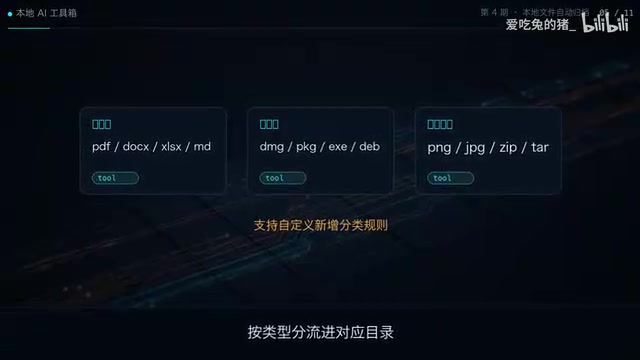
This tool has only two parts: a Python script and a set of auto-classification rules. The script's core logic is extremely lightweight—it relies only on the built-in os and shutil libraries, with no third-party packages. What it does is straightforward: create directories based on file extensions, then move the files there. Images go with images, documents with documents, installers and archives each go to their own place—all sorted in one step.
Because the logic is simple enough, the script has virtually no environment configuration hassle—just copy, paste, and run. For people who don't want to install bloated software just to organize files, the barrier to entry is already negligible.
os and shutil are both modules built into the Python standard library, usable without pip installation. os mainly handles interaction with the operating system, such as traversing directories (os.listdir), checking whether a path exists (os.path.exists), creating directories (os.makedirs), and splitting filenames from extensions (os.path.splitext). shutil is a higher-level file operation tool, with commonly used functions including shutil.move (moving files across directories, and across disks if necessary) and shutil.copy2 (copying while preserving metadata). Together, they complete the entire archiving workflow of "read directory → identify extension → create directory → move file", which is why this script can achieve zero third-party dependencies.
Let the Large Model Modify the Script for You, Instead of Doing It Yourself
The real value of this solution isn't the script itself, but how it works with the large model. The creator emphasizes that the script's rules can be adjusted at any time by the local large model according to your requirements—want an extra category, want to change folder naming, want to adjust the classification order—just say a word to the local assistant, and you don't need to dig through the code yourself.
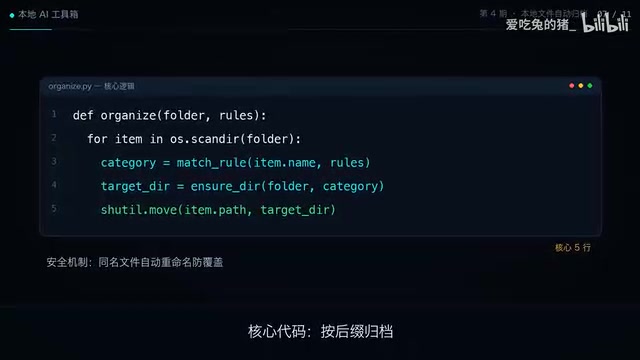
In other words, the script is only the execution layer; the large model takes on the role of "understanding requirements and modifying rules". This division of labor lets non-programmers drive local automation with natural language, without getting stuck on Python syntax.
A local large model refers to a model running offline on a personal computer via tools like Ollama or LM Studio (such as the Llama, Qwen, and other series). Compared with calling cloud APIs, its advantages are that data never leaves the machine, it works without a network, and there's no per-call billing; the trade-off is that model size is usually smaller, and complex reasoning ability is weaker than top-tier cloud models. In this solution, the task is merely "modify a simple Python rule based on natural language", which doesn't demand much from the model—a small local model is entirely sufficient, and this is the key prerequisite that makes this model viable.
Two Seconds vs. Manual Drag-and-Drop: Where's the Gap
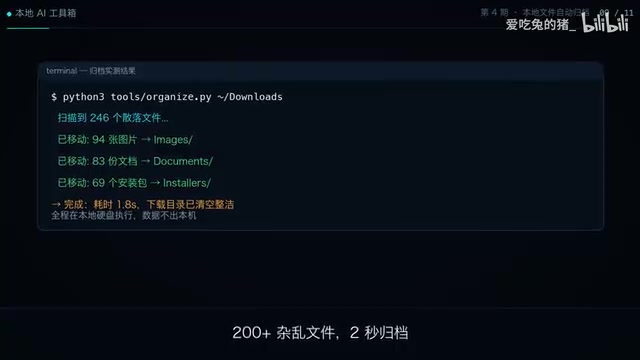
The comparison the creator gives is intuitive: over two hundred messy files, the script sorts them all in two seconds, and the desktop is instantly clean; dragging them one by one manually is time-consuming and laborious, and it's easy to give up halfway.
The essence of this gap isn't speed, but "whether you're willing to start". The cost of manual organizing is so high that it makes people procrastinate, while automation drives the cost down to almost zero—that's the only way the download folder won't repeatedly turn into a dumping ground.
A Calm Reminder
Classifying by extension is a sufficient starting point, but it's not a cure-all. For files with the same name, files without extensions, or scenarios that require classification by content rather than format, pure extension-based rules will fall short. Before actual use, it's best to back up first or test on a small scale. Also, the original video put the script on the first line of the description—if you want to reproduce it, you'll need to get it yourself. The creator also previewed the next episode—building a local monitoring and alerting assistant, with the same idea of combining local models with lightweight scripts.
For readers interested in local AI, this "large model writes scripts, scripts do the dirty work" pattern is worth watching: it doesn't pursue complex Agent frameworks, but treats the model as a code assistant on standby at all times, solving specific small problems at hand.
One-line Summary
Use a local large model to modify rules, and a Python script sorts over two hundred files by extension in two seconds.
Paragraph Summary
The article introduces a zero-third-party-dependency file organization solution: just a script relying only on the Python standard libraries os and shutil, plus a set of rules classifying files by extension, can automatically create directories by category—images, documents, installers, archives, and more—and move over two hundred messy files into place in about two seconds. The real value of the solution lies in its collaboration with a local large model—users make adjustment requests in natural language, and the model modifies the script rules, letting non-programmers drive local automation. The author also reminds that pure extension-based classification has limitations; files with the same name or no extension require caution, and it's advisable to back up first or test on a small scale.
Related articles

Coinbase Engineer: How to Determine Whether an AI Agent Can Operate Unattended
Coinbase engineer Evan Kormos shares an engineering method for judging whether an AI agent can run unattended: model processes with DAG/DCG, replace output comparison with statistical evaluation, and hand over control in three phases—supervision, sampling, and exception handling.

WorkBuddy Beginner's Guide: How AI Agents Automate Office Tasks
WorkBuddy tutorial: learn how this desktop AI agent workbench automates files, organizes data, and generates documents, compared with LLMs and Codex, plus a beginner path and cost analysis.

Doubao Work in Practice: Three Modes That Let AI Actually Get Work Done
Doubao Work practical tutorial: from chat mode to Work Mode Lite and Pro, explaining the logic for choosing among three modes with real office task demonstrations. Even complete beginners can learn to use an AI agent to handle local files, organize materials, and generate documents.