Draw.io Skill: An Open-Source Tool That Lets AI Agents Create Professional Architecture Diagrams

An open-source tool that enables AI Agents to generate professional, editable Draw.io diagrams from natural language.
Draw.io Skill is an open-source skill extension that bridges the gap between AI coding assistants and professional diagramming. With 11 diagram presets, 36 tools, and over 10,000 official icons, it lets AI Agents generate editable Draw.io architecture diagrams from natural language. It can also automatically parse Python projects, Terraform configurations, and SQL schemas to produce visual diagrams, turning code into professional documentation.
An Overlooked Pain Point: Agents Can Write Code, but Can't Draw Diagrams
If you work with AI coding assistants frequently, you've surely encountered this scenario: you ask it to "draw a system architecture diagram," and it returns a chunk of Mermaid code. This code renders fine on GitHub, but when you want to further edit it in Draw.io, you're stuck; you want it to use Draw.io's official icons, but it can't guess them correctly, leaving blank squares where icons should be.
This highlights a fundamental difference between two tools: Mermaid is a text-based diagram description language that defines flowcharts, sequence diagrams, and more through Markdown-like syntax. It's ideal for inline display in repository READMEs, with advantages in version control and automated rendering. But its output is essentially read-only SVG or PNG—you can't drag nodes around, can't add custom icons, and auto-layout for complex diagrams is quite limited. Draw.io (now renamed diagrams.net), on the other hand, is a mature vector drawing tool that uses XML (mxGraph format) to store graphical objects, supporting layers, connection points, custom stylesheets, and thousands of official icon libraries. If an Agent can only output Mermaid, users are locked in a "can look but can't touch" predicament.
Code Agents can already help us write functions, fix bugs, and refactor modules, but when it comes to "visual expression," they're virtually blank. Whether it's a codebase's module structure, a Kubernetes cluster topology, or relationships between SQL tables, Agents often can't generate truly usable, editable professional diagrams.
According to an introduction on Bilibili's "Agent Skill Library," an open-source tool called Draw.io Skill was created precisely to fill this gap—it lets AI Agents generate professional Draw.io diagrams using natural language.
What Is Draw.io Skill: A Professional Diagramming Capability for AI Agents
Draw.io Skill is a skill extension for AI Agents. Its core goal is to enable Agents to produce editable, professional Draw.io diagrams directly from natural language instructions, rather than those "visible but uneditable" Mermaid snippets.
From a technical architecture perspective, it leverages the "Tool Use / Function Calling" mechanism of mainstream code Agents. The Agent itself handles reasoning and planning, while specific execution actions—creating nodes, adding connections, setting styles, exporting files—are handled through external skill tool functions. Draw.io Skill registers a series of callable tools with the Agent, and after receiving the user's natural language instruction, the Agent selects the appropriate tool sequence through multi-step reasoning to complete the diagramming task. This modular architecture means anyone can develop new skills for Agents without modifying the Agent's core model.
Its key numbers are impressive:
- 11 diagram presets: covering common scenarios like architecture diagrams, flowcharts, ER diagrams, etc.
- 36 tools: providing Agents with rich diagramming capabilities
- Over 10,000 official icons: including standard icons from major cloud providers like AWS
- 7.6K GitHub Stars, 211 commits, MIT open-source license

In simple terms, you tell the Agent "draw a microservice e-commerce architecture," and it returns a professional architecture diagram with official AWS icons, exportable to PNG, SVG, PDF, and other formats. Compared to the old experience of only getting a chunk of code, this is an entirely different level.
The Real Killer Feature: Automatically Generating Visual Diagrams from Code
The most noteworthy capability of this Skill isn't "drawing diagrams" per se, but rather letting the Agent understand your project structure and automatically visualize it.
Code as Diagrams: Supporting Multiple Project Types
According to the introduction, it supports several typical "code as diagram" scenarios:
-
Python projects: Generate module dependency graphs with one click, making complex import relationships crystal clear. For large Python projects, inter-module import relationships are often tangled—circular dependencies, implicit coupling, and other issues are hard to spot intuitively from code alone. Visualized dependency graphs help teams quickly identify architectural risks.
-
Terraform configurations: Parse infrastructure-as-code and draw architecture diagrams with official cloud icons. Terraform is HashiCorp's Infrastructure as Code (IaC) tool that allows developers to describe cloud resources (such as VPCs, EC2 instances, load balancers, databases, etc.) using declarative HCL language, then deploy to AWS, Azure, GCP, and other cloud platforms with one click. A mid-size project's Terraform configuration might contain dozens of modules, hundreds of resource definitions, and complex dependencies. The traditional approach is manually maintaining architecture diagrams, but as infrastructure changes frequently, documentation quickly becomes outdated. Draw.io Skill can directly parse resource blocks and module references in .tf files, fundamentally solving the "documentation out of sync with code" problem.
-
SQL CREATE TABLE statements: Automatically output ER diagrams that intuitively display table relationships. ER diagrams (Entity-Relationship Diagrams) are the most essential visualization tool in database design, using rectangles to represent entities (tables) and lines to represent relationships (foreign keys, one-to-many, many-to-many, etc.). In real projects, as business iterates, databases can balloon to hundreds of tables, making manual ER diagram maintenance nearly impossible. This Skill parses field definitions and FOREIGN KEY constraints in CREATE TABLE statements, automatically infers inter-table relationships, and generates standard ER diagrams—highly practical for helping new team members quickly understand legacy system data models.
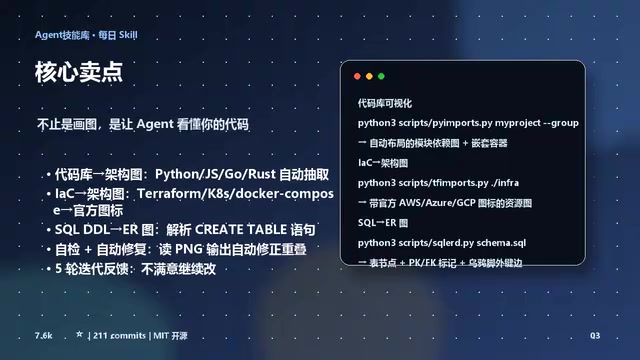
This means the Agent is no longer passively "drawing according to your description" but can actively read real code and configuration files, transforming abstract engineering structures into intuitive visual diagrams. For teams that need to frequently maintain architecture documentation and organize dependency relationships, this is a genuinely practical efficiency tool.
Draw.io Skill Installation and Usage Flow
Two-Step Installation
The installation process has two parts:
- First install Draw.io Desktop: as the underlying support for diagram rendering and editing
- Then install Draw.io Skill: either via one-click npx installation or by manually cloning it into Claude Code's skills directory
Once installed, it's ready to use with a relatively low barrier to entry.
Complete Flow from Natural Language Instruction to Finished Diagram
Using actual operation in Claude Code as an example: when you say "draw a microservice e-commerce architecture," the workflow goes roughly as follows:
- Plan the layout first: The Agent thinks through how to arrange the various components
- Generate Draw.io XML format: This is Draw.io's native format for editable diagrams
- Export to PNG and perform self-inspection: checking for overlapping nodes, obscured labels, etc.
- Return the result for your review

The "self-inspection after generation" design reflects an important paradigm in current Agent engineering—the ReAct (Reasoning + Acting) loop with self-verification. After generating the diagram's XML, the Agent calls Draw.io's rendering engine to export a PNG, then checks for common visual issues: whether nodes overlap, whether text labels are obscured, whether there are too many crossing lines. If problems are detected, the Agent automatically corrects layout parameters and regenerates. This "generate-verify-correct" closed loop significantly improves the success rate of a single interaction. Similar approaches are also applied in code generation (running tests after generation) and document writing (self-checking consistency after generation).
If you're not satisfied with the result, you can continue making modification requests in natural language and let the Agent iterate. This "plan—generate—self-check—feedback" loop makes the final diagram quality much more reliable than one-shot generation.
Why Developers Should Pay Attention to Draw.io Skill
The capability boundaries of code Agents are being continuously expanded by the tool ecosystem. Writing code is just the starting point, while visualization, documentation, and collaboration capabilities across the entire development lifecycle are becoming the new frontier.

The value of Draw.io Skill lies precisely in transforming "diagram generation" from an isolated manual step into a seamlessly integrated part of the Agent workflow. Combined with over 10,000 official icons, the output is not only usable but professional enough to go directly into formal documentation or presentation materials.
For developers who rely heavily on AI coding assistants, rather than repeatedly adjusting architecture diagrams manually, it's better to let the Agent read the code, draw the diagram, and handle revisions iteratively. Its MIT open-source license and local deployment capability also make it more flexible and controllable for enterprise internal use.
Summary
"Agents can write code, but can't draw diagrams"—this statement precisely identifies a shortcoming of current AI coding assistants. Draw.io Skill fills this gap with 11 presets, 36 tools, and over 10,000 official icons. It can not only draw diagrams from natural language but also understand your Python projects, Terraform configurations, and SQL structures to automatically generate professional, editable diagrams.
If you're already using an Agent like Claude Code, give it a try and let your AI assistant truly learn how to "draw diagrams."
Related articles

ChatGPT Space Launches: Team Collaboration and New Pages Features Explained
ChatGPT Space is OpenAI's new team collaboration feature with Pages, real-time collaboration, and Slack/Google Drive sync. We break down its privacy design, multi-platform integration, and the full workflow from conversation to document.

Migrating Apache Spark UDFs to GPU Acceleration with AI Agents
NVIDIA developer blog explains how AI Agents rewrite Apache Spark UDFs for GPU acceleration, covering migration criteria, agent rewriting and verification workflows, plus pitfalls like result consistency and CPU-GPU transfer overhead.

Zed Editor v0.40.4-rc2 Released: Usage Credits Now Available Without Upgrading
Zed editor releases v0.40.4-rc2, allowing users to use usage credits for AI features without upgrading to a paid plan, lowering the trial barrier.