Drive App: Turn Your Phone into a Car Telemetry Device — with License Plate Camera Alerts

An indie iOS app that turns your phone into a car telemetry device with built-in LPR privacy alerts — no hardware needed.
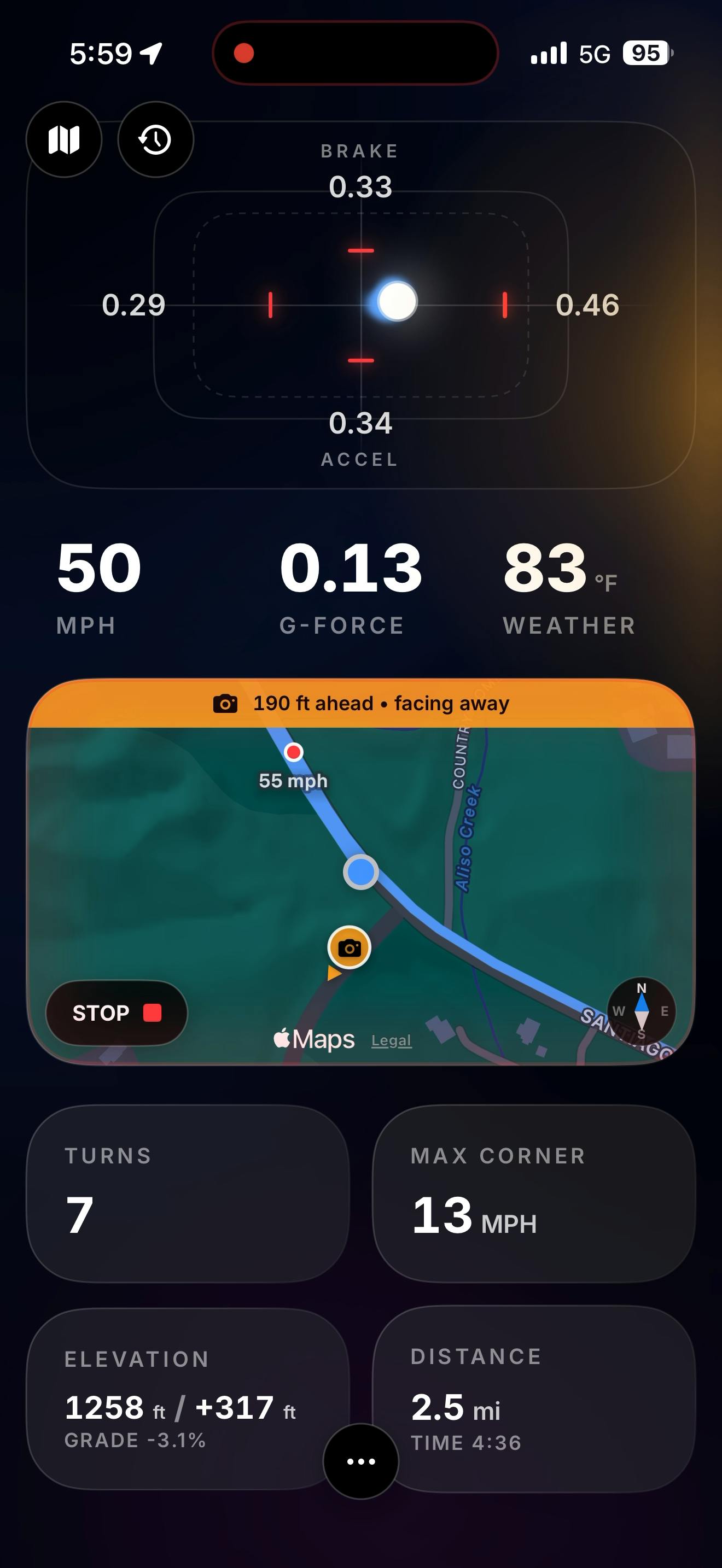
Drive is an iOS app by former Android Auto lead designer Andy Kim that flips his professional focus on autonomous driving — instead of eliminating the feel of driving, it quantifies it. Using only your phone's built-in sensors, it records g-force, braking, cornering, and full drive traces with no OBD dongle, wiring, or account required. It also alerts you when approaching License Plate Reader (LPR) cameras, reflecting the developer's strong stance on personal privacy. The app earned 70 upvotes on Product Hunt, targeting weekend driving enthusiasts who want accessible, lightweight telemetry.
A "Reverse" Creation from an Autonomous Driving Designer
The most interesting products in tech often emerge from their creators' personal contradictions. Drive is one such automotive telemetry app — built by Andy Kim, who once served as a lead designer for autonomous driving on the Android Auto team, focused on letting machines take the wheel and making driving feel "invisible." Yet on weekends, away from work, he drives a 27-year-old car doing the exact opposite: savoring every turn, acceleration, and braking moment by hand.
Drive grew out of that gap. It doesn't aim to automate driving — it aims to visualize and quantify the physical feedback of driving itself, turning every weekend drive into a replayable, analyzable experience. This product philosophy, born from professional expertise yet rebelling against it, gives Drive a compelling narrative tension all its own.
Using Your Phone as a Telemetry Device: No Extra Hardware Required
Traditional vehicle telemetry setups typically mean a complex array of equipment: wiring looms, OBD dongles, even external laptops. That's standard fare for track enthusiasts or modding hobbyists — but the barrier is far too high for someone who just wants to enjoy a mountain road on a Saturday afternoon.
Drive's core innovation is simple: it turns the phone already sitting in your car into a portable telemetry device.
What Driving Data Does Drive Record?
According to its Product Hunt listing, Drive uses your phone's built-in accelerometer, gyroscope, and other sensors to capture and display a complete picture of your drive, including:
- G-force: Lateral and longitudinal acceleration changes
- Braking data: Deceleration intensity and timing under braking
- Cornering data: Lateral forces through turns
- The whole trace: A continuous recording of your entire drive
This means you don't need to be a professional driver to analyze your performance like a racing telemetry engineer — you can review which corner you nailed cleanly and which braking point was a little too abrupt on that winding mountain road.
Zero Hardware, Zero Sign-Up: A Minimalist Philosophy
Andy Kim summed up the barrier to entry for this driving data recorder with a punchy line:
No wiring loom. No dongle. No laptop. No sign up.
In an app ecosystem that routinely demands account creation and cloud sync, "no sign up" is genuinely rare. It lowers the psychological cost of trying the app — and it reflects the product's stance on privacy. You don't need to hand over any personal information. Just download and drive.
LPR Alerts: Privacy Protection Beyond the Drive
Another standout feature in Drive is its built-in License Plate Reader (LPR) camera alert — the app notifies you when you're approaching an LPR camera.
What Is a License Plate Reader (LPR)?
LPR is an automated camera system widely deployed on roads, intersections, and parking lots that can instantly read and log the license plates of passing vehicles. While commonly used for traffic enforcement and security, it has sparked privacy concerns due to its large-scale, indiscriminate collection of vehicle movement data.
Andy Kim was candid about his motivation for building this feature: "since I like my privacy." That framing makes Drive more than just a driving data tool — it carries a distinct privacy-conscious identity, naturally weaving together iOS, automotive telemetry, and personal privacy protection.
Product Positioning and Market Analysis
In terms of product form, Drive targets a niche but genuine need: a lightweight, phone-based telemetry tool for driving enthusiasts.
It doesn't try to compete head-on with professional track data systems (like AiM or RaceChrono paired with external hardware). Instead, it targets the user who drives for fun on weekends. The zero-hardware, zero-sign-up approach keeps the path from discovery to use incredibly short — download, drive, check your data.
On Product Hunt, Drive earned 70 upvotes and ranked #18. In a competitive daily feed, that's a respectable showing — and for a highly vertical iOS app built by an indie developer, that level of attention signals it's resonating with a real audience.
Can Phone Sensor Accuracy Meet the Bar?
A telemetry app that relies on phone sensors faces a core question: is the data accurate enough for serious driving enthusiasts? This remains something the app needs to keep validating. The precision and sampling rate of phone accelerometers and gyroscopes — as well as interference from how the phone is mounted in the car — all affect the accuracy of g-force readings and trace data.
The LPR alert feature's usefulness also depends on the completeness and update frequency of its camera location database, which will likely vary significantly across different countries and regions.
Conclusion: Quantifying the Joy of Driving at the Lowest Possible Barrier
Drive is a textbook "personal pain point" product: an autonomous driving designer channeled his love of pure driving into an app, without forgetting to protect his own privacy along the way. It compresses the complexity of vehicle telemetry into something a single phone can handle, and layers on an LPR privacy alert feature with a clear point of view.
For anyone who enjoys weekend drives and cares even a little about both driving data and personal privacy, Drive is a lightweight tool worth trying. It may not replace professional telemetry gear, but it succeeds at making driving something you can perceive and revisit — at the lowest possible barrier to entry.
Related articles

Vibe Coding Full-Stack in Practice: AI Programming from Beginner to Enterprise Deployment
From Cursor to Claude Code, this Bilibili AI programming course uses four progressive projects to cover full-stack development, open-source secondary development, and team collaboration. The article analyzes the shock to frontend roles, the efficiency shift from 50 people to 5, and the methodology required for enterprise-grade projects.

David Blaine's Global Quest for Real Magic: From South Africa to Japan and India
David Blaine travels to South Africa, Japan, and India in his Do Not Attempt special, documenting Spinning drivers, black mamba rescuers, iaijutsu masters, and ascetics—exploring the boundary between magic and real human极限 challenges.

Is a Touchscreen MacBook Coming? Vergecast Reveals Apple Executive's Response
Vergecast podcast reveals a conversation between a reporter and Apple executive John Ternus about a touchscreen MacBook and Apple Pencil support. Ternus says iPad is the best device for a stylus, while the reporter bets MacBook will eventually support Apple Pencil.