DSH Multi-Version Manager Showdown: Which of These 4 Tools Is Your Upgrade Safety Net?

Four community-built DSH version managers compared — find the right upgrade safety net for your workflow.
DSH (DeepSeek Harness) lacks official multi-version management, making version upgrades a frequent source of plugin failures and broken conversation history. Four community tools fill the gap: DSH Lens offers maximum isolation with automated smoke-test rollback; DSH Multiverse uses PNPM-based dependency sharing in a 4.5 MB Tauri app with a modular, tested Rust backend; DSHVM takes a lightweight CLI pointer-switching approach with the best test coverage; and DSH Launcher focuses on zero-setup onboarding with a Chinese plugin marketplace. Choose based on your priorities: ease of use, co-existence, upgrade safety, or engineering rigor.
The Pain Point: DSH Upgrades That Break Everything
Anyone who's used DSH (DeepSeekAd Harness) has probably been through this: you've got ten-plus plugins installed, everything tuned just right — then an official version upgrade drops, wipes out all your plugins, scrambles your conversation memory format, and leaves you grinding through a rollback or starting from scratch.
The root cause is simple: DSH's official team has never provided multi-version management. The native recommendation is just to keep upgrading forward. The problem is that DSH is the kind of tool that "flips the table when you skip a version" — as one Bilibili content creator's comparative review noted, jumping an Alpha version can render your entire conversation history format invalid. With no official support, the community had to build its own solutions. The result: four version managers, each with a distinctly different philosophy.
DSH Lens: The "Scientific Method" Approach to Isolation
DSH Lens is written in pure Python, zero dependencies, delivered as a CLI plus a small window. Its core concept is isolation — each installation runs in its own dedicated lane: separate install directory, separate data directory, separate port, completely independent from the others. Your daily setup stays untouched while you spin up a new version alongside it, test it to your satisfaction, then promote it to primary.
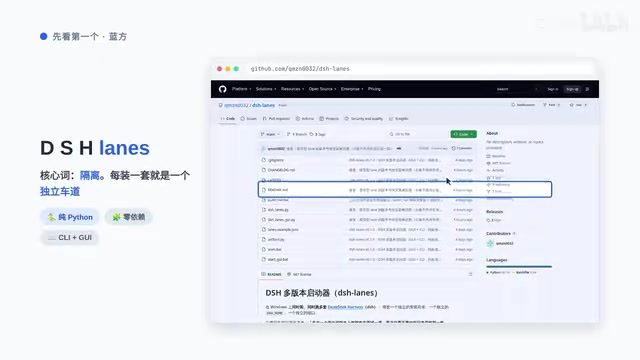
Lens takes isolation seriously to a fault. Its Verify feature goes through every plugin link in a copy and checks whether it actually points back to itself — or is quietly reaching into the host installation. It's specifically designed to catch "fake isolation": instances that appear to run independently but are secretly borrowing the host's code. The upgrade path has a safety net too: it clones the installation, runs a smoke test, and automatically rolls back if anything fails. Lens has essentially turned "upgrade testing" into a discipline.
The weak spot is code quality — 6,300 lines crammed into a single file, not a single test case. Powerful, but more "self-taught hacker" than "professional engineering."
What is "fake isolation"? It's an easy trap to miss in multi-version management: a new version gets its own directory on paper, but the plugin or dependency symlinks still point back to the host installation. The two "independent" instances end up sharing the same codebase. Any modification or upgrade to the new version silently affects the old one — they look isolated but aren't, which makes debugging a nightmare. Lens's Verify function addresses this directly: it resolves the target path of every link inside a copy and confirms it actually falls within that copy's own directory tree rather than the host path, covering both logical and physical isolation in one pass.
DSH Multiverse: Space-Efficient and Developer-Friendly
DSH Multiverse is built with Tauri and Vue, ships as a single 4.5 MB executable. Its core concept is efficiency: it uses PNPM to link multiple versions against shared dependency files, dramatically reducing disk usage. It also embeds DSH's web UI directly inside its own window, so it feels like a proper desktop application.
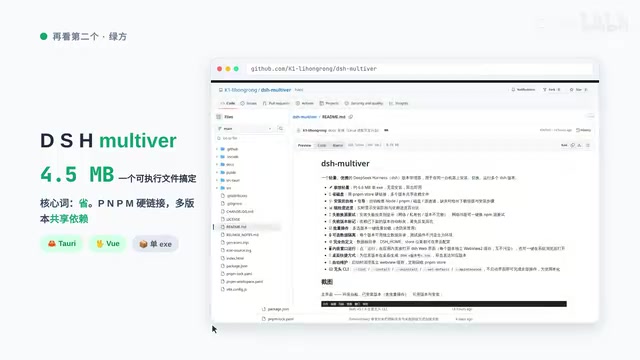
Isolation here is opt-in. By default, data directories are shared to save space, which means plugins and dependencies can bleed across versions. This open design puts the decision in the user's hands rather than acting as a paternalistic gatekeeper.
For plugin developers, it's a genuine win: you can line up multiple versions side by side in the window and instantly see which version breaks your plugin and which one doesn't — compatibility testing becomes a one-click operation. That's essentially infrastructure-building for the DSH community.
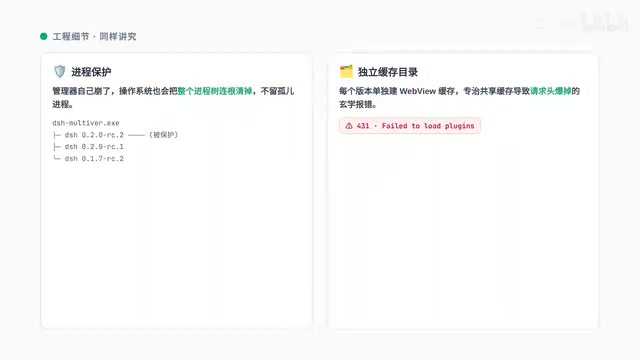
Engineering details are thoughtfully handled: every version gets process protection, so even if the manager itself crashes, the OS tears down the entire process tree cleanly with no orphaned processes left behind. The embedded window gives each version its own isolated key-cache directory, which specifically prevents the mysterious 431 errors caused by shared caches blowing up request headers.
On the engineering quality front, Multiverse's Rust backend is split into 9 modules, each with unit tests — a clear step up from Lens into "professional" territory.
What is PNPM? PNPM (Performant NPM) is a high-efficiency package manager for the Node.js ecosystem. Its core mechanism is content-addressable storage plus hard links: every package's actual files are stored exactly once on disk, and different projects reference that single copy via hard links rather than duplicating the files the way npm or yarn do. In Multiverse's context, this means three or four simultaneous DSH versions can share their common Node modules while only occupying one copy's worth of disk space — typically 60–80% smaller than the traditional approach. The trade-off is the risk of dependency version pollution from shared packages: if one DSH version upgrades a shared package, other versions may be affected. That's precisely why Multiverse makes isolation opt-in rather than mandatory by default.
DSHVM and DSH Launcher: Two More Approaches to Filling the Gap
DSHVM is a cross-platform CLI tool built around pointer switching: versions are installed into slots, and the global command is just a thin forwarder that redirects to whichever slot is currently active. Switching versions means changing the pointer. It also has a guard mechanism against half-completed copies, and its test suite is the most comprehensive of the four.
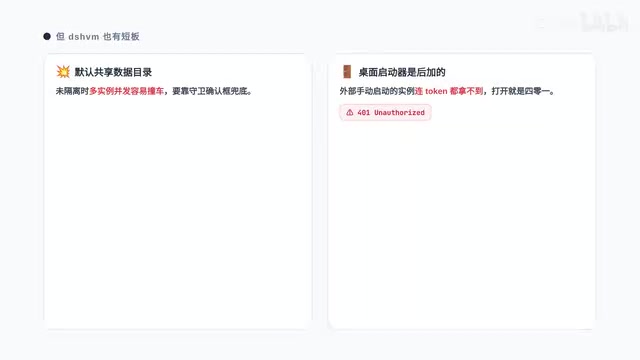
The downsides: data directories are shared by default, so concurrent instances can collide — a confirmation guard dialog is the safety net there. The desktop launcher was added later and feels bolted on; instances launched externally can't even get a Token.
DSH Launcher takes the opposite philosophy: zero barrier to entry. It installs Node and PNPM for you so you never have to wrestle with the environment. It offers three channels to switch between freely with rollback at any time, and includes a Chinese-language plugin marketplace where you can check compatibility before installing anything.
What is "pointer switching" mode? Also known as shim or wrapper mode, it's a classic version manager design pattern: only one global command entry is registered in the system PATH, and that entry contains no version logic whatsoever — it simply reads the currently active version pointer and forwards the request to the actual executable for that version. nvm (Node Version Manager), pyenv, and rbenv all use a similar approach. The advantage is that switching versions requires no terminal restart and no environment variable changes — just update the pointer. The limitation is that the global entry itself becomes a single point of failure: if the pointer file gets corrupted or a version directory is accidentally deleted, every script that depends on that command breaks simultaneously. DSHVM's "anti-partial-copy guard" exists specifically to prevent the edge case where a version install is halfway done but the pointer has already been updated, leaving an incomplete installation.
How to Choose Between the Four
All four tools take different paths to fill the same gap that the official team left open. Based on the reviewer's conclusions, here's how to match your needs to the right tool:
- Don't want to mess with environment setup and want plugin management too: Go with DSH Launcher — out of the box, includes a Chinese plugin marketplace.
- Need multiple versions running side by side day-to-day: Go with DSH Multiverse — space-efficient, developer-friendly, solid engineering.
- Want upgrade safety — test the new version before committing: Go with DSH Lens — maximum isolation, comprehensive rollback.
- Pure CLI user who cares about code quality: Go with DSHVM — best test coverage, lightweight pointer switching.
If the official team ever builds version management into DSH natively, the community's exploration today might just be the best blueprint they could ask for.
Related articles

Chain of Thought Isn't Just for AI: How Humans Can Use CoT to Improve Thinking Quality
Chain of Thought isn't just a prompt trick for large models. Starting from a Hacker News discussion, this article analyzes why CoT works for human thinking too, breaks down actionable ways to transfer it, and highlights the key differences between human CoT and machine CoT.
Cloudflare Teams Up with OpenAI: Closi…
Cloudflare Teams Up with OpenAI: Closing the Loop from Vulnerability Discovery to Defense with AI
Cloudflare uses OpenAI Daybreak to investigate security vulnerabilities and generate reviewable remediation plans, while developers use Codex to boost coding efficiency and quality.

Orca Multi-Agent Orchestration in Practice: A Guide to Parallel Collaboration with Claude and Codex
Orca is Stable AI's free open-source agent workbench supporting 34 agents like Claude Code and Codex in parallel. Learn its Git worktree isolation, multi-model orchestration, and mobile management.