dsh-ops Open-Source Plugin: Adding File and Document Processing to DSH

dsh-ops adds token-efficient file and document reading to DSH via native tools.
dsh-ops is an MIT-licensed DSH plugin from the Tiotto team that packages bounded file and document writing capabilities into more token-efficient native tools. It follows a "one capability set, two outputs" design: Native mode returns plain text with compact line references and low context usage, while TTC mode returns typed results via a per-invocation Rust Worker, suited to structured processing. The TTC SDK has 18 interfaces, 15 of which are file and document tools covering CSV, TSV, Docs paragraphs, and PDF text layers, all read on demand with bounded scope. The plugin offers 8 independent component switches and 4 preset modes, with the "Type" mode resident by default. The project has 5,645 stars and nearly 200 forks; version 0.4.4 supports Windows, Linux, and macOS.
DeepSeqHarness (DSH)'s plugin ecosystem has gained a rather practical addition: dsh-ops. Maintained by the Tiotto team and open-sourced under the MIT license, its goal is clear: to package bounded file and document writing capabilities into a set of more token-efficient native tools, plugging them directly into DSH.
Not long after launch, the project has already gathered 5,645 stars and nearly 200 forks on GitHub, and has topped the JavaScript daily trending list. The numbers show that the community has a real need for "letting Agents read files while burning fewer tokens."
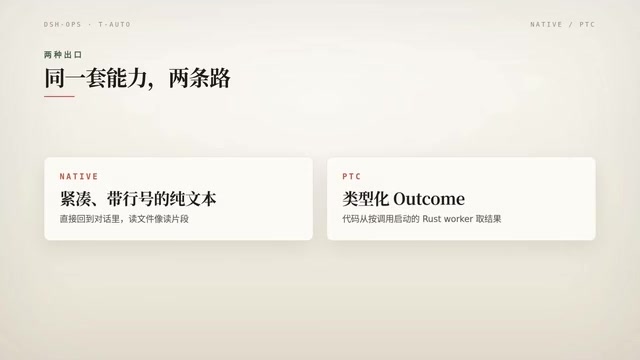
One Capability Set, Two Outputs
The core design of dsh-ops is "one capability set, two outputs," each corresponding to different invocation scenarios.
Native Mode: Plain Text with Compact Line References
In Native mode, the tool returns plain-text results with compact line references. This approach is model-friendly and uses little context, making it suitable for routine reading and batch processing tasks.
"Compact line references" is a practice of annotating each line in a text result with a short line identifier, commonly seen in code retrieval and file reading tools. It allows the model to cite, locate, or subsequently edit a line by giving a short line number rather than restating the entire line, thereby significantly reducing token consumption across round-trip calls. Compared with full line numbers or offset-based coordinates, compact line references further compress the character count of the annotations themselves, with especially noticeable benefits in long files and multi-round batch processing. The cost is that the model needs to understand this line-number convention, and the line numbers are usually only valid within a single result, so cross-call references must rely on a mapping mechanism on the tool side.
TTC Mode: Typed Results from a Rust Worker
In TTC mode, the code obtains typed results from a Rust Worker launched per invocation. Compared with plain text, typed output is better suited to scenarios requiring structured processing, at the cost of an extra layer of process scheduling overhead.
The two modes correspond to the same capability foundation, and the switching cost is mainly on the invocation side rather than re-adapting the toolset. This is fairly important for developers already using DSH—there is no need to maintain two separate integrations for different scenarios.

"A Worker launched per invocation" means that each tool call temporarily spins up an independent process to execute the task and reclaims it upon completion, rather than maintaining a long-running resident service. This model offers good isolation and clean state, making it suitable for scenarios with high requirements for deterministic results; however, process creation, serialization, and IPC communication all introduce extra latency, so the overhead is higher than a resident solution under high-frequency small requests. Typed results refer to return values with explicit structural definitions (such as field names and types) rather than free text, making it easy for the caller to parse and validate directly. Together, these make TTC mode more reliable in scenarios requiring structured processing, at the cost of process scheduling overhead.
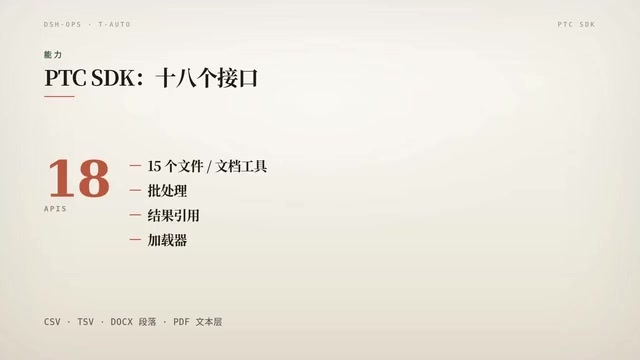
18 Interfaces: A File and Document Toolset
The TTC SDK provides 18 interfaces in total, of which 15 are file and document tools, plus batch result references and loaders.
The supported formats include CSV, TSV, Docs paragraphs, and PDF text layers, all of which can be read on demand. "Bounded" means that each read is limited to explicit boundaries rather than stuffing an entire large file into the context at once—this is precisely the key to saving tokens.
For scenarios that need to process tables and documents within Agent workflows, the benefits of such native tools go beyond tokens to the predictability of results.
"PDF text layer" refers to the text object layer in a PDF file that is independent of the page images. Scanned documents usually contain only images without a text layer and require OCR to extract text; natively generated PDFs generally have a text layer and can be extracted page by page and paragraph by paragraph without image recognition. For Agent tools, reading the text layer means lower latency and higher accuracy, but it should be noted that the reading order of the text layer may not match the visual layout, and order confusion is especially likely in tables and multi-column documents. This is also why "bounded reading" matters: limiting the scope by page or region can reduce semantic noise caused by crossing columns and pages.
Component Switches and Preset Modes
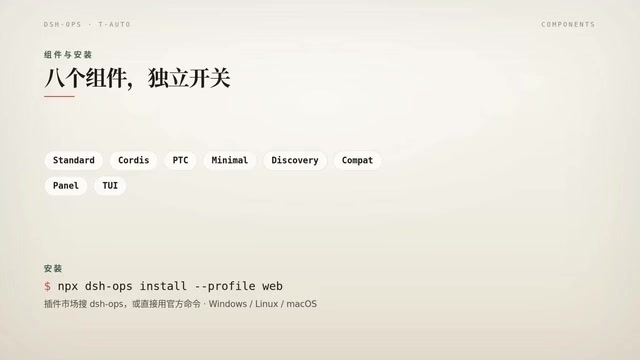
The plugin provides 8 independent component switches and 4 preset modes, among which the "Type" mode is the default resident mode.
The point of independent switches is on-demand assembly: when document processing capabilities are not needed, the corresponding components can be turned off to reduce the context occupied by tool descriptions. For long-session scenarios that are sensitive to the number of tools, this fine-grained control is more practical than an all-or-nothing switch.
In tool-calling Agents, the description text of every tool occupies the context window. The more tools there are, the greater the static overhead, and the more likely the model is to make mistakes when choosing among many similar tools. Independent component switches are essentially a means of context budget management: turning off unneeded capabilities both frees up window space and narrows the model's decision space. Preset modes package this set of switches into combinations oriented toward typical scenarios, reducing the cost of configuring item by item. "Default resident" means that a reasonable set of capabilities is already active out of the box, and users only need to subtract or replace when their needs deviate from the norm, rather than assembling from scratch.
Installation and Platform Support
The installation path is simple: search for DSH or "一型 MPX" in the plugin marketplace.
In terms of platforms, Windows, Linux, and macOS are all supported. The current version is 0.4.4, under the MIT license.
An Easily Misunderstood Naming
It is worth explaining separately that Ops in the project name refers to Operations in a broad sense, not "domain as product." The repository is hosted under Tiotto on GitHub; keeping this in mind during searches can save you some detours.
Summary
dsh-ops solves a specific problem: enabling DSH to use native tools instead of crude context stuffing when processing files and documents. Two outputs, 18 interfaces, independently switchable components, plus a cross-platform MIT open-source implementation together form a solution that can be deployed directly. For teams that are sensitive to token costs and also need to read structured data within Agent workflows, it is worth a try.
Related articles

Abnormal Error Rate Spike in Claude Mythos 5.2 and Fable 5.2
Claude Mythos 5.2 and Claude Fable 5.2 show an abnormal spike in request error rates, marked as investigating on the official status page. This article covers the incident overview, practical impact on developers, and recommended responses.

ReAct Runtime Context Trimming: Why Claude Code Acts at 70%
A deep dive into ReAct runtime context trimming: why Claude Code compresses at ~70% usage, why tool calls dominate, why messages must be dropped in pairs, and why codebases don't need RAG.

AI Agent vs LLM: How Cursor and Claude Code Actually Work
An in-depth analysis of the essential difference between AI Agents and LLMs: LLMs generate code suggestions, while Agents modify files and run tests via tool calls. Using a Spring Boot bug fix as an example, it breaks down the workflows, permission control, and verification mechanisms of Cursor and Claude Code.