DSH Plugin in Action: Letting AI Agents Automate the Entire Antenna Design Workflow

AI Agent automates antenna geometric modeling and S11 iteration in CST via the MCP protocol.
A Bilibili creator developed a plugin called DSH that bridges LLM Agents with CST electromagnetic simulation software via MCP, automating a closed loop from geometric modeling and excitation setup to field monitor configuration and S11 result evaluation. The plugin features a customizable configuration panel, a real-time result dashboard, and event stream visualization logs to reduce AI automation's "black box" anxiety. Users can intervene at any time via a chat interface, preserving human-AI collaborative control. While the demo is compelling, performance comparisons with expert manual designs are absent, and comprehensive metrics beyond S11 — such as gain and radiation pattern — have yet to be validated.
When AI Agents Enter CST: An Automation Attempt in Antenna Design
Antenna design has long been one of the most demanding stages in RF engineering. Engineers must repeatedly adjust geometric structures, configure excitations and field monitors, and iteratively optimize S11 parameters within specialized electromagnetic simulation software like CST — a process that is both time-consuming and experience-dependent. A Bilibili creator recently shared a plugin they developed called DSH, which attempts to bring large language model (LLM) Agents into this workflow, allowing AI to autonomously drive antenna design and iteration.
The core idea behind this toolset is to bridge CST with MCP (Model Context Protocol), enabling the Agent to directly operate the simulation software and complete a closed loop from geometric modeling to result evaluation. For RF engineers accustomed to manually tweaking parameters, this represents a remarkably imaginative reimagining of their workflow.
Service Configuration: The First Step to Connecting CST and MCP
The plugin starts with a service configuration interface. Users enter the paths for CST and MCP, and the system performs local path validation to confirm that the target paths exist. It also provides a probe function to verify that the connection is working properly. This step may seem basic, but it's critical to whether the entire automation chain runs successfully — for an Agent to control CST, a stable software interface must first be established.
Once on the main page, the configuration panel is clearly divided into two sections. The left side is for entering project paths and performance targets, where all design goals to be evaluated and calculated can be specified. Notably, the plugin also includes a dedicated configuration field for special constraints, allowing users to add their own custom requirements without being locked into preset templates.
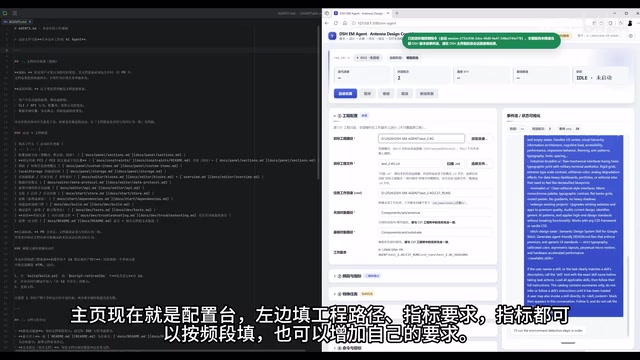
This design strikes a balance between generality and flexibility. Different antenna applications often have their own boundary conditions, and the ability to define custom constraints means the Agent's optimization direction can be precisely guided.
MCP (Model Context Protocol) is an open protocol proposed and championed by Anthropic, designed to provide large language models with a standardized "tool-calling" interface. The core idea is to wrap external software, databases, or APIs into MCP-compliant servers, allowing AI Agents to communicate with them through a unified protocol — eliminating the need to develop a separate adapter for each piece of software. Within this framework, CST simulation software is packaged as an MCP Server, and the Agent can issue commands like "create geometry," "set excitation port," "run simulation," and "read S11 curve" just as it would call a function, with the software's operational logic fully transparent to the Agent. The advantage of this architecture lies in reusability — in theory, the same Agent logic can be quickly migrated to other simulation software (such as HFSS or ADS) simply by swapping out the MCP Server, without rewriting the core reasoning process.
Result Monitoring: A Task Dashboard Without Switching Windows
The right side of the configuration panel serves as the result display area. According to the creator, all task statuses, iteration progress, and candidate designs refresh in real time here — without ever needing to switch windows. This significantly improves the actual user experience. In traditional workflows, engineers typically have to constantly switch between simulation software, scripts, and tracking spreadsheets, with their attention frequently interrupted.
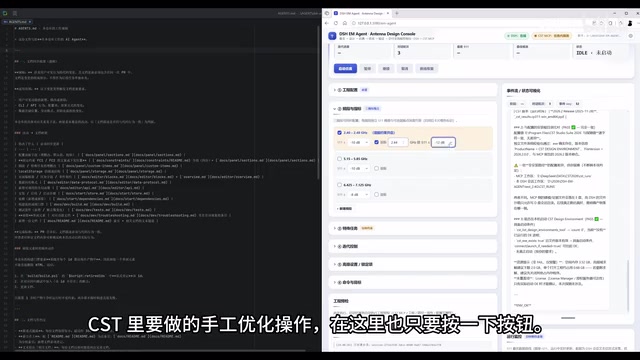
The plugin consolidates what would normally be manual CST optimization operations into button-triggered actions. Users simply click a button to trigger the corresponding action. In the demo, the antenna in CST at this point has only its structure and substrate — no excitation, no post-processing, no field monitors, no date settings. These steps, which would normally require manual configuration, are handed off to the Agent to complete autonomously.
Agent Autonomous Operation: Real-Time Feedback Through Event Stream Visualization
Once configuration is complete, the entire design process is handed over to the Agent. This is the most compelling part of the demo. Event stream visualization cards on the right side print the LLM's output logs in real time, giving users a direct view of the Agent's "thinking" process. Meanwhile, on the left side, the CST interface shows the Agent actively manipulating the antenna's geometry.
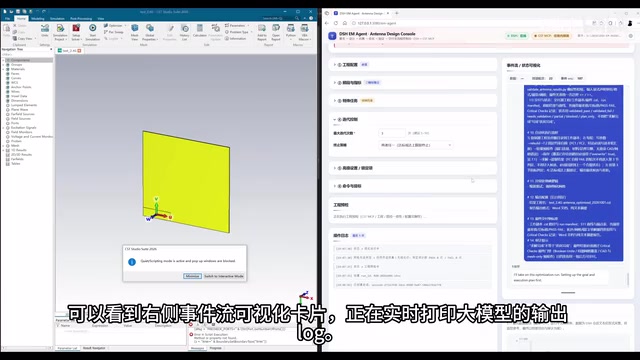
This bidirectional visualization approach addresses the "black box" anxiety that commonly plagues AI automation tools. Engineers can see not only the final results but also track the decision logic behind every step the Agent takes. When the AI makes choices in geometric modeling and parameter tuning, the real-time log output makes the entire process traceable and intervenable.
Human-AI Collaboration: Conversational Command Input
If users are unsatisfied with the Agent's autonomous design decisions or want to add new requirements, they can issue instructions directly through a conversational input card. This human-AI collaborative interaction model preserves the engineer's control over the design process, rather than handing everything over to an AI black box.
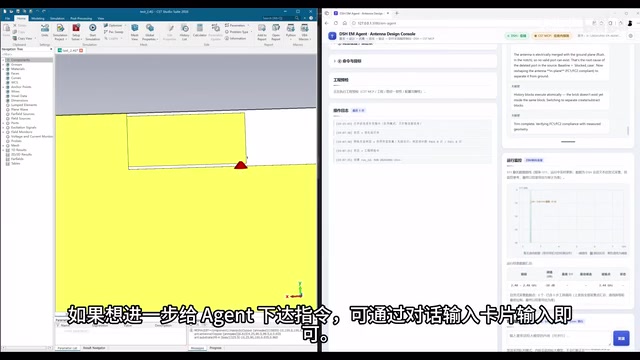
As the Agent runs, the monitoring card on the right continuously refreshes data, displaying S11 results that meet the target criteria. Ultimately, key metrics such as iteration count and number of conversational turns are also updated in real time in the card at the top. The entire closed loop — from configuration and modeling to simulation and result evaluation — flows seamlessly from start to finish.
Value and Limitations: What Does This Kind of Tool Mean?
Based on the demo, the DSH plugin represents a direction worth paying attention to: grafting general-purpose LLM Agent capabilities onto highly specialized engineering software. The core challenge of antenna design lies in accumulated experience and repeated trial and error, while Agents are naturally suited to multi-round iteration toward clearly defined goals — making the combination a logical one.
That said, a measured perspective is warranted. The content shown is primarily a functional demonstration and does not include performance comparison data between AI-designed results and those produced by experienced engineers working manually. It also doesn't address whether the Agent performs stably under complex multi-band and multi-objective constraint scenarios. S11 compliance is only one antenna design metric; whether comprehensive performance indicators like gain, radiation pattern, and bandwidth are equally strong remains to be verified.
For RF engineers, tools like this are more likely to play the role of an "efficiency assistant" in the near term — handling the tedious work of modeling and preliminary iteration, freeing engineers to focus on critical decisions. Truly having AI independently deliver high-quality antenna designs will require much more real-world engineering validation. But regardless, bringing Agents into a specialized simulation environment like CST already represents a valuable exploration.
The S11 parameter (reflection coefficient) is the core metric for measuring how well an antenna's input impedance is matched, typically expressed in decibels (dB) — the lower the value, the less energy is reflected back to the feed port. Engineering practice generally requires S11 to be below -10 dB within the operating band, meaning more than 90% of the input power is effectively radiated. However, S11 only describes whether the antenna "accepts energy" — it doesn't reflect where that energy is radiated or how efficiently. Gain describes directional radiation capability, the radiation pattern describes the three-dimensional distribution of radiated energy, and bandwidth relates to the antenna's operating frequency range. These parameters together form a complete antenna performance profile. In real applications, a design that meets the S11 requirement may still perform poorly in terms of gain or radiation pattern. The difficulty of multi-objective co-optimization far exceeds that of converging on a single metric — which is precisely the deeper reason behind the article's closing note that "comprehensive performance remains to be verified."
Related articles

JobRunner MCP Server: AI Agents Can Now Fix Failed Java Jobs
JobRunner launches an open-source MCP server enabling AI agents to view cluster status, diagnose failures, and recover Java jobs—incident response from any cloud coding environment or existing agent.

MLAI Digital Launches 9 Security Agents: MCP Server Safeguards the Full Lifecycle of Agentic AI
MLAI Digital launches Security MCP Server with nine built-in specialized security agents covering vulnerability discovery, attack simulation, prompt injection detection, API and infrastructure assessment, and accelerated remediation—embedding security validation across the full Agentic AI lifecycle from development to production.

Running Isaac Lab on H100 GPUs: Exploring Better Approaches
Exploring optimization methods for running Isaac Lab on NVIDIA H100 GPUs, including MIG configuration, mixed precision, TensorRT acceleration, and community experience to improve robotics simulation and reinforcement learning efficiency.