Edyt: AI for Every App — Even Text You Can't Select

Edyt embeds AI into any Mac/Windows app, processing selected or unselectable screen text right at your cursor.
Edyt is a system-level AI text tool for Mac and Windows. Select text, press a shortcut, and the AI result appears directly at your cursor — no window switching needed. It offers rewriting, explanation, translation, alternative phrasings, and cross-device synced custom prompts. Its standout feature handles unselectable text: drag to select content in PDFs, screenshots, or screen shares, and built-in OCR feeds it straight into AI processing. A free tier is available and Ubuntu support is planned, though privacy handling and OCR accuracy remain key variables to verify in real-world use.
In our daily workflows, we've grown accustomed to calling on AI inside ChatGPT, Notion, or dedicated writing tools. But the real friction shows up between apps: when you want to rewrite an email, translate a passage from a PDF, or explain something in a screen share, you have to copy, switch windows, paste, and then carry the result back. Edyt, which just launched on Product Hunt, aims to solve exactly this fragmentation — by embedding AI capabilities into any app on Mac and Windows.
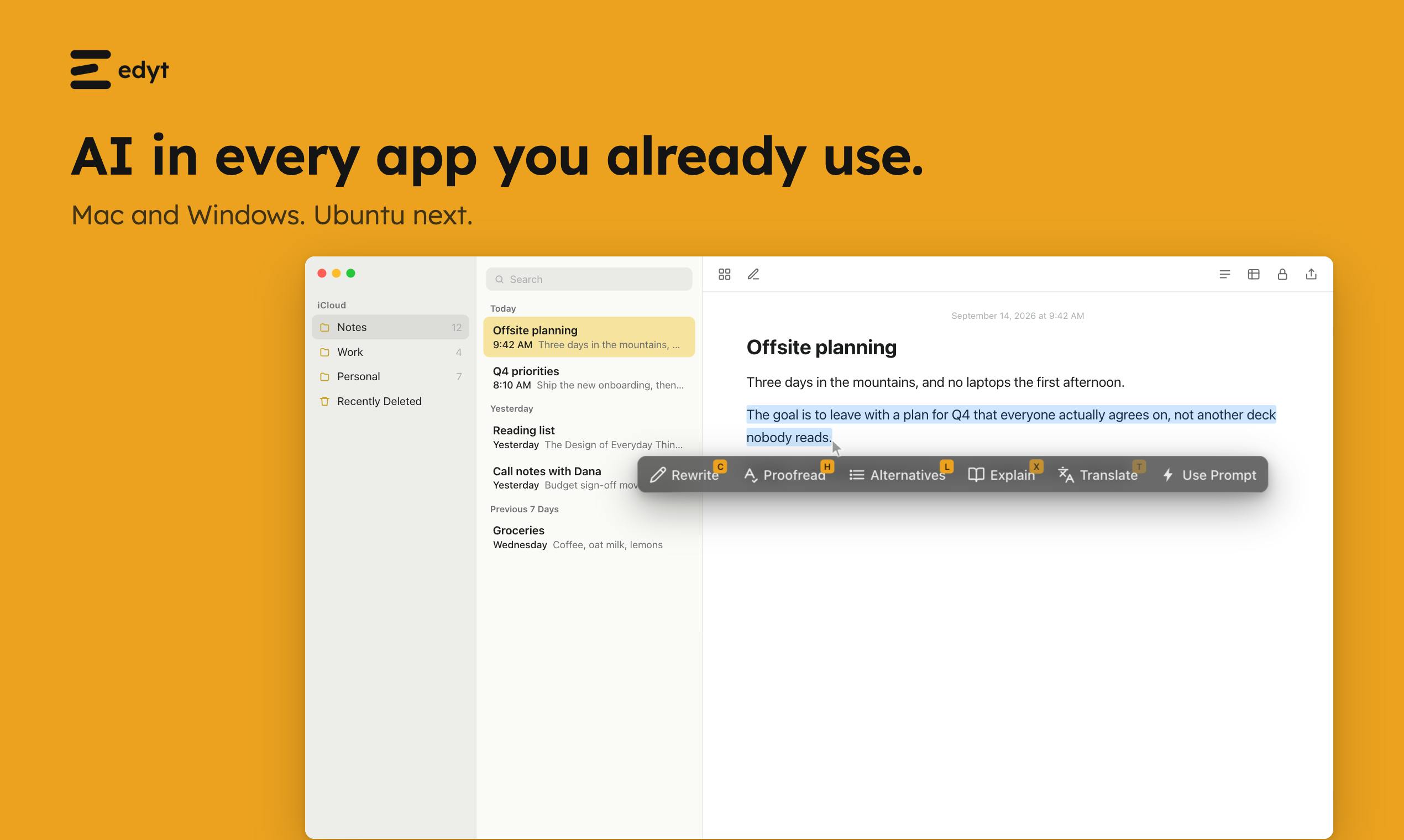
Core Idea: One Shortcut, Results Delivered at Your Cursor
Edyt's product logic is refreshingly straightforward: select some text, press a shortcut, and the AI-processed result appears right where your cursor is. You never have to leave your current app or shuttle content between multiple windows.
This "process in place" interaction essentially transforms AI from a standalone destination into an operating-system-level service. For users who frequently write, translate, or handle emails, every context switch eliminated is a real productivity gain. The product has received 69 upvotes on Product Hunt, ranking #20, across the Productivity, Writing, and Artificial Intelligence categories.
This "OS-level service" product model typically relies on system-level Accessibility APIs — macOS's AXUIElement framework or Windows UI Automation — to read text from the foreground app and write results back. This is fundamentally different from browser extensions (which only work on web pages) or app-native AI (which only works within a single app). Similar tools include PopClip (Mac) and Raycast AI, but most stop at sending text to an AI and displaying the result — few complete that final step of in-place replacement. In-place replacement demands higher permissions and is more likely to trigger security software alerts, making it one of the key engineering challenges for tools in this category.
Feature Breakdown: Rewrite, Explain, Translate, and Alternatives
Edyt offers several core text-focused capabilities:
- Rewrite: Rewrites your content while preserving your original voice, following specific instructions you provide. This sets it apart from simple "polish" tools — it emphasizes not altering your personal style.
- Explain and Translate: Both are deeply customizable — the more specific your request, the deeper the explanation or translation.
- Alternatives: Generates multiple different ways to express the same sentence, useful when you're carefully weighing your word choices.
- Saved Prompts: Store your frequently used custom prompts, run them on any selected text, and have them sync across every machine tied to your account.
Cross-device prompt sync is an easy-to-overlook but genuinely useful detail. For users who work across multiple computers, it means a consistent workflow without any reconfiguration.
The Standout Feature: Handling Text You Can't Even Select
What truly sets Edyt apart is its ability to handle unselectable text.
In many situations, text simply can't be highlighted directly — scanned PDFs, text embedded in screenshots, or content visible in someone else's screen share. Edyt's approach: hold Option (Mac) or Alt (Windows) and drag to select over these areas, and it will recognize and process the text within. This is essentially a built-in OCR-style text capture capability, seamlessly integrated with the subsequent AI processing.
This extends AI text processing from "editable text" to "any visible text on screen" — a direct embodiment of the product's tagline, "AI for text you can't even select," and its key differentiator from similar text-selection tools.
OCR (Optical Character Recognition) is the technology that converts text in images into editable text, traditionally requiring standalone applications like Adobe Acrobat or ABBYY FineReader. Edyt integrates OCR-style capture directly into the AI processing pipeline, eliminating the intermediate steps of "recognize first, then copy, then call AI." It's worth noting that modern operating systems already have some built-in text recognition — macOS Live Text and the Windows 11 Snipping Tool both support extracting text from images. Edyt's distinction is that it feeds the recognized text immediately into AI processing and delivers the output back to the cursor position, rather than stopping at the copy stage. The real-world experience of this integration is highly dependent on the quality of the underlying OCR engine — recognition accuracy tends to drop noticeably for handwriting, low-contrast backgrounds, or non-Latin characters.
Platform Support and Pricing
Edyt currently supports Mac and Windows, with Ubuntu support reportedly in the pipeline. This cross-platform commitment is a positive signal for the Linux user community, even if it hasn't shipped yet.
On pricing, Edyt offers a free tier that the team describes as "enough for most people." This generous free-access strategy lowers the barrier to trying it out, letting users validate its value in real workflows before deciding whether to upgrade.
Open Questions
Despite its clear positioning, there are a few things worth watching:
- Privacy and local processing: The product mentions "Read on your device," but whether AI processing involves cloud uploads — and how screen content and PDF data are protected — are questions any system-level tool must answer clearly.
- Accuracy: The quality of text recognition from screenshots and PDFs directly determines the experience, especially for low-resolution or complex-layout content.
- Free tier limits: The specifics of what "enough for most people" actually means still need real-world validation.
Takeaway
Edyt represents a product form that's taking shape: AI is no longer confined to a standalone application, but acts as an OS-level capability, ready to work on any text visible on your screen at any moment. Its core strength isn't that any single feature is particularly powerful — it's that AI has been placed exactly where users are, right at the cursor. For anyone who regularly processes text across multiple apps, this kind of tool is worth trying.
Related articles

Chain of Thought Isn't Just for AI: How Humans Can Use CoT to Improve Thinking Quality
Chain of Thought isn't just a prompt trick for large models. Starting from a Hacker News discussion, this article analyzes why CoT works for human thinking too, breaks down actionable ways to transfer it, and highlights the key differences between human CoT and machine CoT.
Cloudflare Teams Up with OpenAI: Closi…
Cloudflare Teams Up with OpenAI: Closing the Loop from Vulnerability Discovery to Defense with AI
Cloudflare uses OpenAI Daybreak to investigate security vulnerabilities and generate reviewable remediation plans, while developers use Codex to boost coding efficiency and quality.

Orca Multi-Agent Orchestration in Practice: A Guide to Parallel Collaboration with Claude and Codex
Orca is Stable AI's free open-source agent workbench supporting 34 agents like Claude Code and Codex in parallel. Learn its Git worktree isolation, multi-model orchestration, and mobile management.