EgoLite: Let Claude Code Work in Your Browser in Parallel

EgoLite is an open-source Chromium browser that lets AI Agents and humans browse in parallel without conflicts.
EgoLite is an open-source Chromium browser by Citra Labs, purpose-built for AI Agent and human parallel operation. It solves three critical browser automation pain points: login state inheritance from Chrome, isolated parallel Spaces for concurrent tasks, and semantic Snapshots that cut Token usage from 30,000+ to just 200-300. Compatible with Claude Code, Codex, and Cursor, it enables codebase-driven one-shot execution that's 2.5x faster than traditional CLI approaches.
Why AI Always Stumbles When Browsing the Web
Have you ever asked AI to do things on the web? Scraping pages, filling forms, testing interfaces—if you've tried, you've probably hit the same wall: AI has to log in from scratch every time it opens a browser, or it straight-up hijacks the tab you're currently using. Behind this are three long-standing structural problems in browser automation.
Browser automation technology has evolved over nearly two decades, from early Selenium to Puppeteer to Playwright. But these tools were originally designed for "test engineers," not "AI Agents." They assume users will handle login manually, manage instance lifecycles, and execute within deterministic scripts. When LLM Agents started taking over browser operations, all these assumptions broke down—Agents need dynamic decision-making, parallel execution, and the ability to inherit human session states, capabilities that traditional tools completely lack. While next-generation AI browser tools like Browser Use and LaVague have tried to bridge this gap, they remain constrained by the underlying browser architecture.
First, login states can't be inherited. Tools like Browser Use require independent browser instances, meaning AI has to re-login every time it opens your GitHub or Gmail, with CAPTCHAs coming one after another. Second, humans and Agents fight over the browser. When AI operates on the current tab, you can only sit and wait—move your mouse and everything breaks. Third, CLI approaches are slow and Token-expensive. Every step is a tool call: open, look, find element, click, open again—each time serializing and rebuilding context.
When an AI Agent needs to understand a webpage, traditional approaches serialize the entire DOM tree into text and feed it to the large language model. A typical modern webpage can contain thousands of DOM nodes, easily exceeding 30,000 Tokens when serialized. At GPT-4o pricing, merely "glancing" at a page costs about $0.15 in input costs. More critically, the vast majority of these Tokens are invisible elements, style tags, and script code—completely useless for Agent decision-making. This is why Token optimization isn't just about cost—it directly impacts the Agent's reasoning quality and response speed.

Here's a real scenario: you ask AI to batch-fill ten company leads into a spreadsheet. It opens the browser only to find it doesn't have your login state, gets blocked by CAPTCHAs, or hijacks the tab you're using. There's a fundamental insight here—the bottleneck isn't the API, it's the browser itself. What Agents truly need is a browser that can inherit your login state and run in parallel.
What EgoLite Is: One Browser, Two Users
EgoLite's approach is straightforward: since the problem lies with the browser, build a new one. It's not a plugin or tool—it's a complete Chromium browser, designed from the ground up for "human + AI Agent parallel operation."
It's open-sourced by Citra Labs, has over 7,000 Stars on GitHub, is completely free under the MIT license, and is compatible with the three major Agent environments: Claude Code, Codex, and Cursor. Once installed, it automatically registers the Ego Browser skill, working across all three platforms. This compatibility relies on the Model Context Protocol (MCP) or similar skill registration standards. When EgoLite is installed, it registers an "Ego Browser" tool description in the local skill directory, including the tool name, parameter structure, and capability description. When an Agent needs to perform a browser operation, it recognizes this registered skill and calls the corresponding local API. This loosely-coupled plugin architecture allows the same browser backend to serve different Agent frontends without requiring separate adaptation layers for each platform. Currently macOS only, with Windows and Linux on the roadmap.
The core concept can be summarized in one sentence: One browser, two users. You browse the web normally while the Agent works in an independent Space. Your tabs remain untouched, and you can take over or stop any Space at any time. Privacy is also reassuring—all browsing data stays on your local device; only whether you chose to migrate Chrome is recorded, with no browsing content uploaded.
EgoLite's Four Core Features
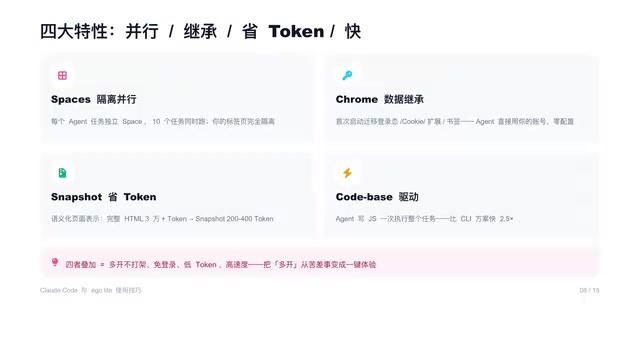
The fundamental difference between EgoLite and traditional browser automation lies in four features, and it's the combination of all four that creates a qualitative leap.
Spaces: Isolated Parallel Execution
Each Agent task corresponds to an independent Space. Ten tasks can run simultaneously, completely isolated from your tabs. This transforms "running multiple instances"—previously a conflict-prone headache—into a one-click experience.
EgoLite's Space isolation builds on Chromium's multi-process architecture and Profile mechanism. Each Space is essentially an independent BrowserContext with its own rendering process, network stack, and JavaScript execution environment, sharing only a read-only snapshot of user data (cookies, login states). This means different Spaces cannot access each other's DOM or tamper with each other's network requests, like multiple virtual machines sharing the same hardware but remaining isolated. This design ensures parallel task stability while avoiding the memory overhead of launching multiple complete browser instances—ten Spaces consume far fewer resources than ten Chrome windows.
Chrome Data Inheritance for Zero-Login Access
On first launch, it migrates your login states, cookies, extensions, and bookmarks. The Agent uses your accounts directly with zero configuration. This is the key to "zero-login" operation.
Snapshot Token-Saving Mechanism
Traditional approaches feed complete HTML to the model, easily hitting 30,000+ Tokens. EgoLite uses semantic Snapshots that retain only visible, interactive elements, dropping Token usage to just two or three hundred. These Snapshots are built on Chromium's accessibility tree, with kernel-level support for complex iFrames and Shadow DOM.
Chromium's accessibility tree is the semantic page structure that browsers build for assistive technologies (like screen readers). It transforms the visually rendered webpage into a semantic tree structure where each node contains a role (button, link, heading), name, state, and executable actions. Unlike the full DOM, the accessibility tree naturally filters out purely decorative elements, retaining only content meaningful for user interaction. EgoLite leverages this mechanism to build Snapshots, essentially letting AI "perceive" pages the way a visually impaired user uses a screen reader—efficient, semantically clear, and unaffected by CSS layouts or JavaScript frameworks. For structures like Shadow DOM and cross-origin iFrames that traditional scrapers struggle to penetrate, the accessibility tree can fully expose their interactive elements at the kernel level.
Codebase-Driven One-Shot Execution
The Agent writes a JS script and executes the entire task at once, instead of N rounds of tool back-and-forth. This is 2.5x faster than CLI approaches.
In traditional CLI-driven mode, every operation step requires the Agent to: 1) send the current page state to the LLM, 2) the LLM returns the next instruction, 3) the tool executes that instruction and returns the new state. A five-step operation requires five complete LLM calls, each with network latency and Token overhead. Codebase-driven mode lets the LLM generate the complete execution script in the first round, with subsequent steps running continuously in the local JavaScript runtime without repeated model calls. This is similar to upgrading from "line-by-line interpreted execution" to "compiled batch execution"—not only 2.5x faster but also significantly reducing the risk of task interruption from network jitter or API rate limiting.
How It Works: The Snapshot-Action-Verify Loop
How does a task run? Four steps. First, you give an instruction, like "/ego-browser open GitHub Trending and summarize the top five trending projects." Second, the Agent uses the Ego Browser skill to compile the task into a "snapshot-action-verify" JS script. Third, the script executes in an isolated Space: opens the page, reads the snapshot, performs actions, returns results. Fourth, your tabs remain completely unaffected throughout.
The core is a loop—snapshot, action, verify, completed in one script run—not N rounds of tool calls. Here's the logic of a real script: open pricing page → read snapshot → click "Contact Sales" → fill in email → submit—five steps executed at once.
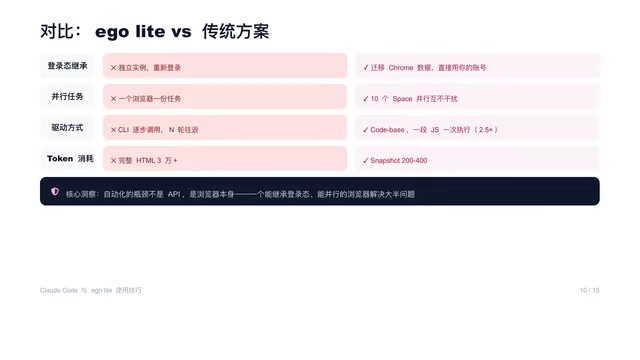
This comparison table clearly shows the difference:
| Dimension | Traditional Approach | EgoLite |
|---|---|---|
| Login State | Separate instance, re-login required | Migrates Chrome data, uses your accounts directly |
| Parallel Tasks | One browser, one task | Ten Spaces running in parallel without interference |
| Driving Method | CLI step-by-step calls, N round-trips | Codebase: one JS script, one-shot execution |
| Token Consumption | Full HTML 30,000+ | Snapshot: only 200-300 |
EgoLite Installation Guide & Three Practical Scenarios
There are three installation methods—pick any one. Method 1 (Recommended): Run npx skills@citra-labs/egolite; the first time you execute a browser task, it will guide you through installing the EgoLite app. Method 2: Download the appropriate DMG installer for your chip architecture, double-click to install, and it automatically registers Ego Browser in all Agent skill directories. Method 3: Paste "setup egolite for me" directly to Claude Code and let it read the installation docs to configure automatically.
Three tips: On first launch, it will ask whether to migrate Chrome data—be sure to select "Yes" as this is the core of zero-login; skills work across all three platforms; currently macOS only.

For practical use, here are three scenarios you can directly replicate:
- Sales & Ops Batch Lead Collection: Open ten Spaces to visit ten company websites in parallel, find contacts and fill forms, while you write emails simultaneously without interference.
- Competitive Research Automation: Open five Spaces to scrape pricing and changelogs from five competitor sites in parallel, with results compiled into a table.
- Batch Repetitive Web Operations: Bulk following, bulk form-filling, monitoring page changes—hand off all the tedious work to Agents in Spaces.
These three scenarios cover the three most valuable things AI can do on the web: collecting, researching, and automating. In one sentence—anything that requires opening a webpage and clicking multiple times can be handed off, just describe the task in plain language.
Four Golden Rules for Using EgoLite
Four practical rules to wrap up: First, always migrate Chrome data on first launch—this is the key to zero-login. Second, leverage Space parallelism and run multiple tasks simultaneously. Third, rely on Snapshots to spend Tokens where they matter. Fourth, you can take over any task you're unsure about at any time—watch it run and grab the steering wheel whenever needed.
If you take away just one thing today, let it be this: Give AI a browser that inherits your login state, letting humans and Agents work in parallel without interference. This is precisely the core logic with which EgoLite aims to redefine browser automation—not building a smarter tool, but adopting a more suitable vehicle.
Key Takeaways
Related articles

ChatGPT Space Launches: Team Collaboration and New Pages Features Explained
ChatGPT Space is OpenAI's new team collaboration feature with Pages, real-time collaboration, and Slack/Google Drive sync. We break down its privacy design, multi-platform integration, and the full workflow from conversation to document.

Migrating Apache Spark UDFs to GPU Acceleration with AI Agents
NVIDIA developer blog explains how AI Agents rewrite Apache Spark UDFs for GPU acceleration, covering migration criteria, agent rewriting and verification workflows, plus pitfalls like result consistency and CPU-GPU transfer overhead.

Zed Editor v0.40.4-rc2 Released: Usage Credits Now Available Without Upgrading
Zed editor releases v0.40.4-rc2, allowing users to use usage credits for AI features without upgrading to a paid plan, lowering the trial barrier.