Elementor MCP in Practice: Connecting Claude, Codex, and Cursor

Elementor launches MCP, letting Claude, Codex, and Cursor directly connect to page structures for automatic handshakes and direct operations.
Elementor's MCP feature uses the Model Context Protocol to establish a direct connection between the site builder and mainstream AI coding assistants. Users enable MCP in Elementor, select a target tool from Claude, Codex, Cursor, or VS Code, and the system completes the handshake automatically — no manual token copying. Connection status has visual feedback, with red indicating failure, reducing troubleshooting costs. The core value lies in solving the "gap" between AI-generated code and Elementor's actual page structure: AI assistants can directly read widget and layout context for more accurate suggestions and shorter debugging paths. However, the video only shows the basic connection flow, not post-connection modification effects, permission boundaries, or security risks — real value awaits hands-on verification.
What Is Elementor MCP?
Elementor's new MCP (Model Context Protocol) feature establishes a direct connection between the site-building tool and mainstream AI coding assistants. According to a YouTube video demonstration, users simply enable the MCP option in Elementor, and the system provides a series of connection configuration entry points for tools including Claude, Codex, and Cursor.
The significance of this connection layer is that AI assistants are no longer limited to generating code snippets — they can directly read and operate on Elementor's page structure and component data, enabling a leap from "conversational suggestions" to "actual execution."
What Is MCP (Model Context Protocol)?
MCP is a communication protocol proposed and open-sourced by Anthropic in late 2024, with the full name Model Context Protocol. Its core idea is to define a standardized interface between AI models and external tools and data sources: AI assistants read data or trigger operations in a unified format through the three capability types exposed by MCP servers — "resources," "tools," and "prompts" — without needing to write custom adapter code for each application. Think of it as "the USB-C port of the AI world" — in the past, every piece of software required a custom cable; now, as long as both sides follow MCP, it's plug-and-play. This is why products from different vendors like Elementor, Claude, and Cursor can interoperate quickly: they all follow the same protocol rather than maintaining proprietary API integration schemes.
Connection Flow: From Enabling MCP to Automatic Handshake
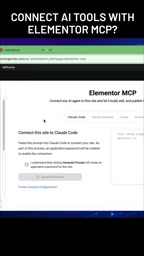
The video demonstrates a very straightforward operational path. After enabling MCP in the Elementor backend, the interface lists multiple connectable AI service options, including Claude, Codex, Cursor, and VS Code.
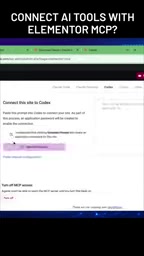
After selecting the target tool, the system guides the user through connection confirmation. The demo mentions a key detail: you can check "whether our connection has been established" in the configuration interface — if the status shows red, it means the connection has not yet succeeded.
After completing configuration, the user switches to Codex to chat, and Elementor automatically creates the connection. There are no complex token-copying or manual configuration steps throughout the process — the connection is established automatically.

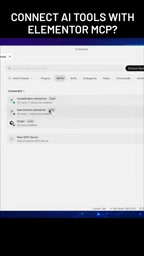
"I'll check whether the connection has been established, then send a message after switching to Codex, and it will automatically create the connection here." — Paraphrased from the video
Practical Impact on WordPress Developers
This integration solves a long-standing pain point: the "gap" between AI-generated code and Elementor's actual page structure. Previously, when writing code with Cursor or Claude, developers had to manually copy, paste, and debug. Now the MCP protocol lets AI assistants directly perceive Elementor's context.
Changes that may emerge in practice:
- Improved page-building efficiency: AI can directly read which widgets and layouts the current page uses, generating suggestions that better fit the actual structure
- Shorter debugging paths: No need to repeatedly switch between the editor and the AI chat window
- Free switching between multiple tools: Claude, Codex, and Cursor users can all use the same connection mechanism
Permissions and Security Boundaries of MCP
Once an MCP connection is established, the AI assistant effectively gains access to the toolset declared by the MCP server. In the Elementor scenario, this means the AI may have the ability to read page structure, modify widget properties, and add or remove components. The MCP protocol itself provides a permission annotation mechanism — servers can declare whether a tool is read-only or destructive, and some clients will request user confirmation before execution based on this. But the protocol is only a framework; actual enforcement depends on how Elementor defines the scope of exposure and whether AI clients strictly execute the confirmation flow. Common risks include: accidentally deleting page elements, unintentionally modifying live content, and cross-site operations in multi-site environments. Therefore, before enabling it on a production site, it's advisable to first verify the boundaries of what AI can execute in a test environment, and to have page version backup and rollback strategies in place.
A Few Details Worth Noting
The video demo mentions that after MCP is enabled, the options are very rich — "you won't lack any choices." This hints that Elementor may still be expanding its list of compatible AI tools.
Another detail is the visual feedback on connection status — red indicates not connected, which reduces troubleshooting costs.
However, the video does not show the specific operational effects after a successful connection, such as what modifications the AI assistant can actually make to pages, where the permission boundaries lie, or whether security risks exist. These are the questions developers care about most, and for now we can only wait for more detailed hands-on testing to verify.
The Context Gap in Elementor and WordPress Development
Elementor uses a visual drag-and-drop building approach, and pages are ultimately stored as JSON structures in metadata fields such as _elementor_data, which is a separate system from developer-written theme templates, CSS, and PHP logic. Traditional AI coding assistants (like Cursor and Claude) can only see code files, not the actual component tree inside the Elementor editor. As a result, developers often need to "translate" — manually mapping the generic HTML/CSS suggestions from AI onto Elementor's widgets and style settings. This is what the article calls the "gap." The value of MCP lies precisely in letting AI directly read this component data structure, thereby producing suggestions that closely match the current page layout and the widgets in use, reducing the intermediate conversion steps.
Who Should Try This
If you match the following situations, this feature is worth paying attention to:
- Developers or designers building WordPress sites with Elementor
- AI coding users who already use Claude, Codex, or Cursor in their daily work
- Teams looking to reduce the "translation cost" between AI output and actual page structure
Currently, Elementor MCP is still at a relatively early stage — the video shows only the basic connection flow. How much value it can actually deliver depends on how deeply the MCP protocol opens up Elementor's data access permissions. This can only be judged through follow-up hands-on testing.
Related articles

How Big Can Stars Really Get? The Physical Limits of the Largest Stars
Red supergiants are the largest stars by volume, with radii up to 2,000 times the Sun, engulfing the inner solar system. But there is no precise upper limit on stellar size—models predict up to 15,000 solar radii. The most massive blue stars are far smaller than red supergiants—biggest and heaviest are two different things.

Apple HomeView Smart Display Full Feature Breakdown: Wall-Mount or Desktop, $299
Apple launches HomeView, a $299 smart display with wall-mount and desktop options, 12MP camera for facial recognition, smart home control, music playback, and recipe step-by-step cooking. Full breakdown of watch faces, apps, privacy, and cooking integration.

Where Did the Promised New Studio Go? Craft Computing Answers After Five Years
Craft Computing's host responds to viewer questions: the new studio promised five years ago was shelved as construction costs soared from $30,000 to $75,000, and was replaced by a 168-square-foot garage conversion.