Emergent AI Hands-On: Building an App from Scratch with a Single Prompt

Emergent AI built a working YouTube planner app in 10 minutes from one prompt — no code, almost no fixes.
This article documents a complete hands-on test of Emergent, an AI no-code app builder. Using a single detailed prompt, Emergent generated a YouTube content planning tool in ten minutes — complete with add/edit/delete, filtering, a content calendar, and responsive layout. Core features worked on the first try with virtually no manual intervention. The build consumed roughly 6.87 credits, mostly during initial generation. Post-build editing is intuitive via element selection. The main limitation: free preview links expire after 30 minutes; permanent publishing requires a paid upgrade.
No-code development tools are reshaping the barrier to building apps. Not long ago, creating something usable meant knowing how to code, having plenty of patience, and tolerating the kind of errors that could ruin an entire afternoon. Emergent claims it handles all the technical heavy lifting — just describe what you need in natural language, and it generates a working application.
This article is based on a complete hands-on demo by a Bilibili content creator, who built a YouTube content planning tool from scratch using a single prompt. We'll walk through the entire process, examine the generated results, and track how many credits were consumed and how many manual fixes were needed.
From Sign-Up to First Build: The Whole Thing Took Ten Minutes
After logging in, Emergent lets you choose between creating a web app or a mobile app — just toggle a button. Since the goal was a content planning tool that runs directly in the browser, the creator chose the web app option. The account showed 10 free credits in the top-right corner.
The core action happens in the description box — that's where you tell Emergent what to build. The creator emphasized that the more useful context you provide, the better the results. His prompt included: a quick-entry form (for video title, content type, priority, and status), content type categories (tutorials, reviews, comparisons), workflow stages (idea, recording, editing, published), and a request for a modern blue, responsive design.
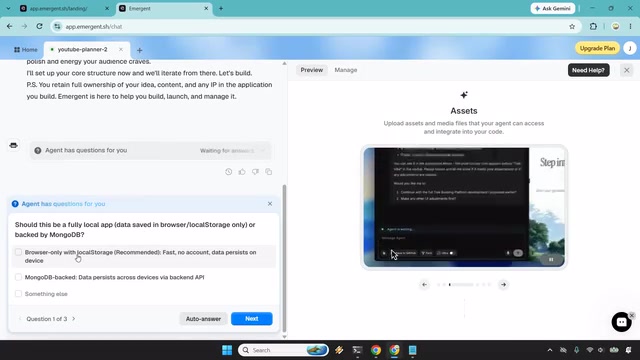
After submitting, the agent didn't jump straight into building — it first asked three follow-up questions: whether data should be saved in local browser storage only or backed by MongoDB; whether editing and deleting functionality should be included; and the preferred color vibe. This kind of interactive clarification is actually part of the experience — it decides how many questions to ask based on the complexity of the request. The creator chose local browser storage, added edit/delete and publish date features, and stuck with a tropical blue-pink color scheme.
It's worth noting that Emergent doesn't just generate a visible interface — it handles the code and logic needed to make the app actually work. The build started at 9:15 and finished at 9:25 — exactly ten minutes.
Emergent is one of the leading examples of "Agentic Development" tools. Its core difference from traditional no-code platforms like Bubble or Webflow is this: those platforms still require users to build apps by dragging components and configuring logic, while Emergent's agent automatically breaks down requirements, plans the tech stack, writes code, and executes it — all without the user ever touching a visual editor. Under the hood, it generates real, runnable frontend code (typically based on frameworks like React), not the configuration files common to low-code platforms. This explains why the tool lets you choose a data storage approach — pure browser local storage (localStorage) means data is saved only on the user's device with no backend server required, while the MongoDB option connects the app to a cloud database, suitable for cross-device sync or multi-user access. The choice directly affects deployment complexity and credit consumption.
Feature Testing: Core Functions Worked Without a Single Fix
When the first version loaded, the creator's initial impression was clean, minimal, and tropical — nothing excessive. But he was quick to point out: looks matter, but if the buttons are broken, even the prettiest design is just "ambitious wallpaper." The real test was whether the features actually worked.
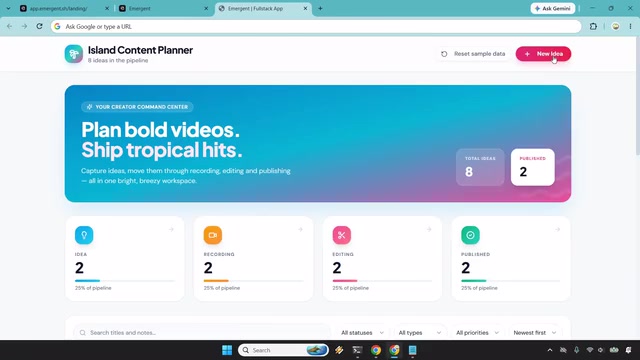
He immediately created an entry called "Urgent Review," set the status, marked priority as high, added a target publish date, and dropped it into the pipeline. Several key checks passed:
- After adding an entry, the idea count correctly incremented
- Entries could move through the stages: Idea → Recording → Editing → Published
- After deleting an entry, the count decreased by one and cards shifted up accordingly
What impressed him even more was the filtering and sorting functionality. You can filter by content type (idea, recording, editing), status type (tutorial, review), priority (high to low), and target date (soonest first). When content piles up, these filters are where the tool earns its keep — letting you quickly find "where things stand in my pipeline."

The creator concluded that on the functional level, it "ran perfectly" with almost no modifications needed. That's a significant point — not having to burn through credits repeatedly telling the AI how to fix bugs saves both time and money.
Multiple Views and Post-Build Editing: Just Select an Element to Change Copy
Beyond the Kanban-style list, the tool also includes a built-in content calendar view. One click opens a monthly calendar laid out by target publish date, making scheduling gaps immediately visible. The creator also demonstrated responsive behavior, switching between desktop, tablet, and mobile views — the layout adapted seamlessly. He particularly liked how the "New Video" button stays pinned to the top in mobile view, which aligns with the primary action's logical priority.
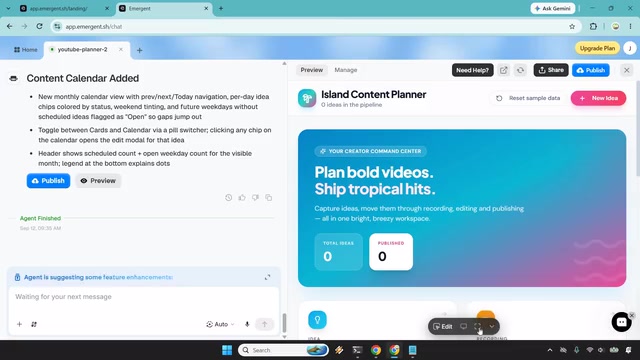
Post-build editing was equally intuitive. To rename the "New Idea" button at the top to "Show New Video," he simply opened edit mode, selected the element, typed the new copy, and it was done in seconds. He also noted that even if you misspell something, the AI can generally infer your intent.
Credits and Publishing: Free Tier Is Enough to Prototype, Permanent Links Require an Upgrade
After building the entire app from scratch plus a few minor adjustments, the account dropped from 10 credits to roughly 3.13 — with the vast majority consumed during the initial generation. For free usage, that's enough to fully prototype one real creative idea.
There is one limitation worth noting: preview links expire after 30 minutes. If you want a permanent link and want to officially publish the app, you'll need to upgrade to a paid plan. The creator mentioned that the trial plan costs just $1 for the first few days and includes 100 credits — a deal he considered good value.
The "30-minute preview link expiration" reflects a sandboxed deployment mechanism common among no-code AI platforms: generated apps run in temporary containers provided by the platform, and free-tier instances are automatically destroyed after a period of time to conserve server resources. With a paid upgrade, the platform allocates a persistent hosting environment and a fixed domain, giving the app a true "live" status. This is similar to the free-tier logic of traditional static hosting platforms like Vercel or Netlify — except that Emergent's credits cover both the "generation" and "hosting" costs simultaneously. For users who just want to validate a prototype's feasibility, the free credits are more than sufficient. For those looking to integrate the tool into a daily workflow, it's worth calculating the credit consumption rate against the value of a paid plan.
Verdict
Overall, this demo exceeded expectations: ten minutes from a single prompt to a working app, with core features running on the first try and almost no manual fixes required. For creators who have a clear app idea but don't want to touch code, tools like Emergent genuinely lower the barrier from concept to finished product.
Of course, this was a relatively simple content planner with modest logic complexity. Its true ceiling — how it handles more complex business requirements, data relationships, and edge cases — still needs more testing to verify. But as an introduction to AI-powered no-code app building, this demo offers a clear and reproducible reference point.
Related articles

Chain of Thought Isn't Just for AI: How Humans Can Use CoT to Improve Thinking Quality
Chain of Thought isn't just a prompt trick for large models. Starting from a Hacker News discussion, this article analyzes why CoT works for human thinking too, breaks down actionable ways to transfer it, and highlights the key differences between human CoT and machine CoT.
Cloudflare Teams Up with OpenAI: Closi…
Cloudflare Teams Up with OpenAI: Closing the Loop from Vulnerability Discovery to Defense with AI
Cloudflare uses OpenAI Daybreak to investigate security vulnerabilities and generate reviewable remediation plans, while developers use Codex to boost coding efficiency and quality.

Orca Multi-Agent Orchestration in Practice: A Guide to Parallel Collaboration with Claude and Codex
Orca is Stable AI's free open-source agent workbench supporting 34 agents like Claude Code and Codex in parallel. Learn its Git worktree isolation, multi-model orchestration, and mobile management.