Enhanced for Todoist: An Open-Source Frontend That Makes Task Management More Efficient

A free, open-source third-party Todoist frontend that enhances the official views with editable tables and review features.
Enhanced for Todoist is a free, open-source third-party Todoist frontend by developer Jules B. It received 67 votes on Product Hunt and ranked No. 10 in its category for the week. Rather than replacing Todoist, it layers more flexible views and planning capabilities on top of existing account data. Core features include editable tables, savable project views, flexible time range settings, effort estimation, guided reviews, and a Pomodoro timer bound to specific tasks. It offers a demo without login, and migration cost is nearly zero. The open-source model appeals to users who value privacy and customization, but as a third-party frontend it depends on Todoist's APIs and data structures, native new features may not be synchronized immediately, community feedback is limited, and long-term maintenance stability remains to be seen.
When Todoist Meets an Open-Source Enhanced Frontend
Todoist is already a mature task management tool, but the official interface still has limitations when it comes to view customization and in-depth planning. A third-party frontend called Enhanced for Todoist has appeared on Product Hunt, built by developer Jules B. and positioned as "a new frontend for your Todoist account." It ranked No. 10 in its category on Product Hunt for the week and collected 67 votes. Although there are only 2 comments, for a free and open-source little tool, this result already shows that it hits a real need for some users.
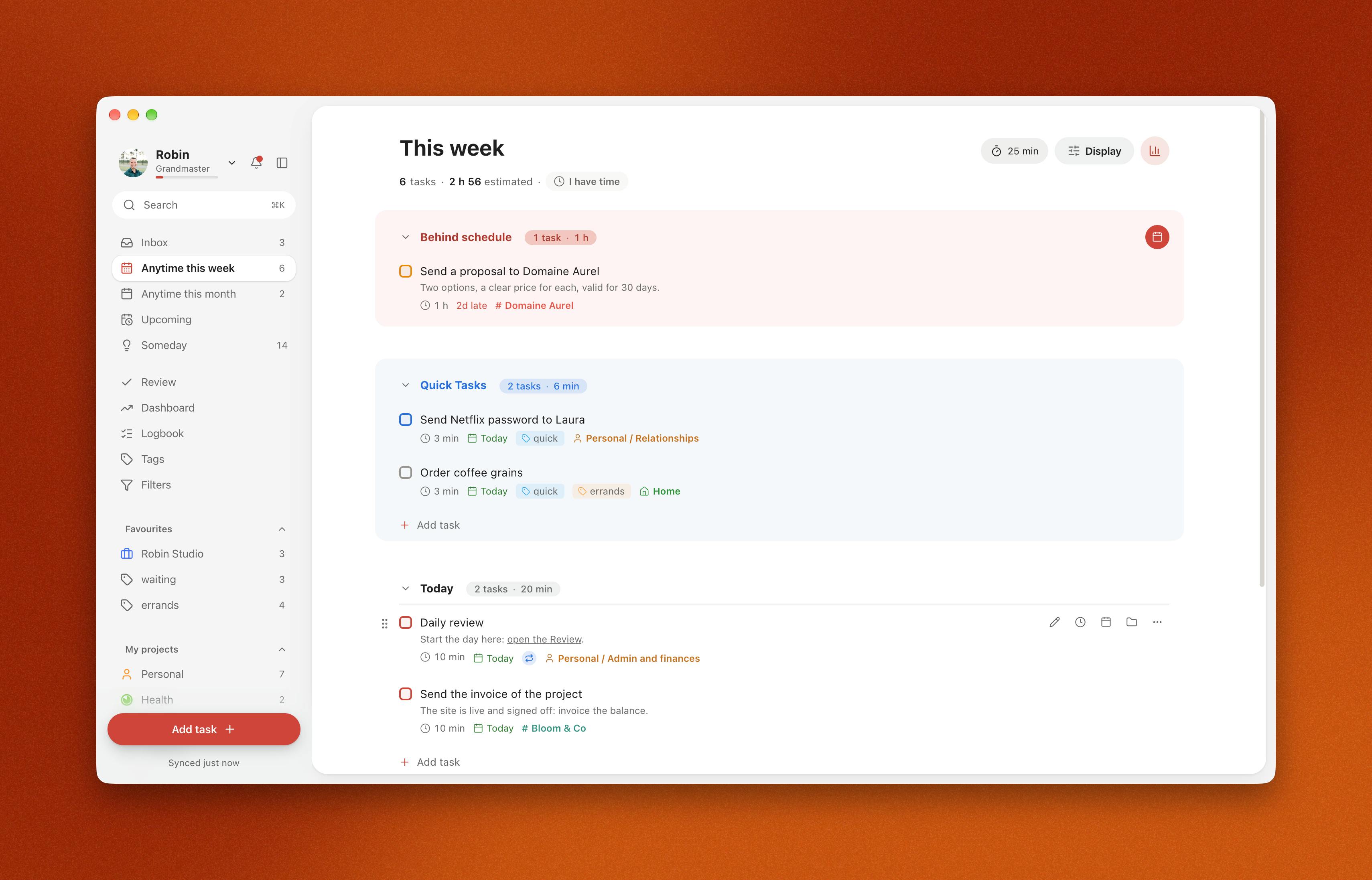
Unlike many productivity tools that require sign-up for a trial, Enhanced for Todoist offers a demo you can try without logging in, lowering the barrier to entry. Its core selling point is not replacing Todoist, but layering more flexible views and planning capabilities on top of your existing data.
Breaking Down the Core Features: More Than a Skin
The official one-liner "more ways to organize, plan, and focus" sums up the product direction, but when it comes to specific features, there are several points worth expanding on.
Editable Tables and Saved Project Views
Todoist's native list and board views are sufficient for everyday use, but they become inflexible when there are many tasks and you need to compare fields side by side. Enhanced for Todoist introduces editable tables, letting users adjust task attributes in bulk like operating a spreadsheet. It also supports saved project views, meaning you can lock in a commonly used combination of filters and sorting and jump back to it with one click next time without setting it up again. This sounds basic, but it is an efficiency detail that heavy users rely on every day.
Flexible Time Ranges and Effort Estimation
Time planning is a pain point in task management. This frontend provides flexible time range settings to help users step outside the fixed framework of "today/tomorrow/this week" when reviewing task distribution. Combined with effort estimation, users can predict the energy a task will require, allowing them to arrange their daily load more reasonably and avoid piling too many high-effort tasks onto the same day.
Guided Reviews and Task-Linked Pomodoro Timer
Guided reviews is a feature oriented toward methodology, guiding users to regularly revisit completed and pending tasks and build a review habit. The task-linked Pomodoro timer binds focus timing to specific tasks; when the timer ends, you can return directly to the corresponding task, reducing the fragmentation of switching back and forth between the timer and the task list.
The Pomodoro Technique was proposed by Francesco Cirillo in the late 1980s. Its core is dividing work into 25-minute focus segments and 5-minute breaks, with a longer break after every four pomodoros. The key to combining it with a task management system lies in "attribution": in traditional use, the timer is a standalone tool, and users find it hard to trace which task a given period of time was actually spent on. Enhanced for Todoist attaches the timer directly to the task object, so each focus session naturally produces task-level time records. This provides quantifiable evidence for later calibrating effort estimates and conducting reviews, rather than merely reminding you to take a break.
The Product Thinking Behind Free and Open Source
Enhanced for Todoist is released under a free and open-source model, with the code hosted on GitHub, which differs from the subscription route of many Todoist enhancement tools. Open source means users can review the code themselves, propose improvements, or even deploy it themselves, which is especially appealing to users who care about data privacy.
From a product validation perspective, the developer first released a demo version on Product Hunt, collected feedback with a low barrier to entry, and then iterated on features. This lightweight approach to getting started is quite pragmatic for independent developers. 67 votes and a No. 10 ranking are not exactly explosive, but they are enough to draw the attention of the target user group.
Todoist officially provides a REST API and a GraphQL API. Third-party developers can access users' account data through OAuth authorization, including core objects such as tasks, projects, labels, and filters. A frontend like Enhanced for Todoist essentially calls these interfaces in the browser to perform read and write operations, so it does not need to build a separate database, nor does it create data silos—changes users make in the enhanced frontend are reflected in the official Todoist client in real time. However, this architecture also brings natural limitations: API rate limits, field coverage, and permission granularity are all unilaterally determined by Todoist, and third-party frontends can hardly implement underlying capabilities that the official product has not yet exposed.
Who It Is For, and Who It Is Not For
This tool is better suited to heavy Todoist users—especially those who find the native views insufficient but do not want to migrate to an entirely new task management platform. It layers capabilities on top of the existing account system, so migration cost is almost zero.
That said, its boundaries should also be recognized: as a third-party frontend, it depends on Todoist's APIs and data structures, and new native client features may not be synchronized immediately; the small number of comments also means the sample of community feedback is limited, and the stability of long-term maintenance remains to be seen. If your need for task management customization is not strong, the official client may already be enough.
For users who pursue flexible views, regular reviews, and focus-timer integration, Enhanced for Todoist offers a free option worth trying.
Related articles
 Tech Frontiers
Gemini Omni 1.2 Flash: AI Video Moves Toward Draft-Style Editing
Google's Gemini Omni 1.2 Flash update enables conversational, draft-style editing of the same video—swap scenes while keeping products, adjust lighting while keeping characters. Clips up to 15s, 720p costs 30% less than the previous Flash—ideal for e-commerce ads, previs, and short-asset production.

Codex Tutorial: One-Command Install and Run Your First Task
Codex tutorial: one-command install and run your first task. Covers the four Codex forms, sandbox and approval guardrails, AGENTS.md and MCP configs, cloud network policy, and the iron rule of human review—everything you need to get started with this autonomous coding agent.
 Tech Frontiers
Localix: An Open-Source Agentic Development Environment with Multi-Model and Local AI Integration
Localix is an MIT open-source Agentic Development Environment (ADE) supporting seamless Claude Code plugin loading, multi-model cloud and local execution, Mini Apps extensions, and agent context management—an open AI collaboration workbench for developers.