Executor: A Unified MCP Proxy Layer for Managing Multiple Coding Agents

Executor is an open-source unified MCP proxy that lets multiple Coding Agents share one configuration.
Executor is an open-source tool designed for developers running multiple Coding Agents like Claude Code and Codex simultaneously. It inserts a unified proxy layer between each Agent and external services, so MCP Servers, OpenAPI, GraphQL, and Google Discovery interfaces only need to be configured once. Agents simply point to Executor as their single entry point. It also offers three permission tiers — Always Allow, Approve Before Execute, and Blocked — with automatic policy inference from interface specs. Deployment options include local CLI, desktop client, official cloud hosting, and Docker/Cloudflare Worker self-hosting, with only Node.js 20+ required.
If you're running multiple Coding Agents at the same time, you've probably run into this frustration: configure MCP once in Claude Code, again in Codex, and yet again in PyAgent and OpenClaw. The same Context Key, the same API Key — you end up pasting it three or four times. When a key expires, you have to hunt through every config file to update it individually. Want to add a new MCP Server? You repeat the process in every single agent.
The open-source project Executor was built specifically to solve this pain point. As described by Bilibili creator EV, Executor can be summed up in one sentence: a unified proxy layer sitting between multiple Agents and the outside world — essentially a centralized MCP configuration management tool.
From "Each Agent on Its Own" to a Single Entry Point
In the traditional setup, each Agent connects directly to external services via MCP, with authentication, keys, and permissions all managed separately — configurations repeated three or four times over. Once Executor is in place, the architecture is completely restructured: external services connect only to Executor, which handles integration, authentication, and centralized management. Each Agent only needs to point to Executor as its single MCP endpoint and share one common working directory.
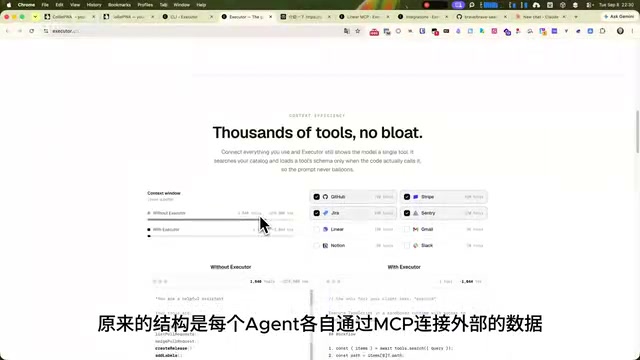
The immediate benefit of this design is "authenticate once, use everywhere." When a key needs updating, you change it in one place. When you add a new service, you configure it once in Executor and all Agents automatically share it.
MCP (Model Context Protocol) is an open protocol introduced by Anthropic in late 2024, designed to standardize communication between AI models and external tools/data sources. The core idea is similar to a USB interface — tool developers implement an MCP Server once, and any Agent supporting the protocol can call it directly, without needing separate adapters for each AI platform. As major Coding Agents like Claude Code, OpenAI Codex, and Cursor have adopted MCP, the ecosystem has expanded rapidly — but so has the problem of scattered configurations across multi-agent environments. That's exactly the pain point Executor addresses.
Not Just MCP — Legacy Services Too
Executor's integration capabilities go beyond MCP Servers. It also supports OpenAPI, GraphQL, and Google Discovery. As long as an interface can be described with a JSON Schema, Executor can convert it into a tool that Agents can call.
This means many legacy services that don't have an official MCP Server but do provide OpenAPI documentation can be integrated and exposed directly to Agents. For organizations with large numbers of internal REST services, this is an extremely practical capability — it eliminates the need to build a separate MCP Server adapter for each one.
OpenAPI, GraphQL, and Google Discovery are three widely used API interface description and query standards. OpenAPI (originally Swagger) is the most broadly adopted REST API description standard, defining endpoints, parameters, and responses in JSON or YAML format. GraphQL is a query language developed by Facebook that allows clients to specify exactly the data structure they need. Google Discovery is a metadata format used internally by Google to describe its cloud service APIs, powering Google Workspace, Cloud, and many other official APIs. What these three standards share is the ability to describe interface contracts in machine-readable JSON Schema form — and that's precisely what Executor leverages to convert them into unified, Agent-callable tool definitions, without requiring a hand-written MCP adapter for every legacy service.
Three Permission Levels: Giving Agents Boundaries
Does integrating a tool mean it's unconditionally available? Not at all. Executor provides independent policy settings for each tool, with three permission levels:
- Always Allow: For read-only operations like looking up documentation or searching for information — granted automatically.
- Approve Before Execute: For operations with side effects like sending emails or modifying data — a confirmation dialog prompts the user before the Agent proceeds.
- Blocked: For tools you never want the Agent to touch — disabled entirely.

If configuring each tool individually feels tedious, Executor can automatically infer default policies from the interface spec — for example, GET requests default to Always Allow. You can get up and running quickly, then gradually tighten policies over time, balancing ease of onboarding with security boundaries.
Four Deployment Options, from Personal to Team Use
Executor offers four execution modes to suit different scales of use:
- Local CLI
- Desktop client
- Hosted on Executor Cloud
- Self-hosted via Docker / deployed to Cloudflare Worker

For individual use, the local CLI or desktop client is sufficient. If you're working across multiple devices, or a team needs to share the same set of integrations, you can host it on the official cloud service or self-host with Docker for centralized management.
Workflow and Installation
Using Executor breaks down into four steps:
- Add an integration: For example, connecting an MCP Server.
- Create a connection: Each connection under an integration is a fully configured, authenticated set of credentials. With GitHub, for instance, you can configure one connection for a personal account and another for a work account under the same integration.
- Set policies: The allow / approve / block permission management described above.
- Connect your Agents: Point each Agent's MCP configuration to Executor and share a common working directory.

The installation barrier is low — you just need Node.js 20 or higher and any package manager like npm or bun. After installing, run executor install to register it as a persistent background service, then use executor web to open the web management UI, where you can add integrations, create connections, and configure permission policies.
The most critical step is connecting Executor to your Agents like Claude Code. Two methods are supported: HTTP, or stdio — the latter requires just a single NPX command in the terminal.
Value and Use Cases
Executor's core value lies in consolidating the scattered, duplicated configurations spread across multiple Agents into a single centralized config: authenticate once, manage centrally, and control permissions all in one place. For developers running two or more Coding Agents simultaneously, it solves a real and recurring pain point.
From an architectural perspective, this kind of "proxy layer / gateway" approach is forward-looking as multi-agent collaboration becomes increasingly common. As the MCP ecosystem grows, how to centrally manage credentials, control permissions, and reuse service definitions will gradually become an unavoidable engineering concern. Executor offers an open-source, self-hostable solution that's well worth ten minutes of your time to install and try out.
Related articles

Sperm Maxing: The Science and Myths Behind Male Fertility Anxiety
Male fertility anxiety has spawned the internet's "sperm maxing" trend—from ice-water testicle soaks to eating raw garlic. These remedies reflect diagnostic gaps and cultural silence around male infertility. This article examines the scientific evidence and internet myths, and how to tell effective methods from false advertising.

Forking a Teammate's AI Agent Session Like a Git Branch — Is This Idea Viable?
A Reddit developer proposes forking teammates' AI Agent sessions like Git branches for shared context and parallel exploration. We analyze the core mechanics, team collaboration value, and potential obstacles.

MCP Security Storm: OAuth SDK Vulnerability Testing and Server Hardening Guide
2026 saw a wave of MCP OAuth vulnerabilities: TypeScript and Python official SDKs both hit high-severity issuer confusion bugs, and LiteLLM auth bypass entered CISA's exploited list. This article covers CVE details, local reproduction results, and a full client/server hardening checklist.