F5-TTS Open-Source Voice Cloning Model: Runs on CPU, Clones a Voice in 3 Seconds

F5-TTS, with CPU capability, 3-10 second sample voice cloning, and local zero-token consumption, is an open-source voice cloning solution worth trying.
The article introduces the open-source voice cloning model F5-TTS shared by a Bilibili creator. Its core advantages are local deployment friendliness, fast generation, and low hardware requirements — it can run on ordinary laptops without a GPU, and offers both a browser interface and script mode. Users need only 3-10 seconds of reference audio to clone a voice and read any text aloud, all done locally with no token consumption. Testing found that sample similarity drops noticeably below 6 seconds, so at least 6 seconds is recommended. The generated results are close to real, suitable for content creators, developers, and ordinary users. The article also reminds that cloning others' voices requires authorization, abuse may be illegal, and AI synthesis should be labeled.
Why Is F5-TTS Worth Paying Attention To?
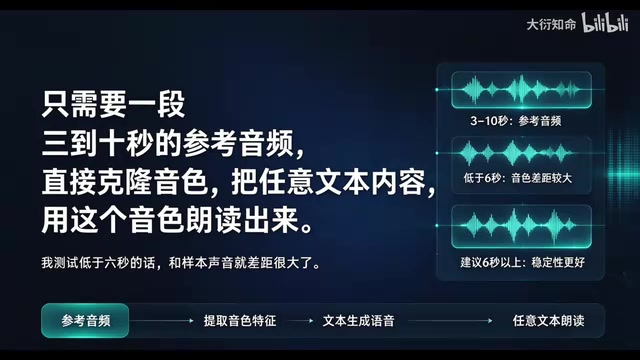
Voice cloning technology is moving from the lab to ordinary people's desktops. Recently, the F5-TTS model shared by a Bilibili creator sparked quite a discussion. Its core selling points are straightforward: local deployment friendly, extremely fast generation, and very low hardware requirements. You only need a 3-to-10-second reference audio clip to clone a highly similar voice and read any text aloud in that voice. No token consumption, no cloud calls — everything happens locally.
Zero-Barrier Hardware and Operation
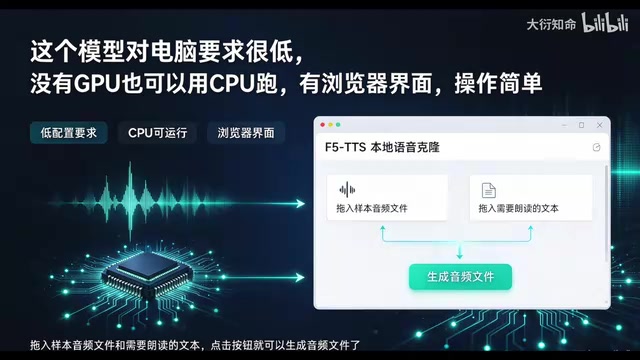
The most appealing aspect of F5-TTS is its tolerance for computer specs. The creator explicitly noted that even without a GPU, it can run on a CPU. This means the vast majority of ordinary laptops can give it a try, with no need to buy an extra graphics card. In terms of operation, it offers a browser-based graphical interface: you simply drag in the sample audio file and the text you want read aloud, click a button, and the audio file is generated. For users who don't want to fuss with code, this design is very friendly.
Local deployment means downloading the model files to your own computer and running them there. The inference process does not go through the vendor's servers, so there is no metered token consumption, and audio data is not uploaded to the cloud. The opposite is cloud API calls: paying by character or duration, depending on the network, and privacy data having to leave your premises. The cost of local deployment is that you need to prepare the runtime environment yourself, usually including a Python interpreter, deep learning frameworks such as PyTorch, and the model weight files. For users familiar with the command line, this is a one-time setup; for ordinary users, it can become a barrier. The article's phrase "tolerant of specs" mainly means that inference can use a CPU, but CPU generation is usually noticeably slower than GPU, and the gap becomes more obvious when generating long texts in batches.
The Limitation of Short Samples: 6 Seconds Is the Dividing Line
Although it officially supports 3-to-10-second reference audio, the creator found a key detail in actual testing: for samples shorter than 6 seconds, the cloned voice differs noticeably from the original. In other words, 3 seconds will run, but the results are unstable. To get more reliable similarity, it's recommended that the reference audio be at least 6 seconds long. This experience is very valuable reference for users preparing to deploy it.
"TTS" in F5-TTS stands for Text-To-Speech, the general term for technology that automatically reads written text aloud as speech; "voice cloning" further imitates a specific speaker's timbre, intonation, and rhythm on top of that. Traditional TTS requires a large amount of recorded data to train a dedicated model, whereas modern zero-shot voice cloning needs only a few seconds to a dozen or so seconds of reference audio for the model to "learn on the spot" and replicate the voice. F5-TTS belongs to the latter, which is why there's the claim that "a 3-to-10-second sample is enough to clone." Understanding this distinction helps clarify its positioning: it doesn't train a voice model that permanently belongs to you; instead, it imitates conditioned on the reference audio at each generation, and sample quality directly determines output similarity.
Actual Results and Listening Experience
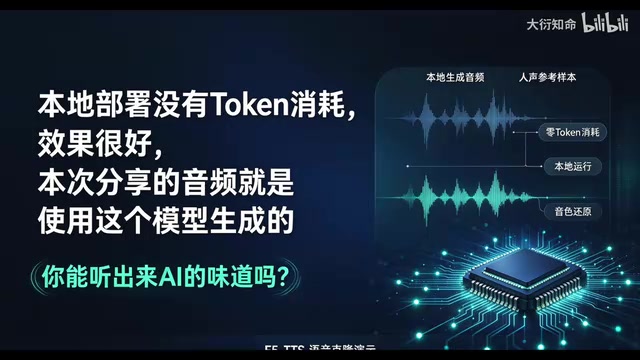
In the video, the creator played audio generated with F5-TTS directly and asked viewers, "Can you hear the AI flavor?" From the description, the generated results are convincing enough to pass for real — at least without professional equipment for analysis, ordinary listeners would find it hard to tell. Of course, the "AI flavor" of voice cloning is a subjective feeling that depends on reference audio quality, text content, and model version. But combined with the creator's assessment that "the results are very good," F5-TTS is in the top tier among open-source models.
Script Mode: The Key to Embedding It in Workflows
Besides the browser interface, F5-TTS also supports script mode. This means you can call the model through code and integrate it into automated workflows — for example, batch-generating audio content, automatically dubbing videos, or building voice interaction applications. For developers and content creators, this capability is more valuable than simply operating the interface.
Script mode essentially means loading the model directly through Python code and calling the generation interface, rather than clicking a button on a web page. A typical flow is: load the pretrained weights, read the reference audio and extract speaker features, pass in the text to be synthesized, and output a wav file. Compared with the graphical interface, script mode can process hundreds or thousands of texts in a loop, plugging the dubbing step into automated pipelines for video editing, podcast production, or customer service systems. For developers, this also means F5-TTS can be wrapped as an HTTP service for other programs to call remotely. Note that script calls likewise depend on local environment configuration, and when generating in batches you should watch GPU or memory usage to avoid overflow from feeding in long texts all at once.
Who Is F5-TTS For?
Content creators can use it to quickly produce narration, audiobooks, or short-video dubbing, saving the time of recording and post-production. Developers can use script mode to build voice cloning services or test voice interaction prototypes. Ordinary users who just want to experience voice cloning will find the browser interface simple enough, with no programming background required.
It's worth noting that although local deployment saves on token costs, it still requires some ability to configure the environment. The creator didn't go into specific installation steps but emphasized that "local deployment is very friendly," implying the installation process isn't complicated. For users familiar with the Python environment, it should be quick to get started.
The Boundaries and Responsibilities of Voice Cloning
F5-TTS's open-source nature lowers the technical barrier, but it also brings a risk of abuse. Cloning someone else's voice requires authorization; using it to impersonate identities, commit fraud, or spread false information is illegal. The technology itself is neutral, but users need to remain respectful. When deploying and sharing generated audio, it's recommended to clearly label it as AI-synthesized to avoid misleading others.
Conclusion: A Local Voice Cloning Solution Worth Trying
With its extremely low hardware barrier and simple operation flow, F5-TTS pulls voice cloning from the cloud down to the local machine. A 3-to-10-second reference audio, CPU-capable, browser interface plus script mode — these features make it quite competitive among open-source voice cloning tools. If you need voice cloning and don't want to rely on paid APIs, F5-TTS is a choice worth deploying and testing. The only thing to remember: give reference audio of at least 6 seconds where possible, and the results will be closer to the original voice.
Related articles

No Code Required: Using AI to Plan Production-Grade Application Architecture
No code, no problem: how to use AI to plan production-grade application architecture — database modeling, agent endpoint design, chat storage, and layered memory.

AI Writes Code, Will Programmers Lose Their Jobs? The Truth About Devin's Autonomous Programming
Devin and other autonomous AI coding agents are changing software development: from Copilot-assisted coding to fully automated engineering agents, the programmer's role shifts from writing code to system design and oversight. This article analyzes the impact of AI programming on employment, code security, and junior developer training, as well as the real direction of programmer demand under the efficiency paradox.

Citigroup's 14,000 Engineers Use Devin, Slashing Tech Outsourcing Bill by 30%
Citigroup's 14,000 engineers used AI coding agent Devin to cut its tech vendor bill by 30% and speed releases 30-40%, while JPMorgan says AI gains aren't in earnings yet.