Fabric IQ MCP Server: Query Power BI Semantic Models with Natural Language

Fabric IQ MCP Server enables any compatible AI agent to query Power BI data in natural language with inherited user permissions.
Fabric IQ MCP Server is a standardized access layer in Microsoft Fabric that lets AI agents like Copilot query Power BI reports and semantic models read-only via the MCP protocol. Permissions are handled through delegated authentication — agents inherit the logged-in user's identity, with RLS and OLS policies enforced automatically. Setup requires only a URL entry in the client config and enabling the developer endpoint in Fabric's tenant settings. Agents answer natural language questions through a three-step tool chain: discover assets, read schema, execute DAX. Since inference runs on the client-side model, Fabric capacity is not consumed.
What Is Fabric IQ MCP Server
The core purpose of Fabric IQ MCP Server is to give AI tools — such as agentic agents — a gateway into Microsoft Fabric resources. Specifically, this MCP Server provides access to reports and semantic models.
A few key points are essential to understanding its role. First, access is currently read-only — meaning no matter what an agent does, it cannot modify the underlying models. This is especially important for enterprise data governance, making it safe to connect. Second, the access an agent receives strictly follows the permissions of the logged-in user — it cannot exceed those boundaries.
Delegated Authentication: How Permissions Are Passed
When an agent connects to the MCP Server, it uses a delegated authentication mechanism. This is the core logic of the entire permission model: the agent is authorized by the logged-in user, so its access scope for semantic models and reports — as well as Row-Level Security (RLS) and Object-Level Security (OLS) restrictions — will exactly match those of the logged-in user.
This design means that if you log in with your own Fabric account, the agent "inherits" your identity and permission boundaries. It won't see data you're not authorized to access, nor will it bypass any configured security policies — the authentication action itself determines what features the agent can reach.
RLS and OLS are two complementary data access control mechanisms in Power BI / Microsoft Fabric. RLS restricts specific users to only the rows within their permission scope by defining roles and DAX filter rules in the semantic model — for example, sales rep A can only see records for their own region. OLS operates at a coarser level, controlling whether users can see specific tables or columns — if a column is hidden by OLS, the user can't query its values, and the field name itself won't be exposed. The combination of delegated authentication with both mechanisms means that when an agent executes a DAX query under a user's identity, the data engine automatically applies all RLS filters and OLS visibility rules for that user. The agent has no technical means to bypass this layer, fundamentally ensuring data isolation in multi-tenant, multi-role scenarios.
Configuration Walkthrough: Using Copilot as an Example
The demo uses Copilot as the agent client. The entire configuration process is straightforward:
1. Register the MCP Server
Find the .copilot folder in your home directory — it contains an mcp-config.json file. Open it with Notepad and configure the MCP Server URL as specified in the official documentation. The URL can be found in the configuration docs.
2. Launch and Authenticate
Once configured, start Copilot and run the command specified in the tutorial. The system will prompt for authentication — this step is critical, because the Fabric user you log in as here determines which reports and semantic models the agent can explore. In the demo, since the machine was already logged in, authentication completed automatically without requiring a password.
3. Enable the Developer Endpoint in Fabric
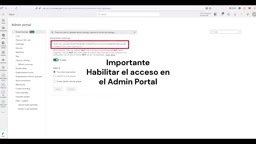
Note that in Fabric's tenant settings, there is a property that controls whether "users can use the MCP Server endpoint for development." This must be enabled for a successful connection to Power BI's MCP — without it, the entire flow won't work.
Live Demo: Chicago Bike Share Model
The demo uses a fairly simple semantic model recording all rides from Chicago's public bike-sharing system. Each ride is associated with a departure station, arrival station, departure time, and arrival time, with relationships to time, station, and date dimensions.
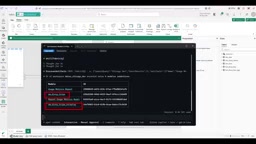
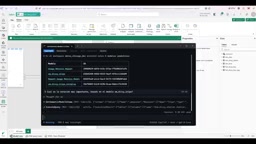
With everything set up, you can ask questions directly in natural language (the demo uses Spanish). The first question was "List all semantic models in the Chicago Dev workspace." The agent not only listed the two models the user had created themselves, but also identified a custom semantic model derived from usage metrics reports — in a sense, it knew the workspace contents better than the user did.
How the Tool Chain Works
The demo reveals several key tools exposed by the MCP Server:
- Discover Artifacts: Used to see what content exists in the Fabric tenant;
- Get Model Schema: Lets the agent understand the structure of a semantic model;
- Execute Query: Executes DAX queries — the core tool that actually retrieves data.
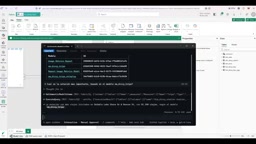
When asked "which is the most important station," the agent first retrieved the model schema, then executed a DAX query, and finally answered in Spanish: the station with the most ride departures was Dusable Lake Shore, with 81,290 trips. The author confirmed this against the report — the result was accurate.
DAX (Data Analysis Expressions) is a formula language designed by Microsoft for Power BI, Analysis Services, and Excel Power Pivot. It is purpose-built for performing aggregations, filtering, and calculations on columnar in-memory data models. Unlike SQL, DAX's calculation logic revolves around "row context" and "filter context," and can automatically detect relationships between tables in the model to simplify cross-table aggregations. In the MCP Server tool chain, the Execute Query tool essentially sends a DAX query request to a Power BI dataset, which is executed by the Analysis Services engine on the Fabric side and returns the result set. The agent first reads the model schema (including table names, column names, measure definitions, and relationships), then auto-generates semantically accurate DAX statements — this two-step "understand structure → generate query" flow is the technical foundation that translates natural language questions into precise numerical answers.
A Critical Detail About Capacity Consumption
One easily overlooked but cost-relevant point: in this mode, model inference does not consume Fabric capacity.
The reason is that the processing here is performed by the model associated with the agent (e.g., Copilot's own model), not a model built into Fabric. The distinction is fundamental — if you create an Agent inside Fabric, that agent consumes Fabric capacity for model processing. But when connecting through an external client like Copilot via the MCP Server, processing is handled by the client-side model.
This also highlights the openness of the MCP protocol: Copilot is not the only option. Any client capable of connecting to an MCP Server — including Google's equivalent agents — can in theory connect to Fabric's reports and semantic models in exactly the same way, delivering the same natural language query experience.
MCP (Model Context Protocol) is an open-source standard protocol proposed by Anthropic in late 2024, designed to unify the communication interface between AI agents and external tools and data sources. Its design philosophy is analogous to how USB standardizes hardware peripherals — as long as the server side implements the MCP Server specification (exposing a tool list and handling tool call requests), any MCP-compatible client can automatically discover and invoke those tools without needing to build custom integration code for every "agent × data source" pair. By implementing Fabric IQ as an MCP Server, Microsoft decouples it at the protocol level from any specific agent brand: Claude, Copilot, Cursor, or any other MCP-compatible client can theoretically query Power BI data using the same connection method — which is the underlying reason why the article mentions that Google agents can connect as well.
Summary
Fabric IQ MCP Server presents a clear path for AI agents to access enterprise BI resources in a secure, permission-constrained way. Read-only access ensures data safety; delegated authentication inherits user permissions along with RLS/OLS policies; and the standardized MCP protocol means you're not locked into a single agent ecosystem. For teams looking to converse with Power BI data in natural language, this is an integration approach well worth exploring.
Related articles

Chain of Thought Isn't Just for AI: How Humans Can Use CoT to Improve Thinking Quality
Chain of Thought isn't just a prompt trick for large models. Starting from a Hacker News discussion, this article analyzes why CoT works for human thinking too, breaks down actionable ways to transfer it, and highlights the key differences between human CoT and machine CoT.
Cloudflare Teams Up with OpenAI: Closi…
Cloudflare Teams Up with OpenAI: Closing the Loop from Vulnerability Discovery to Defense with AI
Cloudflare uses OpenAI Daybreak to investigate security vulnerabilities and generate reviewable remediation plans, while developers use Codex to boost coding efficiency and quality.

Orca Multi-Agent Orchestration in Practice: A Guide to Parallel Collaboration with Claude and Codex
Orca is Stable AI's free open-source agent workbench supporting 34 agents like Claude Code and Codex in parallel. Learn its Git worktree isolation, multi-model orchestration, and mobile management.