Fan: Open-Source Browser Agent That Lets AI Automatically Operate Web Pages to Execute Tasks

Fan is an open-source browser AI Agent that autonomously operates web pages to complete complex tasks.
Fan (FanAgent) is an open-source browser AI Agent that can understand web pages, click elements, fill forms, and execute multi-step tasks autonomously. Positioned as a "browser runtime," it enables developers to build vertical industry assistants on top of it. It supports multi-task parallelism via Spaces and suits use cases like visa applications, literature search, and travel booking. Version 0.4.5 will add BYOK (Bring Your Own Key) support for sustainable open-source operations.
An AI Agent That Autonomously Operates Browsers
As large language models evolve from "chat tools" into "action tools," browser automation is becoming one of the most imaginative deployment scenarios for AI Agents. Recently, a Bilibili creator open-sourced a browser Agent product called Fan (FanAgent) and recorded a complete download and usage tutorial. The core positioning of this tool is clear: an AI Agent that directly interacts with browsers and possesses automation capabilities.
Simply put, it can operate web pages like a human—understanding page content, clicking elements, filling out forms, and autonomously executing a series of tasks based on your defined goals. This isn't simple script recording and playback; it's about letting AI truly "understand" web pages and make decisions.
Browser Agents are a rapidly developing branch within the AI Agent field. The core approach is to let large language models (LLMs) interact directly with browsers to complete web tasks that traditionally require manual human operation. Unlike traditional RPA (Robotic Process Automation) or automation testing frameworks like Selenium, Browser Agents possess semantic understanding capabilities—they can understand user intent based on natural language instructions and dynamically plan operation paths. Representative projects include OpenAI-backed Operator, Microsoft's UFO, and open-source community favorites like Browser-Use and WebVoyager. These projects share a common characteristic: converting web page DOM structures or screenshots into LLM-comprehensible context, then having the model output specific operation instructions (such as click, input, scroll, etc.), forming a closed loop of "perception-decision-execution."
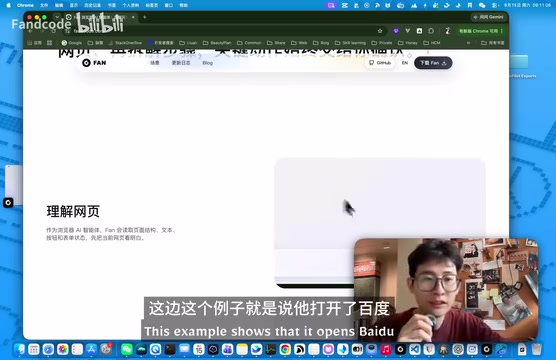
As shown in the demonstration, after opening Baidu, Fan can highlight all clickable elements on the page. This step is key proof of a browser Agent's capability—it needs to first establish an understanding of the web page structure before it can perform subsequent automated operations.
This ability to highlight clickable elements involves a core technical component in the browser Agent field—Page State Representation. Currently, the industry has two main implementation paths: one is DOM parsing, which traverses the web page's HTML structure tree to identify all interactive DOM nodes (such as <a>, <button>, <input> tags) and assigns unique identifiers to each element; the other is vision-based, using screenshots combined with multimodal models to identify operable areas. DOM parsing has advantages in precision and lower token consumption, but adapts poorly to complex dynamically-rendered pages (such as those heavily using Shadow DOM or Canvas); the visual approach is closer to human operating habits but has higher computational costs. Fan's highlighting annotation method intuitively shows users the Agent's understanding of the page while providing clear target anchors for subsequent operation instructions.
Fan's Three Core Capabilities
According to the author, Fan's capabilities can be summarized across three dimensions.
Web Page Understanding
Fan can parse web page structures and identify interactive elements on the page (such as buttons, links, input fields). This is the prerequisite for all automated operations. Compared to traditional crawlers or RPA tools based on fixed selectors, an Agent with semantic understanding is much more adaptable to page redesigns.
Traditional web crawlers and RPA tools rely on CSS selectors, XPath, and other fixed paths to locate page elements. While this approach is execution-efficient, it's extremely fragile—once the target website undergoes front-end refactoring or redesign, the selector paths change, and the entire automation script breaks, requiring manual maintenance. The semantic understanding approach based on large language models is fundamentally different: the Agent locates targets by understanding the semantic meaning of elements (such as "search button" or "submit form") rather than relying on specific HTML attributes or DOM paths. This means that even if the page's HTML structure changes, as long as the functional semantics remain the same, the Agent can still correctly identify and operate on target elements, significantly reducing maintenance costs for automated workflows.
Automated Execution
Fan can open or close pages, fill in automated forms, and execute tasks based on user-defined goals. This means users only need to describe "what to do" without having to specify "how to do each step"—the Agent plans the path on its own.
This relies on the LLM's reasoning and planning capabilities. Technically, this typically employs the ReAct (Reasoning + Acting) framework or similar Chain of Thought mechanisms: the Agent first observes the current page state, then reasons about what operation to execute next, executes it, then observes the new page state, cycling until the task is complete. This "observe-think-act" loop enables the Agent to handle multi-step complex tasks and make adaptive adjustments when encountering unexpected situations (such as pop-ups, CAPTCHAs, or page loading failures). Compared to predefined linear scripts, this approach offers stronger robustness and flexibility.
Multi-Task Parallelism
This is one of Fan's distinctive features—it supports opening multiple Spaces to execute multiple tasks simultaneously. For scenarios requiring batch web operations (such as tracking multiple reports simultaneously or extracting comments in bulk), this parallel capability significantly improves efficiency.
From a technical perspective, implementing multi-task parallelism typically requires solving several core problems: first, browser instance isolation management—each Space may correspond to an independent Browser Context or independent browser process to ensure that Cookies, Sessions, and other states don't interfere between different tasks; second, concurrent management of LLM calls—multiple tasks running simultaneously means multiple API requests need to be sent in parallel, which places higher demands on token consumption and API rate limits; finally, unified task state scheduling—a central scheduler is needed to monitor the execution progress and exception states of each Space. This parallel architecture is particularly suited for scenarios requiring simultaneous processing of multiple independent web tasks, such as batch data collection and multi-platform price monitoring.
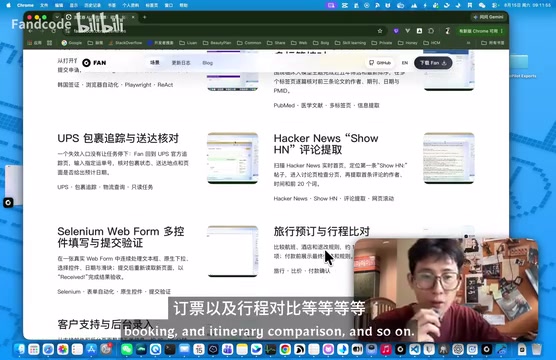
Use Cases: From Visa Applications to Travel Booking
The author lists a series of typical use cases on the project's official website, covering a wide range:
- Visa applications: Automatically fill in tedious application forms
- Literature search: Batch search for materials on academic platforms
- Report tracking: Periodically monitor updates on specific web pages
- Comment extraction: Scrape reviews from e-commerce or social platforms
- Travel booking: Automatic price comparison and reservation
- Information comparison: Collect across pages and generate comparisons
These scenarios share a common characteristic—they are all highly repetitive web operations with relatively fixed processes that still require some judgment. This is precisely where browser Agents deliver the most value. Traditional automation tools (such as Selenium scripts or macro recorders) can also complete these tasks, but they require users to precisely define every step, and scripts need to be rewritten whenever web layouts change. The AI Agent's advantage lies in its semantic understanding of page content and dynamic decision-making ability—for example, in a travel booking scenario, the Agent can not only automatically fill in departure and destination fields but also understand vague instructions like "choose the cheapest direct flight" and make judgments among multiple search results.
Open-Source Design Philosophy: As a "Browser Runtime"
The author specifically emphasized the reasons for choosing open source, which is also Fan's most noteworthy design philosophy.
He positions Fan as a "browser runtime" rather than a closed finished application. This means developers can Fork or Clone the project and build domain-specific assistants for their own industries on top of it.
This design philosophy has deep roots in the open-source ecosystem. By analogy, Node.js is the server-side runtime for JavaScript, and Docker is the runtime for containerized applications—they don't directly solve specific business problems but provide an underlying execution environment for developers to build various applications upon. Fan's approach is similar: it abstracts the core capabilities needed for browser automation (page perception, element interaction, task scheduling, etc.) and provides them as an infrastructure layer for developers. The benefits of this layered architecture are obvious—the underlying capabilities are jointly maintained and optimized by the community, while upper-layer industry applications are customized by developers in various vertical domains according to their own needs, achieving separation of concerns.
The author gave two B2B scenario examples:
If you're a B2B visa application service provider, you can build a visa application AI assistant based on Fan; if you're in other B2B businesses, you can similarly customize a dedicated industry Agent.
This "runtime + secondary development" model essentially abstracts the underlying capabilities of browser automation, letting downstream developers focus on business logic without reinventing the wheel. For teams looking to build AI applications in vertical domains, this is an attractive starting point.
Installation Guide for Two User Groups
Fan provides two paths for users with different backgrounds.
For Developers: Launch from GitHub Source Code
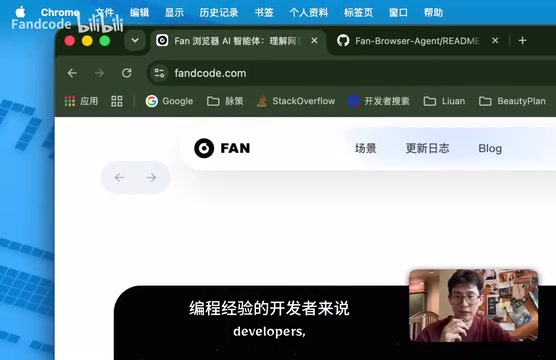
Developers with programming experience can find the project by searching FanAgent on GitHub. The README provides detailed instructions in both Chinese and English, including product introduction and launch methods.
Launching from source is very straightforward, requiring just one command:
npm run
After executing the startup script, the system automatically downloads the backend Agent and front-end Electron dependencies to complete the environment setup. Fan's front end uses the Electron framework—a cross-platform desktop application development framework based on Chromium and Node.js, widely adopted by well-known applications like VS Code, Slack, and Discord. For browser Agent products, choosing Electron has natural advantages: it has a complete Chromium browser engine built in, allowing direct control of browser behavior within the application without depending on browsers installed on the user's system. Meanwhile, the Node.js environment provides rich system-level API access capabilities, facilitating communication with the backend Agent service. However, Electron also has inherent drawbacks, such as high memory usage (each Electron application runs a complete Chromium instance), which may be particularly noticeable in multi-Space parallel scenarios.
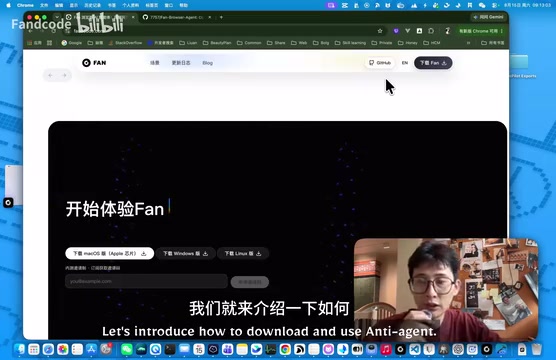
For Non-Developers: Direct Download from Official Website
Users without programming experience can go directly to the product's official website fandcode.com to download the installer—no development environment configuration required.
About API Keys and Version Planning
The author also candidly discussed a current limitation: the API Key costs are currently borne personally by the author. Since LLM API call costs are substantial, individual developers cannot sustain this long-term.
LLM API call costs are one of the core challenges facing all AI applications today. Taking OpenAI's GPT-4o as an example, input token pricing is $2.5 per million tokens and output tokens cost $10 per million tokens. Each operation step of a browser Agent requires sending the page state (which may contain extensive DOM information) to the model for reasoning, and a single task may consume thousands to tens of thousands of tokens. If an open-source project has the author providing free API Keys for all users, costs will grow exponentially as the user base increases—there are already multiple precedents in the open-source community of projects becoming unsustainable for this reason.
Regarding version planning, the author revealed:
- The current version is 0.4.3
- The next version 0.4.5 plans to launch support for users to input their own API Keys, along with a batch of new features
This adjustment is important for the project's sustainability—once users bring their own Keys (the BYOK, Bring Your Own Key model), the project can escape the pressure of the author personally bearing costs and achieve healthier open-source operations. This is also the most mainstream sustainable operating model for open-source AI projects today, maintaining the free-to-use nature of open source while reasonably distributing inference costs to end users.
Final Thoughts
Overall, Fan represents a pragmatic direction for today's browser Agents: rather than pursuing something large and all-encompassing, it focuses on building solid underlying web operation capabilities and opens them up in a "runtime" format, encouraging the community to create secondary applications in vertical industries.
For developers interested in AI Agent deployment, Fan is worth trying—whether using it directly to solve daily repetitive web tasks or forking it to build industry-specific assistants. The author also called on viewers in the video to Star and Fork the project and participate in meaningful secondary development. As version 0.4.5 opens up API Key support, this tool's usability is expected to improve further.
Related articles

Chain of Thought Isn't Just for AI: How Humans Can Use CoT to Improve Thinking Quality
Chain of Thought isn't just a prompt trick for large models. Starting from a Hacker News discussion, this article analyzes why CoT works for human thinking too, breaks down actionable ways to transfer it, and highlights the key differences between human CoT and machine CoT.
Cloudflare Teams Up with OpenAI: Closi…
Cloudflare Teams Up with OpenAI: Closing the Loop from Vulnerability Discovery to Defense with AI
Cloudflare uses OpenAI Daybreak to investigate security vulnerabilities and generate reviewable remediation plans, while developers use Codex to boost coding efficiency and quality.

Orca Multi-Agent Orchestration in Practice: A Guide to Parallel Collaboration with Claude and Codex
Orca is Stable AI's free open-source agent workbench supporting 34 agents like Claude Code and Codex in parallel. Learn its Git worktree isolation, multi-model orchestration, and mobile management.