Figma-Context-MCP: The Open-Source Tool That Lets Cursor Understand Figma Designs

Figma-Context-MCP lets AI coding assistants precisely read Figma designs and generate code via MCP protocol.
Figma-Context-MCP is an open-source MCP server that extracts layout, styling, and component structure from Figma designs, then injects this structured data as context into AI coding assistants like Cursor, enabling pixel-perfect frontend code generation. With 14,600+ Stars on GitHub, written in TypeScript, and supporting both stdio and HTTP SSE deployment modes, it represents the industry trend of AI coding evolving from generic generation to context-aware precision generation.
Project Overview
Converting design files to code has always been a persistent efficiency bottleneck in frontend development. Figma-Context-MCP is an open-source MCP (Model Context Protocol) server that provides layout, styling, and component structure information from Figma designs to AI coding assistants like Cursor, enabling AI to truly "understand" design files when generating code—rather than guessing from screenshots.
The project has earned over 14,600 Stars on GitHub, with more than 1,155 Forks. Written in TypeScript, it's currently the most popular Figma integration solution in the MCP ecosystem.
What Is the MCP Protocol? Why Does It Matter?
Introduction to MCP
MCP (Model Context Protocol) is an open protocol proposed by Anthropic in late 2024 to standardize how AI models interact with external tools and data sources. Think of MCP as a "USB port" for AI assistants—through a unified protocol specification, AI can connect to various external services, retrieve contextual information, and execute operations.
From a technical architecture perspective, MCP uses a client-server model and communicates via JSON-RPC 2.0. AI applications (like Cursor or Claude Desktop) act as MCP clients, sending requests to MCP servers; the MCP servers connect to specific external data sources or tools and return results in a standardized format. This architecture fundamentally differs from traditional REST API integration: the traditional approach requires writing custom integration code for each AI tool, while MCP provides a unified interface specification—a single MCP server can be called by multiple AI tools that support the protocol. MCP defines three core capabilities—Tools (tool invocation), Resources (resource reading), and Prompts (prompt templates). Figma-Context-MCP primarily leverages the Tools capability, allowing AI to proactively call Figma data retrieval functions.
The Gap Between Design and Code
In the traditional frontend development workflow, developers manually inspect Figma designs, extract color values, spacing, font sizes, and other parameters one by one, then translate them into CSS code. Even with AI coding tools like Cursor, the AI can only infer layouts based on text descriptions or screenshots, often resulting in poor fidelity.
The industry has made multiple attempts to bridge the gap between design and code. Figma itself launched Dev Mode in 2023, offering developers a more friendly interface for viewing parameters and generating code snippets. Third-party tools like Anima and Locofy attempt to export Figma designs directly into usable frontend code. However, these solutions have clear limitations: Dev Mode still requires developers to manually view and copy parameters; code generated by Anima and Locofy tends to be structurally rigid and difficult to integrate with existing project code standards and component systems. They are essentially "one-time export" tools that cannot deeply integrate with a developer's real-time coding workflow.
Figma-Context-MCP takes a completely different approach: instead of generating final code directly, it injects design data as context into the AI coding assistant's decision-making process. This means AI can generate code that truly conforms to project standards by considering the project's existing code style, component libraries, and tech stack preferences—rather than producing cookie-cutter template output.
Core Features and How It Works
Structured Extraction of Figma Design Information
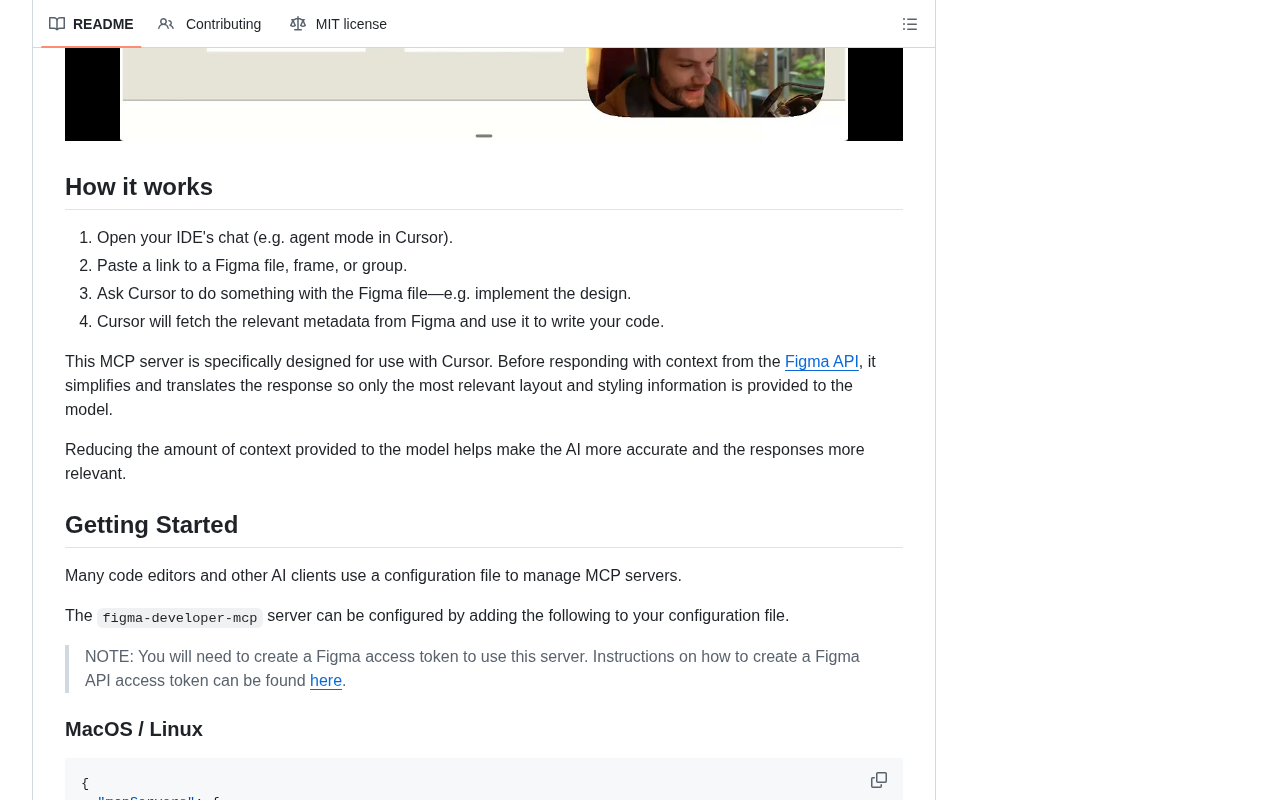
Figma-Context-MCP retrieves key layout information from designs through the Figma API, covering the following dimensions:
- Component hierarchy: Parent-child relationships and nesting levels of elements on the page
- Layout properties: Auto Layout direction, spacing, alignment, etc.
- Style information: Colors, fonts, border radius, shadows, and other visual properties
- Dimensions and positioning: Element width/height, absolute/relative position information
- Component variants: Component states and variant mappings within design systems
To understand the data extraction process, you need to know Figma's internal data model. Figma organizes each design file as a Scene Graph—a tree-like data structure where the root node is a Document, followed by Page, Frame, Group, Component, and other node types. Each node carries rich property information, including geometric transformation matrices, fill/stroke styles, layout constraints, and more. The Figma REST API exposes this scene graph in JSON format, and the JSON data for a single complex page can reach tens of megabytes.
One of Figma-Context-MCP's core tasks is performing intelligent simplification and semantic processing on this raw data. It doesn't stuff the complete JSON tree directly into the AI (which would quickly exhaust the context window). Instead, it extracts the information most critical for code generation and maps Figma-specific concepts to terminology familiar to frontend developers. For example, Figma's Auto Layout essentially corresponds to CSS's Flexbox layout model—Auto Layout's primaryAxisAlignItems maps to justify-content, counterAxisAlignItems maps to align-items, and itemSpacing maps to gap. This semantic mapping enables AI to more accurately translate design intent into standard CSS properties.
Integration with Cursor and Other AI Coding Assistants
As an MCP server, this project integrates seamlessly with AI coding tools that support the MCP protocol. Using Cursor as an example, developers simply add the MCP server address to their configuration, and the AI can automatically retrieve corresponding Figma design information while writing code.
In terms of deployment, the MCP server supports two runtime modes: stdio mode and HTTP SSE (Server-Sent Events) mode. In stdio mode, the MCP server runs as a local subprocess, communicating with the AI client through standard input/output—suitable for individual developers working locally. In HTTP SSE mode, the MCP server runs as an independent network service, supporting remote access and multi-user sharing—better suited for team collaboration scenarios. Cursor currently supports both modes, and developers can declare the MCP server connection method in the .cursor/mcp.json configuration file.
The complete workflow is as follows:
- Developer pastes a Figma design link in Cursor
- The MCP server parses the link and fetches design data through the Figma API
- Structured layout information is passed as context to the AI model
- The AI generates corresponding HTML/CSS/React code based on precise design parameters
The entire process is nearly transparent to developers—no manual copying of design parameters required. It's worth noting that Figma API calls require a Personal Access Token for authentication. Developers need to generate a Token in their Figma account settings and configure it in the MCP server. For enterprise Figma accounts, you'll also need to ensure API access hasn't been restricted by organization administrators.
Technical Architecture Analysis
TypeScript Tech Stack
The project is written in TypeScript, ensuring type safety and making it easy for frontend developers to read and contribute. TypeScript's strong type system is particularly crucial when handling the complex nested data structures returned by the Figma API, effectively reducing runtime errors.
The data structures returned by the Figma API are highly polymorphic—a node could be one of dozens of types like Frame, Text, Rectangle, or Component, each carrying a different set of properties. TypeScript's Union Types and Type Guards mechanisms allow developers to safely process this polymorphic data, with the compiler providing clear error messages when types don't match. Additionally, Figma officially provides the @figma/rest-api-spec type definition package, which Figma-Context-MCP can directly reuse to ensure complete consistency with API return data.
The project's build toolchain is based on the modern Node.js ecosystem, using tsup (a TypeScript bundling tool built on esbuild) for compilation, ensuring fast build speeds. The project supports both installation as an npm package and direct execution via npx, lowering the barrier to entry.
An Active Open-Source Community
With over 1,155 Forks, the community shows high engagement with this project. Developers can extend it based on their specific needs, such as:
- Adding adapters for specific design systems (e.g., Ant Design, Material Design)
- Optimizing code output for specific CSS frameworks (e.g., Tailwind CSS, Styled Components)
- Extending compatibility with other AI coding tools like Windsurf and VS Code Copilot
Practical Use Cases
Rapid Prototyping
Once designers complete their Figma designs, developers can have AI generate initial code scaffolding directly from the design files. Page construction work that used to take hours can now produce a first draft in minutes.
Design System Consistency
For teams with well-established design systems, the MCP server ensures that AI-generated code strictly follows design specifications, reducing rework during design review phases.
Reducing Communication Costs Between Design and Development
Communication costs between designers and developers have always been a pain point in team collaboration. With Figma-Context-MCP, design intent is precisely conveyed to AI, which then translates it into code. Back-and-forth conversations like "the spacing here should be 16px, not 12px" can be significantly reduced.
Industry Trends and Future Outlook
The popularity of Figma-Context-MCP reflects a clear industry trend: AI coding tools are evolving from "generic code generation" to "context-aware precision generation".
The MCP protocol provides AI tools with standardized external data access capabilities, and Figma, as the de facto standard in the design domain, naturally became the first data source to be integrated. It's foreseeable that more MCP servers will emerge to cover databases, API documentation, project management tools, and other areas, gradually building a complete AI-assisted development ecosystem.
In fact, the MCP ecosystem has experienced explosive growth during 2024-2025. Beyond Figma-Context-MCP, the community has produced numerous MCP server implementations: PostgreSQL MCP enables AI to directly query database schemas and data to assist backend development; GitHub MCP lets AI read Issues, PRs, and code repository context; Notion MCP gives AI access to product documentation in team knowledge bases. Anthropic's strategic intent in promoting the MCP protocol is also quite clear—by establishing an open tool invocation standard, they aim to prevent fragmentation in the AI tool ecosystem while giving their Claude model a first-mover advantage in tool-use capabilities.
From a more macro perspective, the widespread adoption of the MCP protocol could reshape the entire software development toolchain landscape. When AI coding assistants can simultaneously perceive design files (Figma MCP), product requirements (Jira/Linear MCP), API specifications (OpenAPI MCP), and database structures (Database MCP), they will no longer be just "code completion tools" but will evolve into development partners that truly understand business context.
Conclusion
Figma-Context-MCP solves the core pain point of AI coding assistants being unable to "read" design files in an elegant way. It's not just a practical frontend development tool—it represents an important direction in AI-assisted coding: injecting professional tool data into AI context through the MCP protocol, evolving code generation from "roughly close enough" to "pixel-perfect reproduction."
If you're a frontend developer using Cursor or other MCP-compatible AI coding tools, Figma-Context-MCP is worth trying out immediately.
Related articles
 Product Reviews
The Programmer's Desk Setup Guide: Building a Workspace That Feels Like Home
Discover how programmers build productive, comfortable workspaces. From multi-monitor setups to ergonomic design, explore the desk philosophy that drives focus and flow.
 Product Reviews
Qoder vs Cursor Real-World Comparison: Which $20/Month AI IDE Is Better?
Hands-on comparison of Qoder vs Cursor AI IDEs: Agent autonomy, human interaction count, and architecture decisions. Qoder needed only 2 interactions vs Cursor's 8.
 Product Reviews
Cursor Cloud Agent Demo: Eliminating Bottlenecks Across the Entire Software Development Lifecycle
Deep analysis of Cursor's Cloud Agent demo showing how cloud VMs, automated test artifacts, and a full-chain control plane systematically eliminate human bottlenecks across the software development lifecycle.