Firebase AI Logic + Gemini: A Practical Guide to Integrating Generative AI in Android

Firebase AI Logic is the SDK integration layer connecting Android apps to Gemini — no custom backend required.
Firebase AI Logic is Google's generative AI integration layer for mobile developers — an SDK plus service proxy that lets Android apps securely call Gemini models without building a custom backend. Its key advantages over direct Gemini API calls include a managed proxy architecture that keeps API keys out of APKs, Firebase App Check to verify request legitimacy, and seamless integration with the Firebase ecosystem (Authentication, Firestore, Remote Config). The recommended architecture follows a layered Compose UI → ViewModel → Repository → AI Logic → Gemini pattern. Supported features include text summarization, streaming responses, multimodal image analysis, structured JSON output, and function calling.
For Android developers, building an AI backend from scratch typically means complex architecture design, API key management, and security hardening. Firebase AI Logic combined with Gemini offers a shortcut: embed Google's generative AI capabilities directly into your mobile app without building a full AI backend. This article covers the core concepts, architecture patterns, security considerations, pricing logic, and hands-on implementation steps for this stack.
What Firebase AI Logic Actually Is
Firebase AI Logic is essentially an SDK plus a service layer that lets mobile developers (Android, iOS, Flutter, Web) easily access Google's generative models, including Gemini. It was formerly known as Vertex AI in Firebase.
A common misconception is treating Firebase AI Logic as the AI model itself — that's not the case. Think of it this way: Gemini is the AI model that actually generates and analyzes content, providing the "intelligence"; Firebase AI Logic is the integration layer, acting as the communication bridge between your app and the model.
The traditional approach requires building a chain like "mobile app → custom backend → Gemini API." With the Firebase AI Logic SDK, your app calls the SDK directly, which then calls Gemini and returns the response — eliminating the need to build and maintain that intermediate backend.
Why Android Developers Should Consider It
Developers can certainly call AI APIs directly, but Firebase AI Logic offers several concrete advantages for mobile scenarios.
Native SDK integration: Firebase provides an Android SDK, allowing developers to interact with generative AI using native code — far more convenient than manually implementing HTTP requests and handling API communication.
Better API key protection: One of the biggest security risks in mobile AI apps is key exposure. Embedding sensitive API keys directly in an APK is insecure because APKs can be reverse-engineered. Firebase AI Logic uses a managed proxy architecture to prevent the Gemini API key from being exposed on the client side.
Firebase App Check integration: App Check verifies that requests genuinely originate from your authenticated app, not unauthorized clients. For production AI apps, this is an important security layer — ensuring requests to the model come from the right source and the right application.
How Firebase App Check works is worth explaining in detail. App Check relies on platform-specific "Attestation Providers" to verify the origin of requests. On Android, it uses the Google Play Integrity API by default, which generates a Google-signed integrity token on the device, proving the request comes from an unmodified, legitimate app running on a trusted, non-rooted device. The Firebase backend validates this token before allowing calls to AI services. For development, a Debug Provider is available to bypass real device verification. App Check isn't a silver bullet — it prevents unauthorized clients from abusing your endpoint, but it doesn't stop authenticated malicious users from quota abuse. That requires pairing it with Firebase Authentication and usage limits.
Recommended Architecture Pattern
In a modern Android app, the typical data flow looks like: Jetpack Compose UI → ViewModel → Repository → Firebase AI Logic SDK → Gemini model → AI response returned.
The key principle: AI calls should never be made directly inside Compose UI. Instead, the ViewModel should manage UI state, and the Repository should encapsulate the Firebase AI Logic implementation. For a text summarization feature, for example, the ViewModel exposes an immutable StateFlow, the summarize function calls repository.summarize(text) inside viewModelScope.launch, updates the state with the response, and the UI consumes it. This layered approach keeps AI implementation aligned with modern Android architecture principles.
In production, you can layer in additional Firebase services — Authentication, App Check, Firestore, Remote Config, Crashlytics — to build a robust AI-powered mobile app architecture.
Integration Steps and Model Selection
The full integration path breaks down into four steps:
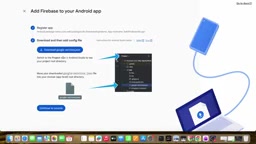
- Set up a Firebase project and connect your app: Follow the guided workflow in the Firebase console, enable the APIs required for your chosen Gemini API provider, register your app, and add the configuration file.
- Install the SDK and initialize: Add the dependency in Gradle (the official recommendation is to use the Firebase Android BoM for unified version management), then initialize Firebase AI and create a model instance in your Kotlin code.
- Send prompt requests to Gemini: Supports both plain text and multimodal input, with outputs including text, code, structured JSON, images, or audio.
- Prepare for production: Use App Check to prevent abuse, and use Remote Config for server-side prompt management.
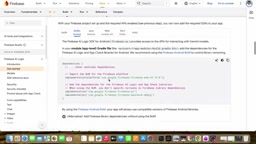
Creating a model instance looks roughly like Firebase.ai(backend = GenerativeBackend.googleAI()).generativeModel(modelName). You can then send prompts — such as "Explain Android Jetpack Compose in plain language" — and receive text responses.
When choosing a Gemini API provider, there are two options: the Gemini Developer API is free to start with, ideal for testing and lightweight use cases; the Agent Platform Gemini API (formerly Vertex AI) is enterprise-grade for production and incurs associated costs. Demos typically use models like Gemini 3.8 Flash. One important note: when using the Gemini Developer API, no separate API key is required, since App Check already handles request source verification.
Application Patterns: From Text Summarization to Function Calling
Gemini's capabilities go far beyond simple Q&A. With Firebase AI Logic, you can build a wide range of application patterns:
- Text summarization: User inputs long text, the model returns a bullet-point summary.
- Streaming responses: Responses are delivered incrementally rather than waiting for the full result — especially well-suited for chat apps and long-form text generation, significantly improving perceived performance.
- Multimodal processing: Send camera-captured images to the model for analysis — common use cases include receipt parsing (extracting merchant, amount, date, and items) and image assistants.
- Structured output: Return JSON directly, which Android apps can deserialize into Kotlin data classes — useful for data extraction, AI forms, document processing, classification, and recommendations.
- Function calling: When a user asks "What's the weather like today?", Gemini can determine that a weather API call is needed and orchestrate the flow: "user → Gemini → weather API → result → Gemini" — upgrading your app from a Q&A bot to a genuinely intelligent assistant.
Combining Firestore and Remote Config enables scenarios like AI note-taking apps: Authentication identifies users, AI Logic handles generation, and Firestore stores summaries and chat history.
Function Calling is a key capability that distinguishes Gemini from earlier large language models, and its mechanism is worth explaining. Developers declare a set of "tools" when initializing the model, describing function names, purposes, and parameter structures (typically as JSON Schema). When a user sends a request, Gemini infers whether a tool needs to be called — if so, it returns a structured "function call request" in its response rather than generating text directly. The client or backend then actually executes the function (e.g., calling a weather API) and sends the result back to Gemini, which then integrates the result into a natural language response. Throughout this process, Gemini acts as the "decision-maker" while the actual external calls remain under the developer's control — ensuring both security and the ability to access real-time data and private business logic.
Direct Gemini, Custom Backend, or Hybrid Architecture
A question worth weighing: if you can call the Gemini API directly, why bother with Firebase AI Logic?
Comparing the two: both provide access to Gemini, but the direct approach requires manual HTTP handling, no native SDK, and you'll need to implement App Check and Firebase ecosystem integration yourself. Firebase AI Logic is broadly superior in terms of SDK integration, security, auth and storage integration, and architectural consistency.
That said, the right choice depends on scale:
- Prototypes and small-to-medium apps: Go directly with "Android → Firebase AI Logic → Gemini" — fast and convenient.
- Enterprise-grade apps: Introduce a custom backend layer — "Android → backend → business logic → Gemini" — for better control over business rules, authorization, data processing, API orchestration, and enterprise security.
- Large-scale apps: Use a hybrid architecture combining Firebase AI Logic with a custom backend and external services for both flexibility and control.
Another interesting direction is combining on-device AI with cloud AI: on-device models offer low latency, offline availability, reduced cloud consumption, and stronger privacy; cloud Gemini provides greater capability. The two together often cover a wider range of real-world scenarios.
On-device AI refers to deploying and running lightweight models directly on the user's device rather than sending requests to a cloud server. In the Android ecosystem, Google's MediaPipe LLM Inference API and Gemini Nano (via Android AICore) are the primary on-device solutions. The core advantages of on-device inference are: requests never leave the device, naturally satisfying privacy-sensitive use cases (e.g., healthcare, finance); no network round-trip latency for more immediate responses; continued operation in low-connectivity or offline environments; and no consumption of cloud API quota. The trade-off is that model capability is constrained by device compute — complex reasoning, long contexts, and multimodal tasks still require cloud Gemini. In practice, a common strategy is to use on-device models for simple, high-frequency local tasks, falling back to the cloud for requests that exceed local capabilities — forming a tiered "edge-cloud collaborative" inference architecture.
Best Practices Worth Remembering
- Never embed sensitive API keys in your APK; use Firebase AI Logic's supported architecture.
- Enable App Check to prevent unauthorized client access.
- Always incorporate Firebase Authentication when storing user-related AI data.
- Validate AI output — don't blindly trust model content for business logic.
- Monitor AI usage — AI calls consume quota and generate costs.
- Keep prompts maintainable — prefer server-side prompt management.
- Handle network errors, rate limiting, invalid inputs, and model service failures gracefully, and be mindful of UI thread handling.
A Small Hiccup During Testing
During a live demo, the first request returned a message saying "the model is experiencing high demand, please try again later" — a real-world scenario that production apps must handle, and a testament to why error handling is essential. On a retry, the model successfully returned a story about a "magic backpack," validating the complete pipeline from initialization and App Check configuration through to prompt requests.
Overall, Firebase AI Logic + Gemini is an important combination for modern Android developers looking to integrate generative AI: Firebase handles the integration layer, Gemini handles the underlying generative capabilities, and together they enable rapid development of chat apps, text summarization, AI assistants, image analysis, document processing, AI coding tools, recommendation systems, and more.
Related articles

How Big Can Stars Really Get? The Physical Limits of the Largest Stars
Red supergiants are the largest stars by volume, with radii up to 2,000 times the Sun, engulfing the inner solar system. But there is no precise upper limit on stellar size—models predict up to 15,000 solar radii. The most massive blue stars are far smaller than red supergiants—biggest and heaviest are two different things.

Apple HomeView Smart Display Full Feature Breakdown: Wall-Mount or Desktop, $299
Apple launches HomeView, a $299 smart display with wall-mount and desktop options, 12MP camera for facial recognition, smart home control, music playback, and recipe step-by-step cooking. Full breakdown of watch faces, apps, privacy, and cooking integration.

Where Did the Promised New Studio Go? Craft Computing Answers After Five Years
Craft Computing's host responds to viewer questions: the new studio promised five years ago was shelved as construction costs soared from $30,000 to $75,000, and was replaced by a 168-square-foot garage conversion.