Flexible Elixir: Let AI Agents Operate Your IDE Directly Inside IntelliJ

Flexible Elixir lets Claude Code control IntelliJ's IEX, tests, and Credo toolchain via MCP.
Flexible Elixir is an IntelliJ plugin that runs an MCP server inside the IDE, upgrading AI agents like Claude Code from chat assistants to real development environment operators. Agents can call the IDE's code index, start IEX sessions, run Mix tests, and execute the project's own Credo static analysis — all visible in real time in the IDE console. Setup is minimal with one-click installation, and a "ask first, act second" permission model ensures every tool call requires developer approval.
When AI Agents Step Inside the IDE
Most AI coding assistants live at the "chat box" level — they can see code snippets, but they can't touch your development environment. Flexible Elixir takes a different approach: it runs an MCP (Model Context Protocol) server inside IntelliJ, giving AI agents like Claude Code direct access to the IDE's own index, IEX, Mix, and Credo.
In other words, the agent is no longer a bystander — it's the co-pilot sitting right next to you in the driver's seat. It can run IEX sessions, execute tests, and perform static analysis, all while you watch everything unfold in real time in the console.
MCP (Model Context Protocol) is an open protocol introduced by Anthropic in late 2024, designed to standardize how AI models connect to external tools and data sources. The core idea: by defining a unified server-client interface, AI agents can call any external capability — whether it's the file system, a database, or IDE features — in a structured way, without writing custom integration code for each tool. Claude Code, acting as an MCP client, can discover and invoke tools exposed by any MCP-compliant server. Flexible Elixir leverages this mechanism to wrap IntelliJ's internal capabilities as MCP tools, allowing Claude Code to operate the IDE as if calling functions.
Zero-Configuration Setup with Claude Code
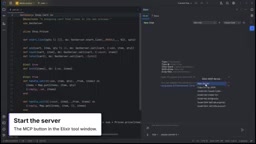
The entire onboarding flow is remarkably lightweight. Developers start the MCP server from the Elixir tool window at the top of IntelliJ, then install the server address and token into Claude Code with a single click — no manual config file editing required.
This matters a lot for the actual user experience. The biggest friction point in the MCP ecosystem for newcomers is usually the configuration step: ports, secrets, and paths all have to be exactly right. Flexible Elixir collapses all of that into a one-click install, significantly lowering the barrier to getting started.
How the Agent Actually "Uses" Your Toolchain
The demo video walks through a typical interaction. The author asks directly in the AI tab: "What's in this project, and what does card do?" The agent doesn't act unilaterally — it asks for permission before calling any tools, and only requests the module list and file outline from the IDE after getting the go-ahead.
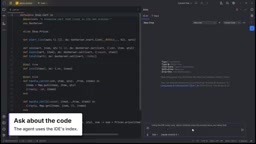
This "ask first, act second" permission model is a critical safety design when an agent directly operates a development environment. It keeps the developer in control of every step, rather than letting AI silently execute commands with potential side effects in the background.
A Real-Time, Visible IEX Session
When the agent starts IEX and runs a receipt, it opens a real IEX session inside the IDE — and every command it executes is mirrored in real time in the console below. This transparency means you don't have to trust a black box. Everything the agent does and every response it gets is fully traceable.
Tests and Credo: Closing the Feedback Loop
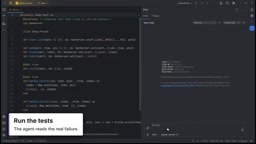
The agent's value isn't just in reading code — it's in being able to actually run things and validate them. In the demo, the agent runs tests through the IDE, receives failure messages with line numbers, and pinpoints a specific Map.put call in card — exactly the kind of precise information you need when tracking down a bug.
It then runs the project's own Credo static analysis and summarizes the results: a missing module doc, a forgotten IO.inspect, and a case where it suggests switching to Map.join.
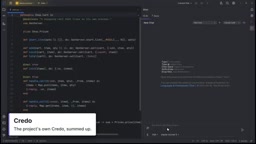
Worth emphasizing here is "the project's own Credo" — the agent isn't invoking some generic universal ruleset, but the actual check configuration defined in your project. This ensures that the AI's suggestions stay aligned with your team's existing standards, rather than introducing new style conflicts.
Credo is the most widely used static code analysis tool in the Elixir community, comparable to RuboCop for Ruby or Flake8 for Python. It analyzes the AST (abstract syntax tree) to detect code style issues, potential bugs, and readability problems, and allows teams to customize rule strictness via a .credo.exs config file. Unlike compiler errors, Credo's findings are more "advisory" in nature — things like overly complex functions, leftover debug statements, or inconsistent naming conventions. When an AI agent invokes the project's own Credo configuration rather than a built-in ruleset, its code improvement suggestions naturally conform to the current team's coding standards, avoiding friction between AI feedback and human code review.
What This Means for Elixir Developers
The core value of Flexible Elixir lies in upgrading the AI agent from a "chat assistant" to an "environment operator." Because it connects to the IDE's real index, compiler, and toolchain, the context it retrieves is more accurate and the results it produces are more trustworthy.
- Richer context: The agent reads from the IDE index rather than pasted snippets, giving it a much stronger understanding of the project's structure.
- Closed feedback loops: From running IEX to executing tests to static analysis, the entire development cycle can be completed within the conversation.
- Controlled permissions: Every tool call requires consent first — the developer always has the final say.
The plugin is available on the JetBrains Marketplace. For developers who write Elixir daily in IntelliJ and want to integrate Claude Code more deeply into their workflow, it offers a low-friction path to get started.
Related articles

Chain of Thought Isn't Just for AI: How Humans Can Use CoT to Improve Thinking Quality
Chain of Thought isn't just a prompt trick for large models. Starting from a Hacker News discussion, this article analyzes why CoT works for human thinking too, breaks down actionable ways to transfer it, and highlights the key differences between human CoT and machine CoT.
Cloudflare Teams Up with OpenAI: Closi…
Cloudflare Teams Up with OpenAI: Closing the Loop from Vulnerability Discovery to Defense with AI
Cloudflare uses OpenAI Daybreak to investigate security vulnerabilities and generate reviewable remediation plans, while developers use Codex to boost coding efficiency and quality.

Orca Multi-Agent Orchestration in Practice: A Guide to Parallel Collaboration with Claude and Codex
Orca is Stable AI's free open-source agent workbench supporting 34 agents like Claude Code and Codex in parallel. Learn its Git worktree isolation, multi-model orchestration, and mobile management.