FluMind Super Mind Map: A Free Mind Mapping Tool Built with AI Zero-Code Development in 18 Days

A non-programmer built FluMind, a free online mind mapping tool, in 18 days using AI coding tools.
After Baidu Mind Map shut down, a non-programmer used AI zero-code tools like Cline Code and Cursor to build FluMind (Super Mind Map) in just 18 days. The tool breaks free from traditional tree structures, supporting node interconnection and grouping, with a built-in AI Canvas for business analysis, high-res export, and presentation mode. Completely free with all features open to every user, FluMind showcases how AI coding tools are dramatically lowering the barrier to software development.
Project Background: A Replacement After Baidu Mind Map Shut Down
As online mind mapping tools like Baidu Mind Map went offline one after another, a large number of power users lost access to their lightweight "open in browser, use and go" thinking tools. Baidu Mind Map (KityMinder) launched in 2014 and was one of China's earliest browser-based free online mind mapping tools. Its core advantages were zero installation, cloud data sync, and support for multiple export formats. Around 2023, Baidu Mind Map gradually ceased maintenance and eventually shut down — reflecting an industry pattern: free tools struggle to sustain operations without a clear business model, but their departure often leaves a conspicuous "tool vacuum" among users. The demand is clear, the willingness to migrate is strong, and expectations for features are relatively specific. This is precisely the opportunity window for indie developers to step in.
A power user of mind mapping tools decided to take matters into their own hands. Leveraging AI zero-code development tools, they built a brand-new online mind mapping tool called FluMind (Super Mind Map) in just 18 days.
The core philosophy behind this project was straightforward: if you're going to build it, build the features you always wanted but could never have. It wasn't about cloning Baidu Mind Map — it was about rethinking what a mind mapping tool should be.
FluMind Core Features: From Tree Diagrams to Network Thinking
Node Interconnection & Grouping: Breaking Free from Tree Structure Constraints
The biggest limitation of traditional mind maps is their tree structure — information can only radiate outward from the center, and nodes cannot form lateral connections. This format originates from Tony Buzan's Mind Map concept proposed in the 1970s, designed to simulate the brain's radiant thinking. However, cognitive science research shows that human memory and knowledge organization actually more closely resemble a Semantic Network model — concepts have numerous lateral, cross-cutting associations rather than purely parent-child relationships. FluMind breaks this constraint by supporting interconnections between nodes, transforming the mind map from a "tree" into a "network" that better mirrors how the human brain actually processes complex problems.
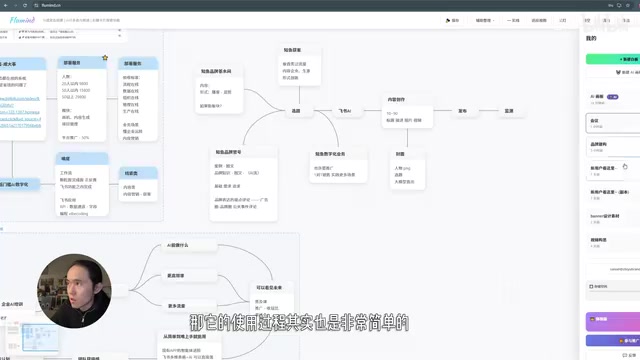
The grouping feature allows users to organize nodes across multiple levels and incorporate multimedia content such as images. In practical use cases — like taking notes during a meeting while discussions unfold — you can naturally build multi-level, interconnected knowledge structures instead of being forced to squeeze complex discussions into a linear tree framework.
High-Resolution Export & Presentation Mode: From Thinking to Presenting in One Place
FluMind supports 3x high-resolution image export. Exported images can be directly inserted into PowerPoint and other presentation documents, solving the long-standing issues of blurry exports and broken layouts that plague many mind mapping tools.
Presentation mode is another practical highlight:
- Flashlight function: Hold the L key to activate a spotlight effect, making it easy to guide audience attention during presentations
- Double-click highlight: Double-click any position to create a highlight effect centered on that point
- Light/dark toggle: Supports lights-on/lights-off modes to adapt to different presentation scenarios
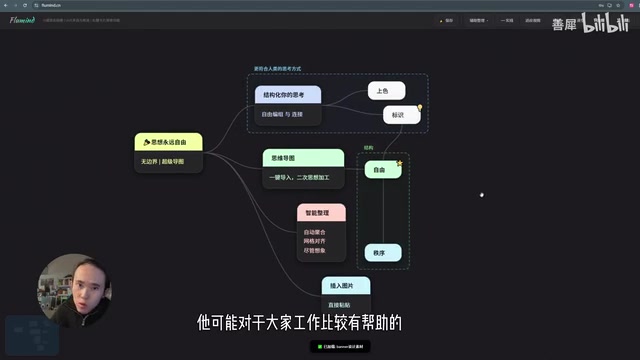
These features make FluMind not just a tool for organizing thoughts, but also a presentation tool ready for reports and teaching.
AI Canvas: AI-Assisted Business Analysis and Thinking

FluMind has a built-in AI Canvas feature, currently focused on business analysis scenarios. For example, entering "Bilibili self-media" prompts the AI to automatically generate an analysis framework following a consulting mindset: first examine users, then needs, then market, then yourself; adjust variables, apply cost-effectiveness thinking for altruistic validation, and finally develop the product.
After content is generated, clicking the "Grid Align" function under "Assisted Organization" neatly arranges scattered nodes into a clear, orderly layout. The developer has revealed that the AI Canvas has a "rather revolutionary feature" concept planned for the next development phase.
Pricing Strategy: Permanently Free, Zero Barriers to Entry
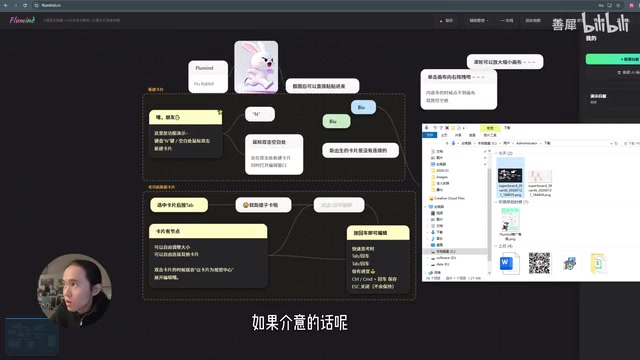
FluMind adopts an extremely user-friendly business strategy:
- Simple registration: Only an email is required — no phone number needed
- Completely free features: All core features are available to all users
- No meaningful upgrade difference: The only distinction is whether exported images include a logo watermark in the upper-left corner
- Free upgrade method: Upgrade by sharing a referral link — no payment required
FluMind's pricing strategy is essentially a minimalist variant of the Freemium model, but its distinguishing characteristic is the near-complete elimination of motivation for paid conversion. This differs from traditional SaaS PLG (Product-Led Growth) logic: traditional PLG relies on feature restrictions to drive paid conversions, whereas FluMind is closer to a "word-of-mouth driven" community model. By unlocking watermark removal through sharing links, users become distribution nodes. This strategy sacrifices short-term revenue but effectively builds user base and reputation during the cold-start phase — a common early-stage product operation practice among indie hackers.
The developer explicitly states on the product page that "most features are sufficient as-is — no need to upgrade." This kind of candor is remarkably rare among today's SaaS products.
Development Process: A Non-Programmer Shipped a Product in 18 Days Using AI Coding Tools
The entire project was built entirely with AI zero-code tools, with the developer describing their ideas directly to AI tools for implementation:
- Early development: Used Cline Code + Zhipu (GLM) large model
- Later iterations: Switched to Cursor for optimization
Cline (formerly Claude Dev) is an open-source AI coding plugin for VS Code that supports multiple LLM APIs. It can autonomously read/write files and execute terminal commands, enabling end-to-end code generation and debugging — particularly well-suited for rapid prototyping in early project stages. Cursor is a code editor with deeply integrated AI capabilities, built as a fork of VS Code, featuring built-in code completion, conversational programming, and codebase understanding. It performs more reliably during iterative optimization. The combination of the two — using Cline for rapid scaffolding and Cursor for fine-tuning — represents a typical AI-assisted development workflow among today's "non-programmer developer" community.
The developer is not a programmer but rather a product user with clear needs. This case once again demonstrates that AI coding tools like Cursor are dramatically lowering the barrier to software development, enabling "people with ideas" to turn their creativity directly into usable products. Going from zero to launch in 18 days — this kind of efficiency would be nearly unimaginable under traditional development paradigms.
Summary: Who Is FluMind For?
FluMind's core value lies in providing a way of thinking that is both "free and structured." It doesn't aim to replace all mind mapping tools — rather, it fills a specific gap: browser-based access, node interconnection, presentation support, and AI-assisted analysis.
The project is currently on a development hiatus, with the developer planning to attend to other matters first before returning to enhance the AI Canvas feature. If you're looking for a free online mind mapping tool and need to quickly organize your thoughts or create presentation materials, FluMind is worth a try.
Key Takeaways
- The developer used AI zero-code tools (Cline Code + Zhipu/Cursor) to complete FluMind in 18 days
- The core innovation breaks through traditional tree structures, supporting node interconnection, grouping, and multi-level associations — better aligned with the semantic network model from cognitive science
- Built-in AI Canvas automatically generates frameworks following business analysis thinking, with support for high-res export and presentation mode
- The product adopts a permanently free strategy with all features open to all users, operating solely through a referral-sharing mechanism
- The project showcases a real-world case of AI coding tools lowering the development barrier, enabling non-programmers to turn ideas into functional products
Related articles
 Product Reviews
The Programmer's Desk Setup Guide: Building a Workspace That Feels Like Home
Discover how programmers build productive, comfortable workspaces. From multi-monitor setups to ergonomic design, explore the desk philosophy that drives focus and flow.
 Product Reviews
Qoder vs Cursor Real-World Comparison: Which $20/Month AI IDE Is Better?
Hands-on comparison of Qoder vs Cursor AI IDEs: Agent autonomy, human interaction count, and architecture decisions. Qoder needed only 2 interactions vs Cursor's 8.
 Product Reviews
Cursor Cloud Agent Demo: Eliminating Bottlenecks Across the Entire Software Development Lifecycle
Deep analysis of Cursor's Cloud Agent demo showing how cloud VMs, automated test artifacts, and a full-chain control plane systematically eliminate human bottlenecks across the software development lifecycle.