Four RTX 6000 Cards Share a Name but Not a Chip: How to Rent the 96GB Blackwell

Among four RTX 6000 cards, only the 96GB GDDR7 RTX PRO 6000 Blackwell is new—verify with nvidia-smi before renting.
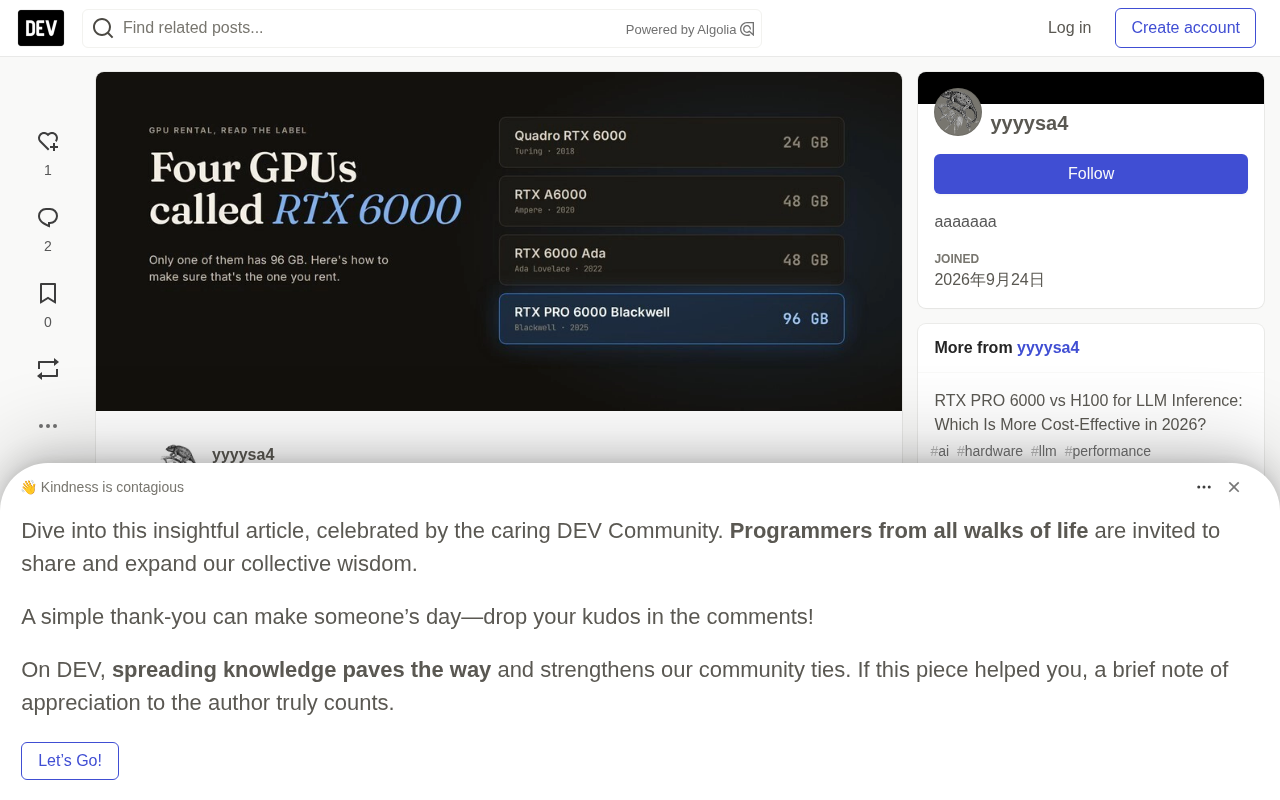
The GPU rental market has four cards named "RTX 6000": the 2018 Quadro RTX 6000 (24GB), 2020 RTX A6000 (48GB), 2022 RTX 6000 Ada (48GB), and 2025 RTX PRO 6000 Blackwell (96GB GDDR7). Naming changes cause confusion, especially the Ada card once sharing the Quadro name. The 96GB Blackwell comes in Workstation, Max-Q, and Server versions with up to ~12% performance difference. The author suggests filtering by price (~$1/hour usually means 48GB Ada) and running nvidia-smi to check name, VRAM, and compute_cap (Blackwell should be 12.0), as compute capability is a driver-read hardware identifier that cannot be faked.
Four RTX 6000 Cards Share a Name but Not a Chip: How to Rent the 96GB Blackwell
Search "RTX 6000" on the GPU rental market and you'll see at least four different cards. They share a name but perform worlds apart. If you need to run larger open-source models, your target should be the 96GB Blackwell version—and it happens to be the one most easily confused with the others.
These days, when I see "RTX 6000" in a listing, it feels like seeing "large" on a coffee menu—it's a hint, not a spec. Here's what I check now.
Four Cards, One Name
Start with a table to sort out the true identities of these four "RTX 6000" cards:
| GPU Model | Architecture | Year | VRAM | Bandwidth |
|---|---|---|---|---|
| Quadro RTX 6000 | Turing | 2018 | 24 GB GDDR6 | 672 GB/s |
| RTX A6000 | Ampere | 2020 | 48 GB GDDR6 | 768 GB/s |
| RTX 6000 Ada Generation | Ada Lovelace | 2022 | 48 GB GDDR6 | 960 GB/s |
| RTX PRO 6000 Blackwell | Blackwell | 2025 | 96 GB GDDR7 | 1,597–1,792 GB/s |
The main source of confusion is the Ada card. NVIDIA originally named it just "RTX 6000" and only later added the "Ada Generation" suffix, so for a while it was completely identical to the 2018 Quadro. According to GPUperHour's breakdown, this naming overlap is one of the root causes of information chaos in the second-hand market and rental platforms.
Why the Name Keeps Repeating
NVIDIA's professional card naming has undergone multiple adjustments. The Turing era's "Quadro RTX 6000" carried the Quadro prefix, the Ampere era switched to "RTX A6000," and the Ada era went back to "RTX 6000." This back-and-forth has made platform labeling casual—many renters simply write "RTX 6000," offloading the burden of identification onto users.
Quadro is a sub-brand NVIDIA has used for professional workstation GPUs since the early 2000s, running parallel to the consumer GeForce series, focusing on ISV-certified drivers and higher double-precision performance. Around 2020, NVIDIA gradually downplayed the Quadro brand: Ampere-generation professional cards were renamed the RTX A series (e.g., RTX A6000), the Ada generation was simply called RTX 6000 (later adding the Ada Generation suffix), and the 2025 Blackwell generation revived the RTX PRO prefix. This repeated changing of brand prefixes is the source of model naming confusion—rental platforms often stick with old names or abbreviations, causing the same model to appear under completely different names on different pages. Understanding this brand evolution history helps explain why simply searching "RTX 6000" hits four generations of products at once.
Is "RTX 6000 Blackwell" the Same as "RTX PRO 6000"?
Yes. "RTX 6000 Blackwell" is shorthand for the RTX PRO 6000 Blackwell, the 96GB GDDR7 card NVIDIA announced at GTC 2025. If a listing shows both Blackwell and 96GB, you've found the right series.
But there are three versions under this series, and they're not identical:
- Workstation Edition: 600W power, through-flow cooling, 1,792 GB/s bandwidth
- Max-Q Workstation Edition: 300W power, designed for multi-GPU single machines, same 1,792 GB/s bandwidth
- Server Edition: 400–600W power, passive cooling for multi-GPU servers, 1,597 GB/s bandwidth
All three have 96GB VRAM, so capacity alone can't distinguish versions. The bandwidth difference is worth noting when reading benchmarks: single-user token generation is mainly limited by memory bandwidth, so results from a Workstation Edition may be about 12% faster than a Server Edition. If the renter has the card in a server, be sure to ask which version you're getting.
According to NVIDIA's official product page and the Server Edition data sheet published by Akamai, all three share the same 96GB GDDR7 VRAM and Blackwell architecture, but power and cooling design determine actual performance delivery.
Price Is a Clue
On GPU price tracker getdeploying, this week the on-demand median price for the RTX 6000 Ada is about $1.03 per hour, and the RTX PRO 6000 about $2.24. So if a listing just says "RTX 6000" and the price is around a dollar per hour, my first guess is the 48GB Ada card, not a bargain on Blackwell. Of course, cheap PRO 6000 listings do exist, so check the specs before concluding.
The price difference reflects a hard gap in VRAM and bandwidth. The material cost of 96GB GDDR7 is far higher than 48GB GDDR6, and renters can't offer it at half price long-term. Using price as a preliminary filter signal helps you quickly rule out most mislabeled listings.
Before and After Renting, I Do These Checks
- Read the full name and VRAM capacity. 96GB GDDR7 is the Blackwell card; 48GB is the A6000 or 6000 Ada, no matter what the listing says; 24GB is the old Quadro.
- Ask which version it is, especially if you plan to compare it with public benchmarks.
- Run a command as soon as the machine boots:
nvidia-smi --query-gpu=name,memory.total,compute_cap --format=csv
The output name should show RTX PRO 6000 Blackwell, total VRAM close to 96GB, and compute capability should be 12.0. The A6000 reports 8.6, the 6000 Ada reports 8.9, and this output settles all lingering doubts.
Why compute_cap Is the Most Reliable
GPU names can be arbitrarily rewritten by platforms, and VRAM capacity may display abnormally due to virtualization or MIG partitioning, but compute capability is a hardware identifier read directly by the driver and is nearly impossible to fake. 12.0 corresponds to Blackwell architecture, 8.9 to Ada, 8.6 to Ampere—three numbers cut through everything and are more trustworthy than any listing description.
Compute Capability is a version number NVIDIA defines for its GPU architectures, expressed as major.minor, e.g., Ampere is 8.x, Ada Lovelace is 8.9, Blackwell is 12.0. It is encoded directly in the GPU's hardware identifier, read by the driver through PCI configuration space and GPU registers, and does not depend on any upper-layer software or platform labeling, so it cannot be faked by modifying product descriptions or virtualization layers (MIG partitioning only affects VRAM and compute unit visibility, not the architecture version number). Different compute_cap values correspond to different instruction sets, tensor core generations, and CUDA feature support, determining whether frameworks like PyTorch and vLLM can enable new precision formats such as FP8/FP4. Therefore, a single number can accurately lock down the GPU's true architecture—this is the fundamental reason it's more reliable than name and VRAM capacity.
A Convenient Option and Final Advice
On per-second billing platforms, the cost of that check command is nearly zero. EcoHash offers a convenient option: its RTX Pro 6000 page explicitly states that the card is not an RTX A6000 or RTX 6000 Ada, but a Blackwell Server Edition with 96GB per card, priced at $1.89 per GPU hour, billed per second. The $1 sign-up credit is enough to run on one card for about half an hour—enough to boot and execute the above command.
To summarize a few practical principles:
- "RTX 6000" alone cannot determine which card you're getting; "RTX PRO 6000 Blackwell, 96GB" can.
- A 48GB card is not Blackwell, no matter what the listing says.
- Ask which version it is, and trust
nvidia-smiover product descriptions.
Cross-verifying multiple sources—NVIDIA official specs, getdeploying price data, GPUperHour's model breakdown, and EcoHash's rental description—the conclusion is consistent: names are marketing, specs are facts, and the command is the judge.
References: NVIDIA RTX PRO 6000 series product page, Max-Q version page, and RTX 6000 Ada page; Akamai-published Server Edition data sheet; GPUperHour's comparison of older GPUs; getdeploying's RTX 6000 Ada and RTX PRO 6000 price pages.
Related articles

Workbuddy for Absolute Beginners: How a Desktop AI Agent Fits Into Real Workflows
A beginner's guide to the Workbuddy desktop AI agent: installation, claiming credits, file management, and building automated workflows—compared with CodeX for fit and cost, helping professionals shift from AI question-askers to AI managers.

OpenAI's New Agent Stack: Computer Use, Decisions API, and Ultra-Fast Workflows
OpenAI Dev Day unveiled a new agent stack: Computer Use outperforms humans, Decisions API delivers ultra-low-latency classification via Luna, Agents API opens the same Computer Use capabilities, and GPT-6.1 Sol costs only one-seventh of Astra. Core updates, benchmark data, and developer insights.

Liang Wenfeng Open-Sources DeepInfo Inference Framework, Takes On U.S. Ban
DeepSeek open-sources its DeepInfo inference framework after its models, featuring GPU/CPU cross-pipelining, small-model prediction with large-model verification, and full Huawei Ascend and NVIDIA chip support—facing the U.S. federal ban head-on. This article analyzes its significance for AI deployment and open-source strategy.