Framedeo: Generate Product Launch Videos in Minutes with AI

Framedeo uses AI to turn your website and screenshots into a product launch video in minutes.
Framedeo is an AI video generation tool built for early-stage teams and indie developers. It takes a website URL, Logo, and product screenshots as input and automatically produces a polished launch video — compressing what traditionally takes days or weeks into just minutes. It targets the real bottleneck of launch velocity: small teams without dedicated video staff often skip video entirely and ship with static assets, reducing reach. Framedeo belongs to the "brand asset reassembly" category of AIGC video tools, suited for SaaS launches, feature announcements, and indie developer marketing. The product is still in very early stages with limited Product Hunt traction, and output quality and template depth remain to be validated — best treated as a rapid prototyping aid rather than a one-click final production solution.
An AI Tool That Turns Your Website Into a Launch Video
For early-stage teams and indie developers, the most painful part of shipping a product often isn't the product itself — it's the marketing assets, especially a decent launch video. The traditional approach involves scripting, screen recording, editing, voiceovers, and subtitles, eating up days or even weeks. Framedeo aims to compress that entire process into just a few minutes using AI.
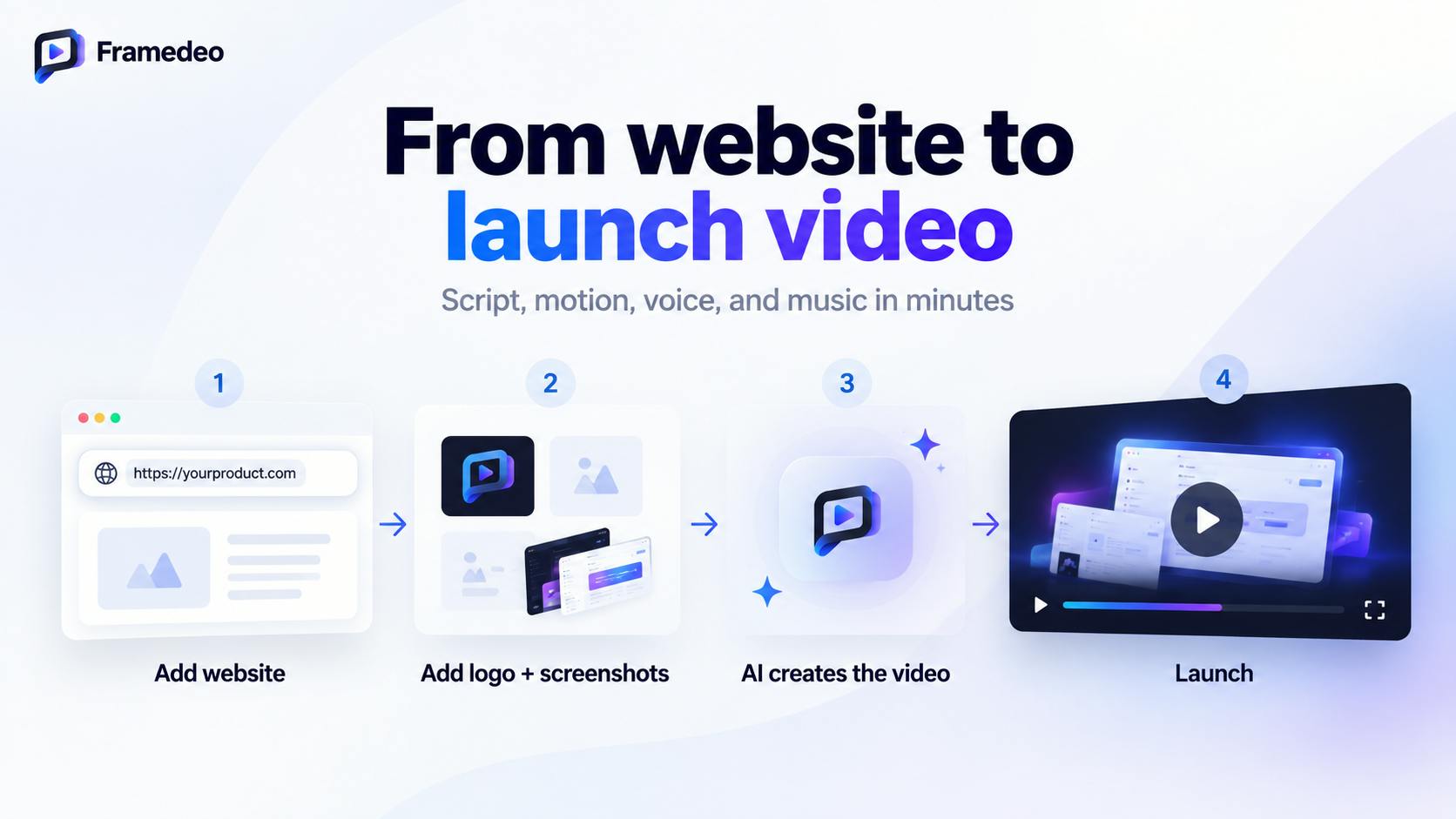
According to its Product Hunt listing, Framedeo's core promise is simple: feed it your website, Logo, and product screenshots, and it automatically generates a polished product launch video. Its positioning tag says it plainly — "Create product launch videos in minutes with AI."
What Pain Point Does It Solve
Framedeo targets a very real bottleneck: launch velocity. Product teams frequently get slowed down by video production, or skip it altogether and ship with only static images and text — which measurably hurts reach and engagement.
One line from the official description hits the nail on the head: "Skip weeks of editing, launch faster, and ship with a video that actually gets attention." This surfaces two distinct value propositions: time cost — compressing a week-long production cycle down to minutes — and distribution impact — video consistently outperforms static assets on social media and landing pages.
For small teams without a dedicated designer or video editor, tools like this matter because they lower the barrier to entry. No editing software expertise required. No outsourcing budget needed. Just usable launch assets, fast.
How It Works and Where It Fits
Based on publicly available information, Framedeo's input requirements are remarkably lightweight: a URL, a Logo, and a few screenshots. The tool automatically organizes the visuals, pacing, and presentation to produce a video. This "feed it assets, get a video" model aligns with the mainstream approach in AIGC video tooling — rapidly assembling a user's existing brand assets into dynamic content.
Framedeo is categorized under Marketing, Artificial Intelligence, and Video, and was built by Lionel Lakson. Its practical use cases generally fall into:
- SaaS product launches: Need an intro video for your website, Product Hunt page, or social channels
- Feature update announcements: Quickly generate a short video for a new release
- Indie developer marketing: Produce professional-looking launch content without a team
AIGC video tools typically follow one of two technical paths: generating video from scratch via text prompts (e.g., Sora, Runway), or brand asset reassembly — taking screenshots, Logos, color schemes, and other existing elements and composing them into dynamic video using preset templates and animation engines. Framedeo belongs to the latter category. The advantage is that outputs are naturally consistent with your brand visuals — no need to describe a style. The limitation is that creative range is constrained by the depth of the template library. The fewer the templates, the more likely different users' videos start looking identical. Understanding this technical path helps set realistic expectations for what the tool can and can't do.
A Grounded Look: The Reality of an Early-Stage Product
It's worth being honest about where Framedeo stands right now. Its Product Hunt data is still very early — 6 upvotes, 2 comments, ranked 19th on its launch day. That means it hasn't gone through large-scale user validation yet, and real-world questions about generation quality, template variety, and output consistency remain unanswered.
The AI-generated video space is already intensely competitive, with tools ranging from general-purpose text-to-video to vertically focused marketing video platforms. Framedeo's differentiation lies in the "launch video" niche and its ultra-minimal "website and screenshots in, video out" input model. Whether it can actually win on quality and usability will depend on how the product evolves.
For teams curious to try it, the right mental model is to treat it as an accelerator for prototyping — use it to quickly produce a first cut, then evaluate whether it meets your launch bar, rather than expecting a one-click, production-ready final video.
The marketing video tool landscape can be roughly divided into a few tiers: general-purpose tools like Synthesia and HeyGen specialize in AI avatar narration, suited for tutorials and demos; template-driven tools like Animoto and Lumen5 focus on converting text and images into social videos; on the vertical product marketing side, Arcade and Supademo focus on interactive product demos. Framedeo sits somewhere between "template-driven" and "vertical product launch," with "enter a URL and get a video" as its core differentiator. For budget-constrained early-stage teams, this category is worth comparing across tools, since template styles, export formats, and pricing models vary significantly.
Takeaway
Framedeo represents a broader pattern in AIGC tooling: rather than building a general-purpose video generator, it targets a specific, high-frequency use case — the product launch — where the pain point is clear and the input requirements can be kept minimal. Whether it earns a permanent place in team workflows will come down to the maturity of its generation quality and template ecosystem. As a newly launched product, it's worth watching — but it needs to be tested with real assets before drawing any firm conclusions.
Related articles

Workbuddy for Absolute Beginners: How a Desktop AI Agent Fits Into Real Workflows
A beginner's guide to the Workbuddy desktop AI agent: installation, claiming credits, file management, and building automated workflows—compared with CodeX for fit and cost, helping professionals shift from AI question-askers to AI managers.

OpenAI's New Agent Stack: Computer Use, Decisions API, and Ultra-Fast Workflows
OpenAI Dev Day unveiled a new agent stack: Computer Use outperforms humans, Decisions API delivers ultra-low-latency classification via Luna, Agents API opens the same Computer Use capabilities, and GPT-6.1 Sol costs only one-seventh of Astra. Core updates, benchmark data, and developer insights.

Liang Wenfeng Open-Sources DeepInfo Inference Framework, Takes On U.S. Ban
DeepSeek open-sources its DeepInfo inference framework after its models, featuring GPU/CPU cross-pipelining, small-model prediction with large-model verification, and full Huawei Ascend and NVIDIA chip support—facing the U.S. federal ban head-on. This article analyzes its significance for AI deployment and open-source strategy.