Free Access to GPT-6 Astra: Building 4 3D Games with Cline

Get free GPT-6 Astra access via Zenslab, plug it into Cline, and build 3D games in minutes.
A Bilibili creator demonstrated how to try GPT-6 Astra without a credit card: register on Zenslab, link a Telegram account to claim ~20,000 free credits valid for ~3 days, then connect the API to VS Code's Cline extension using a custom Base URL. With single prompts, he generated a 3D cooking game, a CS-style FPS, a Dust2 map, and a multi-mode shooter. Results were surprisingly solid, though free credits aren't enough for sustained production-level iteration.
A Bilibili creator shared a method to try GPT-6 Astra without a credit card or any payment — using it alongside the Cline extension in VS Code to build multiple 3D games in just a few minutes. These include a cooking game, a tactical shooter, and a Dust2-style map inspired by Counter-Strike. This article walks through the full workflow and real-world results, as a reference for developers looking to experience high-end model capabilities on a budget.
Free Access: Zenslab + Telegram
The core of this approach is a platform called Zenslab — a hosted application that aggregates various large language models, free to register. The process is straightforward: sign up with your name, email, and password, then activate your account using the verification code sent to your inbox.
After registration, the platform prompts you to claim a free 20,000-point bonus. The key step is linking your Telegram account — described by the creator as similar to WhatsApp or other instant messaging apps. Download Telegram on your phone, complete the standard sign-up, then link your account by scanning a QR code.
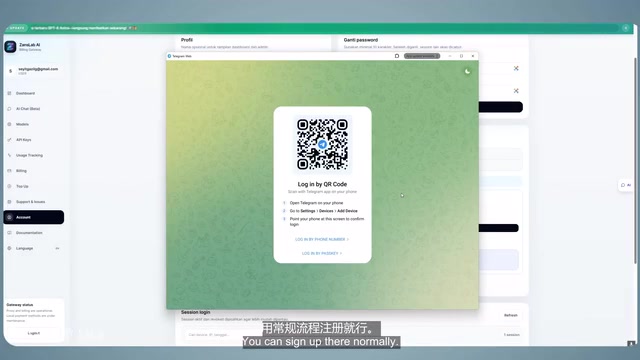
During linking, a Zenslab bot opens a one-on-one chat. Paste the code shown on the webpage into that chat, then follow the prompts to join Zenslab's Telegram channel. Once both tasks are done, your account receives approximately 20,000 points. Importantly, this allowance isn't per-request billing — it comes with roughly a three-day usage window, a point the creator confirmed multiple times in the video. During that period, you can call several models including GPT-5.5, GPT-5.6, and the star of this article: GPT-6 Astra.
Zenslab falls into the category of "model aggregator API platforms." The business model works by purchasing API call rights in bulk from underlying model providers (such as OpenAI), then reselling them to end users in the form of credits or points, all exposed through a unified OpenAI-compatible interface. When a user calls the platform using their key, the request is forwarded to the actual model service. The advantage of such platforms is single-point access to multiple models, often paired with trial credits to attract new users — which is exactly where this free allowance comes from. That said, adding an intermediary means your data passes through a third-party server, so you should assess privacy risks before using it for sensitive code or commercial projects. It's also worth noting that "GPT-6 Astra" is not a formally announced product name from OpenAI — the actual underlying model version remains unverified.
The Web Chat Interface: Functional, But Still Beta
Once you have your credits, head to the API key section to create and copy a key. Switch to the AI chat interface, select your key and model, and send a "Hi" to test — the model responds normally, costing 18 points for that exchange.
In practice, the web interface left a lot to be desired. The creator first tried sending a prompt for a "Minecraft-style 3D farming game," which returned an error — likely due to the prompt being too long. Retrying still failed. Switching to the shorter prompt "Create a spiral galaxy with 30,000 particles" did generate output, but the result didn't match expectations.
The creator openly called the web chat interface "still feeling like a beta," noting limited stability that makes it unsuitable for real development tasks. That leads to what he called the "real trick."
The Real Approach: Connecting the API to Cline in VS Code

The workaround is to take the API key local and call it through Visual Studio Code. The creator uses the Cline extension (referred to verbally as "Client / K-Line" in the video), which can be found and installed directly from the extensions marketplace. He also mentioned that similar tools like OpenCode work just as well — use whatever you're comfortable with.
The setup follows the standard OpenAI-compatible integration pattern: skip Cline's built-in free path, select "Use your own API key and provider," then fill in the Base URL from Zenslab, your API key, and the model name GPT-6 Astra. Send a "Hi" to verify the model is online, and you're ready to start generating.
This "custom Base URL + custom Key" integration pattern is now the standard way to call third-party model services, and it's what allows the free credits to be truly embedded into a development workflow — rather than being stuck in a web chat box.
Cline is an open-source AI coding extension for VS Code. Its key strength is that it's not just a code completion tool — it's an autonomous agent capable of reading and writing files, executing terminal commands, and controlling a browser. Users describe tasks in natural language, and Cline automatically breaks them into steps, generates code, and writes it directly to the project directory. Every action along the way requests user confirmation, creating a semi-automated "human-in-the-loop" workflow. It natively supports OpenAI-compatible API formats, meaning any service that exposes a standard /v1/chat/completions endpoint — whether OpenAI's official API, a locally deployed Ollama instance, or a third-party aggregator like Zenslab — can be connected simply by entering a Base URL and API Key, with no code changes required. This is the technical foundation that makes the approach in this article work.
Four 3D Games Tested: From Cooking to Dust2
3D Cooking Game: A Pleasant Surprise
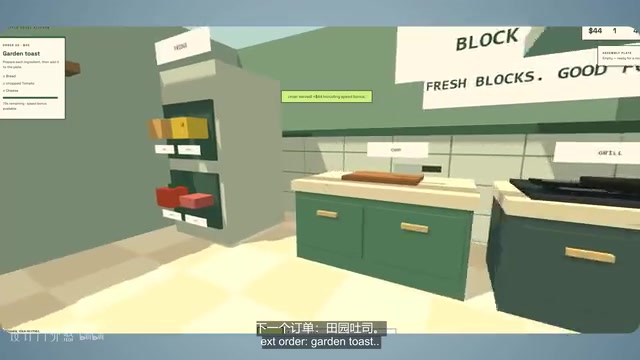
The first test was a "Minecraft-style 3D cooking game." After generation, the game loaded with a cooking station, a chopping block, and a serving counter, complete with an order menu. Following the menu to assemble a burger (bread, cooked meat, cheese) and serving it earns in-game revenue. The creator called it "genuinely impressive" and said the result exceeded his expectations.
3D Tactical Shooter: CS Vibes, With Bugs
The second was a first-person shooter inspired by Counter-Strike 2. The model output a single HTML file. During testing, moving the character triggered a console popup bug. The creator asked the model to auto-fix it, and after a retry the issue was resolved.
The final product isn't a real CS2 — weapons and sound effects lean more toward a Minecraft aesthetic and feel rough around the edges, requiring further polish. But the creator's point was clear: "I wrote one prompt and waited," and within minutes had a working 3D game. That alone speaks to how far the technology has come.
Dust2 Map: Better Than Expected
Next, the creator asked the model to generate a Dust2 map. The result was a top-down view in a distinctly Dust-style aesthetic, with bomb sites marked and tunnels visible. He admitted: "I expected the layout and naming to be much worse" — the actual output beat his expectations.
Multi-Mode Upgrade: Deathmatch, Bomb Defuse, and Zombie Mode
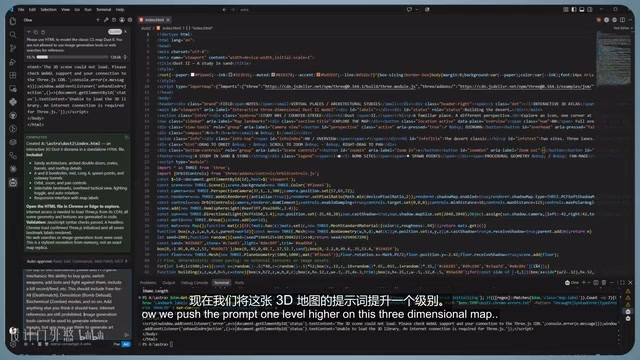
The final step was upgrading the map to include deathmatch, bomb defuse, and zombie modes. This time the model spent noticeably longer thinking — long enough that it seemed like it had hung. Rather than rewriting from scratch, it upgraded the existing HTML and added CSS, with a "Play FPS" button appearing at the top. Clicking it loads the 3D map, lets you switch between modes, and pick up different weapons. However, the old bug of the console popping up when moving still persisted.
Is the Free Allowance Enough?
The creator summarized: within roughly 21,000 points, he built three different games, one map, and layered on multi-mode support. This proves the free credits are genuinely enough to run GPT-6 Astra — not just "read about it."
But he was also honest about the limits: for production-level continuous iteration, 20,000 points "really isn't enough for deep, high-intensity iteration." Combined with the roughly three-day time limit, this approach is better suited to rapid experimentation and stress-testing than long-term development.
For developers who want to experience high-end model coding capabilities at low cost, this is a path worth trying — no credit card or billing information required, and the model integrates directly into a real development workflow.
Related articles

Felix Rieseberg Personal Homepage
Felix Rieseberg's personal homepage sparks attention on Hacker News. This article covers the Slack engineer's technical background, the rise and fall of nativefier, and the value of a developer homepage as a tech calling card.

@ai-sdk/vue 3.0.306 Patch Release Syncs with [email protected] Update
@ai-sdk/vue 3.0.306 released, synced with [email protected]. A routine patch release for the Vercel AI SDK ecosystem with no public API changes; the Vue adapter layer stays version-aligned with the core package.

Gemini 4 Argon API Launches: The Era of Million-Token Output Begins
Google launches Gemini 4 Argon with sparse MoE architecture, up to 1M output tokens, and a 68.90% Vals Index score, available across API, AI Studio, and the Gemini app.