Free AI Content Automation with n8n: Turn One Article into Multi-Platform Content

Use n8n to connect Google Sheets and Gemini into a free workflow that turns one topic into content for three platforms.
The article breaks down an n8n-based multi-platform content automation solution: enter a topic in the Topic column of Google Sheets, and the workflow automatically calls Google Gemini to generate a LinkedIn post, Twitter thread, and Newsletter, writing them back to the spreadsheet in about a minute with no paid tools. The system uses four nodes — Google Sheets Trigger for polling, Check Status to avoid duplicate processing, an AI node using Gemini 2.5 Flash to produce JSON-format outputs, and Prepare Content plus Update Row to parse and write back data. Structured output is key, and AI content still needs human review.
In the world of content creation, a single idea needs to be adapted to different formats and tones for different platforms, which often consumes a huge amount of time. A YouTube tutorial called "Tech Fix with Nadia" demonstrates an automation solution based on n8n: simply enter a topic in Google Sheets, and the system automatically generates three types of content — a LinkedIn post, a Twitter thread, and a Newsletter — all completely free.
The core idea behind this solution isn't complicated — use Google Sheets as the input and output interface, n8n for workflow orchestration, and Google Gemini for content generation. But what's clever about it is the completeness and reusability of the workflow design, which is worth breaking down in detail.
What Exactly Does This Automation System Do?
The system's logic can be summed up as: one input, three outputs, fully unattended.
You enter a topic in the "Topic" column of Google Sheets (for example, "Why remote work keeps growing"), wait about a minute, and the LinkedIn post, Twitter thread, and Newsletter columns are automatically filled with the corresponding content, with the status column changing to "done" as a marker that processing is complete.
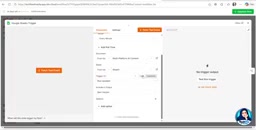
There's one key detail in this design: a status check mechanism. Before executing, the workflow first checks whether the Status of that row is already "done". If so, it skips processing. This avoids wasting AI quota and generating duplicate content from repeated runs. For scenarios that require batch processing of multiple rows, this mechanism is especially useful.
The Four Key Nodes of the n8n Workflow
The entire automation is completed through four nodes connected in sequence, each with a clear responsibility.
Google Sheets Trigger: Polling-Based Trigger
The entry point of the workflow is the Google Sheets Trigger node. It automatically checks the spreadsheet for new content at a set frequency (once per minute in the tutorial). When a newly entered topic is detected, the entire process is triggered.
This trigger method is a polling model, suitable for scenarios that don't have extremely high real-time requirements. If you need faster response, you can increase the polling frequency, but pay attention to API call quotas.
Check Status: Preventing Duplicate Processing
Immediately after the trigger is a conditional judgment node. Its logic is: continue execution only when Status is not equal to "done". This acts as a lightweight task queue management — completed records won't be processed again.
From an engineering perspective, although this node is simple, it's the key to whether the entire system can run stably. Without it, every poll could trigger processing of all historical records.
Polling Trigger refers to the system actively querying the data source at fixed intervals to determine whether there is new data, as opposed to the Webhook model where the data source actively pushes events. The advantage of polling is that it's simple to implement and doesn't rely on external services' callback capabilities; the downside is that there's latency, and each query consumes API call quota. In n8n, the Google Sheets Trigger is a polling-type node, and you can set the check frequency. When the frequency is set to once per minute, it means the average latency is within half a minute, which is sufficient for non-real-time tasks like content generation. To reduce quota consumption, you can lower the frequency to once every few minutes, at the cost of slower response. Understanding the trade-off between polling and Webhooks is a fundamental judgment you can't avoid when designing automation workflows.
AI Node: Generating Content with Gemini 2.5 Flash
This is the core of the entire workflow. The tutorial uses Gemini 2.5 Flash, which is currently free to call, with no need to pay for expensive AI tools.
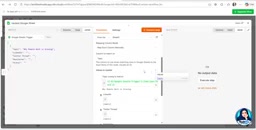
But the key isn't which model you use — it's prompt engineering. The author doesn't simply throw the topic at the AI and ask it to "write something". Instead, the prompt precisely defines three output requirements: a LinkedIn post (professional style), a Twitter thread (split into items), and a Newsletter (complete long-form article). At the same time, Gemini is asked to return in JSON format, making it easy for subsequent nodes to split and process by field.
This design approach is worth learning from: structured output is the prerequisite for multi-platform content automation. If the AI returns free-form text, subsequent parsing and routing become very difficult.
Gemini 2.5 Flash is a lightweight multimodal large model released by Google, part of the Gemini 2.5 series that leans toward speed and cost, positioned between the smaller Flash-Lite and the more powerful Pro. Its characteristic is that it maintains fast response speed while having decent reasoning and long-text generation capabilities, and it offers free usage quota through Google AI Studio, making it suitable for personal projects and small-scale automation experiments. Note that free quota usually has limits on requests per minute (RPM) and requests per day (RPD). When batch processing multiple rows, if the polling frequency is too high, it may trigger rate limiting. Therefore, in production environments, it's recommended to adjust the trigger frequency based on actual quota, or configure a retry mechanism for failed nodes, to avoid workflow interruptions caused by exhausting the quota.
Prepare Content + Update Row: Parsing and Writing Back
The JSON response returned by the AI needs to be split into three independent fields, which is done by Prepare Content (a code node).
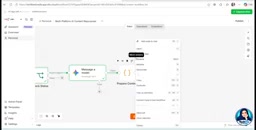
For users who aren't familiar with code, the author gives a practical suggestion: send the AI node's output directly to ChatGPT or Gemini, explain your needs, and let the AI generate the parsing code for you. This approach lowers the technical barrier to automation workflows.
The final Update Row node is responsible for writing the split content back to the corresponding columns in Google Sheets. When doing this, you need to manually map each column — associate the Topic field with the original row to locate the update target, fill the LinkedIn, Twitter, and Newsletter outputs into their respective columns, and finally set Status to whatever value you prefer.
n8n is an open-source workflow automation tool, often compared with Zapier and Make, but its differentiator is that it supports self-hosting, code nodes, and freer workflow orchestration, making it suitable for multi-step tasks with conditional judgments. It uses a node-based visual interface, where each node represents an operation unit, and data is passed between nodes through connections, with a unified JSON data format. This design allows chains like "trigger — judge — generate — parse — write back" to be built intuitively, while retaining the ability to insert custom code at any node, balancing low-code with extensibility. For individual creators, the self-hosted version has no task count limits, with only server costs to bear, which is a notable advantage over commercial SaaS tools for long-term use.
Test Results and Practical Boundaries
In the tutorial, the author runs a complete test using "The future of remote work" as a new topic. About a minute after triggering, content for all three platforms is generated and written back to the correct columns.
From a practical standpoint, this system has several clear advantages: the workflow can be used repeatedly, and changing the topic generates a new batch of content; the free solution lowers the cost of experimentation; and Google Sheets as an interface is intuitive and easy to use, operable even by non-technical users.
But there are also things to be clear-eyed about. AI-generated content is still a first draft — the author himself mentions that after generation, manual review and revision are needed before it can be used for actual content planning. Whether content quality is stable across different platforms depends on how well the prompt is refined and the complexity of the topic.
Why Is This Solution Worth Paying Attention To?
The value of this workflow isn't just a one-off tutorial. It demonstrates a reusable automation pattern: input layer (Sheets) + orchestration layer (n8n) + generation layer (Gemini) + write-back layer (Sheets). This architecture can be extended to more scenarios — such as automatically generating product descriptions, email marketing copy, social media comment replies, and more.
As an open-source automation tool, n8n, combined with Gemini's free quota, lets individual creators and small teams build something like an enterprise-grade content pipeline. This is perhaps what's truly worth learning from this kind of tutorial: not copying a specific workflow, but understanding the universal chain of "trigger — judge — generate — parse — write back", and then recombining it according to your own needs.
If you're already using n8n for automation, or you're looking for an efficient solution for multi-platform content distribution, this approach is worth trying out.
One-line Summary
Use n8n to connect Google Sheets with Gemini and build a free workflow that auto-generates content for three platforms from a single topic.
Paragraph Summary
The article breaks down a multi-platform content automation solution based on n8n: enter a topic in the Topic column of Google Sheets, and the workflow automatically calls Google Gemini to generate a LinkedIn post, Twitter thread, and Newsletter, writing them back to the corresponding columns in the spreadsheet — all in about a minute, with no paid tools required. The system consists of four nodes — the Google Sheets Trigger handles polling, the Check Status node avoids duplicate processing by checking status, the AI node uses Gemini 2.5 Flash to produce three types of content in JSON format according to the prompt, and the Prepare Content and Update Row nodes parse the JSON and write the data back. The author emphasizes that structured output is the prerequisite for downstream routing, and that the status check is key to stable operation, while also pointing out that AI-generated content still needs manual review and is suitable as a first-draft production tool.
Related articles

How Big Can Stars Really Get? The Physical Limits of the Largest Stars
Red supergiants are the largest stars by volume, with radii up to 2,000 times the Sun, engulfing the inner solar system. But there is no precise upper limit on stellar size—models predict up to 15,000 solar radii. The most massive blue stars are far smaller than red supergiants—biggest and heaviest are two different things.

Apple HomeView Smart Display Full Feature Breakdown: Wall-Mount or Desktop, $299
Apple launches HomeView, a $299 smart display with wall-mount and desktop options, 12MP camera for facial recognition, smart home control, music playback, and recipe step-by-step cooking. Full breakdown of watch faces, apps, privacy, and cooking integration.

Where Did the Promised New Studio Go? Craft Computing Answers After Five Years
Craft Computing's host responds to viewer questions: the new studio promised five years ago was shelved as construction costs soared from $30,000 to $75,000, and was replaced by a 168-square-foot garage conversion.