Free Sandbox Tool Sandbox Runtime: Blocks AI Agents from Reading SSH Keys

Anthropic open-sources Sandbox Runtime, providing lightweight sandbox isolation for AI agents via the srt command.
Sandbox Runtime is a free open-source sandbox tool from Anthropic designed to restrict AI coding agents' access, preventing them from reading SSH keys or visiting unauthorized websites. It requires no Docker or containers—after installing via npm, simply prefix commands with `srt` to enable the sandbox. Currently supports Mac and Linux. The tool has over 6,000 GitHub stars and is suited for NCP servers and coding agents. The article notes that sandbox effectiveness depends on configuration strictness, users must explicitly define allowed resource paths to avoid a false sense of security, and Windows support is still pending.
AI coding agents boost productivity but also introduce new security risks—they might read your SSH keys or access unauthorized websites. An open-source tool called Sandbox Runtime aims to solve this problem.
What Is Sandbox Runtime?
According to a YouTube video, Sandbox Runtime is a free sandbox tool from Anthropic. It is the underlying sandbox technology that powers Claude Code. The project is open source under the Apache 2.0 license and has over 6,000 stars on GitHub.
Its core function is to limit the scope of what AI agents can do: agents cannot access websites you haven't explicitly allowed, nor can they read private files (such as SSH keys).
Sandbox is a security mechanism that creates an isolated runtime environment for programs, restricting the system resources they can access (such as files, networks, processes, etc.). In the context of AI agents, a sandbox prevents agents from performing operations beyond their authorization, such as reading sensitive files or connecting to malicious servers. Common implementations include OS-level isolation (such as seccomp, namespaces), containerization (such as Docker), or lightweight runtime interception. Sandbox Runtime belongs to the latter category—it does not rely on full virtualization but instead intercepts and enforces policies at the system call level, providing fine-grained permission management while maintaining performance.
How to Use It?
The installation process is very simple—just one npm command. After installation, simply prefix any command with srt to enable the sandbox.
For example, instead of running the claude command, run srt claude, and that process will be constrained by the sandbox.
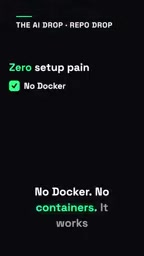
No Docker, no containers needed. It runs directly on your system and currently supports Mac and Linux.
npm (Node Package Manager) is a package management tool for JavaScript, widely used to install and manage dependencies for Node.js projects. You can globally install command-line tools via npm install -g. The srt prefix is a transparent proxy approach: when you execute srt <command>, srt launches a sandbox-constrained child process to run the original command, and all filesystem and network access goes through policy checks. This approach requires no modifications to your existing toolchain, lowering the barrier to adoption.
Why Does It Matter?
AI agents typically need filesystem and network access to complete tasks, but this also means they might inadvertently or maliciously read sensitive data. SSH keys are among the most critical credentials for developers—if leaked, they can lead to server compromise.
Sandbox Runtime enforces isolation so that agents can only access explicitly permitted resources.
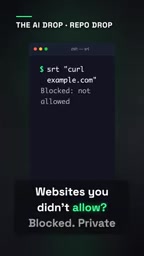
SSH keys are cryptographic credentials used for passwordless login to remote servers, typically stored in the ~/.ssh/ directory (such as id_rsa). Once leaked, an attacker can directly log into the associated servers, causing data breaches or system damage. AI coding agents assisting with development may scan the filesystem as part of their tasks, and without isolation, they could easily read or exfiltrate keys by accident. Sandboxes effectively block such risks by restricting file read paths and network egress.
Use Cases
According to the video, the tool is well-suited for NCP servers and coding agents. For teams using AI agents for development, it provides a simple and effective security layer.
NCP servers typically refer to NVIDIA Cloud Playground or similar high-performance computing cloud environments, commonly used for AI model training and inference. When running coding agents on such servers, the sandbox prevents accidental operations from affecting the host machine or other tenants. Coding agents such as Claude Code and GitHub Copilot need access to code repositories and network resources, and the sandbox ensures their behavioral boundaries remain controllable without sacrificing functionality—especially suitable for multi-user or production environments.
A Few Thoughts
Being open source and free lowers the adoption barrier, but the effectiveness of the sandbox depends on how strict the configuration is. Users need to clearly define which resources and paths are allowed; otherwise, they may fall into a false sense of security. Additionally, it currently only supports Mac and Linux—Windows users will have to wait.
Would you add a sandbox to your AI agent?
Related articles

GitHub Daily · October 30: Skills Ecosystem Explodes, Agents Start Provisioning Their Own Computers
GitHub Daily Oct 30: Skills ecosystem hits three layers (official, personal, vertical), agents get their own computers, and cross-session memory becomes essential.
AWS AgentCore Gateway: Connecting AI A…
AWS AgentCore Gateway: Connecting AI Agents to Enterprise Backends with MCP
How AWS AgentCore Gateway acts as a primary MCP server to aggregate REST APIs, Lambda, and existing MCP services? Analyzing its AST real-time mapping, zero cold start, semantic search for tool overload, session isolation, and key injection security design, plus the architectural approach to decoupling enterprise AI agents from backends.

One Link Gives Figma AI a New Skill: Hands-On with MCP Connectors
Paste one MCP server link and the AI Agent in Figma gains new tool capabilities. We break down the setup flow, 20+ one-click apps, read/write permissions and execution policies, and the public HTTPS requirement.