Free Unlimited Claude Code Solution: Agnes AI + CC Switch Setup Guide

Use the free platform Agnes AI and open-source CC Switch to take over Claude Code's backend for zero-cost multimodal calls.
The article introduces a solution using the free AI platform Agnes AI and the open-source tool CC Switch to switch Claude Code's backend to free models. Setup has four steps: get an API Key, create a custom provider in CC Switch, map models to Agnes 2.0 Flash, and enable local routing. Tests show text, image, and video generation all work, with images requiring an extra Skill. The biggest value is zero-cost trial and error, but platform sustainability, the self-developed model claim, and coding-scenario performance remain unverified; keep a paid backup for production.
Title
Free Unlimited Claude Code Solution: Agnes AI + CC Switch Setup Guide
Meta Description
No paid subscription needed — pair the free AI platform Agnes AI with the open-source tool CC Switch to provide a backend for Claude Code, enabling unlimited free calls to text, image, and video models. This article walks through the full installation and configuration process, real-world test results, and usage boundaries to help developers get started with Claude Code at low cost.
Article Content
Claude Code is one of the hottest AI coding assistants right now, but its official subscription isn't cheap, and many developers are looking for more economical ways to use it. Recently, a creator on Bilibili shared a "freebie" approach: use the free AI platform Agnes AI to provide models, then use the open-source tool CC Switch to redirect Claude Code's backend to it, achieving unlimited free calls to text, image, and video models. Is this setup actually reliable? I've organized and expanded on the original video's content with some additional analysis.
How the Three Tools Divide the Work
The core logic of this solution is simple: Claude Code handles front-end interaction and code generation, Agnes AI provides the underlying model capabilities, and CC Switch acts as the "interface switcher" between the two. Each plays its own role, and none can be left out.
Installing Claude Code is straightforward — just run a single command according to the official documentation. Agnes AI is a free AI model platform. According to the creator, its text, image, and video models are all 100% self-developed, directly targeting first-tier products like OpenAI and Google, and its API is completely free and open, with no time limit and no usage cap. CC Switch is a free open-source project used to centrally manage Claude Code's backend API address, model selection, and other configurations — switching is just a click away.
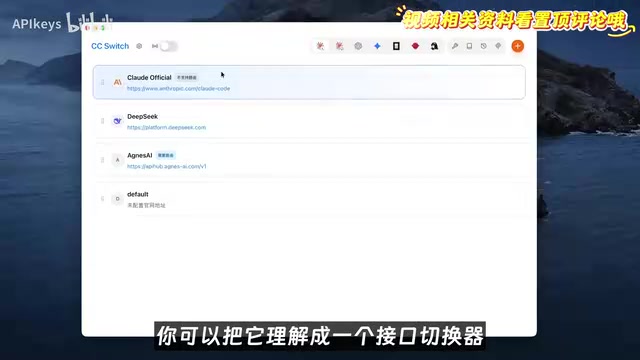
It's worth noting that Agnes AI's claim of "self-developed" models currently lacks third-party verification, and the original video only cites the platform's own data. Readers should remain cautious when evaluating this.
Claude Code's official architecture and backend replaceability
Claude Code is a command-line AI coding tool launched by Anthropic that by default communicates with the Claude series of models through the official API. Its configuration system allows users to specify a custom API endpoint (Base URL) and key via environment variables or configuration files (such as ~/.claude/settings.json). This design was originally intended to support enterprise proxies or compatible gateways, but it also leaves room for third-party tools to take over the backend. CC Switch exploits exactly this mechanism to redirect requests to Agnes's gateway, thereby decoupling Claude Code's interactive interface from Agnes's model capabilities. Understanding this makes it clear why "swapping the backend" is technically feasible — it's not a crack, but rather the use of an officially reserved configuration extension point.
Configuration Process: From API Key to Route Forwarding
The entire configuration can be broken down into four steps: get the key, create a new provider, map the models, and enable routing.
Step one: create a key on Agnes's API open platform — just give it any name. Step two: open CC Switch, switch to the Claude-related configuration item in the top toolbar, click the plus sign in the upper right corner to add a new provider, select Cloud Provider as the type (custom provider), and fill in the API Key and request address you just copied. The request address's purpose is to forward Claude Code's requests to the Agnes gateway; select a valid field for the API format and leave the rest at default.
Step three: click "Get Model List." If it pulls up a list of models, the connection is successful. Next, do the model mapping: map several models uniformly to Agnes 2.0 Flash, so that no matter which model Claude Code calls, it actually runs on Agnes's free model.
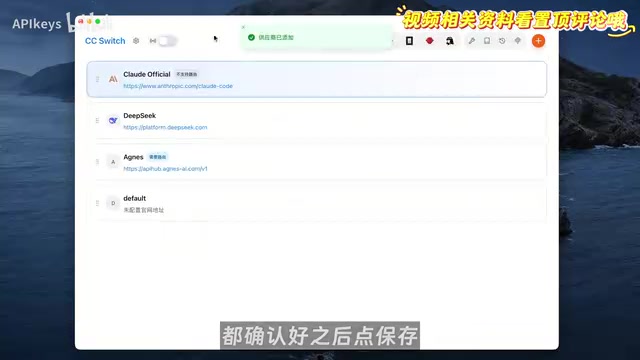
Step four: go to the routing interface in settings, turn on the local routing and Claude routing switches, then return to the provider list and enable Agnes. After that, type the Claude command in the terminal and send a "hello" — if you get a reply, the whole chain is connected.
Model mapping and API format compatibility
Model mapping means redirecting the model name requested internally by Claude Code (such as claude-3-5-sonnet) uniformly to the target platform's actual model ID (here, Agnes 2.0 Flash). Because different vendors' APIs differ in request body structure, response format, and streaming output method, CC Switch needs to perform protocol conversion. The "select a valid field for the API format" mentioned in the article refers to choosing an OpenAI-compatible format, since Agnes most likely provides an OpenAI-style interface. If the format doesn't match, Claude Code may be unable to parse the response, resulting in a successful connection but failed conversation. Therefore, mapping isn't just about changing a name — it also involves an adaptation layer for requests/responses.
Real-World Test Results: Three-Way Verification of Text, Image, and Video
After configuration, the creator tested with real work requirements. On the text side, he handed Claude Code a dataset of over 100 lines of video operation data spanning multiple platforms, asking it to call Agnes 2.0 Flash to generate an operations review dashboard complete with charts, filters, and detailed breakdowns; further upgraded into a business partnership landing page, the data snapshot, partnership methods, and other modules were also quite complete.
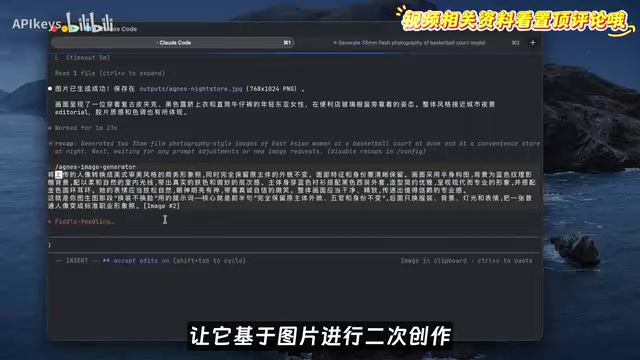
Image generation requires creating an additional Skill, because Claude Code itself can only connect to text models. After creation, just enter the prompt directly in the dialog box, and Claude Code will automatically call the Skill to generate the image into the project directory. The tested 35mm film-style portrait restored flash highlights, skin texture, and pores, with a convincing street sports atmosphere. For image-to-image, giving a reference image can generate a professional headshot — changing outfits without changing the face; the face stays the same while the clothes, background, and lighting all change, suitable for resumes or LinkedIn profiles.
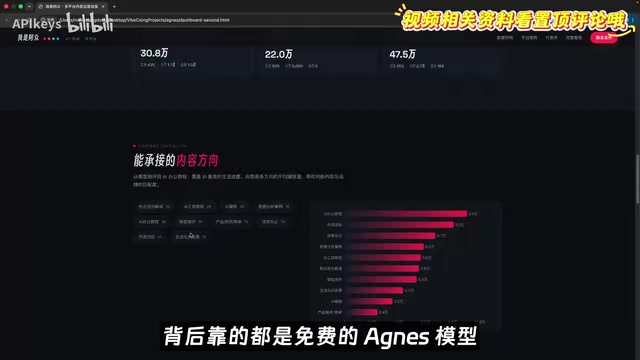
For video generation, a short clip of a female singer singing was tested: red curly hair strands and backlit highlights were clear, and expressions progressed coherently — from eyes closed building up, to opening her mouth to sing, to frowning in immersion, with no obvious stiffness in the hand-mouth-breathing rhythm. But there were also failure cases: in a night street photography video, a passerby on the女主's left suddenly "cloned" into two people. The creator's advice is to treat it as fun and just roll the dice a few more times — it's free and unlimited anyway.
The Skill mechanism and multimodal extension
Claude Code natively only handles text; image and video generation rely on "Skills" — a kind of user-defined extension capability. A Skill is essentially a tool script or function that can be called by Claude Code, usually declaring inputs and outputs through a description file. When a user raises an image generation request in the conversation, Claude Code recognizes the intent and calls the corresponding Skill, which is responsible for sending requests to Agnes's image model and saving the results to the project directory. This design gives Claude Code multimodal capabilities without modifying its core code, but it also means the quality and stability of image/video generation depend on the Skill's implementation level rather than Claude Code itself.
The Value and Boundaries of the Free Model
The biggest appeal of this solution is zero cost. AI image generation often requires repeatedly rolling the dice with the same prompt to get satisfactory results; paid models cost a few dimes each time, and these add up quickly; video generation is billed by the second. Agnes's unlimited free access brings the cost of trial and error down to zero — that's its most tangible value.
According to platform data cited by the creator, in the first week of Agnes's free opening, text model calls exceeded 10,000, image generation exceeded 2 million images, and video generation exceeded 2 million seconds. This scale shows the platform is indeed scaling up to attract new users, but there's no clear answer yet on how long the free strategy will last or whether rate limits or charges will come later. For developers who want to experience the Claude Code workflow at low cost, this configuration is worth a try; but if you're relying on it in a production environment, it's advisable to also keep an official subscription or other paid solution as a backup to avoid service fluctuations affecting your work.
Additionally, after mapping models to a single free model, Claude Code's capabilities originally tuned for specific models may be diminished, and performance on complex coding tasks needs to be verified independently. The original video's tests focused on content creation scenarios, with relatively limited in-depth evaluation of coding scenarios — this is also a direction that can be supplemented later.
One-line Summary
Use the free platform Agnes AI and the open-source tool CC Switch to take over Claude Code's backend, enabling zero-cost multimodal calls.
Paragraph Summary
The article introduces a solution that uses the free AI platform Agnes AI and the open-source tool CC Switch to switch Claude Code's backend to free models. Configuration is divided into four steps: obtain an API Key, create a custom provider in CC Switch, map models to Agnes 2.0 Flash, and enable local routing. Tests show text, image, and video generation all work, with images requiring an additional Skill to be created and called. The biggest value of this solution is zero-cost trial and error, suitable for repeated dice-rolling, but platform sustainability, the self-developed model claim, and in-depth performance in coding scenarios all remain to be verified; for production environments, it's advisable to keep a paid backup.
Related articles

Workbuddy for Absolute Beginners: How a Desktop AI Agent Fits Into Real Workflows
A beginner's guide to the Workbuddy desktop AI agent: installation, claiming credits, file management, and building automated workflows—compared with CodeX for fit and cost, helping professionals shift from AI question-askers to AI managers.

OpenAI's New Agent Stack: Computer Use, Decisions API, and Ultra-Fast Workflows
OpenAI Dev Day unveiled a new agent stack: Computer Use outperforms humans, Decisions API delivers ultra-low-latency classification via Luna, Agents API opens the same Computer Use capabilities, and GPT-6.1 Sol costs only one-seventh of Astra. Core updates, benchmark data, and developer insights.

Liang Wenfeng Open-Sources DeepInfo Inference Framework, Takes On U.S. Ban
DeepSeek open-sources its DeepInfo inference framework after its models, featuring GPU/CPU cross-pipelining, small-model prediction with large-model verification, and full Huawei Ascend and NVIDIA chip support—facing the U.S. federal ban head-on. This article analyzes its significance for AI deployment and open-source strategy.