From Completion to Agents: The 2026 AI Coding Tool Selection Matrix

AI coding assistants are evolving from completion tools into autonomous agents, so tool selection must shift from leaderboard scores to real-world environment and compliance fit.
The article notes that AI coding assistants have evolved from inline completion tools that "predict the next line" into agents that can independently plan, edit across files, execute terminal commands, and open PRs, shifting developers from line-by-line review to task-level delegation—at the cost of granting third-party models unsupervised access to proprietary codebases. The author criticizes standardized benchmarks like SWEbench as distorted: high scores do not equal production readiness. Selection should follow two axes—autonomy level and runtime location. Visual IDEs like Cursor and Windsurf offer polished experiences but require editor migration; terminal-native tools like Cloud Code and ATER trade visual polish for control granularity; GitHub Copilot relies on Actions sandboxes for compliance but has unpredictable costs; BYOK and OpenHands self-hosting return data sovereignty to users at the cost of self-managed operations and inference fees. The final decision path is to ask about compliance first, then workspace form.
AI coding assistants are undergoing a role transition: from "predict the next line of code" completion tools to autonomous agents that "finish the feature while you're in a meeting." The direct consequence of this shift is that the logic of tool selection has been completely rewritten—in the past you looked at benchmark scores; now you have to look at whether it can be embedded into your real development environment.
From Inline Completion to Asynchronous Execution: The Capability Boundary Has Shifted
According to the analysis in the video, the baseline of workflows has moved. Early assistants relied on the context of the current window to predict the next few lines—essentially a "sentence-level" completer. Today's coding agents can make their own plans, edit across multiple files, execute terminal commands, and independently open pull requests.
This capability upgrade is not a quantitative change but a restructuring of the working model: developers shift from line-by-line review to task-level delegation. But the cost is equally clear—for the agent to actually run, you must hand unsupervised access to proprietary codebases to third-party models. This trust threshold is what you really need to weigh when selecting tools.

Another often-overlooked issue is the distortion of benchmarks. The source material explicitly notes that selecting models solely on standardized benchmarks like SWEbench ignores how tools actually perform in production. No matter how high the score, if it cannot adapt to your specific development environment, or forces the team to migrate to an unfamiliar IDE, violates enterprise compliance policies, or generates unpredictable API costs, then the "highest score" becomes the biggest liability.
SWEbench is one of the most frequently cited benchmarks for evaluating coding agents today. It draws issues and their corresponding fix commits from real GitHub repositories, requiring models to generate patches in isolated environments and pass hidden tests. Its value lies in providing a reproducible, horizontally comparable standardized exam room. But its limitations are equally obvious: the problems are mostly local fixes within repositories, with environment dependencies, build scripts, and test suites pre-configured, so models do not need to face enterprise intranets, private dependencies, legacy code styles, or approval workflows. Therefore, SWEbench scores measure "the ability to solve single-point problems under controlled conditions," not "comprehensive performance after being embedded in a real development pipeline." Treating benchmark scores as the primary basis for selection is essentially using exam room results to predict production line performance—the gap between the two is exactly why many teams succeed in pilots but fail at scale.
The Two Axes of the Selection Matrix
The market map provided in the video positions tools along two axes: the horizontal axis is the level of autonomy, from supervised editing to fully asynchronous execution; the vertical axis is the runtime location, from local terminals to cloud IDEs. The advantage of this framework is that it converts the unanswerable question of "which one is stronger" into "which quadrant are you in."
Visual IDE Camp: Great Experience, But You Have to Replace Your Editor
Cursor and Windsurf occupy this cell. They offer supervised multi-file editing, deep semantic indexing, and real-time visual diffs that let you clearly see which line the agent changed. But the integration cost is underestimated: teams must abandon their native VS Code or JetBrains environments and migrate entirely to proprietary forks.
Windsurf's cascade feature is optimized for the pain point of "continuous supervision"—it actively monitors terminal commands and file edits, continuously updating its own context in the Autonomous flow, so it can run longer autonomous chains. However, the material also points out its risk: Windsurf was recently acquired quickly by Cognition, and the post-acquisition uncertainty adds variables to long-term enterprise procurement.

A fork IDE refers to an independent distribution developed secondarily on top of open-source editor codebases such as VS Code; Cursor and Windsurf both belong to this category. They can achieve capabilities that native plugins find hard to match, such as deep semantic indexing and cross-file diff previews, because they can directly modify the editor kernel. But this also means teams can no longer receive automatic upstream updates, plugin ecosystems and internal toolchains need to be re-verified for compatibility, and enterprise unified configuration, license management, and security audit processes must all be re-adapted. For teams that have already built debuggers, static checks, and remote development pipelines around JetBrains or standard VS Code, the migration cost is often not the subscription fee but the reconstruction of this hidden infrastructure. When evaluating such tools, "migration man-hours" and "plugin compatibility lists" should be treated as selection metrics of equal weight to features.
Terminal-Native Camp: Control Granularity Traded for Visual Polish
For developers unwilling to leave the command line, priorities are completely different. Cloud Code executes long-cycle complex tasks through intelligent search, not relying on pre-built indexes but reading the repository directly, so it performs more effectively on codebases it has never seen. The cost is no graphical interface, and its usage consumes the same token budget as a standard cloud chat subscription.
ATER takes another path: deeply bound to version control, every AI change is packaged as an independent, reviewable Git commit, making rollback of errors almost zero-cost. The trade-off between the two types of tools is clear—the visual IDE branch provides a refined, readable experience, while terminal-native agents trade visual polish for fine-grained control, allowing heavy users to complete complex changes within the command-line context.
Enterprise Environments: Compliance Over Raw Capability
For large engineering organizations, security and ecosystem alignment weigh more than model capability itself. GitHub's Copilot coding agent runs directly in GitHub Actions sandboxes: you assign it an issue, and it writes code, runs tests, and opens PRs, all without local execution. Keeping the entire lifecycle within GitHub is a prerequisite for maintaining existing role-based access control and SOC 2 compliance.

But the financial reality of autonomous execution is another matter: it rapidly consumes usage quotas. Compared with traditional fixed-seat licensing, monthly bills become significantly harder to predict. To run these agents safely at scale, regulated enterprises need to deploy dedicated infrastructure like Northflank, providing secure microVM sandbox isolation and bring-your-own-cloud deployment capabilities. This heavy DevOps configuration protects enterprise data, but the time and resources it requires are simply unavailable to startup teams and independent developers.
SOC 2 is a service organization controls reporting framework developed by the American Institute of Certified Public Accountants (AICPA). Centered on five trust services principles—security, availability, processing integrity, confidentiality, and privacy—it audits whether enterprises have established verifiable controls. For buyers, a vendor holding a SOC 2 Type II report means its access control, change management, log auditing, and other processes have been continuously observed by an independent third party. RBAC (role-based access control) is a foundational mechanism within it: granting permissions by role rather than individual ensures that agents can only touch repositories and pipelines within their scope of responsibility. When a coding agent is granted the authority to write code and open PRs, it effectively becomes a "non-human identity" that must be incorporated into the same permission model and audit trail; otherwise, a single unauthorized automated commit could breach the entire compliance system.
Privacy and Open-Source Self-Hosting: Keep Risk in Your Own Hands
The bring-your-own-key (BYOK) model, adopted by extensions like Client, connects directly to the inference provider of your choice. There is no platform markup, and prompt routing is entirely under your control. The other side of control is the overall transfer of financial risk: you need to monitor inference costs yourself, and during heavy development, a single day's consumption can easily reach tens of dollars.
OpenHands offers a self-hosted architecture where agents run inside isolated Docker containers. The AI can execute commands and modify files but will not touch your host machine. Configuration requires manual tinkering, and it lacks the out-of-the-box interface of venture-backed products.
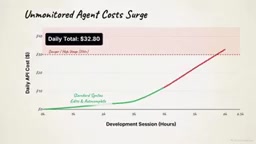
The common logic of this group is: enterprise platforms trade ecosystem lock-in for security and compliance commitments, while open-source tools hand you complete data sovereignty and transparent costs—provided you manage the infrastructure yourself.
Decision Tree: Ask About Compliance First, Then About Workspace
The video concludes with an actionable selection path. The first step is to see whether the organization is bound by strict security standards—under heavy regulation, Copilot is the definite choice. If not restricted, then look at the workspace form: command-line users go to Cloud Code or ATER; IDE users then branch by payment model—choose Cursor or Windsurf for a predictable fixed rate, or take the BYOK route to Client to avoid platform fees.
The most suitable coding agent is rarely the one ranked first on the leaderboard. It is the tool that matches your operational reality closely enough that the team is willing to trust it to merge code into production.
Related articles

Sugra MCP: One-Click Access to 200+ Data Sources, Connecting Mainstream AI Applications
Sugra MCP connects mainstream AI apps like Claude, ChatGPT, and Cursor through a unified MCP protocol, offering 200+ data sources and 1,600+ endpoints. Listed in Anthropic, OpenAI, and GitHub directories—integrate with one command.
 Tech Frontiers
T3 Code: Free, Open-Source, and a Unified Way to Manage All AI Coding Agents
T3 Code is a free open-source app that aggregates AI coding tools like Cloud Code and Codex into one interface, with conversation handoff, branch isolation review, automatic PR creation, and remote access.
 Tech Frontiers
Conductor Cloud Service Shutting Down? A Comparative Review of Three Parallel AI Coding Agent Solutions
Conductor's cloud service is shutting down—how can developers keep running AI coding agents in parallel? This article compares three alternatives: Orca, Codex, and Cursor: Orca is open-source and free and compatible with old workspaces, Codex is built into the ChatGPT desktop app and supports cloud handoff, and Cursor offers multi-agent windows within the editor. Choose the tool that best fits your workflow.