From Empty Folder to Cloud Agent: A Hands-On Look at Microsoft Foundry Canvas

Microsoft Foundry Canvas lets developers build and deploy hosted AI agents from scratch through a conversational panel in GitHub Copilot.
Microsoft Foundry Canvas is a side-panel extension embedded in the GitHub Copilot app that consolidates agent scaffolding, runtime configuration, and tool integration into a conversational workflow. Every choice a developer makes is passed to Copilot along with Foundry project context, and Copilot handles code generation automatically. The three-stage flow — create, customize, deploy — supports local Agent Inspector debugging with full tool call traces and token tracking, while maintaining consistency between local and cloud environments. The Sparkles cupcake assistant demo showcases automatic MCP tool detection, multi-tool chained calls, and one-click cloud deployment, illustrating how conversational agent development is moving from concept to practical reality.
What Is Microsoft Foundry Canvas
Starting from an empty folder and deploying a hosted agent to the cloud is a process that often intimidates developers — scaffolding, runtime configuration, and orchestration logic consume enormous effort before any real work gets done. Microsoft Foundry Canvas aims to consolidate all of these steps into a single conversational panel.
Foundry Canvas is an extension embedded in the GitHub Copilot app, presented as a side panel that guides developers through building and deploying agents. Its core mechanism is straightforward: every choice you make in Canvas is passed to Copilot along with the Foundry project context, and Copilot handles the actual code generation and configuration. Developers never have to write boilerplate scaffold code themselves.
A "hosted agent" refers to an agent whose runtime, orchestration, and execution are fully managed by the platform — in this case, Microsoft Foundry. It is packaged in a custom container that can run locally or be deployed to the cloud without modification. This model lets developers focus on the agent's behavior rather than its infrastructure.
The Microsoft Agent Framework is a SDK framework from Microsoft for building, orchestrating, and deploying AI agents. It abstracts the low-level details of agent–LLM interaction and provides capabilities such as tool calling, multi-step reasoning, and state management. Developers can define agent behavior rules and available toolsets through declarative configuration or code. The Responses protocol is a communication protocol supported by the framework that, compared to the Chat Completions protocol, is better suited for stateful multi-turn conversations and streaming output — offering finer-grained tracking of each reasoning step and tool call. Microsoft Foundry is the managed service layer of the Azure AI platform, providing model deployment, agent runtimes, observability, and evaluation capabilities. Foundry Canvas is built on top of this foundation.
Environment Setup and Getting Started
Using Foundry Canvas requires two prerequisites: the GitHub Copilot app installed, and the Microsoft Foundry Canvas extension installed within it. To install the extension, navigate to the Customize section of the GitHub Copilot app, open the Featured tab, and you'll find the Microsoft Foundry extension at the top.
The launch process is straightforward: open a new conversation in your target local folder, type a prompt like "Create a Foundry hosted agent using Microsoft Foundry Canvas," and this triggers the Foundry extension — Canvas then opens in the right-hand panel.
Canvas breaks the workflow into three stages: Step 1 is creating the hosted agent, Step 2 is building and customizing the current agent, and Step 3 is deploying and testing. During the creation stage, Copilot provides some preset prompts to spark ideas, or you can simply ask Copilot to help you through the creation directly. This step also requires configuring a target Foundry project — the agent will be provisioned into that project, which must contain a model instance (the demo uses GPT-4.1 mini).
A Real-World Example: The Sparkles Cupcake Assistant
The video demo uses an assistant called "Sparkles" — a cupcake shop concierge. This agent plays the role of a friendly store assistant who helps customers place orders for cupcake pickup. Its business logic includes: asking for a customer ID, creating IDs for new customers, collecting information needed to register new customers, and performing all of these operations through a dedicated Sparkles MCP server.
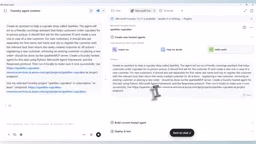
On the implementation side, Copilot was instructed to use Python, the Microsoft Agent Framework, and the Responses protocol. For provisioning, the existing Foundry project was reused. After submitting the prompt, Copilot begins generating agent code in the workspace based on these choices.
Opening the workspace via the Visual Studio Code icon reveals that the core logic lives in main.py under the source folder — it uses the Microsoft Agent Framework to construct the agent, connects to the Foundry-hosted model, and encodes instructions specific to the Sparkles store (such as logic for looking up and creating customer IDs). One notable detail: Copilot detected that a toolbox containing an MCP server already existed in the project and automatically included it in the agent's toolset.
Deployment is driven by two YAML files: azure.yaml handles provisioning the Foundry project and model deployment, while toolbox.yaml serves as a placeholder configuration for connecting the toolbox.
The MCP (Model Context Protocol) is an open protocol proposed by Anthropic and now adopted by multiple vendors. It standardizes how LLMs interact with external tools and data sources. MCP servers expose tools (such as database queries or API calls) through a standardized interface, and the agent runtime discovers and invokes these tools via the protocol — no need to write custom adapter code for each tool. In the Sparkles demo, the Sparkles MCP server wraps business operations like "create customer," "create order," and "list cupcakes." The agent simply calls the relevant tools through the protocol without needing to know the backend implementation. Copilot's ability to automatically detect existing MCP servers and incorporate them into the toolset is a direct result of MCP's standardized description capability — tool names, parameters, and purposes are all machine-readable via protocol metadata, requiring no manual configuration.
Customization, Local Debugging, and Deployment
In the second stage — customization — adjustable dimensions include the model, toolbox, skills, and guardrails. For the model, if multiple model instances are deployed in the project, you can easily switch between them for comparison. On the toolbox side, the demo had a pre-configured toolbox containing the Sparkles MCP (with tools for creating customers and orders) as well as a web search tool.
Local debugging is one of the more practical parts of this workflow. The agent runs locally on port 8088, and through the Agent Inspector interface, you can interact with the local agent and inspect execution traces. Developers can see tool calls, the streamed generation of response text, MCP server tool call results, and can drill into tool call details to pinpoint errors. The interface also displays token consumption for cost estimation.
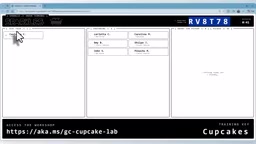
The demo walked through a complete order flow: request a red velvet flavor → agent asks for customer ID → provide name, last name, and city as a new customer → agent calls the register customer tool → order confirmed. Throughout the interaction, multiple tools were called in sequence (such as list_cupcakes, register_customer, and order_cupcake), and the order was ultimately visible in the store dashboard.
Once testing is satisfactory, clicking deploy pushes the hosted agent to the Microsoft Foundry cloud within minutes. Copilot also suggests that developers configure an evaluation suite. After deployment, the Sparkles Concierge Agent appears in Foundry, running in the cloud.
Agent Inspector is a visual debugging interface for local agent development. Its core function is to display the complete process of each reasoning step and tool call as an "execution trace." Unlike traditional application debugging, an agent's execution path is dynamic — the model decides at runtime whether to call a tool, which tool to call, and how to interpret the returned result — making observability especially critical. Through Inspector, developers can see: the model's raw inputs and outputs, the request parameters and return values for each tool call, the step-by-step streaming generation process, and the token count consumed at each step. This observability eliminates guesswork from debugging, allowing developers to pinpoint exactly where an agent went wrong or drifted off course — which is particularly valuable for complex business workflows involving multiple chained tool calls.
The Value and Significance of This Workflow
From an empty folder, a single prompt, and one application — to a hosted agent running on Foundry with its model, toolbox, and instructions fully wired up — the core value of this end-to-end loop is lowering the barrier to agent development.
For developers, the biggest relief comes from three areas: automatic scaffold generation eliminates repetitive infrastructure work; the local Inspector provides observability so debugging is no longer a black box; and the consistency between local containers and cloud deployment avoids the classic "works locally, breaks in the cloud" problem. The automatic detection and integration of MCP servers also reflects the increasingly tight integration between tool ecosystems and agent frameworks.
It's worth noting that the content described here is based on a single video demo. Stability in real production environments, performance under complex business scenarios, and the specific capabilities of the evaluation suite all await further validation from real-world practice. That said, judging by the completeness of the demo presented, the paradigm of building agents through conversational interfaces is clearly moving from concept to practical reality.
Related articles

ChatGPT Space Launches: Team Collaboration and New Pages Features Explained
ChatGPT Space is OpenAI's new team collaboration feature with Pages, real-time collaboration, and Slack/Google Drive sync. We break down its privacy design, multi-platform integration, and the full workflow from conversation to document.

Migrating Apache Spark UDFs to GPU Acceleration with AI Agents
NVIDIA developer blog explains how AI Agents rewrite Apache Spark UDFs for GPU acceleration, covering migration criteria, agent rewriting and verification workflows, plus pitfalls like result consistency and CPU-GPU transfer overhead.

Zed Editor v0.40.4-rc2 Released: Usage Credits Now Available Without Upgrading
Zed editor releases v0.40.4-rc2, allowing users to use usage credits for AI features without upgrading to a paid plan, lowering the trial barrier.