From Ollama to vLLM: Deploying a Production-Grade AI Agent on Kubernetes

Move a local AI Agent to production by swapping Ollama for vLLM and deploying to Kubernetes — almost no Agent code changes needed.
This article walks through the full path of taking a local AI Agent to production. The demo Agent uses Qwen3 with three tools (calculator, web search, GitHub MCP) served locally via Ollama. Migration involves two steps: replacing Ollama with vLLM to handle concurrent traffic, then containerizing the Agent and deploying it to OpenShift (Kubernetes). The Agent code barely changes — the difference between the laptop and cluster versions is essentially one config file. The article closes with an important reminder: being deployed is not the same as being production ready. Permission isolation, resource limits, and observability are the real challenges.
A locally running AI Agent is exciting — but it has one fatal limitation: it serves only one person, on one machine. The moment you close your laptop, or multiple users try to access it simultaneously, the whole system falls apart. How do you take a local Agent to production? This article breaks down a hands-on demo that walks through the full path: swapping Ollama for vLLM and deploying to an OpenShift (Kubernetes) cluster.
Where the Local Agent Starts — and Where It Falls Short
The Agent in the demo already has a fairly complete set of capabilities: three tools attached — a calculator, a web search tool, and a GitHub MCP connector. Inference is handled by the open-weight model Qwen3, served locally via Ollama. The whole thing runs for free on a laptop, with no message data leaving the machine.
This architecture works great for personal development, debugging, and demos. The problem is that it's inherently single-machine, single-user. Local inference servers like Ollama are designed for one-person interactive use — not for high concurrency. When you need a team to share the same model, or multiple Agents to call it simultaneously, this setup can't hold up.
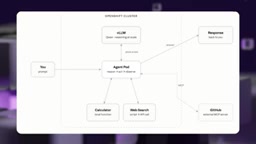
The key insight here is that when moving to production, the Agent's own code barely needs to change. What changes is where the model runs and how it's served. The entire migration touches just two things: the inference serving layer and the deployment target.
Step 1: Replace Ollama with vLLM for Inference
The first piece of the migration is the model itself. Ollama is great for local single-machine inference, but production requires an inference server that can handle real concurrent traffic — which is exactly what vLLM is built for.
vLLM's core value is efficiently handling large numbers of concurrent requests against the same model. When multiple users or multiple Agents hit the model at the same time, vLLM can sustain that load. It's still the same model (Qwen3), but the nature of the work has changed — from serving one person to serving a cluster's worth of traffic.
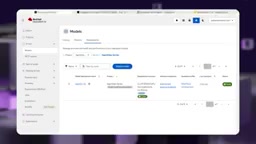
In Red Hat OpenShift AI, you can deploy your own model through AI Hub. The demo pulls the model directly from Hugging Face via URI, but models can also be hosted from a variety of storage locations. Once you select your hardware and runtime, you're ready to deploy. After deployment, you get three things:
- An internal link: for other services inside the cluster to call the model
- An external link: for accessing the model from outside the cluster
- An API Key: for authenticating requests to the model
One thing worth highlighting: while the Agent code stays the same, there is one configuration change that's absolutely required. In the .env file, the endpoint that previously pointed to Ollama on localhost now points to the vLLM service running inside the cluster. An API Key is added (because the model is now hosted publicly online), and the model ID is adjusted slightly to match the format vLLM expects. This config file is essentially the entire difference between the laptop version and the cluster version.
It's also worth noting that this architecture is agnostic about where the model comes from. Whether you self-host an open-source model or call Claude or GPT directly, the Agent doesn't care where the inference comes from — it just needs a conversational endpoint. The demo uses self-hosting simply because it makes for a more illustrative use case.
vLLM's ability to handle concurrency efficiently comes down to two core mechanisms. The first is PagedAttention: traditional inference frameworks require pre-allocating a large contiguous block of GPU memory for the KV cache (the intermediate attention state) for each request, which causes significant memory fragmentation and limits concurrency. vLLM borrows the idea of paging from OS virtual memory, splitting the KV cache into fixed-size blocks that are allocated dynamically on demand — improving memory utilization by several times. On top of that, vLLM supports Continuous Batching: rather than waiting for a full batch of requests to accumulate before running inference together (as in static batching), Continuous Batching allows new requests to join an in-progress batch at any time, dramatically reducing queuing latency. Together, these two techniques typically give vLLM an order-of-magnitude throughput advantage over Ollama on the same hardware — which is why it has become the de facto standard for production inference serving.
Step 2: Containerize the Agent and Deploy to the Cluster
The second piece is getting the Agent itself onto the cluster. The process is fairly standard:
- Grab the login command from the OpenShift console, paste it into the terminal to authenticate
- Start Podman (or Docker)
- Build the container image
- Push the image to the Quay image registry
- Deploy
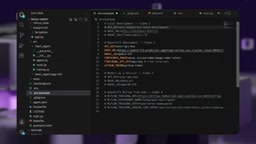
The demo wraps all of these steps into make commands for automation; the full commands are available in the accompanying repository. About a minute later, the model endpoint and the Agent are running side by side on the same cluster. The Pod gets scheduled and starts — the Agent that was running on a laptop a minute ago is now alive as a Pod on OpenShift.
OpenShift is Red Hat's enterprise container platform built on top of Kubernetes — the relationship is similar to RHEL and the Linux kernel. Kubernetes is the open-source foundation; OpenShift adds developer workflows, a built-in image registry, CI/CD pipelines, and stricter security policies (such as disallowing containers from running as root by default). Quay, used in the demo, is Red Hat's container image registry service — similar in function to Docker Hub or GitHub Container Registry, but with finer-grained access control and image security scanning. Podman is a daemonless container runtime led by Red Hat, with a CLI that's highly compatible with Docker. The key difference is that Podman doesn't require a persistent background daemon — each container runs directly as a user process, providing better privilege isolation. For developers already familiar with Docker, the learning curve for switching to Podman is nearly zero.
Verification: Tool Calls Work Just Fine on the Cluster
With the deployment done, you can validate the Agent by throwing questions at it that rely on its custom tools. The demo tests web search and math calculations, then has the Agent look up an issue on GitHub and create a new one via the GitHub MCP tool.
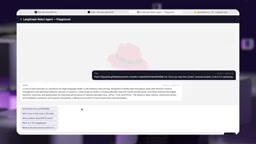
The Agent successfully performs both read and write operations through the same MCP tool, initiated from wherever it's running inside the cluster. The chat logs are now viewed through Red Hat OpenShift AI rather than a local terminal. The full stack — model, Agent, and Playground — is deployed inside the cluster, with inference served by vLLM instead of Ollama.
"Successfully Deployed" Is Not the Same as "Production Ready"
This is the most sobering part of the demo: deployed and production ready are two completely different animals.
The current Pod has a range of issues that are unacceptable in a real production environment:
- It can read any file inside its own container and make outbound calls to almost anywhere
- There is no real observability into its behavior — you can't clearly see what it's doing
- There are almost no meaningful resource limits
- There's no concept of safe multi-team sharing
- The Agent has no assigned permissions, and no scoping has been applied to its behavior
In other words, getting it running is just the first step. Permission isolation, resource quotas, observability, and behavioral constraints — these are the hard problems that actually get an Agent into production, and each one deserves its own deep dive.
The production-readiness challenges mentioned here have mature solution paths within the Kubernetes/OpenShift ecosystem. Permission isolation is typically handled through RBAC (Role-Based Access Control) and ServiceAccounts, granting Agent Pods only the minimum necessary privileges. Resource limits are enforced by setting resources.requests and resources.limits in the Pod manifest to cap CPU and memory usage, preventing a single Agent from exhausting cluster resources. Observability relies on standard protocols like OpenTelemetry to export the Agent's tool call traces, latency, and error rates to platforms like Prometheus/Grafana or dedicated LLM observability tools (such as Langfuse or Phoenix). Observability is particularly tricky for AI Agents — the model's reasoning process is itself a black box, and tool call sequences are non-deterministic, making traditional APM tools hard to apply directly. This is one of the most active areas of infrastructure development in AI engineering today.
Takeaways
The core lesson from this migration is highly practical: taking a local Agent to production is not about rewriting the Agent's logic — it's about swapping the inference serving layer (Ollama → vLLM) and the deployment target (laptop → Kubernetes/OpenShift). The actual code changes are minimal; it's essentially just a config file. But once the deployment is successful, security and governance are where the real work begins.
Related articles

JobRunner MCP Server: AI Agents Can Now Fix Failed Java Jobs
JobRunner launches an open-source MCP server enabling AI agents to view cluster status, diagnose failures, and recover Java jobs—incident response from any cloud coding environment or existing agent.

MLAI Digital Launches 9 Security Agents: MCP Server Safeguards the Full Lifecycle of Agentic AI
MLAI Digital launches Security MCP Server with nine built-in specialized security agents covering vulnerability discovery, attack simulation, prompt injection detection, API and infrastructure assessment, and accelerated remediation—embedding security validation across the full Agentic AI lifecycle from development to production.

Running Isaac Lab on H100 GPUs: Exploring Better Approaches
Exploring optimization methods for running Isaac Lab on NVIDIA H100 GPUs, including MIG configuration, mixed precision, TensorRT acceleration, and community experience to improve robotics simulation and reinforcement learning efficiency.