Full AI Comic Drama Workflow with WorkBuddy: 8 Steps from Zero to Final Cut

A Bilibili creator uses WorkBuddy's eight-step pipeline to break down AI comic drama production, from topic selection to publishing without skipping a step.
Based on a Bilibili creator's WorkBuddy hands-on tutorial, this article maps out the complete production path for AI comic dramas. It first clarifies the difference between comic dramas and animation: comic dramas apply local motion effects to static storyboards, have low costs, use vertical-screen short episodes, and tell stories through visuals plus sound. It then introduces WorkBuddy's core capabilities—model selection, workspace, and Experts and Skills sections—which enable it to replace traditional multi-role collaboration. The focus is the eight-step pipeline: topic planning, script writing, storyboard script, image assets, video generation, voiceover and music, editing and compositing, and export and publishing, emphasizing that the output of the previous step is the raw material of the next and cannot be skipped. The article also offers the practical tip of summoning individual experts rather than an expert team, and points out that the most common beginner mistake is skipping early planning and going straight to video generation.
AI comic dramas are rising fast on short-video platforms, but many people get stuck at "I know it's popular, but I don't know where to start." This WorkBuddy hands-on tutorial posted by a Bilibili creator breaks down comic drama production into a clear eight-step assembly line. Based on that tutorial and an analysis of WorkBuddy's capabilities, this article maps out a reusable production path.
A Comic Drama Is Not Animation: Understand the Underlying Logic First
The tutorial opens by clarifying an easily confused concept: a comic drama is "a comic that moves." In essence, it applies local motion effects to static storyboard frames—push-ins, pull-outs, pans, parallax layering—then adds voiceover and background music and edits it into a short video. Animation, by contrast, is drawn frame by frame to create continuous movement, and its production cost is far higher.
According to the creator's summary, comic dramas have three notable characteristics: they are mainly vertical-screen, suited to mobile platforms such as Douyin, Kuaishou, and Hongguo; each episode is very short, usually around one minute, and if the first few seconds fail to hook viewers, they will swipe away; and they tell stories through storyboard frames plus sound, without needing live-action shooting.
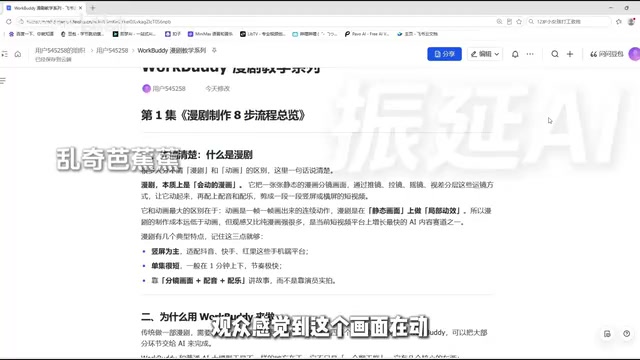
Precisely because production cost is much lower than animation while the viewing experience is stronger than pure comics, comic dramas are growing vigorously on short-video platforms.
Storyboard is a core concept in film, television, and comic production. It refers to breaking down the script into individual shots and using sketches or text to describe each shot's composition, shot size, camera movement, character actions, and dialogue. A storyboard functions like a construction blueprint—the script decides "what story to tell," while the storyboard decides "how each frame is presented." In comic dramas, the storyboard script is the intermediate layer connecting the text script to AI image/video generation, because AI generation tools need explicit visual instructions (such as "medium shot, push-in, character A turns around") rather than literary narrative description. Storyboard quality directly determines the consistency of subsequent images and videos, which is why the third step in the eight-step pipeline cannot be skipped.
Why Use WorkBuddy: It Is More Than a Chat Box
Traditionally, making one comic drama requires collaboration among four or five roles—screenwriter, storyboard artist, illustrator, voice actor, and editor—and it is hard to move forward if any one is missing. WorkBuddyAd positions itself as "a domestic alternative to Codex," with an interface layout and operating logic that are basically the same, but it is better adapted to the domestic office software ecosystem, requires no special network configuration, and can be used free of charge.
Its essential difference from ordinary AI large-model tools lies in several core capabilities: it can select different AI models as the underlying engine; it provides a workspace where generated content can be categorized and saved into corresponding folders; and most importantly, it has two major sections, "Experts" and "Skills"—experts are professional roles from various industries, such as comic drama screenwriter, comic drama storyboard artist, and art director; skills are tools such as image processing and video generation.
This tutorial contains 28 knowledge points in total, divided into an introductory section, case section, advanced section, and industry section. The accompanying materials include four major parts: installation, case breakdown, Skill customization, and industry implementation.
The Eight-Step Pipeline: Not a Single Step Can Be Skipped
The creator divides comic drama production into eight steps and emphasizes that this is a production line: the output of the previous step is the raw material of the next.
Step 1: Topic Planning
Determine three things—who the audience is, what the subject matter is, and what art style to use. The audience determines the mode of expression: young women aged 18 to 25 are suited to themes such as filling pets and counterattack, while men around 30 are better matched to rebirth urban war god themes. The art style must be fixed at project initiation. If the same story uses a 3D comic drama style versus a Chinese-style thick-paint style, the viewing experience and audience will be completely different. This step outputs the story synopsis, which is the foundation of the entire comic drama.
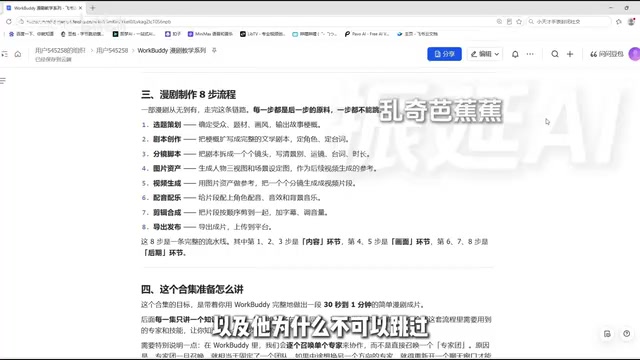
Art style in AI comic drama production is not only an aesthetic choice but also a technical variable affecting generation consistency. Common comic drama art styles include 3D comic drama style, Chinese-style thick paint, Japanese cel-shading, and American-style thick paint. Different art styles pose different levels of difficulty for AI models to understand: thick-paint styles have rich light and shadow layers, making it easy for models to generate a unified texture; while clean-lined cel-shading styles impose higher requirements on character silhouette consistency. More critically, once the art style is determined, all subsequent image assets and video generation should use the same set of prompts and reference image system. Changing the art style midway will cause character appearance to break. Therefore, the tutorial's emphasis on "fixing the art style at project initiation" is essentially locking technical parameters for the subsequent pipeline.
Step 2: Script Writing
Expand the story synopsis into a complete literary script, clarifying character identities and motivations, dialogue content, and the order in which each scene occurs. The script is the basis for all later stages; storyboarding, images, and videos must all return to the script. This step must be written solidly.
Step 3: Storyboard Script
Break the script into individual shots, and for each shot clearly write four things: shot size (close-up, medium close-up, medium shot, full shot, long shot), camera movement (push, pull, pan, tracking), character actions and dialogue, and shot duration. The storyboard script is the bridge connecting the script and the visuals—the script is written for reading as text, while the storyboard script is used when generating visuals.
Step 4: Image Assets
Generate character three-view sheets and scene setting images according to the storyboard script. The purpose of the three-view sheet (front, side, back) is to ensure that the character looks consistent when turning to any angle in subsequent videos, rather than looking different in every image. Scene setting images cover every scene in which the story takes place. The creator particularly emphasizes that this step is the most easily overlooked, yet it has the greatest impact on the final result.
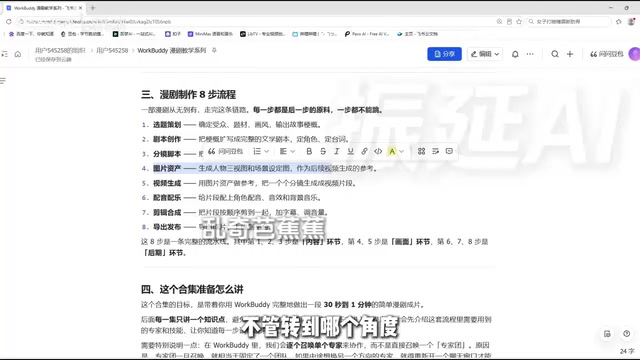
Character three-view sheets (front, side, back) are a standard practice in the animation and comic industries for ensuring character consistency. In traditional hand-drawing, three-view sheets serve as references for artists; in AI generation workflows, three-view sheets are input to the model as "character reference images," so that when the model generates the same character in different shots and from different angles, facial features, hairstyle, and clothing details remain consistent. Without three-view sheets, AI easily generates characters that "look similar but are different" across shots, and viewers will clearly feel pulled out of the story. Together with scene setting images, three-view sheets form the comic drama's "visual asset library." In the subsequent video generation stage, each shot calls the corresponding reference image from the library, which is the key means of solving the "character breakdown" problem in AI video.
Step 5: Video Generation
Using image assets as references, generate video clips one by one for the shots in the storyboard script. A comic drama is not generated as a whole episode at once; instead, each shot is generated as a clip of a few seconds to a dozen or so seconds, and then they are assembled.
Image-to-Video is currently the mainstream mode of AI video generation: the user provides a static image as the first frame or reference, and the model generates a dynamic clip of several seconds based on it. Compared with text-to-video, image-to-video can more precisely control image content and character appearance, because the image itself has already locked composition and appearance. Comic drama production takes advantage of this characteristic—first ensuring that each shot's image is correct through image assets, then letting the model add local motion effects (push/pull/pan/tracking, parallax layering) to the correct image. This segmented "image first, video second" generation method is more controllable than generating an entire episode at once, and it also makes it easy to redo a single shot if something goes wrong without affecting other clips.
Step 6: Voiceover and Music
Add character voiceover, sound effects, and background music to the video clips. Voiceover should match the character's identity and personality; sound effects cover environmental sounds such as fight sounds, footsteps, and doors closing; background music sets the emotional tone. Viewers cannot keep watching a comic drama without sound.
Step 7: Editing and Compositing
Cut the clips together in the order of the storyboard script, remove redundant and slow-paced parts, add subtitles, and adjust the volume ratio between voiceover and background music so that the voice is clearly audible and the music does not steal the scene.
Step 8: Export and Publish
Choose the resolution and aspect ratio (vertical or horizontal), match them to the publishing platform, and then export and upload.
The eight steps can be grouped into three categories: steps one, two, and three are the content stage; steps four and five are the visual stage; and steps six, seven, and eight are the post-production stage. The most common mistake beginners make is skipping the earlier steps and going straight to video generation, resulting in chaotic visuals, characters that look different in every image, and a story that cannot be told clearly.
An Important Technique: Summon Experts One by One
There is a noteworthy operational detail in the tutorial: in WorkBuddy, you should summon individual experts one by one for collaboration, rather than directly summoning the entire expert team. The reason is that once an expert team is summoned, it is fixed as a team, and if you want to switch to an expert in a different direction midway, you must reopen the chat window; individual experts, however, can be swapped as needed, summoning the corresponding expert for each step and switching at any time after finishing, which is much more flexible.
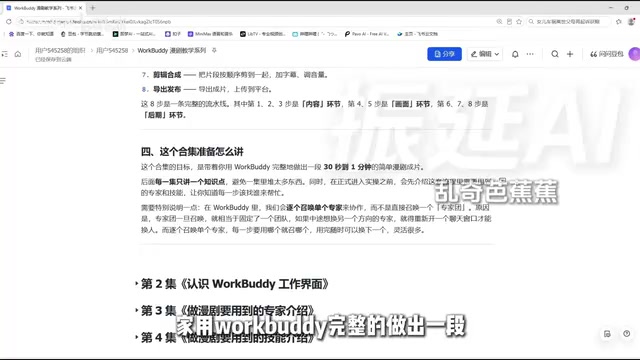
Course Planning and Practical Advice
The goal of this series is to guide learners through using WorkBuddy to complete a simple comic drama final cut of 30 seconds to one minute. Each episode covers only one knowledge point. Before entering hands-on practice, two episodes first explain the experts and skills that will be used in the workflow, so learners know whom to summon and which skill to use at each step. The creator invested nearly three months polishing the course, and the accompanying materials include 12 commonly used Skills and more hands-on materials.
For zero-foundation learners, the value of this eight-step path lies in providing a global map—first run the workflow through, then fill in details episode by episode. This is easier to stick with than diving straight into tool features.
Related articles
 Tech Frontiers
How Do You Stop AI Agent Emails From Sounding Like AI? One Developer's Solution
AI agent emails always sound like AI? A developer shares reright: a rewrite step that validates numbers, names, and links, preventing humanizers from tampering with key info. Test data and integration details inside.
 Tech Frontiers
Starlink Mobile: SpaceX's Carrier Ambitions and the 5G Deployment Challenge
SpaceX plans to make Starlink Mobile a mainstream carrier, deploying thousands of direct-to-cell satellites and building a terrestrial 5G network to challenge AT&T, Verizon, and T-Mobile. This article analyzes its dual-track strategy, 5G deployment challenges, and the competitive landscape.
 Tech Frontiers
OpenAI Raises Another $11 Billion, Valuation Hits $1.25 Trillion
OpenAI has raised an additional $11 billion in a new funding round at a valuation of $1.25 trillion. The deal is not yet closed and is expected to be completed in the coming weeks, further consolidating its leading position in AI.