Full-Stack Delivery with Claude Code: One Person Completing an Enterprise-Level RAG Project
AI programming tools are reshaping full-stack development, enabling one person to deliver a small team's output.
This article explains how AI programming tools are restructuring full-stack development workflows. Core insights include: enterprise-level RAG projects should adopt a "backend-drives-frontend" strategy, validating the technical pipeline before developing the interface; specification documents serve as the critical foundation for AI-collaborative development, solving the AI session amnesia problem and ensuring project consistency. Those who master AI programming tools can match the output of a small team working alone.
AI Programming Is Reshaping the Software Development Workflow
When building full-stack projects with AI, the most common failure point isn't writing code itself—it's not thinking clearly from the start about whether to begin with the frontend or the backend. Get the direction wrong, and every line of AI-generated code piles up in the wrong place. Many people spend three days coding with AI only to realize that their frontend and backend interfaces are completely misaligned, forcing them to manually rewrite more than half the project.
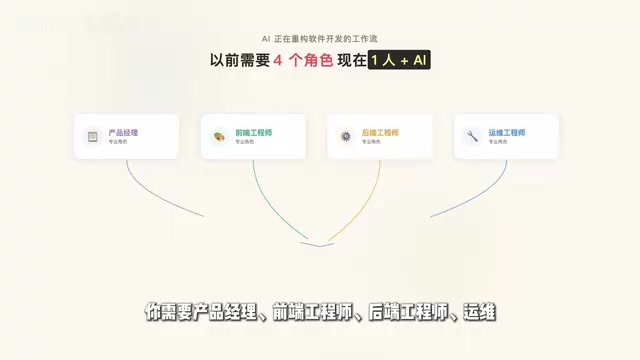
Previously, delivering a complete full-stack project required four roles working in tandem: a product manager, a frontend engineer, a backend engineer, and an ops engineer. Now, one person plus an AI programming tool can potentially handle the work of all four roles.
Industry Context: The Essence of Full-Stack Role Restructuring The traditional division of labor in software development stems from the specialized barriers of technical complexity: frontend engineers need to master the React/Vue ecosystem, CSS layouts, and browser compatibility; backend engineers need familiarity with database design, API security, and performance optimization; ops engineers need to understand containerization, CI/CD, and cloud service configuration. The learning curves of these knowledge domains made it difficult for a single full-stack developer to guarantee engineering quality. AI programming tools are compressing the learning costs of these specialized barriers, but they haven't eliminated the need for judgment—when to interrupt the AI, how to verify the correctness of generated code, how to design system architecture—these still require human engineering experience. Therefore, the essence of AI full-stack delivery capability is the product of "engineering judgment × AI execution power," not merely tool proficiency.
What does this mean? Someone who has mastered AI programming tools can deliver output equivalent to what a small team used to produce. But those still stuck at the stage of using AI to write code snippets will see the gap between themselves and the former group widen every month. This article breaks down how to use Claude Code to drive the complete delivery of an enterprise-level multimodal RAG project, from technical research to deployment.
Technical Context: What Is Multimodal RAG RAG (Retrieval-Augmented Generation) is the core architectural paradigm for enterprise AI applications today. It addresses two fundamental flaws of large language models: the knowledge cutoff date and hallucination problems—the model no longer relies on knowledge frozen during training, but retrieves from external knowledge bases in real-time when answering questions. Traditional RAG only handles text, while multimodal RAG further integrates retrieval capabilities for images, tables, PDFs, and other unstructured data, making internal technical documents, product manuals, and financial reports all searchable knowledge sources. Vector databases (such as Pinecone, Weaviate, Chroma) are the storage core of the RAG architecture—they convert text and images into high-dimensional vectors and retrieve information through semantic similarity rather than keyword matching. This is why RAG systems can understand "the penalty clause in this contract" rather than just searching for the keyword "penalty."
Frontend-First or Backend-First: Wrong Direction Means Total Failure
These two paths have completely different workflows, and which one you choose depends on your project characteristics.
Frontend-First: When the Product Form Is Already Determined
Starting with the frontend means you already have a clear picture of what the product looks like and how users interact with it. You produce the UI prototype first, lock down the page interactions, then build backend services to support them. This approach suits ToC products with clear requirements and complex interactions.
Backend-First: When Technical Feasibility Needs Validation
Starting with the backend means first verifying whether the technology can actually work. For example, if you're building an internal knowledge base Q&A system for your company, you need to first get the retrieval pipeline running, define the interface specifications, and confirm this path is viable before circling back to use a PRD to drive the frontend.
For enterprise-level RAG projects, starting with the backend is the safer choice. Because if the core pipelines—multimodal retrieval, vector databases, LLM calls—can't be made to work, no amount of beautiful frontend design matters; it's all castles in the air.
Engineering Context: The Root Cause of Frontend-Backend Interface Misalignment Frontend-backend interface misalignment is one of the most frequent causes of rework in traditional collaborative development. The fundamental reason is that when frontend and backend development proceed in parallel, both sides have differing implicit assumptions about data structures, field naming, and error handling that aren't synchronized. The industry typically uses the API-First development methodology to solve this: first define the interface contract using OpenAPI/Swagger, then both frontend and backend develop against the same contract, and during final integration only verify whether the implementation conforms to the contract. In AI-collaborative development scenarios, this problem is further amplified—AI may generate interface definitions with vastly different styles across different sessions. The "backend-drives-frontend" strategy described in this article is essentially the combination of API-First methodology with AI workflows: first establish the interface de facto standard with a backend MVP, then use PRD documentation to convey this standard to the frontend development session, architecturally eliminating the possibility of interface drift.
Complete Delivery Process for an Enterprise-Level RAG Project
The entire project delivery process can be broken down into five key steps:
- Technical Research: Use Claude Code for in-depth research to determine the tech stack
- Generate Specification Documents: Lock down the architecture and establish a consistency foundation for subsequent AI collaboration
- Build the Backend MVP: Get the core pipelines running (retrieval, Q&A, multimodal processing)
- Output PRD to Drive Frontend: Design the frontend interface based on validated backend capabilities
- Frontend-Backend Integration and Launch: Use Claude Code throughout to minimize hand-written code
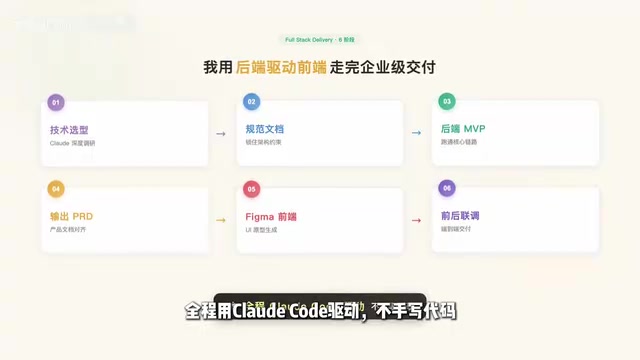
The core philosophy of this process is "backend drives frontend"—first ensure the technical pipeline works, then use product documentation to drive interface development, maximizing the avoidance of frontend-backend interface misalignment.
Specification Documents: The Hidden Foundation of AI-Collaborative Development
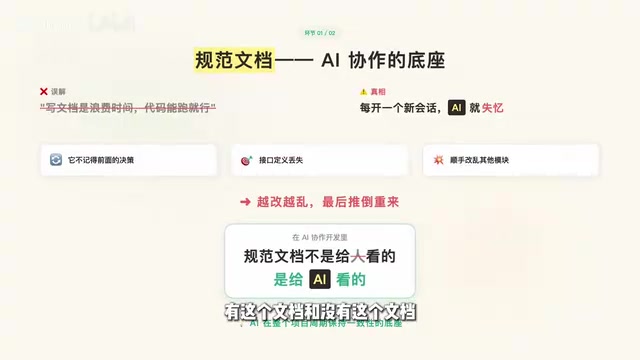
Many people think writing documentation is a waste of time—as long as the code runs, that's enough. But in AI-collaborative development, the role of specification documents has undergone a fundamental transformation—they're not for humans to read; they're for the AI to read.
Why Specification Documents Are So Critical
Working on projects with AI presents an unavoidable problem: every time you open a new session, the AI has amnesia. It doesn't remember what decisions you made previously, how interfaces were defined, or where architectural constraints lie. The result is that when you modify one module, it casually changes the logic in another module too, creating increasing chaos.
Technical Context: The Root Cause of AI Session Amnesia The technical root of AI session amnesia lies in the stateless nature of large language models. Every new session starts from zero with no persistent project memory. This creates a fundamental contradiction with how human developers work—human engineers accumulate project context in their minds, while LLMs are essentially "on their first day at work" every time. The industry has multiple solutions for this: storing session history in vector databases, Memory modules, and the specification document injection method described in this article. The advantage of the specification document injection method lies in its determinism—it's carefully distilled structured knowledge crafted by humans, more controllable and precise than automated memory retrieval, and particularly suited for engineering projects requiring strict consistency. Injecting the specification document as a system prompt or first message when starting each new session is equivalent to giving the AI a "project onboarding," allowing it to work within a unified constraint framework.
In AI-collaborative development, specification documents serve as the foundation that maintains consistency for the AI throughout the entire project lifecycle. The trajectory of a project with versus without this document is completely different.
What Should Specification Documents Contain
A qualified AI collaboration specification document should at minimum cover:
- Tech Stack Constraints: Explicitly state the frameworks, library versions, and database types being used
- Interface Specifications: API paths, request/response formats, error code definitions
- Architectural Constraints: Module divisions, data flow, dependency relationships
- Coding Standards: Naming conventions, directory structure, commenting requirements
Each time you start a new session, feeding the specification document to Claude Code as context allows it to work under unified constraints rather than operating in a vacuum every time.
Related articles
 Product Reviews
The Programmer's Desk Setup Guide: Building a Workspace That Feels Like Home
Discover how programmers build productive, comfortable workspaces. From multi-monitor setups to ergonomic design, explore the desk philosophy that drives focus and flow.
 Product Reviews
Qoder vs Cursor Real-World Comparison: Which $20/Month AI IDE Is Better?
Hands-on comparison of Qoder vs Cursor AI IDEs: Agent autonomy, human interaction count, and architecture decisions. Qoder needed only 2 interactions vs Cursor's 8.
 Product Reviews
Cursor Cloud Agent Demo: Eliminating Bottlenecks Across the Entire Software Development Lifecycle
Deep analysis of Cursor's Cloud Agent demo showing how cloud VMs, automated test artifacts, and a full-chain control plane systematically eliminate human bottlenecks across the software development lifecycle.