Fwrd: Forward iPhone SMS to Slack/Discord/Telegram

Fwrd uses Apple Shortcuts to forward iPhone SMS to Slack, Discord, and Telegram—lightweight but dependent on the phone being online.
Fwrd is a lightweight tool launched on Product Hunt whose core function is forwarding qualifying iPhone SMS to Slack, Discord, or Telegram. It doesn't build its own relay server; instead, it forwards locally on the iPhone via a "When Message Received" automation that users create in Apple Shortcuts, so no account registration is required and SMS content doesn't pass through third-party servers. The product offers 15 free forwards per month, with payment required beyond that, and includes a setup guide. Typical scenarios include dual-phone users forwarding verification codes and bank alerts to commonly used apps, and small teams syncing business number SMS to Discord channels for collaborative viewing. Its main limitations are dependence on the iPhone being continuously online, possible false negatives in filtering rules, occasional automation failures after system updates, and the need to pay attention to visibility scope when forwarding sensitive SMS to group channels.
Title
Fwrd: Forward iPhone SMS to Slack/Discord/Telegram
Meta Description
Fwrd is a tool that forwards iPhone SMS to Slack, Discord, or Telegram via Apple Shortcuts automation, with no account required and 15 free forwards per month. This article explains how it works, its use cases, and its limitations.
Article Content
Anyone who switches back and forth between iPhone and Android has run into the same annoyance: verification codes, delivery notifications, and bank alerts only land in SMS, but you're sitting in front of Slack or Discord. Moving SMS into team collaboration tools seems simple, but in practice it either relies on carrier gateways or requires an always-on server. Fwrd, launched on Product Hunt, offers a lighter answer.
What Is Fwrd
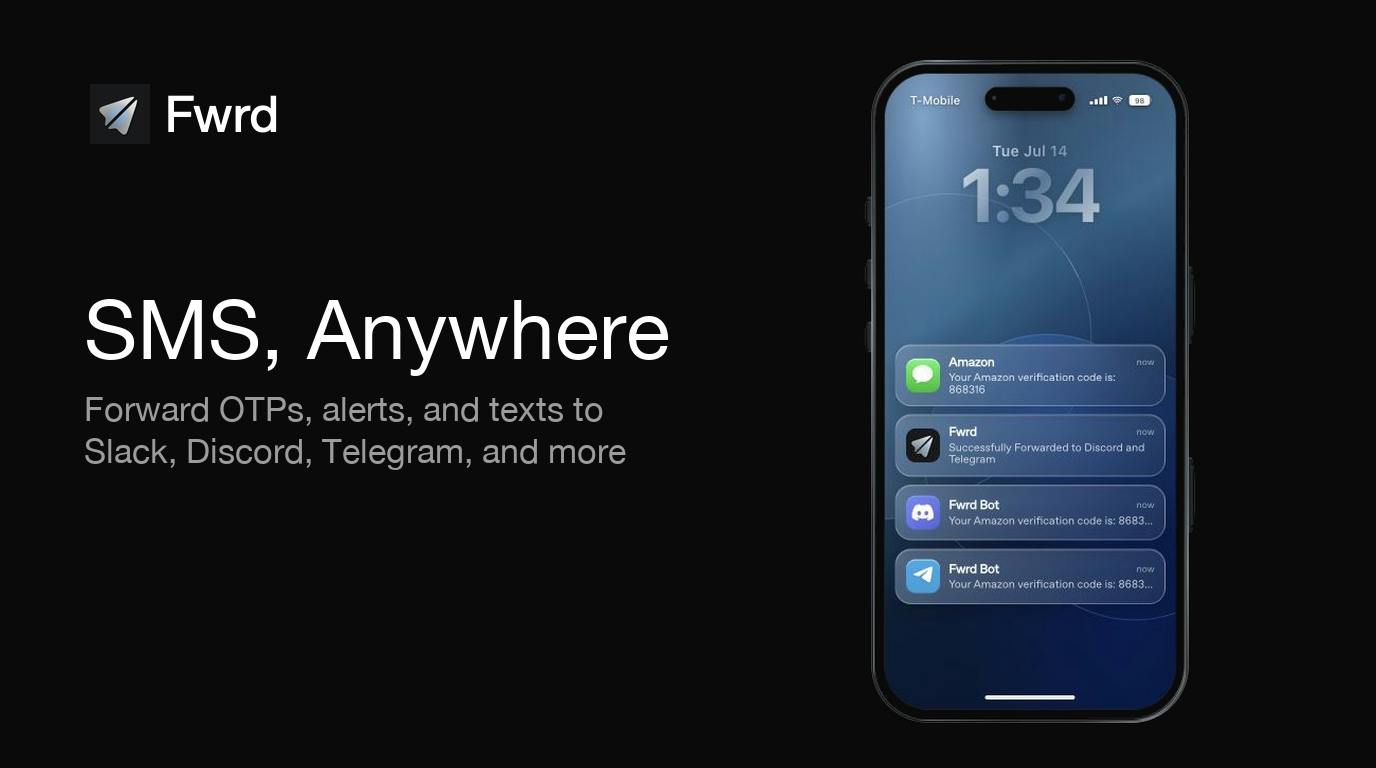
Fwrd's positioning can be summed up in one sentence: forward qualifying iPhone SMS to Slack, Discord, or Telegram. According to its Product Hunt page, it doesn't build its own SMS relay server; instead, it uses a Message automation that users create in Apple Shortcuts to handle forwarding. The automation runs locally on your iPhone and sends SMS to your chosen target channel.
The direct benefit of this design is that no Fwrd account is required, meaning SMS content doesn't pass through a third-party account system. The product offers 15 free forwards per month, after which payment is required. The official site also provides an automation setup guide (fwrdsms.com/guides/automation) to help users build the shortcut.
How It Works: Apple Shortcuts as the Forwarding Engine
The key to understanding Fwrd is understanding its relationship with Apple Shortcuts. It isn't a standalone forwarding app; it's more like a "hosting and quota" shell wrapped around a Shortcuts automation.
Apple Shortcuts itself supports a "When Message Received" automation trigger and can push content to Slack, Discord, and Telegram via Webhooks or app actions. Fwrd's value lies in productizing this process: providing reusable templates, target-side configuration, and usage quota management. The forwarding action happens on the iPhone, with the chain being "SMS → Shortcuts → target platform," and no Fwrd server is involved in processing the content.
The advantage of this architecture is a clear privacy boundary; the cost is dependence on the iPhone being online—when the phone is offline or powered off, the automation naturally cannot run.
Apple Shortcuts' "When Message Received" automation is a personal automation trigger on iOS that users can create in the Shortcuts app's "Automation" tab, setting it to execute follow-up actions when an SMS arrives from a specific sender or containing specific keywords. This automation requires user confirmation on first run by default, and newer iOS versions allow turning off "Ask Before Running" for fully background execution. Note that the automation only runs locally on the iPhone and requires the device to be unlocked and available; the SMS database is not synced to any third party outside iCloud, so this chain naturally has strong privacy characteristics.
Webhook is an event-triggered HTTP callback mechanism: when a specified event occurs in a system, it proactively sends an HTTP request (usually POST) to a pre-configured URL, pushing event data in JSON or similar formats. Slack, Discord, and Telegram all provide their own Incoming Webhook addresses; users simply enter the address into the Shortcuts "Get Contents of URL" action to push SMS body text to the corresponding channel. Compared to calling a full Bot API, Webhooks require no key application and no long-lived connection maintenance, making them the lowest-cost integration for personal automation scenarios—the downside being no ability to receive replies or do two-way interaction.
The Real Problem These Tools Solve
SMS forwarding sounds like a niche need, but its use cases are actually quite specific.
For individual users, the most typical is the dual-phone crowd: your main device is Android or a work computer, and a backup iPhone is only used for receiving SMS. Forwarding verification codes, bank transaction alerts, and package pickup codes to your frequently used Telegram or Slack saves you from reaching for your phone one more time.
For small teams, the scenario leans toward operations and customer service: sharing a business number and syncing customer SMS to a Discord channel in real time so all team members can see it, rather than taking turns checking the same phone. Compared to applying for a carrier-level SMS API, the startup cost of using something like Fwrd is nearly zero.
Carrier SMS API (SMS Gateway) refers to interface services provided by telecom carriers or their agents that allow programmatic sending and receiving of SMS. Common forms include SMS modem/gateway hardware, A2P (Application-to-Person) SMS channels, and cloud communication platforms. These services typically require enterprise qualifications and real-name registration, are billed per message, and have strict compliance requirements on sending frequency and content templates. Their advantages are stability, programmability, and independence from any single phone being online, making them suitable for large-scale notifications and customer service systems; their disadvantages are that the activation threshold and ongoing costs are significantly higher than personal automation solutions, making them uneconomical for users who just want to sync a few SMS to a chat channel.
Free Quota and Cost
Fwrd uses a "free to start + pay per use" model, with 15 free forwards per month. This quota is suitable for validating whether the need exists: if you only occasionally receive a few verification codes, it's basically enough; once used for business notifications or multi-person collaboration, you'll hit the cap quickly.
On Product Hunt, Fwrd received 84 upvotes and 4 comments, ranking 18th. The vote count isn't particularly outstanding, indicating it's still a niche tool targeting a specific pain point rather than a mainstream hit.
Limitations Worth Noting
Before choosing this kind of solution, there are several real constraints to think through.
The "qualifying" nature of forwarding rules means not all SMS will be forwarded; the specific filtering logic needs to be configured according to the official guide and may produce false negatives. At the same time, the entire chain depends on the iPhone being continuously online, and Apple Shortcuts automations occasionally fail after system updates, making stability inferior to server-side solutions. Additionally, SMS content involves highly sensitive information such as verification codes, so when forwarding to team channels, pay attention to the visibility scope of channel members.
Summary
Fwrd uses the "local runway" of Apple Shortcuts to bypass the cost and privacy issues of traditional SMS gateways, making it an extremely low-barrier option for dual-phone users and small teams that need to share SMS. Its ceiling is also clear: limited by iPhone online status, limited free quota, and filtering rules that need self-tuning. Treating it as a lightweight patch rather than an enterprise-grade solution will set more accurate expectations.
One-line Summary
Fwrd uses Apple Shortcuts to forward iPhone SMS to Slack, Discord, and Telegram—lightweight but dependent on the phone being online.
Paragraph Summary
Fwrd is a lightweight tool launched on Product Hunt whose core function is forwarding qualifying iPhone SMS to Slack, Discord, or Telegram. It doesn't build its own relay server; instead, it forwards locally on the iPhone via a "When Message Received" automation that users create in Apple Shortcuts, so no account registration is required and SMS content doesn't pass through third-party servers. The product offers 15 free forwards per month, with payment required beyond that, and includes a setup guide. Typical scenarios include dual-phone users forwarding verification codes and bank alerts to commonly used apps, and small teams syncing business number SMS to Discord channels for collaborative viewing. Its main limitations are dependence on the iPhone being continuously online, possible false negatives in filtering rules, occasional automation failures after system updates, and the need to pay attention to visibility scope when forwarding sensitive SMS to group channels.
Related articles

Chain of Thought Isn't Just for AI: How Humans Can Use CoT to Improve Thinking Quality
Chain of Thought isn't just a prompt trick for large models. Starting from a Hacker News discussion, this article analyzes why CoT works for human thinking too, breaks down actionable ways to transfer it, and highlights the key differences between human CoT and machine CoT.
Cloudflare Teams Up with OpenAI: Closi…
Cloudflare Teams Up with OpenAI: Closing the Loop from Vulnerability Discovery to Defense with AI
Cloudflare uses OpenAI Daybreak to investigate security vulnerabilities and generate reviewable remediation plans, while developers use Codex to boost coding efficiency and quality.

Orca Multi-Agent Orchestration in Practice: A Guide to Parallel Collaboration with Claude and Codex
Orca is Stable AI's free open-source agent workbench supporting 34 agents like Claude Code and Codex in parallel. Learn its Git worktree isolation, multi-model orchestration, and mobile management.