Ganella: Turning the Mac Dock into a Real-Time Widget Hub
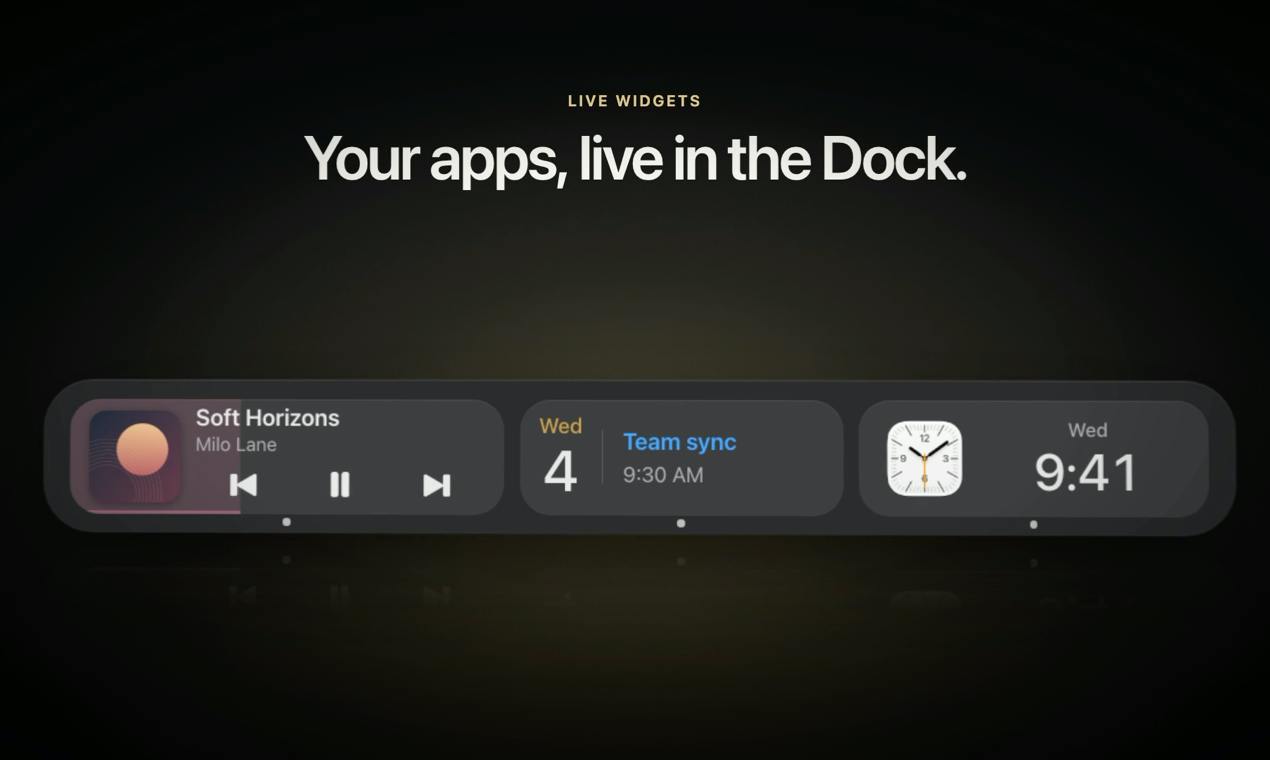
Ganella turns the Mac Dock into an operable, status-displaying real-time widget panel.
Ganella is a tool that aims to replace the native macOS Dock by upgrading app icons into real-time widgets covering Spotify/Music controls, calendar, browser tabs, Xcode build status, terminal, and AI agents like Claude, Codex, and ChatGPT. It also includes clipboard history, app folders, per-display Dock positions, four appearance styles, and costs $9.99 as a one-time purchase after a 7-day free trial. It received 85 votes and 4 comments on Product Hunt, ranking 7th for the day.
From Launcher to Info Panel: Ganella Redefines the Mac Dock
Mac users have a complicated relationship with the Dock: it's the most reliable app launcher, and also one of the most space-wasting elements on screen. A tool called Ganella, spotted on Product Hunt, tries to turn this "launcher" into an "info panel." Its approach is straightforward—your frequently used apps shouldn't just be an icon, but a live widget you can operate directly and that displays status.
Ganella positions itself as a replacement for the native macOS Dock. Users can place app widgets of their choice in the Dock area, including playback controls for Spotify and Music, calendar, open browser tabs, Xcode build status, terminal, and AI agents like Claude, Codex, and ChatGPT. In other words, it compresses information that would normally require switching windows to view or operate into the Dock strip.
The macOS Dock is a system-level resident process (managed by Dock.app) responsible for launching apps, minimizing windows, and switching. For third-party tools to "replace" or "enhance" the Dock, there are usually two paths: one is to fully take over the Dock process (high risk, easily affected by system updates), and the other is to overlay a floating panel or auxiliary window near the Dock position. Ganella falls into the latter—it doesn't actually kill the system Dock, but renders custom widgets in its place. This explains why it can retain the native Dock's stability while achieving the "info panel" transformation. Understanding this helps assess its compatibility boundaries and upgrade risks.
Core Feature Breakdown: Which Apps Have Been "Widgetized"
Media Control and Schedule Management
Spotify and Music control is Ganella's most intuitive use case: switch tracks, pause, and see what's currently playing right from the Dock without opening the app. The calendar widget puts upcoming events at your fingertips, reducing back-and-forth switching between apps. These features aren't new, but placing them at the Dock level makes the interaction path shorter than menu bar tools or Notification Center.
Developer Workflows
Ganella's coverage of developer scenarios is worth noting. Xcode build status, terminal, and open browser tabs are all pieces of information developers need to check frequently during development. Putting these states on the Dock can be understood as a kind of "always-on dashboard." For developers with multiple terminal windows and simulators open, saving one Cmd+Tab switch adds up to a real efficiency difference.
AI Agent Entry Points
Ganella lists AI agents like Claude, Codex, and ChatGPT as widget targets. This reflects a trend: AI tools are evolving from "a webpage" or "a standalone app" into always-on nodes in the workflow. It's unclear how deep the interaction goes for these widgets—whether they're just shortcuts or can display conversation status or execution results. The original information doesn't provide details, so actual testing is needed to judge.
In this article's context, "AI agents" refers to AI services like Claude, ChatGPT, and Codex that can hold conversations or execute tasks. They typically exist as webpages or standalone desktop apps, with interaction organized by session. Making these services into Dock widgets has two common technical approaches: embedding a WebView to load the web version, or pulling status via official/third-party APIs. The former offers full interaction but higher resource usage; the latter is lightweight but limited by API capabilities. The original article doesn't specify which approach Ganella uses, and this directly determines whether the widget is a "shortcut" or something that "can display conversation status."
Beyond Widgets: Clipboard History and Multi-Display Support
Ganella's feature list also includes several practical tools. Clipboard history is a high-frequency need that macOS doesn't provide natively, so users typically rely on third-party tools; Ganella builds it in, reducing the toolchain count. App folders let the Dock hold more apps without stretching horizontally across the screen.
Multi-display support is another explicitly mentioned point: each display can have a different position. For Mac users with external monitors, the Dock jumping between screens is a common pain point, and Ganella's "independent position per display" design directly addresses this.
In terms of appearance, Ganella offers four styles, including Liquid Glass. Pricing is a 7-day free trial, no registration required, and a one-time purchase of $9.99.
macOS doesn't provide native clipboard history, so users typically rely on third-party tools like Paste and Maccy. These tools monitor the system clipboard (NSPasteboard) to record copied content and bring up a history panel via keyboard shortcut. Ganella building in clipboard history means it needs to run in the background monitoring clipboard changes, which naturally fits its always-on Dock positioning but also brings extra memory usage and privacy considerations—the clipboard may contain sensitive information like passwords, so how the tool handles storage and cleanup policies deserves attention.
In multi-display scenarios, macOS by default shows the Dock on only one display, and users can specify the position in System Settings. Ganella allowing "independent position settings per display" effectively means rendering widget panels separately in each screen's Dock area, which requires handling edge cases like display hot-plugging and resolution changes.
Multi-Source Perspectives and Product Positioning Analysis
Looking at Product Hunt data, Ganella received 85 votes and 4 comments, ranking 7th for the day. The ratio of votes to comments shows some attention but limited discussion depth, typical of a product in the "exposed, awaiting validation" stage. Developer Antoniel Mariano chose a one-time purchase rather than a subscription model, which is a more user-friendly pricing approach among similar tools.
Placing Ganella in the broader product landscape, it sits at a crossroads: on one end are launchers like Alfred and Raycast, on the other are desktop widget tools like Übersicht and GeekTool. Ganella's differentiator is binding to the Dock position, emphasizing native experience, and including AI agents as widget targets. Whether this positioning holds depends on a key question: once information density at the Dock position increases, will users be willing to give up the stability of the native system Dock?
Another area to watch is stability and compatibility. Replacing the system-level Dock means keeping up with macOS version updates, and any system-level API change could affect the tool's operation. For developer tool products, this often affects retention more than feature count.
Who Should Try Ganella
If you frequently switch between Xcode, terminal, browser, and AI conversations every day, and you're used to pinning frequently used apps to the Dock, Ganella's "status exposure" approach is worth validating with the free trial. For users who only need media control and calendar, the system's built-in widgets and menu bar tools may already suffice, and the benefit of replacing the Dock is relatively limited.
The 7-day trial with no registration lowers the barrier to trying it. Whether Ganella can grow from a Product Hunt showcase into a long-term tool ultimately depends on whether the widget interaction depth and system compatibility can withstand daily high-frequency use.
One-line Summary
Ganella turns the Mac Dock into an operable, status-displaying real-time widget panel.
Paragraph Summary
Ganella is a tool that attempts to replace the native macOS Dock, with the core idea of upgrading traditional app icons into real-time widgets covering Spotify/Music playback controls, calendar, browser tabs, Xcode build status, terminal, and AI agent entry points like Claude, Codex, and ChatGPT. It also includes clipboard history, app folders, and supports independent Dock position settings per display, offering four appearance styles (including Liquid Glass), priced at a 7-day free trial with a one-time purchase of $9.99. On Product Hunt, it received 85 votes, 4 comments, and ranked 7th for the day, placing it in an early exposure stage. Its differentiators are binding to the Dock position, emphasizing native experience, and incorporating AI agents, but the interaction depth of AI widgets and version compatibility stability after replacing the system Dock remain key unverified questions.
Related articles

Watching Movies in the Terminal: Building an SSH Streaming Service with Codex Multi-Agent Workflow
A creator uses Codex multi-agent workflow to build an SSH-accessible streaming service in the terminal, with planning, cloud async dev, AI-drawn scenes, and synced live channels.

AI Face Licensing: A New Micro-Drama Trend or a Hollywood Trap?
Actors are licensing their faces to micro-drama startups for AI digital doubles to perform. Popular in China, the model raises concerns in Hollywood over lost control and diluted bargaining power.
Amazon's First Digital Photo Frame Is 50% Off for Black Friday: Is the Alexa Frame Worth Buying?
Amazon's first digital photo frame, the Alexa Photo Frame, is nearly 50% off for Black Friday, with prices starting at $114. We analyze why this new product dropped in price just one month after launch, its positioning, who it's for, and buying advice.