Gemini 2.0 Flash Coding Test: AI-Driven 3D Game Development from Start to Finish

Gemini 2.0 Flash tested across SVG, 3D, and FPS game dev — impressive code quality at minimal cost.
This article evaluates Gemini 2.0 Flash's programming capabilities through three practical tests: SVG animation generation, Three.js 3D ocean scene construction, and a complete FPS game. The model demonstrates strong spatial reasoning, compositional generalization, and defensive programming skills. Paired with Google's Antigravity CLI, all three projects consumed only 2% of the weekly token quota, showcasing exceptional cost efficiency.
Overview
Google's newly released Gemini 2.0 Flash model delivers a significant leap in coding capability. This article evaluates the model's real-world performance through three hands-on test cases—SVG animation generation, Three.js 3D scene construction, and full first-person shooter game development—all using the Antigravity CLI tool. The results show that Gemini 2.0 Flash not only produces high-quality code but also consumes remarkably few tokens, making it an outstanding value proposition.
Core Capabilities of Gemini 2.0 Flash
Gemini 2.0 Flash achieved a score of 71.0% on long-horizon software engineering benchmarks, approaching the performance of top-tier models. These benchmarks are fundamentally different from simple code completion tasks—they draw test cases from real GitHub issues and pull requests, requiring the model to understand full repository context, cross-file dependencies, and accurately locate bugs to generate correct patches. A prime example is SWE-bench, where models must continuously iterate and improve code across multiple interaction rounds. A score of 71.0% means the model can independently solve over 70% of real-world software engineering problems, a level that closely rivals the best closed-source models available today.
This version introduces adjustable thinking levels (Reasoning Effort), enabling the model to perform deeper reasoning steps on complex tasks and iteratively invoke tools to verify results. This feature evolved from the Chain-of-Thought reasoning paradigm—traditional large language models use a fixed reasoning depth when generating responses, whereas adjustable thinking levels allow developers to dynamically set reasoning intensity based on task complexity. For simple tasks, a lower thinking level enables fast responses while conserving tokens; for complex coding challenges, deeper reasoning lets the model perform multi-step logical verification and self-correction internally. In essence, this provides a tunable knob between reasoning quality and computational cost.
Notably, despite the substantial capability improvements, pricing remains at the same level as Gemini 1.5 Flash, giving it a clear edge in cost control. Paired with Google's official Antigravity CLI coding assistant, developers can generate and test code directly in VS Code using natural language instructions.
Test Case 1: SVG Animation Generation — A Test of Compositional Ability
The first test chose a counterintuitive scenario: "a teapot riding a bicycle." This seemingly simple request is actually extremely challenging.
SVG (Scalable Vector Graphics) is a W3C standard for XML-based two-dimensional vector graphics. Unlike raster formats such as JPEG and PNG, SVG uses mathematical formulas to describe graphics, maintaining clarity at any zoom level. An SVG file is essentially structured text code containing basic graphic elements like <path>, <circle>, and <rect>, along with animation directives such as <animate> and <animateTransform>. A complex image may require hundreds or even thousands of lines of code, and any punctuation error can cause rendering failure. The core difficulty in generating complex SVG animations lies in the fact that the model must precisely calculate Bézier curve control points, coordinate transformation matrices, and animation keyframe timing at a pure text level—any numerical deviation can cause graphic distortion or animation breakage. It's essentially asking the model to "draw blind" without a canvas.
More critically, this scenario tests the model's generalization ability and compositional generalization. Generalization is a core metric for measuring AI intelligence—it refers to a model's ability to apply knowledge learned from training data to unseen new situations. Compositional generalization is an even more advanced form, requiring the model to freely combine independently learned concepts to generate novel combinations never seen in the training set. While training data contains abundant examples of "a person riding a bicycle," the combination "a teapot riding a bicycle" virtually doesn't exist. The model needs to extract the action structure from the concept of "riding a bicycle" (sitting on the seat, feet on pedals, hands on handlebars) and map the teapot's morphological features onto the rider's position. This kind of abstract reasoning is an important frontier in current AI research, and it also demands spatial imagination—constructing a three-dimensional coordinate system without visual feedback.
Test Results and Bug Fixes
Two minor issues were found during testing: the teapot's feet weren't correctly placed on the pedals, and the bicycle spoke positions were inaccurate. After feeding these issues back to the model, it accurately understood and fixed the code. The final animation included three scene effects—daytime, dusk, and nighttime—and even allowed adjustable riding speed, exceeding expectations.
Test Case 2: Three.js 3D Scene — Complex Spatial Modeling Challenge
The second test significantly raised the difficulty: creating a "miniature ocean world inside a glass bottle" using Three.js.
Three.js is currently the most popular WebGL 3D graphics library, providing high-level abstraction APIs for browser-based 3D rendering. WebGL itself is a low-level graphics programming interface—using it directly requires writing extensive shader code (GLSL) and manually managing GPU buffers, presenting a very high barrier to entry. Three.js encapsulates these low-level operations into an intuitive object model: Scene, Camera, Renderer, Mesh, Material, and Light. Developers simply organize these objects in a hierarchy, and Three.js automatically handles matrix transformations, lighting calculations, and GPU communication. However, even with this abstraction layer, creating complex 3D scenes still requires deep understanding of projection geometry, normal directions, UV mapping, and the rendering pipeline.
This task tested complex spatial modeling ability. The model had to understand that:
- The glass bottle is a transparent shell
- Fish, reefs, water, and all other elements must be strictly confined within the bottle
- Elements must not clip through each other or float outside the bottle
Clipping/Intersection is a common problem in 3D graphics development, where two objects that shouldn't overlap penetrate each other during rendering. In this scenario, fish might swim through the bottle walls, or reefs might clip through the bottle bottom. Avoiding clipping requires precise collision detection and boundary constraint calculations—the model must understand that the bottle's geometry defines an enclosed 3D space, and all internal elements' motion trajectories must be constrained within this boundary. This involves Bounding Box or Bounding Sphere detection algorithms and real-time coordinate range validation.
This places extremely high demands on geometric computation capability. Furthermore, 3D code has zero tolerance for errors—one wrong variable and the screen goes black. This perfectly tests the model's logical coherence in long-form text generation and its first-attempt success rate.

Scene Elements and Interactive Features
The test results were impressive. The generated scene included:
- A crystal glass bottle container
- Glowing microorganism effects
- Interactive fish schools (they scatter in fright when clicked)
- A feeding system and deep-sea sound effects
- Multiple lighting effects (afternoon sunlight, sunset glow, fluorescent night)
- Multiple preset camera angles (ancient city, sea turtle, jellyfish close-up)

In the second round of testing, a diver character was added, and the model quickly understood the requirements and modified the code. Although 360 Security Guard falsely flagged a virus (it was actually a normal script authorization), the functionality was implemented correctly. The diver explores the ocean floor with a flashlight in the right hand, creating a strong sense of immersion.
Test Case 3: FPS Game Development — The Ultimate Comprehensive Test
The ultimate test was developing a complete first-person shooter game. The prompt explicitly specified core elements: WASD movement, mouse aiming, left-click shooting, enemy health bars, ammunition system, and scoring mechanics.
Typical Issues and Solutions
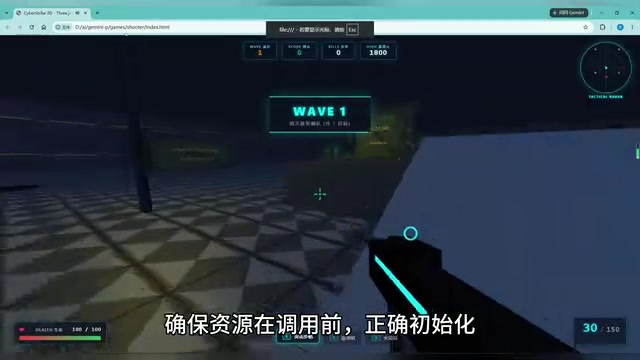
A typical timing issue emerged during development: the code attempted to access a property of an object that hadn't finished initializing. Timing issues (Race Condition/Initialization Order Issue) are among the most insidious and common bug types in software development. In JavaScript environments, due to the asynchronous execution model, the actual execution order of code may differ from the written order. When code tries to access an object that hasn't completed initialization, it throws a "Cannot read property of undefined" or "null reference" exception.
The model accurately analyzed the root cause and provided the standard solution—Defensive Programming, which involves null-pointer checks before access. The core principle of defensive programming is "never assume external inputs or dependent objects are in the expected state." Specific implementations include null-pointer checks (if (obj && obj.property)), optional chaining operators (obj?.property), and default value assignments. The model's ability to identify and apply this programming paradigm demonstrates that it understands not just syntax but also software engineering best practices.
Game Systems and Mechanics
The fixed game was remarkably complete:
Weapon System: Rifle, shotgun, and rocket launcher
Enemy Types: Fragile drones, bio-soldiers with headshot detection, heavy mechs
Game Mechanics:
- Health packs and ammo randomly spawning across the map
- Ten waves with escalating difficulty
- Complete UI system (wave counter, score, kill count, high score)
- Tactical radar
- Death/results screen
Wave-based design is a classic level design pattern in shooting games, originating from early arcade titles like Space Invaders and Galaga. Its core mechanism releases enemies in batches, with each wave progressively increasing in enemy count, type variety, and strength, creating a natural difficulty curve. This design provides a clear sense of progression and milestone-based achievement while giving players breathing room between waves for rest and tactical adjustment. From a technical implementation standpoint, a wave system requires a state machine to manage the current wave, enemy spawn queue, inter-wave countdown timer, and dynamic difficulty parameter adjustment logic, placing certain demands on code architecture design.
A game of this complexity would typically require experienced developers hours or even days to complete, yet Gemini 2.0 Flash generated a highly playable complete version in a short time.
Antigravity CLI Installation and Usage Guide
Antigravity CLI is Google's official AI coding assistant tool that integrates directly into VS Code. Its design philosophy upgrades AI programming assistants from conversational interaction to an "agentic" workflow—the tool doesn't just generate code but also automatically creates project structures, executes code, analyzes runtime results, and autonomously iterates on fixes when issues are found. This closed-loop development experience greatly reduces the context-switching cost between writing and debugging code.
Installation is straightforward—simply run the installation script in PowerShell. To use it, press Ctrl + backtick to open the terminal, type ag to launch the tool, then describe your requirements in natural language. The tool automatically creates files, runs tests, and verifies code, making the entire workflow highly automated.
Performance and Cost-Effectiveness Analysis
Based on the test data, completing all three test cases (SVG animation, 3D ocean world, FPS game) consumed only 2% of the plan's weekly quota. This means developers can accomplish far more work than expected within the same budget. Token consumption is so low partly because Gemini 2.0 Flash's model architecture is optimized—the Flash series uses knowledge distillation and model pruning techniques to maintain high output quality while dramatically reducing inference computation. Additionally, the adjustable thinking levels enable the model to save substantial unnecessary reasoning tokens on simpler subtasks.
Strengths Summary
- Fast code generation with consistent quality
- Extremely low token consumption with clear cost advantages
- Significant code quality improvements over previous versions
- Occasional minor bugs, but easy to locate and fix
- Capable of understanding complex spatial relationships and logical constraints
Limitations
- Timing-sensitive code may require manually added safeguards
- Complex projects still need human review and debugging
- Some security software may falsely flag generated scripts
Conclusion
Gemini 2.0 Flash demonstrates powerful practical value in AI-assisted coding scenarios. It handles not only simple code generation tasks but also development scenarios requiring deep understanding of spatial relationships, physics rules, and complex logic. Paired with the Antigravity CLI tool, development efficiency can improve by orders of magnitude.
For individual developers and small teams, this AI-assisted tool can already handle prototype development, rapid idea validation, and even the bulk of coding work for moderately complex projects. The extremely low token consumption also makes long-duration, high-frequency use entirely feasible. While it can't fully replace human developers yet, as a productivity multiplier, Gemini 2.0 Flash is already impressive.
Key Takeaways
Related articles

U.S. Investigated Chinese Spy Plot Targeting Nvidia CEO
The New York Times reports the U.S. investigated a Chinese spy plot targeting Nvidia's CEO; a Singapore AI cloud executive is accused of illegally selling chips to China and possible espionage, highlighting escalating AI chip geopolitics.

Ex-Palantir Execs Found Dream, a16z Invests $17M to Build Construction AI World Model
Former Palantir executives founded Dream, which raised $17M from a16z to train an AI world model on 100M sq ft of building permit data, aiming to challenge Autodesk in construction.

Mistral Large 4 Updates Weights and Cuts Prices, AI Gateway Users Upgrade Seamlessly
Mistral Large 4 updates weights and lowers input, cached input, and output token prices on AI Gateway, enhancing agentic coding and defensive cybersecurity. Existing model IDs point to the new version automatically—seamless upgrade with no code changes.