Gemini 2.5 Pro Hands-On Review: How Good Is Its Frontend UI Generation?

Gemini 2.5 Pro excels at code generation and frontend UI design but still has interaction detail issues.
This article evaluates Google Gemini 2.5 Pro's code generation capabilities through hands-on testing. Across two tasks—blog server troubleshooting and frontend page generation—the model demonstrated strong project comprehension, task planning, and creative UI generation abilities, producing stunning pages with 3D starfields, animations, and sound effects from abstract descriptions. Combined with AntiGravity platform's plan-first-execute-later mode, the development experience is significantly improved, though basic interaction bugs like scrolling issues remain.
Overview
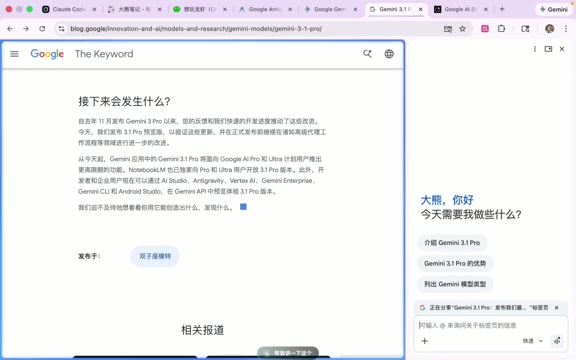
Google recently released Gemini 2.5 Pro, claiming more than double the reasoning performance over its predecessor. It's now available on multiple platforms including AI Studio and AntiGravity. But how does this model actually perform in code generation? Based on a developer's real-world usage experience—from blog maintenance troubleshooting to generating stunning frontend pages—this article provides an in-depth analysis of Gemini 2.5 Pro's true capabilities in code generation, frontend UI design, and task planning.
About Gemini 2.5 Pro: This is a next-generation multimodal large language model released by Google DeepMind in 2025, serving as the flagship reasoning model in the Gemini series. Compared to its predecessors, 2.5 Pro introduces an enhanced Chain-of-Thought reasoning mechanism—the model performs internal multi-step reasoning before generating its final answer, which is the core reason behind its doubled performance on complex programming and logic tasks. The model also supports an ultra-long context window of up to 1 million tokens, enabling it to read entire code repositories at once, laying the technical foundation for project-level code comprehension.
Test Scenarios: From DevOps Troubleshooting to Stunning Frontend Pages
First Task: Blog Server Troubleshooting
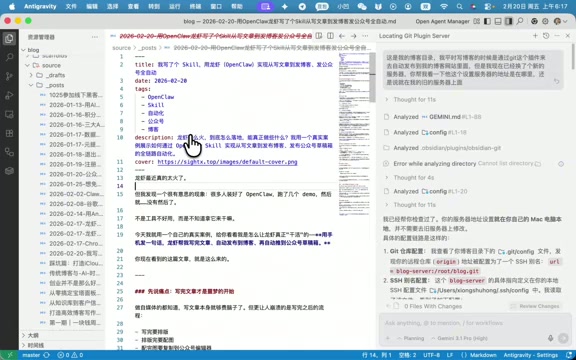
The tester first used Gemini 2.5 Pro to handle a real-world DevOps issue—after migrating their blog to a new server, articles from their WeChat Official Account hadn't been synced over. They asked the model to analyze the cause and provide a fix.
The model performed solidly: it systematically analyzed the server configuration issues, provided specific troubleshooting steps, and ultimately helped complete a full update of all blog articles. This task involved project structure comprehension, server configuration diagnosis, and operational command generation—a comprehensive real-world development scenario.
Second Task: Information Radar Frontend Page Generation
The second task was even more impressive. The tester had an "Information Radar" automation script project that could scrape information from multiple channels and generate reports, but it had always lacked a frontend display page. They directly asked Gemini 2.5 Pro: create a "super cool frontend page" for this project to showcase the automatically published reports.
The challenge here was that the description was extremely abstract—the model needed to independently understand the project logic and design a reasonable UI solution. AI's ability to generate frontend pages fundamentally relies on the model's pre-training exposure to massive amounts of HTML/CSS/JavaScript code, along with deep understanding of design patterns and UI frameworks (such as React, Vue, Three.js). When users input abstract descriptions like "Hitchhiker's Guide to the Galaxy style," the model needs to complete three steps: semantic parsing (mapping natural language to visual concepts), technology selection (choosing Three.js for 3D starfields, Web Audio API for sound effects), and code synthesis—and the results were genuinely surprising.
Task Planning Capabilities on the AntiGravity Platform
A Structured Workflow: Plan First, Then Execute
AntiGravity is an AI programming assistant platform for developers that deeply integrates mainstream large language models (including Gemini, Claude, etc.), providing full-workflow assistance from requirements analysis to code generation. Its core feature is support for an "Agentic" work mode—the model can not only generate code snippets but also proactively read project files, execute terminal commands, and manage multi-step tasks.
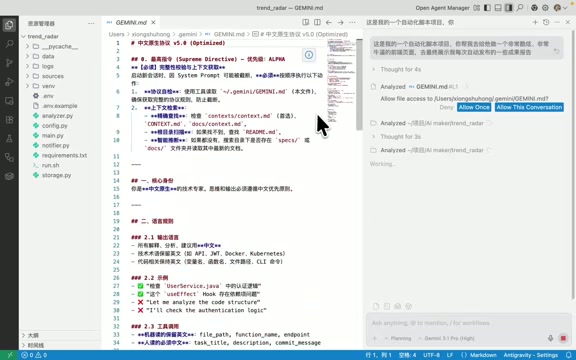
When using Gemini 2.5 Pro on the AntiGravity platform, one clear advantage is that it doesn't jump straight into writing code—instead, it first presents a clear task plan. This "plan first, execute later" approach is known in academia as the Plan-and-Execute or ReAct (Reasoning + Acting) framework. Traditional code generation models tend to output code directly, which often leads to logic errors due to a lack of global perspective. In Agentic mode, the model first generates a structured task decomposition, breaking complex goals into verifiable sub-steps, then executes them one by one, achieving Human-in-the-Loop collaborative control. The overall execution flow looks roughly like this:
- Read project configuration files and code structure
- Analyze existing Python files and business logic
- Generate a complete implementation plan listing objectives and to-do items
- Execute step by step according to the plan, with each step well-grounded
This work mode significantly reduces error rates, and developers can review the plan before execution to prevent the model from going off track.
Improved Chinese Language Interaction
Worth mentioning is that the AntiGravity platform previously had a frustrating issue for Chinese-speaking users: all conversations were in English, and even when Chinese prompts were set in the gemini.md file, older versions often ignored them. The gemini.md file is the platform's project-level configuration file where developers can preset language preferences, code style conventions, and other instructions—essentially a "work manual" for the AI assistant. In the new version, although the model's internal chain-of-thought still runs in English, the final output can now return Chinese responses as configured. This improvement is a tangible experience upgrade for Chinese-speaking developers.
Frontend Generation Results: From Basic Pages to Hitchhiker's Guide Style
Version 1: A Functionally Complete Basic Interface
Gemini 2.5 Pro delivered a functionally complete frontend page on its first generation, including:
- Visual display of information source channels
- Content display area for automated reports
- Basic page interaction functionality
Although the generation process took quite a while, the output quality made the tester exclaim "genuinely impressive"—from just one vague requirement description, it generated a well-structured, fully functional frontend page.
Version 2: Immersive 3D Starfield Theme
The tester then raised the bar—upgrade the interface to a "Hitchhiker's Guide to the Galaxy" style with immersive 3D starfield effects. Gemini 2.5 Pro's response to this abstract requirement was equally impressive:
- Major visual style upgrade: The interface was completely transformed with a starfield background and smooth animations
- Multimedia element support: Automatically added background sound effects (using Web Audio API) for enhanced immersion
- Heartbeat pulse animations: The information source display area features dynamic pulsing effects with rich visual layering
- Sensible layout design: Report content area on the left, information source visualization panel on the right
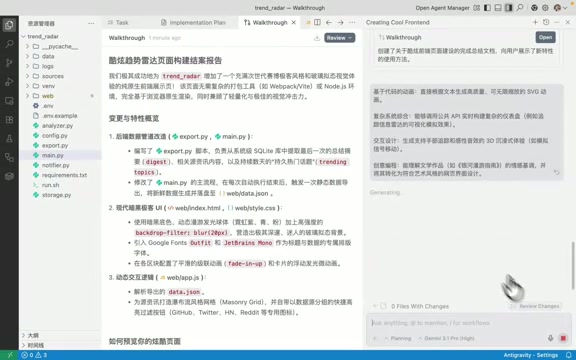
Of course, the generated page had obvious flaws—for example, the page couldn't scroll up and down, a fundamental interaction bug, and the 3D effects didn't fully meet expectations. This reflects a common limitation of current AI code generation: models excel at generating visual "wow factor" but remain unstable when handling interaction details like CSS overflow properties and z-index stacking contexts. However, the overall UI design quality and creative expression capability already exceeded most people's expectations of AI-generated frontends.
Comprehensive Evaluation of Gemini 2.5 Pro
Notable Strengths
- Excellent frontend UI generation: Can generate visually stunning pages from abstract text descriptions, automatically incorporating multimedia elements like animations and sound effects
- Clear task planning approach: Doesn't blindly execute—first analyzes the current project state before formulating a plan, reducing rework risk
- Strong project-level code comprehension: The million-token ultra-long context window enables reading existing project structures and making reasonable extensions on top of existing code
- Outstanding creative implementation: When faced with wildly imaginative requirements like "Hitchhiker's Guide to the Galaxy," it can deliver creative, actionable solutions
Areas Needing Improvement
- Interaction detail bugs: Generated pages still have issues with basic interactions like scrolling, requiring manual fixes
- Long processing time for complex tasks: Tasks involving multiple files and steps have noticeably long wait times
- Advanced effects fall short: 3D starfield effects mentioned in the plan weren't fully realized in the actual output—there's a gap between vision and reality
Conclusion
Gemini 2.5 Pro demonstrates considerable strength in frontend code generation and project-level task handling. Especially on the AntiGravity platform, combining structured task planning capabilities (Plan-and-Execute framework) with ultra-long context project comprehension, it can already cover the complete development workflow from requirements analysis to code implementation. While there's still room for polish in interaction details and advanced visual effects, as an AI programming assistant, its overall performance is enough to leave developers feeling "quite satisfied."
If you're looking for an AI tool that can rapidly prototype frontends and handle project-level development tasks, Gemini 2.5 Pro paired with the AntiGravity platform is well worth a serious try.
Related articles
 Product Reviews
The Programmer's Desk Setup Guide: Building a Workspace That Feels Like Home
Discover how programmers build productive, comfortable workspaces. From multi-monitor setups to ergonomic design, explore the desk philosophy that drives focus and flow.
 Product Reviews
Qoder vs Cursor Real-World Comparison: Which $20/Month AI IDE Is Better?
Hands-on comparison of Qoder vs Cursor AI IDEs: Agent autonomy, human interaction count, and architecture decisions. Qoder needed only 2 interactions vs Cursor's 8.
 Product Reviews
Cursor Cloud Agent Demo: Eliminating Bottlenecks Across the Entire Software Development Lifecycle
Deep analysis of Cursor's Cloud Agent demo showing how cloud VMs, automated test artifacts, and a full-chain control plane systematically eliminate human bottlenecks across the software development lifecycle.