Gemini 3.1 Pro Hands-On Review: In-Depth Experience with Six Major Features Including Music, Video, and Coding

Gemini 3.1 Pro hands-on: major upgrades across music, video, coding, animation, web building, and scheduling.
Google released Gemini 3.1 Pro with six core features: music generation, video creation, natural language programming, SVG animation, website building, and schedule management. Music generation uses the D-My model for automatic lyric creation and fine-grained genre control; video generation supports cinematic camera work and original sound effects; coding assistance enables liberal arts students to build games in one hour using natural language; SVG animation has evolved from crude to refined and production-ready. Testing shows significant progress across all features, though details still have room for improvement.
Google's latest Gemini 3.1 Pro release brings an epic update covering six core features: music generation, video creation, coding assistance, SVG animation, natural language website building, and intelligent schedule management. A blogger who describes themselves as a "liberal arts student" demonstrated the actual performance and limitations of these features through hands-on testing.
AI Music Generation: No Lyrics Needed, Gemini Creates Automatically
Gemini 3.1 Pro is equipped with Google's latest generative music model D-My, achieving three major improvements in audio generation: no need to provide your own lyrics (automatically generated based on prompts), stronger creative control (adjustable genre, vocals, rhythm, and other elements), and high fidelity (more complex and realistic music structure).
D-My is built on a fusion of Diffusion Model and Transformer architecture. Google had previously released music generation tools like MusicLM and MusicFX, and D-My can be seen as the culmination of this technological lineage. Unlike OpenAI's Jukebox or Meta's MusicGen, D-My's core breakthrough lies in end-to-end multimodal understanding — it can not only parse the emotional semantics in text prompts but also map music theory parameters such as BPM, key, and instrumentation into Latent Space for fine-grained control. This explains why simple prompts yield mediocre results: the model needs sufficiently rich musical dimension information to activate its deep generative capabilities.
In practice, users simply click the "Create Music" button in the chat interface and choose from multiple preset genres. However, the blogger noted that simple prompts produce average results. The real trick is to break down the music formula — explicitly specifying genre, instruments, tempo (BPM), vocal style, and atmosphere to get satisfying results. A practical tip: find an existing reference track, give the link to Gemini for prompt structure analysis, then use the analysis results to reverse-engineer generation — this significantly improves success rates.
AI Video Generation: Cinematic Camera Work and Original Sound Effects
Gemini 3.1 Pro's video generation capabilities are equally impressive, supporting the creation of 8-second cinematic short films through text or reference videos. Three highlights include: cinematic camera work with original sound effects, static image-to-dynamic video conversion, and significant improvements in aspect ratio and stability.
Behind this capability is the continuous iteration of Google's Veo series video generation models. Veo employs a Cascaded Diffusion Models architecture, first generating a semantic skeleton in low-resolution space, then progressively upsampling to high resolution, thereby achieving cinematic quality while maintaining temporal consistency. The so-called "cinematic camera work" technically relies on explicit modeling of camera motion parameters (pan, dolly, rotation, depth of field) rather than simple inter-frame interpolation. It's worth noting that the 8-second duration limit isn't a technical bottleneck but an engineering trade-off between computational cost and quality — when generating longer videos, cross-frame temporal consistency errors accumulate exponentially, causing "drift" in character faces or scenes.

The blogger tested with their own photo, describing in detail the camera movement (single continuous shot), action details (standing up from a seat, walking toward the camera, making a kissing gesture), background music (subtle jazz), and even dialogue content. Results showed that AI maintained a highly consistent character appearance matching the original photo and achieved basic camera movement effects, but the smile was slightly exaggerated and the dialogue generation had a "Chinese accent." Overall, video generation has made a qualitative leap in visual consistency, but there's still room for optimization in detail expressiveness.
Natural Language Programming: A Liberal Arts Student Builds a Classic Game in One Hour
This is perhaps the most exciting feature of this update. As a liberal arts student who doesn't even have Python installed on their computer, the blogger successfully developed the childhood classic game "Little Person Going Downstairs" using only natural language communication with Gemini 3.1 Pro — all within one hour.
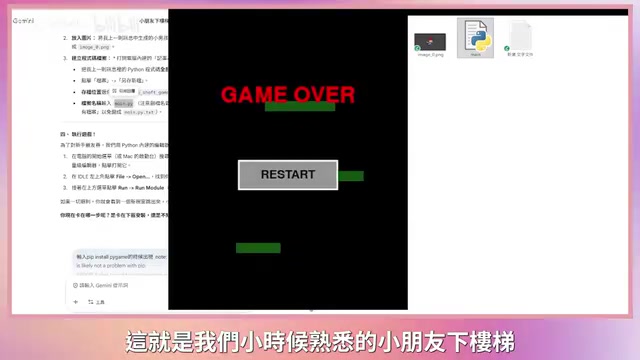
Gemini 3.1 Pro's breakthrough in coding assistance represents a paradigm shift from "code completion" to "intent understanding." Early GitHub Copilot was essentially a context-based code continuation tool; the new generation of models possesses complete software engineering reasoning ability — it can understand the physics engine logic, collision detection algorithms, and game loop architecture implied behind "make the block fall with gravity." This capability stems from the model digesting massive amounts of GitHub repositories, Stack Overflow Q&As, and technical documentation during pre-training, forming a cross-language, cross-framework programming knowledge graph. More critically, 3.1 Pro has developed state tracking capabilities across multi-turn conversations, incrementally mapping users' natural language requirements onto existing code structures rather than regenerating from scratch each time.
Throughout the process, Gemini behaved like a patient tutor: not only generating complete program code but also automatically creating pixel-art game assets; when the blogger mentioned having no development tools installed, it guided them step by step through downloading and installing Python; when installation errors occurred, simply copying the error message to Gemini allowed it to precisely locate the problem and provide fix commands.
The blogger used Chinese natural language throughout to describe requirements — "make the block fall with gravity," "add a restart button," "the ceiling has spikes, hitting them costs health" — and Gemini accurately understood and converted each into executable code. This experience essentially reduces the barrier to programming to zero.
SVG Animation Generation: A Qualitative Leap from Flat to Refined
SVG (Scalable Vector Graphics) is an XML-based 2D graphics format whose animation capabilities are implemented through SMIL (Synchronized Multimedia Integration Language) or CSS/JavaScript. Unlike bitmap video, SVG animation is essentially a mathematical description of geometric shape parameters (coordinates, colors, transformation matrices) changing over time, resulting in extremely small file sizes and infinite scaling without quality loss — ideal for web embedding. The challenge of AI-generated SVG animation lies in the fact that the model needs to simultaneously understand visual semantics and underlying XML structural logic, decomposing actions into a series of parameterizable geometric transformation sequences.
Previously, Gemini's SVG animations resembled early Flash — flat and not smooth enough. Version 3.1 Pro can now generate refined SVG animations directly usable on websites based on text prompts.
The blogger tested a "Mario hitting blocks"
Related articles
 Product Reviews
The Programmer's Desk Setup Guide: Building a Workspace That Feels Like Home
Discover how programmers build productive, comfortable workspaces. From multi-monitor setups to ergonomic design, explore the desk philosophy that drives focus and flow.
 Product Reviews
Qoder vs Cursor Real-World Comparison: Which $20/Month AI IDE Is Better?
Hands-on comparison of Qoder vs Cursor AI IDEs: Agent autonomy, human interaction count, and architecture decisions. Qoder needed only 2 interactions vs Cursor's 8.
 Product Reviews
Cursor Cloud Agent Demo: Eliminating Bottlenecks Across the Entire Software Development Lifecycle
Deep analysis of Cursor's Cloud Agent demo showing how cloud VMs, automated test artifacts, and a full-chain control plane systematically eliminate human bottlenecks across the software development lifecycle.