Gemini 4 Argon Demo: Turning a 2D Android Maps App into a 3D Planetarium with AI

Google's Project Planetarium demo shows Gemini 4 Argon turning a 2D maps app into a self-correcting 3D interactive world with a single prompt.
Google released the Project Planetarium demo, showcasing how Gemini 4 Argon spatializes a basic 2D Android Maps app in its entirety from just a single prompt, generating an interactive 3D landmark world with custom shaders and fluid physics—a dimensional upgrade at the application architecture level. In the demo, after detecting a missing Google Maps API key at runtime, Argon automatically switches to procedural 3D rendering as a fallback, embodying the autonomous agent loop of "perceive obstacle—make autonomous decision—execute alternative." The app then successfully deploys a 3D model of the Griffith Observatory with interactive orbit controls and native 120Hz Canvas rendering. Finally, users can step inside the planetarium, where stars in a 360-degree dome are driven by audio-reactive shaders and pulse to the rhythm of on-device Gemini Nano narration. This multi-model collaboration model may become the new norm in mobile development.
When 2D Maps Meet the AI Spatial Revolution
How many lines of code does it take to turn an ordinary Android maps app into an interactive 3D world? Google's newly released Project Planetarium demo offers a rather striking answer—just a single prompt.
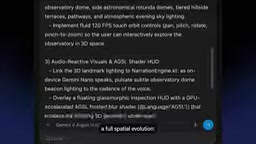
The core of this demo is using Gemini 4 Argon to "spatialize" a basic 2D Android Maps app in its entirety, generating an interactive 3D landmark world complete with custom shaders and fluid physics. The entire process begins by checking the Android skills already installed in the workspace, then triggers a full spatial evolution through a single command. This is no longer a simple UI reskin—it's a dimensional upgrade at the application architecture level.
Argon's Auto-Correction: From Missing API Key to Procedural 3D Rendering
The most telling demonstration of Argon's intelligence comes at app runtime. After the 3D scene loads, the app fails to access aerial imagery because it lacks a valid Google Maps API key—an extremely common blocking issue in development.
Argon's approach: upon detecting this obstacle, it automatically implements procedural 3D rendering of the scene as a fallback. In other words, instead of stopping at an error screen and waiting for the developer to patch it manually, it autonomously chooses a degraded but functional technical path and keeps the task moving.
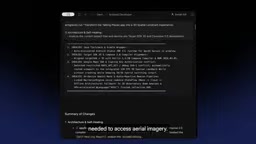
This closed loop of "perceive obstacle—make autonomous decision—execute alternative" is a hallmark of how today's AI coding tools are evolving from code completion toward autonomous agents. The developer's role is shifting from writing line by line to setting goals and reviewing results.
Procedural 3D Rendering refers to a rendering approach that does not rely on external texture maps or pre-baked model assets, but instead generates geometry, materials, and lighting effects directly at runtime through mathematical algorithms and code logic. In this case, since the missing Google Maps API key prevented access to real aerial imagery, Argon turned to procedural techniques such as noise functions and geometric primitive combinations to construct terrain and building outlines. The advantages of this approach are zero external resource dependency, offline operability, and dynamically adjustable parameters; the disadvantage is that visual realism falls short of actual photography. For an AI coding tool, choosing procedural rendering is a classic "optimal solution under constraints" strategy: it sacrifices fidelity but preserves functional completeness and task progressability—which is precisely the essential difference at the decision-making level between autonomous agents and traditional code completion tools.
3D Reconstruction of the Griffith Observatory with Native 120Hz Rendering
After correction is complete, the app successfully deploys a 3D spatial model of the Griffith Observatory in Los Angeles. This model is not a static display—it features interactive orbit controls and renders natively in Canvas at a 120Hz refresh rate.
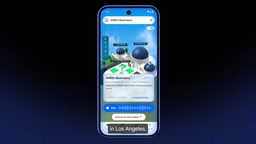
The 120Hz rendering capability indicates that what was generated is not a simplified schematic model, but a real graphics pipeline targeting high-performance devices. For mobile 3D app developers, this means AI-generated code is beginning to touch rendering performance—a domain traditionally dependent on senior graphics engineers.
Orbit Controls are a common camera manipulation mode in 3D graphics applications, allowing users to rotate the viewpoint around a target object through touch drag, pinch-to-zoom, and other gestures—as if observing the object along an invisible orbit. Implementing orbit controls in a mobile Canvas rendering scenario requires handling multiple sub-problems such as touch event mapping, camera quaternion or Euler angle computation, and inertial damping. Combined with a 120Hz refresh rate, this means a rendering interval of only about 8.3 milliseconds per frame, and the code must complete scene graph traversal, shader execution, and buffer swapping in an extremely short time. This places high demands on AI-generated code: not only must the logic be correct, but frame rates must remain stable under the power and performance constraints of mobile GPUs—traditionally the domain of senior graphics engineers.
Stepping Into the Planetarium: Audio-Reactive Shaders and Gemini Nano Narration
The final step of the demo pushes the experience toward full immersion: Argon lets users directly "step inside" the planetarium, rendering a 360-degree celestial dome. The stars in the dome are driven by audio-reactive shaders, pulsing to the rhythm of on-device Gemini Nano narration.
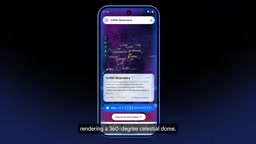
The narration itself also creates a complete sense of scene: "Welcome to the Griffith Observatory, perched gracefully on the southern slope of the Hollywood Hills. Gaze out over the dizzying expanse of the Los Angeles Basin, and listen to the breeze on the hilltop and the faint hum of the city below." Audio, visuals, and narrative layered together form a complete interactive experience generated by AI in one pass.
From a technical architecture perspective, this demo chains together multiple capability layers: Gemini 4 Argon handles code generation and problem fixing, on-device Gemini Nano handles real-time voice narration, and custom shaders handle translating audio signals into visual animation. This multi-model collaboration model may become the norm for future mobile app development.
Audio-Reactive Shaders are a class of rendering programs that run on the GPU. Their core idea is to pass audio signal spectral data (such as the energy values of various frequency bands extracted via FFT, the Fast Fourier Transform) as uniform variables into vertex or fragment shaders, so that visual elements' color, brightness, displacement, scale, and other properties change in real time with the rhythm of sound. In the demo, the pulsing effect of the stars is the result of mapping the audio amplitude of Gemini Nano's narration to particle size or glow intensity. Achieving this effect requires connecting four links: audio capture, spectral analysis, GPU data transfer, and shader programming—and Argon completed this entire chain in a single generation. Gemini Nano, meanwhile, is Google's lightweight large model designed for on-device deployment, built specifically for low-latency voice and text tasks on phones and other endpoints.
What This Means for Developers
Project Planetarium demonstrates more than "AI can write Android code"—it reveals a new development paradigm: describe a spatial experience goal in natural language, and let AI handle the entire chain from skill checking and code generation to runtime correction and performance tuning. For indie developers and small-to-medium teams, this dramatically lowers the barrier to entry for 3D interactive applications.
Of course, the demo scenario is highly idealized. Complex business logic, state management, and device compatibility in real projects are still areas where AI tools need to prove themselves. But the direction is clear—in the era of spatialized Android development, the toolchain is already taking the first step.
One-line Summary
Google's Project Planetarium demo shows Gemini 4 Argon turning a 2D maps app into a self-correcting 3D interactive world with a single prompt.
Paragraph Summary
Google released the Project Planetarium demo, showcasing how Gemini 4 Argon spatializes a basic 2D Android Maps app in its entirety from just a single prompt, generating an interactive 3D landmark world with custom shaders and fluid physics—a dimensional upgrade at the application architecture level. In the demo, after detecting a missing Google Maps API key at runtime, Argon automatically switches to procedural 3D rendering as a fallback, embodying the autonomous agent loop of "perceive obstacle—make autonomous decision—execute alternative." The app then successfully deploys a 3D model of the Griffith Observatory with interactive orbit controls and native 120Hz Canvas rendering. Finally, users can step inside the planetarium, where stars in a 360-degree dome are driven by audio-reactive shaders and pulse to the rhythm of on-device Gemini Nano narration. This multi-model collaboration model may become the new norm in mobile development.
Related articles

How Big Can Stars Really Get? The Physical Limits of the Largest Stars
Red supergiants are the largest stars by volume, with radii up to 2,000 times the Sun, engulfing the inner solar system. But there is no precise upper limit on stellar size—models predict up to 15,000 solar radii. The most massive blue stars are far smaller than red supergiants—biggest and heaviest are two different things.

Apple HomeView Smart Display Full Feature Breakdown: Wall-Mount or Desktop, $299
Apple launches HomeView, a $299 smart display with wall-mount and desktop options, 12MP camera for facial recognition, smart home control, music playback, and recipe step-by-step cooking. Full breakdown of watch faces, apps, privacy, and cooking integration.

Where Did the Promised New Studio Go? Craft Computing Answers After Five Years
Craft Computing's host responds to viewer questions: the new studio promised five years ago was shelved as construction costs soared from $30,000 to $75,000, and was replaced by a 168-square-foot garage conversion.