Gemini 4 Argon Generates a Cyberpunk 3D City from a Single Prompt, Running at 60 FPS in the Browser

Gemini 4 Argon generates a 60 FPS browser-based cyberpunk 3D animation from a plain prompt in 30 minutes.
The article documents a test by a YouTube creator with early access to Gemini 4 Argon: using a plain prompt with almost no technical instructions, they asked the model to generate a cyberpunk-style 3D animation with explicit constraints of running in the browser at no less than 30fps, ideally 60fps. The model produced runnable code in one shot in about 30 minutes, maintaining a stable 60fps in the browser. The creator admitted the neon colors were slightly overdone, but the overall result exceeded expectations. The article argues that the real value isn't the visuals, but that the model met explicit engineering constraints without any code structure or performance optimization instructions—showing AI can now generate Three.js code that meets engineering requirements, dramatically lowering the cost of 3D prototype validation.
One Prompt, One AI-Built City
Ever since Google's Gemini 4 Argon launched, the debate over whether "Google has caught up" hasn't stopped. A YouTube creator who got roughly a week of early access ran a straightforward test: using an almost unedited prompt, they asked the model to directly generate a cyberpunk-style 3D animation, with an explicit requirement that it run in the browser at a minimum of 30fps, ideally 60fps.
The result was pretty convincing. The entire animation ran effortlessly at 60 frames per second in the browser, and this came from a very plain prompt, taking about 30 minutes to generate.

What the Prompt Actually Said
The prompt the creator shared isn't complicated. Its core requirements break down into a few layers: use 3JS (Three.js) to build a hyper-realistic cyberpunk 3D scene with as much detail as possible; prioritize maintaining at least 30fps, ideally 60fps; include lots of neon colors and dynamic elements like flying cars weaving between skyscrapers.
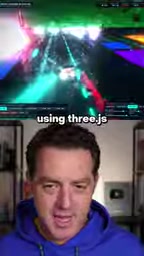
One detail worth noting: this prompt contained almost no technical instructions about code structure, rendering pipelines, or performance optimization. The creator's own assessment was that it was "very simple, very plain"—which is exactly what makes this demo so interesting to think about.
What is Three.js
Three.js is a JavaScript 3D graphics library built on top of WebGL. It wraps WebGL's low-level shaders, buffers, and matrix operations into high-level objects like Scene, Camera, Renderer, and Mesh, letting developers render 3D content in the browser with just a few dozen lines of code. It's not a game engine itself—it doesn't include physics or animation state machines—so performance depends heavily on how developers organize geometry, control the number of draw calls, and reuse materials and textures.
This is precisely why the demo is worth paying attention to: getting the model to directly produce Three.js code that hits 60fps is like asking it to simultaneously understand the basic constraints of the rendering pipeline—things like merging geometry to reduce draw calls, avoiding rebuilding objects every frame, and using instancing (InstancedMesh) to render large numbers of repeated elements. These typically fall within the experience of an intermediate front-end 3D engineer.
The Neon Is Definitely a Bit Much
The creator also admitted that the final product "might have gone a little overboard" with the neon colors. Cyberpunk is inherently a high-saturation, high-contrast visual style, and when given open-ended instructions like "the more detail the better," AI tends to stack visual elements, leading to color overflow or a noisy image.

Still, from the final impression, this bit of color excess didn't break the overall effect. The creator's own words were "overall it's really great." For a generation with almost zero tuning, achieving this balance between stylization and runnability already exceeds expectations.
The Signal Behind 60 FPS
What really gives this demo weight isn't whether the visuals look good—it's that it hits 60 frames per second in the browser.

Frame rate in 3D animation directly reflects code quality: scene complexity, geometry count, lighting and shader overhead—if any part is handled poorly, frames will drop. The model didn't just write runnable Three.js code; it also met explicit performance constraints. This means Gemini 4 Argon, when it comes to "generating executable, deployable front-end 3D code," is no longer just capable of producing results—it's capable of producing results that meet engineering requirements.
The creator summed up the experience with "Google has caught up," and based on this test, that judgment has its basis.
Why 60 FPS Says More Than Good Visuals
Frame rate is the combined result of rendering performance: the browser has only about 16.7 milliseconds of budget per frame (the time window corresponding to 60fps), and every geometry's vertex count, the number of lights, shadow map resolution, and shader complexity all consume that budget. Once you go over, you get dropped frames and stuttering.
So "stable 60fps" means the model-generated code made reasonable trade-offs between scene complexity and rendering overhead—this isn't something you can get right by visual aesthetics alone; it requires an implementation that aligns with engineering common sense. By contrast, "neon overload" is a pure style issue—change one line of color configuration and it's fixed; failing to meet performance standards often requires restructuring the code. This is why the creator used frame rate rather than the visuals themselves as the core evidence.
What It Means for Developers
In the past, going from a one-sentence creative description to a runnable 3D scene involved a whole pipeline: modeling, shader writing, performance tuning. The path Gemini 4 Argon demonstrated is: describe visual goals and performance metrics in natural language, and the model produces runnable code in one shot.
This doesn't mean professional 3D development will be replaced, but it does push the cost of prototype validation extremely low. For scenarios that need rapid validation of visual concepts, interactive demos, or motion effects for marketing pages, trading 30 minutes for a 60fps runnable prototype is a pretty good deal.
As for style issues like "too much neon," those are actually the easiest part to fix with one more round of prompting.
How the Path from Natural Language to Executable 3D Code Is Changing
The traditional Web 3D development chain is: concept design → modeling (Blender, etc.) → export glTF/OBJ → write Three.js loading and interaction logic → repeatedly tune with performance panels. Modeling and tuning are the two most time-consuming stages and the most dependent on specialists.
The path Gemini 4 Argon demonstrated skips the asset preparation step, directly generating geometry and materials procedurally through code. For the prototype stage, this means: validating a visual concept no longer requires making model assets first—just a description. But procedural generation has its limits—when you need fine art assets, complex skeletal animations, or large open-world scenes, you still have to go back to the traditional pipeline. It compresses the "early-stage trial and error" cost, rather than replacing final asset production.
Related articles

Claude Reportedly Able to Hide Secret Messages in Benign Images
A Reddit post claims Claude Fable 5.1 can hide secret messages in benign images. This article reviews the background, image steganography principles, and potential security risks, and suggests a testing path from rumor to verification.

Federal Government Awards $85 Million; CFS to Develop Fusion-Specific Semiconductors
The federal government awards $85 million to Commonwealth Fusion Systems to develop conductors and power semiconductors for fusion plants. This article analyzes the significance of this funding for the fusion supply chain and commercialization path.

When Should AI Assistants Proactively Suggest? Timing Is Everything
When should AI assistants proactively suggest? Reddit discussion reveals: the same suggestion feels different at different times. This article analyzes the dual nature of proactive suggestions, the boundary of user expectations, and design principles, exploring how to balance automation and user control.