Gemini CLI YOLO Mode Source Code Analysis: Why settings.json Can't Enable It

Gemini CLI deliberately forbids writing YOLO mode into config files, accepting only in-process human input to resist prompt injection.
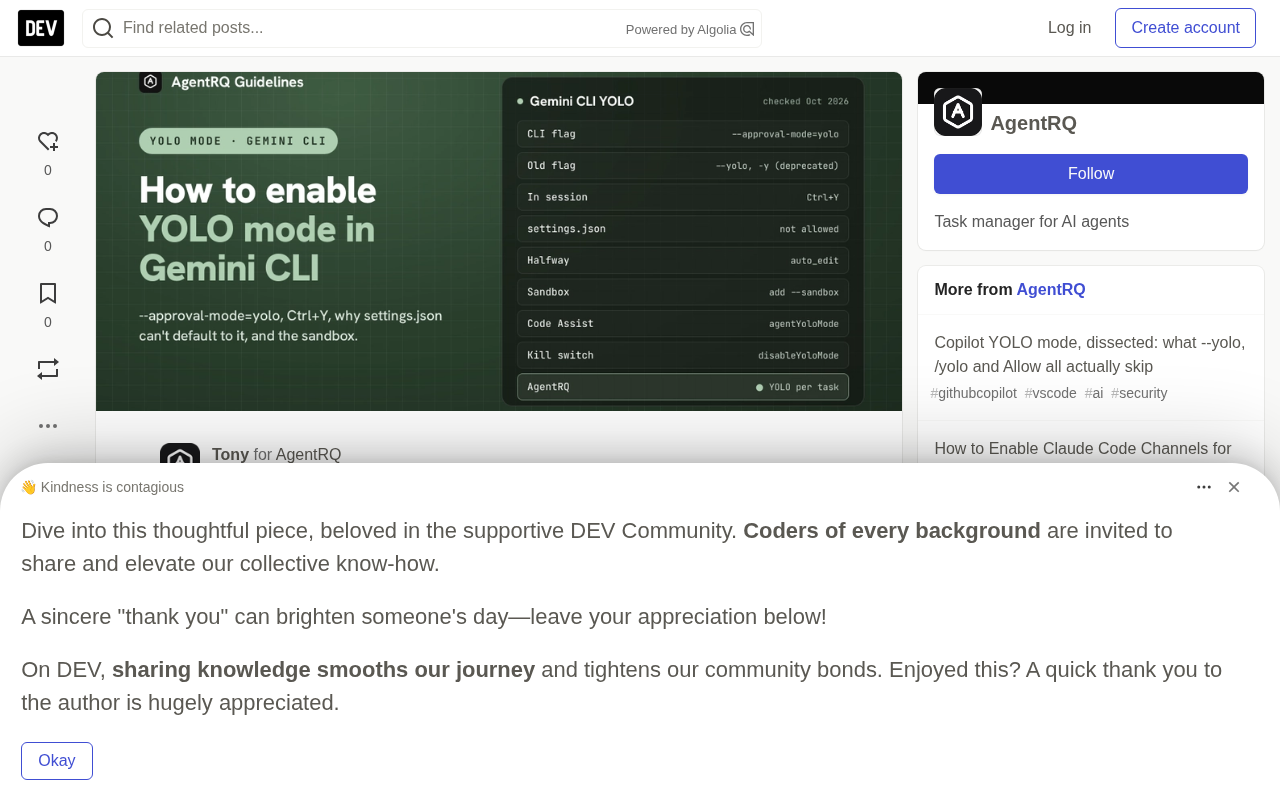
Gemini CLI's YOLO mode (which skips all tool-call approvals) can only be triggered via command-line flags or the in-session Ctrl+Y, and cannot be set as the default in settings.json—the parser simply skips the `"yolo"` value in `defaultApprovalMode`. This is a deliberate safety design: a workspace's `.gemini/settings.json` could be controlled by a malicious repository, and once a project file can enable YOLO, combined with prompt injection it effectively gives an attacker full control over the agent. The article also clarifies several common misconceptions: approval mode and sandbox are two independent dimensions, and YOLO does not automatically enable the sandbox—you need to pass `--sandbox` separately; in headless mode the policy engine translates `ask_user` decisions into `deny`, and unapproved tool calls silently do not execute; Shift+Tab will never accidentally enter YOLO. The article concludes by comparing with Qwen Code, which allows yolo in settings, and notes that neither route is absolutely right or wrong—the key is understanding the threat model behind it.
Gemini CLI YOLO Mode: A Deliberate Safety Design
In coding agents, YOLO mode means skipping all approval prompts and letting the model execute tool calls directly. Behind this "hands-off" convenience lies a core tension in permission design: how to balance convenience and safety.
Gemini CLI gives a fairly clear answer to this question—based on a review of the google-gemini/gemini-cli source code, YOLO mode can only be triggered via command-line flags or in-session hotkeys, and cannot be set as the default through settings.json. This is not a bug, but a design choice enforced by three lines of code.
How the Approval Mode Is Selected at Startup
Gemini CLI offers four approval modes: default, auto_edit, plan, and yolo. The resolution order at startup is as follows:
- Command-line argument
--approval-mode <x> - Otherwise check
--yolo/-y(mapped toyolo) - Otherwise read
general.defaultApprovalModefrom settings—but if the value isyolo, it is skipped - Otherwise fall back to
default
Step three is the key. The parser doesn't throw an error just because settings contains "yolo"—it simply turns a blind eye, as if that key doesn't exist. The settings schema also explicitly states: YOLO "can only be enabled via the command line."
After mode resolution, there are two more gates:
- Kill switch: If
security.disableYoloModeoradmin.secureModeEnabledis set and the resolved result is YOLO, aFatalConfigErroris thrown at startup. This is not a silent downgrade, but a clear message that "you requested a forbidden mode." - Folder trust: If the current directory is not trusted, any non-
defaultmode is forcibly reverted todefaultwith a warning. This rule also applies toauto_editandplan.
Threat Model: A Cloned Repository
Why can't "yolo" be written into settings.json? The answer lies in the threat model.
Gemini CLI merges multiple layers of configuration, one of which is the workspace's own .gemini/settings.json. If a project file could set defaultApprovalMode: "yolo", then git clone evil-repo && cd evil-repo && gemini would be equivalent to handing an attacker-controlled GEMINI.md to an agent that executes shell commands without ever asking. Prompt injection plus auto-approval is the worst combination in agent security.
The rule thus becomes clear: YOLO must come from a flag or keypress that a human typed in the current process. Configuration files can make you more cautious (disableYoloMode, secureModeEnabled, folder trust), but can never make you more aggressive. If you want YOLO enabled every time, the officially supported approach is a shell alias:
alias gemini-yolo='gemini --approval-mode=yolo --sandbox'
For comparison, Qwen Code, a fork of Gemini CLI, allows setting tools.approvalMode: "yolo" in settings, delegating the protection responsibility to the folder trust mechanism. Each approach has its trade-offs, but Gemini CLI chose the more conservative end.
Prompt Injection refers to an attacker embedding malicious instructions into content that the model will read—such as GEMINI.md in a project, source code comments, READMEs, issue text, or files inside dependency packages—thereby hijacking the agent's behavior so that it performs operations intended by the attacker rather than the user. In ordinary conversational scenarios, prompt injection at worst makes the model say the wrong thing; but in coding agents with tool-calling capabilities, the model can directly read and write files, execute shell commands, and make network requests, dramatically amplifying the harm of injection. When prompt injection is combined with "auto-approval," the model can carry out malicious operations without any human confirmation, and the attack chain is fully closed: a single git clone of a carefully constructed repository can trigger it. This is why the industry generally regards "untrusted input + execution without approval" as the most dangerous combination in agent security, and defensive approaches typically include least privilege, sandbox isolation, and requiring that high-risk operations come from trusted human input.
Does YOLO Enable the Sandbox? No
Regardless of what some old configuration documentation may say, in the current source code, YOLO does not enable the sandbox.
Gemini CLI has two independent layers:
| Layer | What It Controls | Switches |
|---|---|---|
| Approval mode | Whether tool calls require human confirmation | --approval-mode, Ctrl+Y, Shift+Tab |
| Sandbox | What tool calls can reach after execution | --sandbox, GEMINI_SANDBOX, tools.sandbox |
The sandbox resolver never reads the approval mode. When nothing is set, it returns "no sandbox." When enabled, the behavior varies by platform:
- macOS: Prefers
sandbox-exec(Seatbelt), with a default profile ofpermissive-open. It starts from(deny default), allows file reads from any location, but restricts writes to the project directory, temp directories, cache,~/.npm,~/.cache, and paths specified by--include-directories. It also explicitly blocks the Docker socket and writes to the~/.geminicredential files. Other built-in profiles can be selected viaSEATBELT_PROFILE; values not in the list are rejected, which incidentally blocks path traversal. - Linux/Other: Tries Docker, then Podman in order.
- Explicitly specified only:
runsc(gVisor),lxc,windows-native.
Invalid values fail fast. Setting GEMINI_SANDBOX=runsc on a Mac, or setting true when neither Docker nor Podman is available, is a fatal error rather than silently running without a sandbox.
The core takeaway: YOLO plus sandbox is a reasonable combination; YOLO without sandbox means "run anything with your user's full privileges." Be sure to pass --sandbox yourself.
Seatbelt (sandbox-exec) is a process sandboxing mechanism built into macOS that uses a profile written in a Scheme-like syntax to declare the scope of system calls and file access a process is allowed. A typical profile starts with (deny default), meaning deny everything by default, and then allows necessary capabilities one by one. This "deny by default, allow explicitly" whitelist model is safer than "allow by default, deny item by item." The permissive-open mentioned in the article is one such built-in profile: it allows reads from any path, but restricts writes to the project directory, temp directories, cache, and paths explicitly listed in --include-directories, and blocks the Docker socket and credential files. A similar mechanism is gVisor (runsc) on Linux, which implements a set of system call interfaces in user space to provide containers with a stronger isolation boundary than ordinary Docker. Understanding these mechanisms helps to judge: the sandbox addresses "what can be reached after execution," while the approval mode addresses "whether to execute." The two are complementary but not interchangeable.
In-Session Interaction and Headless Mode Pitfalls
Ctrl+Y toggles between YOLO and default; this is the only way to enter YOLO within a session. Shift+Tab cycles through default → auto_edit → plan, and never lands on YOLO; if you press it while in YOLO, it downgrades to auto_edit. This is a small but sensible design: the key you use frequently won't accidentally drop you into a dangerous mode.
Additionally, passing --yolo and --approval-mode together doesn't "pick a winner"—it directly throws a validation error. When intent is ambiguous, fail at the door.
Headless runs (gemini -p "…") are another scenario prone to pitfalls. In non-interactive mode, no one can answer prompts, and the policy engine translates ask_user decisions into deny. In headless default mode, tool calls that should have asked simply don't execute. The CLI also removes the ask_user tool from the tool set, and the source code comment explains it plainly: this way it "can never be allowed by a high-priority policy rule while unattended."
The choices in headless scenarios are therefore limited: --approval-mode=yolo (preferably with --sandbox), --approval-mode=auto_edit plus policy rules, or a policy file that only allows specific tools.
Headless mode refers to running the agent non-interactively, typically in the form gemini -p "…", often used in CI/CD, scripts, or server-side batch processing. Since there is no terminal to pop up confirmation prompts, any decision that requires "asking the user" must have an alternative destination—Gemini CLI's policy engine chooses to translate it into deny, that is, deny by default rather than quietly allow. This is a typical fail-safe design: when human authorization cannot be obtained, it is better to do nothing than to execute without permission. The same idea is reflected in trimming the tool set—removing the ask_user tool directly so that the state of "awaiting authorization" does not exist in unattended scenarios, fundamentally preventing rules from being bypassed. This also explains why headless scenarios must explicitly choose yolo, auto_edit, or a policy file, because a design that implicitly depends on interaction is doomed to fail in automated workflows.
Compromise Options and FAQ
Between "ask me every time" and "approve everything," there are some intermediate options:
auto_edit: Automatically approves file edits, but still asks before shell commands.tools.allowed: Lists tool patterns that don't require prompts, such asrun_shell_command(git).- Policy engine: The recommended route. Place TOML files under
~/.gemini/policies/to defineallow/deny/ask_userrules, optionally scoped to specific modes (including YOLO). The command-line argument--allowed-toolsis deprecated, and migration is recommended.
In the VS Code Gemini Code Assist extension, you can enable "geminicodeassist.agentYoloMode": true in user settings and reload the window, but it follows the same familiar rule: it only takes effect in trusted workspaces. In IntelliJ, the corresponding option is "Auto-approve changes."
FAQ:
- Does
gemini --yolostill work? Yes, but it is deprecated. Switch to--approval-mode=yolo, and don't pass both at the same time. - Can YOLO be set as the default in settings.json? No. The parser skips
"yolo"indefaultApprovalMode. Use a shell alias. - What does Ctrl+Y do? Toggles YOLO and default in a running session.
- Does YOLO enable the sandbox? Not in the current source code. You need to additionally add
--sandboxor setGEMINI_SANDBOX. - Why is
--yolostartup rejected? Becausesecurity.disableYoloModeoradmin.secureModeEnabledis set. This is a fatal error by design. If it starts but downgrades to default, it means the folder is not trusted.
Policy engine is a finer-grained permission control layer in Gemini CLI than boolean switches: place TOML files under the ~/.gemini/policies/ directory, where each rule declares an action (allow / deny / ask_user) and matching conditions, and can limit the scope of modes in which it takes effect—including whether it applies to YOLO. Compared with a simple tool whitelist like tools.allowed, the policy engine allows you to express conditional intentions such as "only allow git commands in YOLO mode" or "always ask for write operations," thereby achieving an auditable balance between convenience and safety. Its difference from the command-line argument --allowed-tools (deprecated) is that policies persist in files, support more complex matching logic, and are better suited for unified distribution and version management within a team. For users who want automation without fully opening things up, a policy file is usually the first choice.
Summary
Gemini CLI's permission design is one of the clearer ones among coding agents: approval mode and sandbox are orthogonal, YOLO can only come from human input, and configuration files can only tighten, not loosen. This conservative strategy sacrifices some convenience—you can't make all projects default to skipping approvals with one click—in exchange for a hard boundary against prompt injection and malicious repositories. For users who need unattended operation in CI, the recommended combination is --approval-mode=yolo --sandbox, along with trusted directories and a clean working tree.
It's worth considering: Qwen Code chose to trust user-level configuration, while Gemini CLI chose to trust only in-process input. Neither route is absolutely right or wrong, but understanding the threat model behind them is what allows you to make the appropriate choice for your workflow.
Related articles

Felix Rieseberg Personal Homepage
Felix Rieseberg's personal homepage sparks attention on Hacker News. This article covers the Slack engineer's technical background, the rise and fall of nativefier, and the value of a developer homepage as a tech calling card.

@ai-sdk/vue 3.0.306 Patch Release Syncs with [email protected] Update
@ai-sdk/vue 3.0.306 released, synced with [email protected]. A routine patch release for the Vercel AI SDK ecosystem with no public API changes; the Vue adapter layer stays version-aligned with the core package.

Gemini 4 Argon API Launches: The Era of Million-Token Output Begins
Google launches Gemini 4 Argon with sparse MoE architecture, up to 1M output tokens, and a 68.90% Vals Index score, available across API, AI Studio, and the Gemini app.