Gemini Omni Flash Complete Guide: Google's Multimodal Video Editing Model

Gemini Omni Flash brings multi-turn video editing, audio sync, and character consistency to Google's API at $0.10/sec.
Gemini Omni Flash is Google's new multimodal video model available via the Interaction API, enabling multi-turn text and reference image-driven video editing, synchronized audio generation, and character consistency across shots — all at a competitive price of $0.10 per second, on par with Veo 3.1 Fast.
Google's Gemini Omni model, unveiled at Google I/O, is now officially available via API. Known as Gemini Omni Flash, it's positioned as a multimodal model purpose-built for video — supporting any-to-any input/output and combining video editing with generation capabilities.
The "Omni" architecture represents a significant technical leap in Google's multimodal AI ambitions. Traditional multimodal models typically chain together separate modal encoders, while the core idea behind the Omni architecture is to have a single model natively understand and generate cross-modal content — text, images, audio, and video are all processed within a unified token space. This closely mirrors OpenAI GPT-4o's design philosophy, which similarly touts "any input to any output." From an engineering standpoint, this architecture requires the model to be exposed to large-scale multimodal paired data during pretraining rather than being aligned after the fact — giving it a natural advantage in cross-modal consistency (such as audio-video sync). The "Flash" suffix follows Google's established Gemini naming convention: Flash denotes a lightweight inference version optimized for speed and cost, forming a high-low pairing with the Pro version. This article covers the core capabilities, API usage, and best practices that are easy to overlook.
Pricing: On Par with Veo 3.1 Fast
For most people, pricing is the first question. Gemini Omni Flash is built on the Flash model and carries a clear cost advantage, priced at the same level as Veo 3.1 Fast.
To understand what this pricing means for the market, it helps to know Google's Veo product lineup. Veo is a foundation model series developed by Google DeepMind specifically for video generation. Veo 2 launched in late 2024 and drew widespread attention for its impressive physical motion rendering. Veo 3 debuted at Google I/O 2025 as the first model to natively generate audio and video together. Veo 3.1 Fast is the inference-accelerated version of Veo 3, targeting high-throughput use cases. By positioning Gemini Omni Flash at the same price as Veo 3.1 Fast, Google is effectively unifying its pricing anchors across its "video generation" and "multimodal editing" product lines.
This "high value-for-money" approach reflects the core strategy driving model iteration across Google and the industry at large — maintaining strong capability while driving inference costs into a reasonable range. Video generation is priced at approximately $0.10 per second, meaning a 10-second video costs roughly $1. Compared to Sora (subscription-based) or Runway Gen-4 (credit-based), this pricing offers API developers a far more transparent cost model. Whether it's worth it depends on your real-world needs for generation quality and iteration speed.
For creators who need to generate B-roll footage in bulk or perform multi-round fine-grained edits, this price point is quite competitive among professional video generation models.
Core Capability: Text- and Reference Image-Driven Video Editing
Gemini Omni Flash's standout feature is video editing driven by text or reference image prompts — not just generating from scratch. It's delivered through Google's new Interaction API, which enables several capabilities that previous video generation models lacked.
The Interaction API is fundamentally a paradigm upgrade over traditional "generate-and-done" video APIs. Conventional video generation APIs (including early Veo and Runway Gen series) are typically stateless single-call operations: input a prompt, receive a video, end of interaction. The Interaction API introduces the concept of "session state" — each generated video is assigned a unique ID, and subsequent edit requests only need to reference that ID, with the server automatically maintaining the context chain. This is similar to how "conversation history" works in large language models, now applied to video generation. It dramatically reduces bandwidth consumption and friction in multi-round iteration workflows, bringing video creation closer to the natural interactive experience of text editing.
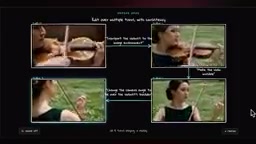
The most impressive capability in the demo is "targeted editing." Using a video of a violinist as an example:
- Provide a reference image and prompt "place the violinist in this environment" — the model preserves the subject's pose and only replaces the background;
- In round two, input "make the violin disappear" — the pose remains unchanged, but the instruction is accurately executed;
- In round three, request "switch the camera to behind the performer's shoulder" — the model achieves a spatial camera rotation while maintaining the original pose.
This multi-turn conversational video editing capability is precisely what sets it apart from traditional video generation models.
Audio-Video Sync: Text-Driven Sound Generation
Beyond visual editing, Gemini Omni Flash can generate audio synchronized with the video, with the audio type defined directly in the prompt.
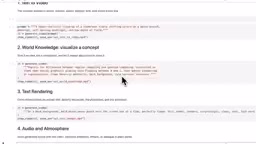
The demo featured a nighttime café scene: a barista steaming milk, jazz playing in the background, an espresso machine hissing, and cups clinking softly. The output closely matched the prompt — the visuals had a hyper-realistic quality, and the sound effects precisely corresponded to the visual action. This capability is a direct result of the Omni unified token space architecture — audio and video signals share the same representation layer inside the model, rather than being stitched together in post-processing.
Two current limitations are worth noting:
- No native audio input — you cannot upload an audio file to drive generation;
- However, if you provide a video with existing audio, the model generally preserves that audio well during edits, with only occasional minor drift.
Additionally, since it's built on the Flash model, it inherits strong world knowledge and text rendering capabilities.
API Usage and Best Practices
The workflow is straightforward: set your API key, then call the Interaction API. The current model string is gemini-omni-flash-preview (still in preview and not yet generally available).
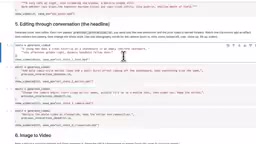
Key parameters include:
- Aspect ratio: supports 16:9 and other formats;
- Reference input: accepts reference images and text prompts (reference audio not yet supported);
- Video duration: currently capped at 10 seconds;
- Resolution: currently limited to 720p;
- Upstream storage: when enabled, Google saves the video on the backend, so subsequent edits only require the previous interaction's ID — no need to re-upload the video.
Multi-Round Editing Workflow
This is the most valuable workflow to master. After generating a video in round one, you receive its ID. In subsequent edits, simply pass that ID and the API knows which video to operate on. Technically, this introduces something akin to "version control" for video creation — each ID maps to a definitive video state, making the edit chain traceable and reversible.
The skateboarding demo illustrates this well: round one generates "a dynamic tracking shot of a skateboarder in golden dusk light," and round two adds "comic-book action lines and burst effects on the skateboard." The model precisely synchronizes the comic-book effects with the motion in the scene, demonstrating genuine world-level scene understanding.
A butterfly example is equally instructive: first "replace the butterfly with a bee," then "turn the bee into a small swarm of fireflies" — each pass makes only the targeted change, while the rest of the video and audio are fully preserved.
Prompting Tips
Users with a photography background will find the learning curve gentler. Prompts can define camera angles and movement, style, lighting conditions, location, action, and audio type. The core advice is:
The model's first-pass generation often falls short of expectations, but combining a reference image with a reference video enables highly precise targeted edits.
Multiple Reference Images and Character Consistency
You're not limited to a single reference image — up to seven images can be provided. You can pass a static image generated by an image generation tool along with an "animate this" prompt and a camera movement description to bring the still image to life.
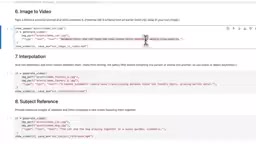
"Character consistency" in video generation is a well-known technical challenge across the industry. Diffusion models theoretically sample each frame independently from noise, causing a character's appearance, clothing details, and facial features to drift between frames. Gemini Omni Flash addresses this through multi-reference image input, using a mechanism similar to IP-Adapter or InstantID: visual features from reference images are injected into the cross-attention layers of the generation process as persistent visual constraint signals. Compared to describing character appearance in text alone, image references provide richer high-frequency visual detail (texture, color distribution, geometry), significantly improving identity stability across shots.
A more advanced use case is providing a character sheet. Upload multiple images of the same character as a chef, a gamer, and a farmer, then request "a montage of this character rapidly switching between these identities." Multi-angle, multi-costume reference sets allow the model to build a more complete visual vocabulary for the character — the output is tight in pacing, and character consistency is remarkably well-maintained.
When making targeted edits to such a video, the model modifies only the designated character while leaving the rest of the scene completely untouched. For creators who need to maintain a brand character or virtual avatar, this is genuinely valuable.
Safety Filters
Gemini Omni Flash's safety filters are quite strict, and it's worth being aware of this before you start:
- Celebrity images cannot be used as references;
- Certain keywords trigger the filter, and the system currently errs on the side of caution.
This strict stance reflects the enormous regulatory pressure the entire AI video generation industry is under for content safety compliance. Between 2024 and 2025, multiple countries enacted or strengthened regulatory frameworks for AI-generated content (AIGC), including the EU AI Act's mandatory transparency requirements for high-risk AI systems and the U.S. Federal Trade Commission's investigations into deepfake content. Banning celebrity image inputs is a direct response to the legal risk of "unauthorized likeness infringement" — lawsuits of this kind have established precedents across multiple jurisdictions. As a prime target of tech regulation, Google tends to adopt a more conservative "precautionary" stance on content moderation. These strict filters are a double-edged sword: they reduce the platform's legal exposure, but also constrain creative possibilities to some degree — a structural tension shared by all publicly available video generation APIs today.
Overall Assessment
Gemini Omni Flash demonstrates several standout differentiators: multi-turn conversational video editing, audio-video synchronized generation, multi-reference-image character consistency, and pricing on par with Veo 3.1 Fast.
Current limitations include: preview status (not yet generally available), a 10-second duration cap, 720p resolution, and no native audio input.
For users seeking an iterative, controllable video creation tool, its "editing-first" philosophy delivers more production value than one-shot generation alone. This paradigm shift, complemented by the session-state mechanism introduced by the Interaction API, points toward an AI video creation future that more closely resembles a professional non-linear editing workflow. Whether $0.10 per second is worth it — that's ultimately for your real-world creative use cases to decide.
Key Takeaways
Related articles

Coinbase Engineer: How to Determine Whether an AI Agent Can Operate Unattended
Coinbase engineer Evan Kormos shares an engineering method for judging whether an AI agent can run unattended: model processes with DAG/DCG, replace output comparison with statistical evaluation, and hand over control in three phases—supervision, sampling, and exception handling.

WorkBuddy Beginner's Guide: How AI Agents Automate Office Tasks
WorkBuddy tutorial: learn how this desktop AI agent workbench automates files, organizes data, and generates documents, compared with LLMs and Codex, plus a beginner path and cost analysis.

Doubao Work in Practice: Three Modes That Let AI Actually Get Work Done
Doubao Work practical tutorial: from chat mode to Work Mode Lite and Pro, explaining the logic for choosing among three modes with real office task demonstrations. Even complete beginners can learn to use an AI agent to handle local files, organize materials, and generate documents.