Generate AI Product Ads in One Place Inside Claude with Fish Creative MCP

Use Fish Creative MCP to let Claude complete the entire skincare ad creation workflow within a single conversation.
Using the fictional skincare brand Lumaglow as an example, the article demonstrates how to connect image and video generation tools to Claude through Fish Creative MCP and complete a product ad within a single conversation window. The five steps are: configure and authorize the api.fish.audio server, write a creative brief before generating product images, compare options and check material, lighting, composition, and label text, create image-to-video with restrained motion and play it back to check consistency, and finally import into editing software with music, transitions, and a branded end card. The author emphasizes that the real value lies in each step building on the previous one, with the agent coordinating tools and maintaining context; however, human judgment cannot be omitted—final quality depends on the model, prompts, and output, and review and cost confirmation still need to be done by humans.
Title
Generate AI Product Ads in One Place Inside Claude with Fish Creative MCP
Meta Description
Fish Creative MCP lets AI agents complete the entire product ad workflow right inside a Claude conversation: generating product images, image-to-video, filtering and refining, and editing the final cut. This article breaks down the five-step workflow and practical tips for a Lumaglow skincare ad.
Article Content
Can an AI agent independently produce a product ad? A YouTube tutorial creator offers a reproducible answer using Fish Creative MCP: from creative brief, product image generation, and image-to-video, all the way to the final edit, the entire process is completed within a single Claude conversation window—no need to constantly switch between web tools.
What Is MCP, and What Gap Does Fish Creative Fill
MCP stands for Model Context Protocol, and its purpose is to let AI assistants directly call external tools within a conversation. Fish Creative MCP connects image and video generation tools into MCP-capable AI agents, so that "generating a product image" and "turning that image into a dynamic shot" no longer require opening two separate platforms and manually uploading and downloading.
This difference may seem like just saving a few clicks, but it actually affects the rhythm of creation. In the traditional workflow, every interface switch interrupts your train of thought—prompts need to be reorganized, and reference images need to be re-uploaded. In MCP mode, the agent remembers the context, and the image from the previous round can be used directly as input for the next round of video generation.
MCP was proposed and open-sourced by Anthropic in late 2024. It uses a client-server architecture: the AI application (such as Claude Desktop) acts as the client, and the external service acts as the server, exposing three types of capabilities—"tools," "resources," and "prompt templates"—through the JSON-RPC protocol. The server can run as a local process or be hosted remotely; remote connections commonly use two methods: HTTP-based streaming transport and SSE (Server-Sent Events). The authorization step typically follows the OAuth flow: after the user completes a one-time login authorization in their AI client, the client can call the server's tools on the user's behalf. This explains what the sequence of operations in the tutorial—"fill in the server address, save, authorize, confirm tools are visible"—actually means: it is not about opening a third-party website, but about letting Claude discover and call the image and video generation functions provided by Fish Creative through a standard protocol.
Five Steps to Complete a Skincare Ad
The tutorial uses a fictional skincare brand, Lumaglow, as a demonstration. The goal is a "premium-feel" hydrating serum ad: a glass bottle, realistic lighting, elegant product shots, and cinematic movement. The entire workflow can be divided into five steps.
Step 1: Connect the Service to Claude
Add the Fish Audio server in Claude's MCP settings, using its supported remote connection method, with the server address api.fish.audio. After saving the configuration, complete authorization as prompted, then confirm that the server is connected and the tools are callable within Claude. The author specifically emphasizes that this step is not about opening the Fish Creative website, but about connecting the service to the agent so that tools are exposed to the model through MCP.
Step 2: Write the Brief First, Then Generate Images
After connecting, the author does not immediately ask the agent to generate images. Instead, they first provide a clear creative brief. The agent then checks the available image generation options and organizes the request accordingly. The point of this step is that the creative direction is set by the human, while execution details are delegated to the agent's orchestration.
Step 3: Compare Side by Side and Evaluate Item by Item
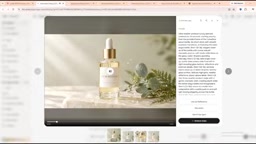
After image generation, compare the results side by side. The author's selection criteria are very specific: whether the material looks realistic, whether the lighting is attractive, whether the composition is clean, and whether the product looks like something from a professional ad.
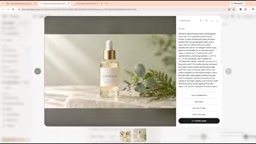
There is also an easily overlooked checkpoint—label text. AI-generated text often contains errors, so the bottle label needs to be zoomed in and verified. If problems are found, either revise the prompt or use the existing editing features to fix it, and then decide whether to continue.
Step 4: Image-to-Video—Restraint Matters More Than Showing Off
Select the strongest image as the reference for video generation, then turn it into a dynamic product shot. The author deliberately keeps the motion restrained, because the product itself is the protagonist; the camera movement is only responsible for making the image "come alive" and must not steal the show.
After generation, actually play it back and check: whether the motion is natural, whether the lighting is consistent, and whether the bottle shape is distorted. If the bottle deforms or the motion is unnatural, adjust the prompt and retry—provided that the available options and budget allow.
The second shot should be visually different but remain in the same creative direction: the first shot introduces the product, and the second emphasizes texture and detail. Compare the two clips and take the strongest parts; when improvement is needed, make targeted tweaks rather than overturning the entire creative direction. The author sees this as a core habit of AI generation work—the first result is only a starting point, and watching the clip determines what to change next.
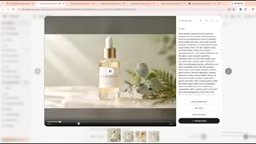
Image-to-video refers to using a static image as the first frame or reference frame and having a video generation model infer the subsequent motion. Mainstream models are mostly based on diffusion architectures, denoising frame by frame in latent space and maintaining temporal coherence through temporal attention. Because motion is "inferred" rather than "filmed," common artifacts include drifting bottle contours, distorted label text, flickering highlights, and object deformation. Control methods usually include prompts describing motion direction and amplitude, specifying camera movement types (dolly in, dolly out, pan, truck), and setting motion intensity parameters. The larger the motion amplitude, the more pixels the model needs to "invent," and the higher the risk of deformation; this is also why product ads should use slow push-ins and subtle orbits rather than rapid camera moves.
Step 5: Return to Editing Software for the Finale
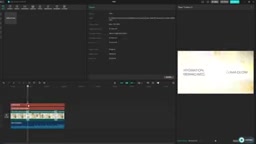
The generated clips are imported into a video editor: open with the main product shot, cut to macro details, and end on a clean branded end card. Add background music, light transitions, and simple typography, with the end frame using the brand name Lumaglow and the tagline Hydration Reimagined.
The editing is deliberately kept simple so that the product visuals carry the main expression. The goal is to make the final cut feel like a complete ad rather than a collage of AI clips. Once the pacing, sound, and text are in place, watch it through, make final adjustments, and export.
What Is the Value of This Workflow
The real value is not that "AI can generate video," but that each step builds on the previous one. Each generation is not an isolated task; the agent coordinates the available tools and strings the creative process together in the same continuous conversation. This approach can be transferred to product ads, social media assets, promotional short films, and other scenarios.
It should be noted that the quality of the final cut depends on the available models, prompts, and output results, and the review step cannot be skipped; for paid tasks, generation costs should also be confirmed before approval. In the author's workflow, human judgment is always present—selecting images, checking labels, reviewing clips, and deciding on the edit. These decisions are not handed over to the model.
To replicate this workflow, the starting point is to articulate the creative vision clearly: first establish a unified visual tone, then generate several more options, and repeatedly refine the strongest result.
One-line Summary
Use Fish Creative MCP to let Claude complete the entire skincare ad creation workflow within a single conversation.
Paragraph Summary
Using the fictional skincare brand Lumaglow as an example, the article demonstrates how to connect image and video generation tools to Claude through Fish Creative MCP and complete a product ad within a single conversation window. The workflow has five steps: configure and authorize the api.fish.audio server, write a creative brief before generating product images, compare options side by side and check material, lighting, composition, and label text, create image-to-video with restrained motion and play it back to check consistency, and finally import into editing software with music, transitions, and a branded end card. The author emphasizes that the real value lies in each step building on the previous one, with the agent coordinating tools and maintaining context; however, human judgment cannot be omitted—final quality depends on the model, prompts, and output, and review and cost confirmation still need to be done by humans.
Related articles

Prompt Engineering for Beginners: From Writing Prompts to Engineering Thinking
Starting from the essence and four functions of prompts, this article systematically explains the six-step process, four success criteria, learning value, and practical limitations of prompt engineering to help you build a complete understanding.

Anthropic Launches Nasdaq IPO: AI Giant's Listing and Risk Disclosures
Anthropic officially launches its Nasdaq IPO under ticker ANT, with market valuation expected to potentially exceed SpaceX's record. The prospectus devotes nearly 100 pages to AI risks, while first-half revenue grew over 14x but net losses widened sharply, reigniting the AI bubble debate.

Rust cURL Clone Uses 4,832 unsafe Blocks—Is the Memory Safety Myth Broken?
A Rust cURL clone uses 4,832 unsafe keywords, challenging Rust's memory safety narrative. We analyze what unsafe really means, compare Fil-C, and examine rewrite motives.