Generating a Runnable Enterprise System from Natural Language: Breaking Down a Real-World AI Coding Workflow

Use a six-step prompt chain to precisely control context so AI reliably generates runnable enterprise systems.
The article presents a practical AI coding workflow from the Bilibili series "AI Coding in Practice 09": instead of letting the LLM improvise, it splits system generation into six serial stages — feature description, data model, feature menu, code definitions, backend code, and frontend code — with each step's input coming from the previous step's exact output to form a deterministic generation chain. The data model stage uses a dedicated prompt to strictly constrain JSON output so it can be stored in a database; the backend code stage uses a parallel expression to generate multiple code blocks at once, saving 5–10x in measured time. The core methodology is precise control of each conversation's context, mapping software development phases onto a prompt chain to make one-click enterprise system generation a reproducible, debuggable engineering method.
In AI coding circles, "generate an entire system with one sentence" is often dismissed as marketing fluff. But in "AI Coding in Practice 09," a Bilibili creator demonstrates a workflow that actually works: through carefully designed prompt chains and serial/parallel orchestration, an LLM starts from natural-language requirements and successively produces a feature description, data model, feature menu, and code definitions, ultimately generating frontend and backend code to arrive at a genuinely runnable enterprise system. The core of this approach isn't letting the AI roam free — it's using engineering discipline to constrain what gets generated at each step.
Why a Workflow Beats a Free-Form Agent
At the start of the video, the creator makes a key point: the essence of a workflow is the optimal combination of agent tool calls. If you let an agent freely generate a system, it has to decide on its own what to do next, which easily leads to omissions or logical leaps. A workflow, by contrast, breaks the task into fixed stages, each with explicit input and output constraints — it's faster and the results are more stable.
This workflow is serial and progresses layer by layer. Only after the feature description is generated can the data model be produced; only with a data model can the feature menu be generated; only with a menu can code definitions be generated. Although the platform supports parallel execution, these steps are coupled when building a real system and can't be arbitrarily parallelized. The creator emphasizes that precisely because each step is based on the exact output of the previous one, subsequent generation can "pull context with great precision" rather than improvising randomly the way traditional conversations do.
Agent refers to an LLM application form with autonomous planning, tool-calling, and memory capabilities. When faced with open-ended tasks like "generate a system," a free-form agent must decide on task decomposition, execution order, and next actions on its own; its decision space is large and its path is non-deterministic, making omissions, duplication, or logical leaps likely. By contrast, a Workflow pre-decomposes a task into fixed nodes, each bound to explicit prompts, input variables, and output formats, dispatched sequentially or in parallel by an orchestration engine according to dependencies. The difference is like "letting an intern improvise" versus "running an SOP assembly line": the former is flexible but uncontrollable, while the latter trades some autonomy for determinism, debuggability, and speed. The workflow in this article packages agent capabilities into fixed nodes, which is why it's faster and more stable than a free-form agent.
The Six-Step Generation Chain: Rigorous Design from Requirements to Code
Step 1: Feature Description — Closure Is the Keyword
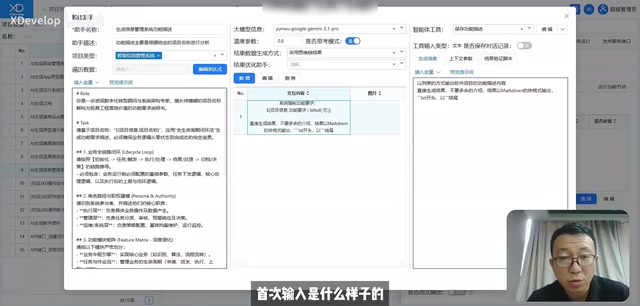
The prompt for generating the feature description demands "sufficient closure": roles, feature modules, and business rules all need explicit requirements. The prompt dynamically inserts the project name and user feature requirements, showing "none" if the user has no special requirements. The creator previews the effect after input, with the project name accurately embedded in the prompt. The goal of this step is to have the AI produce a structurally complete, clearly bounded feature specification that serves as the baseline for all subsequent steps.
Step 2: Data Model and Fields — The Most Complex Step
The prompt for data model fields is far more complex than the one for feature descriptions. The prompt the creator shows contains a large number of specifications: descriptions of built-in fields (to avoid duplicate generation), modeling paradigms for ordinary table structures and hierarchical structures, definitions of relationships between fields, and more. The input section likewise inserts the project name and the feature description generated in the previous step.
This step also has a critical technical point: how to constrain the AI to output strict JSON. Because the data model ultimately has to be stored in a database, format errors will prevent the system from running. To address this, the creator designed a dedicated "message generation" prompt that imposes strong constraints on the JSON structure.
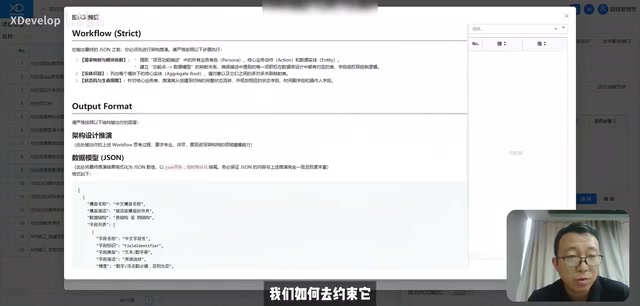
Structured Output refers to the technique of constraining an LLM to return results according to a predefined schema (such as JSON Schema). Common implementations include: providing JSON examples and field constraints in the prompt, using function calling/tool calling, and vendor-provided JSON Mode or schema-constrained decoding. The point is to make model output directly parseable and storable by programs, avoiding downstream pipeline breaks caused by extraneous text, missing fields, or type errors. The "message generation" prompt mentioned in the article belongs to the strong-constraint-at-the-prompt-level category: it explicitly specifies field names, nested structures, and value types, and requires the model to output only JSON. For data models that need to be written to a database, this constraint is the key prerequisite for whether the system runs at all.
Step 3: Feature Menu — Hierarchical JSON Structure
Generating the feature menu depends on the feature description and data model. The prompt defines the hierarchical JSON structure and generation rules for the menu, ensuring menu items correspond to entities in the data model. The creator specifically notes that the context here isn't randomly selected — "whatever was generated before is what gets pulled out afterward." This precise context control is the foundation of stable output.
Step 4: Backend Code Definitions — Grouping Reduces Error Rates
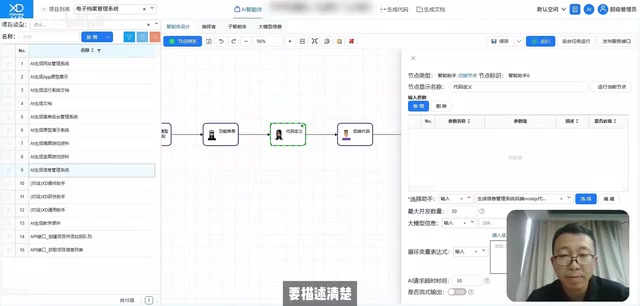
Here the creator made a counterintuitive design choice: instead of generating code directly, first generate "code definitions." A code definition is a description of a group of service interfaces rather than a single interface. The reason is that there are too many individual interfaces, which makes errors and confusion likely; grouping the interfaces reduces the information volume and makes generation more stable.
Code definition generation is based on the project name, feature description, data model, and feature menu. The creator previews the prompt — considerable in length but fully controllable. He compares it to the context volume of Claude Code, noting that while this approach's context isn't short either, it is "sufficiently precise and sufficiently accurate," and much less than Claude Code's.
Step 5: Backend Code — Parallel Generation Speeds Things Up 5 to 10x
With code definitions in hand, the actual backend code can be generated. Here a parallel mechanism comes in: by iterating over a parallel expression over the code definition list, multiple code blocks are generated simultaneously in one go. The creator says that generating them one by one would be very time-consuming for a dozen or so code blocks; with parallelism, "you save at least 5x the time — 5 to 10x — and we've actually measured this."
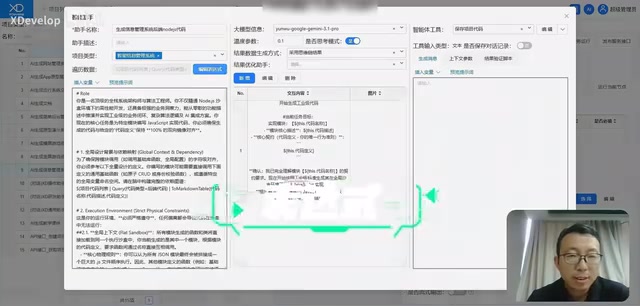
When generating each code block, the prompt carries all the background information: the data model, the earlier design information, and the name and definition of the current code block. Interestingly, this step doesn't use the "message generation" constraint, because backend code is text output rather than JSON, so the conversational result can be used directly. The creator calls this multi-turn dialogue a "chain-of-thought" mode: what you discuss in round one, what you discuss in round two, progressing layer by layer.
A parallel expression is a node type in workflow orchestration that typically receives a list variable, concurrently executes the same sub-workflow for each element in the list, and finally aggregates the results of each branch. Compared with a serial loop, it fires multiple model calls that would otherwise be awaited one by one all at once, so the total time is roughly that of the slowest call rather than the sum of all calls — hence the several-fold speedup when generating a dozen independent code blocks. When using parallelism, note that branches must not have data dependencies on each other, or results will be non-deterministic; also consider the model API's concurrency rate limits and failure retries. The 5-to-10x speedup measured in the article comes precisely from rewriting "generate code blocks one by one" as "iterate over the code definition list and generate in parallel."
Step 6: Frontend Code — Precise Coupling with the Backend
Frontend code generation is relatively simple because the backend service structure is already fixed. The creator mentions that frontend generation relies on a complex prompt system in the component library — for example, the prompt for generating the workbench UI is very long and includes the previously defined backend interface information. This is exactly why the frontend and backend can be interlinked and combined: both definitions come from the same data model and code definitions.
The Core Methodology: Precise Context Control
Behind the entire workflow is a unified idea: control the context and prompt of every AI conversation. In traditional conversations, the AI's context slides and is random; in this workflow, each step's input is the exact output of the previous step, forming a deterministic generation chain. The creator repeatedly stresses "very precise," "very rigorous," and "sufficiently clear" — all pointing to the same conclusion: the key to getting AI to generate a runnable system isn't how powerful the model is, but how accurate the information you feed it is.
From an engineering perspective, this approach maps the phases of software development onto a prompt chain: requirements analysis, database design, menu design, interface design, and coding implementation. Each phase has clear deliverables, and the deliverables remain structurally consistent with one another. This both reduces the AI's cognitive load and lets human developers inspect and intervene at every step.
For developers who want to reproduce this workflow, the creator's advice is implicit in the workflow design: first define the output format for each phase (especially the JSON structure), then design how data is passed between phases, and finally use a parallel mechanism to optimize the time-consuming parts. Generating an enterprise system from natural language with one click isn't magic — it's a reproducible, debuggable engineering method.
Related articles

Michael Nielsen Takes Down His Classic Neural Network Textbook, Sparking Community Discussion
Michael Nielsen's classic free textbook Neural Networks and Deep Learning has been taken offline, sparking discussion on Hacker News about the reasons and impact.

Inside the AI Training Data Market: The Trade-off Between Exclusivity and Discounts
G2i founder Gabe Greenberg reveals the dual-track pricing of the AI training data market: labs pay a premium for exclusive data or accept discounts that allow others to buy it.

SessionGraph: Unifying All Coding Agent Sessions in One Interactive Graph
SessionGraph aggregates coding agent sessions into an interactive graph, helping developers review, debug, and manage AI coding workflows across sessions. This article examines its positioning, value, and open questions.