Generating an Android App from a Single Prompt: A Google AI Studio Hands-On Test

Google AI Studio generates a native Android app from a single prompt — features work, but the paywall and design have real flaws.
Google AI Studio introduced a feature that lets users generate a Kotlin-based native Android app from a natural-language description and run it directly on their own phone, with no developer account or cable required. In testing, it generated 30 files in 16 minutes, and a habit-tracking app passed all six functional checks — even adding unrequested features. But deeper inspection found fake habit data on the first screen, a new-habit button covering a check-in button, poor chart contrast, broken price text, and a visual style indistinguishable from countless AI apps. Worse, the paywall had no payment system at all — tapping subscribe merely wrote a database record, and the security rules let any user self-upgrade to Pro. The feature is also mainly US-only, with other regions still requiring USB debugging or a $25 developer account.
One Prompt, One Native Android App — Google Pulled It Off
Google AI Studio has rolled out a new feature: users simply describe what they want in natural language, and the AI generates a complete native Android app written in Kotlin. Anyone with an ordinary Google account can run the app directly on their own phone — no developer account, no payment, no USB cable required. The app stays private and never appears in the app store.
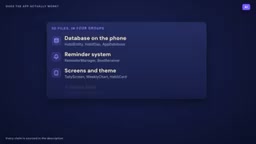
According to a hands-on test by a YouTube creator, he used a single pre-written prompt asking for a habit-tracking app with streak tracking, a weekly chart, reminders, and local data storage. Sixteen minutes later, AI Studio had generated 30 files — including a local database, a reminder scheduling system, the UI, themes, an app icon, and basic tests. He didn't change a single line of code, and the app ran fine.
A year ago, this might have been a week's worth of work for a beginner.
Hands-On Results: It Runs, But It's Far from "Done"
Feature Verification: All 6 Checks Passed
All six items on the checklist passed: adding a habit, checking in, streak increments, weekly chart updates, data persistence after closing, and reminder notifications firing correctly. The AI even proactively added features that weren't requested, like code to automatically reset reminders after a phone restart.
Problems Beneath the Surface
But a close look at the first screen revealed an issue — 4 habits that were never created were listed there, two of them with streak records, and even two completion entries dated the day before the test. For a real app, showing fake data on day one is a serious trust problem. This is a reminder: every single number in an AI-generated app needs human verification.
Design-Level Flaws
After evaluating screen by screen from a user's perspective, four obvious problems emerged:
- The "New Habit" button covers the check-in button of the last habit, making that habit unclickable
- The chart label font is too small — gray text on a dark blue background is nearly illegible
- The price text on the paywall breaks across three lines
- The overall visual style — dark navy blue, lavender buttons, rounded cards — looks identical to hundreds of other AI-generated apps
The last point is the most damning. As the tester put it: "If your app looks like everyone's first draft, users will treat it like a first draft."

The Paywall: A Carefully Crafted Illusion
The tester then asked the AI to add two must-have features for a paid app: cross-device sync login and subscription payments. The specific prompt was: a $2.99/month Pro subscription that unlocks unlimited habits.
AI Studio immediately configured a Firebase cloud database, and 15 minutes later generated a login button, a sync banner, and a paywall. But the tester discovered something shocking in the code:
No payment system was connected at all. After tapping the "Subscribe" button, the code simply writes a record into the database — Pro equals true, valid for 30 days. And the security rules the AI itself wrote allow any logged-in user to write that record for their own account. In other words, any logged-in user can make themselves Pro for free.
AI Studio's own summary even described this set of security rules as a "zero-trust" architecture, but what it actually built wasn't a subscription system — it was the appearance of one.
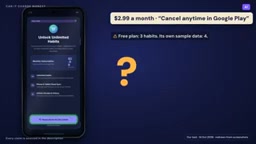
A real Android in-app subscription requires integrating Google Play Billing and a developer-controlled server that verifies each purchase with Google before unlocking functionality. Google's official guidelines explicitly state: the phone side should not have the final say.
The app itself is already the easy part. Accounts, payments, and the data behind them are the real business.
Google Play Billing is Google's official in-app payment system for Android apps, covering one-time purchases, subscriptions, promotional offers, and more. Its core mechanism is: the user initiates a purchase on the phone, the Google Play client shows a confirmation screen, the transaction is charged and verified by Google's servers, and a digitally signed purchase receipt (a purchase token) is returned. Developers must send this receipt to their own backend server, which calls the Google Play Developer API to verify its authenticity with Google — only after verification passes are the corresponding entitlements actually unlocked. This "server-side verification" step is the key to security — because code running on the user's device is untrustworthy, and an attacker can tamper with local logic but cannot forge the signed receipt returned by Google's servers. For this reason, any implementation that puts the unlock logic on the phone side, or that determines a user is a paying member based solely on a local database field, is essentially a fake paywall that can be easily bypassed.
Firebase Security Rules are the access-control mechanism for Firebase cloud databases (Firestore/Realtime Database), used to define who can read and write which data under what conditions. Its syntax is something like: "If the requester is logged in and the document belongs to their UID, allow the write." The problem is that this kind of rule bases its default decision on "requester identity" rather than "payment status" — it can only verify that a user is who they claim to be, not whether they actually paid. So when the AI hands the write permission for the "Pro flag" to the user themselves, any logged-in user can legitimately mark themselves as Pro. The correct approach is to hand all writes of subscription status entirely to a trusted backend, operated through server-side keys, with the client having read-only permission — architecturally preventing users from self-authorizing.
The Reality of Regional Restrictions and the Publishing Path
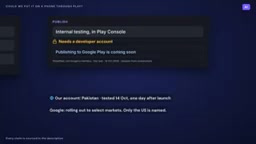
Google claims this feature is rolling out in the US and select other markets, for users 18 and older. But in the tester's account in Pakistan, the install button offered only one option: a USB cable. You'd need to enable developer options and USB debugging and connect the phone to install. The publishing feature points to internal testing and requires operating through the Play Console, which again requires a developer account.
The system prompt said "Publishing to Google Play coming soon," consistent with Google's wording — the new path is rolling out in select markets, with only the US named so far. The tester ran his test just one day after the announcement, and feature rollouts take time. Even in the US, the end of this path is just your own phone.
A Three-Step Roadmap
Google's plan is divided into three phases:
- Step One: Run the app on your own phone, now freely available (US market)
- Step Two: Share with friends and family, which Google says is "coming in the next few months," without revealing a cap or a specific date
- Step Three: Publish publicly to the app store, with unchanged rules — you still need to register a full developer account, and the app must pass the same review process as every other app
Registering a developer account currently costs $25, and new individual accounts also need at least 12 testers testing continuously for 14 days before they can publish publicly. Step one is free; the last step hasn't changed.
The Real Impact on Developers and Founders
What You Can Do Now
Testing an idea on your phone with one prompt used to require a cable, setup, or $25 — now it just takes one prompt. For individuals who want to validate a product concept without spending on development, this is a genuine lowering of the barrier.
What You Still Need to Do
If the test app turns into something worth keeping, the honest path is: download the project from AI Studio (it's a standard Android project, openable in Android Studio), find a developer to fix the paywall, security rules, and design issues, then register a developer account and start the testing countdown as early as possible.
How the Competitive Landscape Is Changing
If you're selling simple apps, you need to watch for a new class of competitor — people who'd rather build it themselves. When the barrier to building drops to a single prompt, some users who would have bought your app may now choose to make their own.
Still, the tester offered a precise summary at the end: a single prompt can give you an app, but good looks, real payments, and a channel to reach users are still work you have to do.
Related articles

Chain of Thought Isn't Just for AI: How Humans Can Use CoT to Improve Thinking Quality
Chain of Thought isn't just a prompt trick for large models. Starting from a Hacker News discussion, this article analyzes why CoT works for human thinking too, breaks down actionable ways to transfer it, and highlights the key differences between human CoT and machine CoT.
Cloudflare Teams Up with OpenAI: Closi…
Cloudflare Teams Up with OpenAI: Closing the Loop from Vulnerability Discovery to Defense with AI
Cloudflare uses OpenAI Daybreak to investigate security vulnerabilities and generate reviewable remediation plans, while developers use Codex to boost coding efficiency and quality.

Orca Multi-Agent Orchestration in Practice: A Guide to Parallel Collaboration with Claude and Codex
Orca is Stable AI's free open-source agent workbench supporting 34 agents like Claude Code and Codex in parallel. Learn its Git worktree isolation, multi-model orchestration, and mobile management.