Get One Year of Google AI Pro Free: A Complete Guide to Gemini's Student Discount
Google Gemini relaunches student free plan — eligible users can claim one year of Google AI Pro for free.
Google Gemini has reopened its student free plan, open to both new users and returning users whose previous trial has expired, running through December 31. U.S. college students get Google AI Pro (worth $19.99/month), including flagship AI models, 2TB storage, and YouTube Premium; students elsewhere get AI Plus by default but can upgrade to Pro by switching their Google Play payment region. Participants must bind a Visa or Mastercard and have no active Google One subscription. New users also need to complete SheerID student verification. After subscribing, cancel auto-renewal immediately to avoid charges after the year ends. This method exploits regional policy differences and carries some platform rule risk — using a secondary account is recommended.
Google Gemini has recently reopened a new round of its student free plan, allowing eligible users to obtain up to 12 months of Google AI Pro membership at zero or minimal cost. Whether you're a new user trying this for the first time, or a returning user from last year whose membership is expiring or who's been asked to re-verify their student status — everyone can seamlessly renew or sign up through this round. This guide is based on a hands-on tutorial by Bilibili creator Porter科技迷, and walks through the complete application process along with key things to watch out for.
What Is the Gemini Student Free Plan
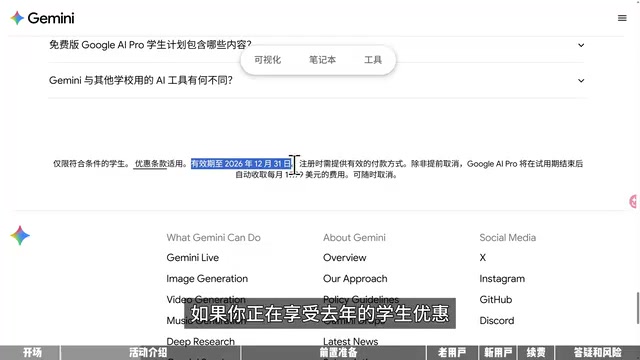
The official name of Google's promotion is "Gemini Student Free Plan — One Year." The core deal: eligible students get one free year of Gemini membership. The activity page clearly states that U.S. college students aged 18 and above can use Google AI Pro for free, and both new users and students whose previous AI Pro trial has already expired are eligible — meaning last year's participants can renew as well.
It's important to distinguish between Pro and Plus. According to Gemini's official clarification on X, U.S. college students receive one year of free Google AI Pro, while students in over 140 other countries and regions can only receive free Google AI Plus. Pro comes with significantly richer benefits — access to more powerful models, more cloud storage, and YouTube Premium. So if you have the option to claim Pro, you should definitely go for it.
The offer is valid through the end of this year (December 31). This is especially relevant for returning users: if your current membership hasn't expired yet, you can simply wait until it does and then come back to renew. There's no rush — bookmark this guide so you don't miss it.
Google AI Pro (formerly known as Google One AI Premium) is Google's premium personal subscription plan, normally priced at $19.99/month. Its core benefits include: access to Gemini's latest flagship models (such as Gemini 2.5 Pro), deeply integrated Gemini features across Google Workspace apps, 2TB of Google Drive storage, and YouTube Premium. Google AI Plus is a lower-tier plan, typically offering access to more basic models and fewer add-on benefits, with a lower price point and reduced feature set. The main difference lies in the ceiling of model capability and the breadth of bundled services — for heavy users, Pro offers far better value than Plus.
Prerequisites Before You Start
You'll need a valid payment method to register — specifically, a Visa or Mastercard credit or debit card, such as one issued by a Chinese bank, or a crypto-linked card from platforms like Bybit. The terms clearly state: unless you cancel early, Google AI Pro will charge $19.99/month after the trial period ends, but you can cancel at any time without affecting your access for the current year. So once you've successfully claimed the free plan, cancel auto-renewal immediately to avoid being charged after the year is up.
There are two things to prepare before starting. First, go to "Manage your Google Account → Wallet and payments" and add a Visa or Mastercard in advance. The creator warns that trying to add a card during the subscription flow often causes mysterious errors. For the billing address, you can look up an address generator for a U.S. tax-free state such as Oregon. Second, make sure your account has no active Google One subscription — if you do have one, wait for it to expire before participating.
SheerID is a third-party identity verification platform used by companies like Google, Adobe, and Spotify to confirm eligibility for special groups such as students, military personnel, and healthcare workers. Verification methods typically include uploading a student ID or enrollment certificate, receiving a confirmation email via an official school address (e.g., .edu), or direct verification through a school's database. For students in mainland China, most universities are not in SheerID's database and .edu email addresses are uncommon, making self-verification difficult — which is why the guide mentions seeking third-party verification services.
Three Possible Page Scenarios and How to Upgrade from Plus to Pro
After using a U.S.-region proxy to open the activity page and clicking "Student Free Plan," you may encounter one of three scenarios:
- Best case: The page shows "Enjoy 12 months of Google AI Pro for free" — this is the ideal outcome.
- Ineligible: A message says your account doesn't qualify for the offer. This commonly happens when a payment method outside the eligible region was previously linked. Try going to "Wallet and payments → Manage payment methods" and removing the existing method, then try again. If it still doesn't work, you may need to switch Google accounts.
- Plus only: The left side shows Plus for free, while Pro is shown as paid.
For upgrading from Plus to Pro, the creator discovered through testing that Google determines your account's country/region based on your Google Play payment profile. So you can add a U.S.-based payment method in Google Play settings to switch your region to the United States. Important note: your Google Play payment profile can only be changed once every 90 days, and the change may take up to 48 hours to take effect. Once the switch is successful, go back to the activity page — it should now correctly display Google AI Pro.
Google Play's country/region setting is tied to your Google account and determines your "payment region," which in turn affects the content library, pricing, and promotions you can access. To switch regions, go to "Account → Country and profiles" in the Google Play app or on the web. The system requires a valid local payment method in the target country. The 90-day cooldown is Google's mechanism to prevent users from frequently switching regions to exploit regional pricing differences. During the transition, some previously purchased apps or subscriptions may become temporarily unavailable — make sure you're not interrupting any active paid services before making the switch.
Subscribing and Canceling Auto-Renewal
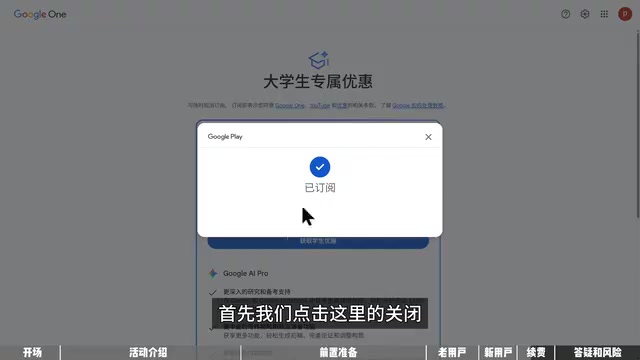
Returning users can click "Get student discount" and skip the student verification step entirely — the system will automatically reuse your previously verified student credentials. Once you reach the payment page, don't rush to click subscribe. First confirm that the details show "12-month free trial," the billing start date, and "cancel anytime." When you click subscribe, Google will place a small pre-authorization hold on your card and then immediately release it to verify the card is real — so make sure your card has at least a few dollars available.
New users will need to complete student verification first: clicking "Get student discount" redirects to SheerID's verification page. The creator notes that no ideal third-party solution has been found yet — the only known option is searching for "SheerID学生认证" (SheerID student verification) on Xianyu (闲鱼) to find a seller who can complete the verification on your behalf. After verification, the remaining steps are the same as for returning users.
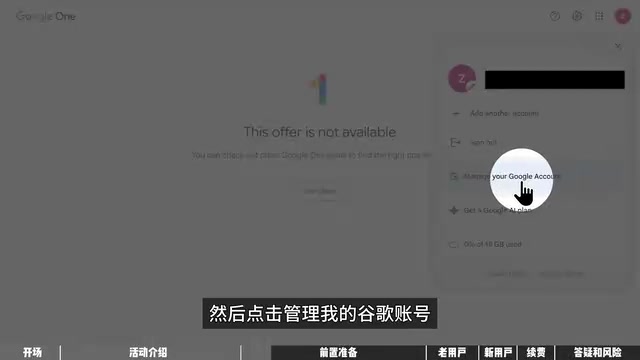
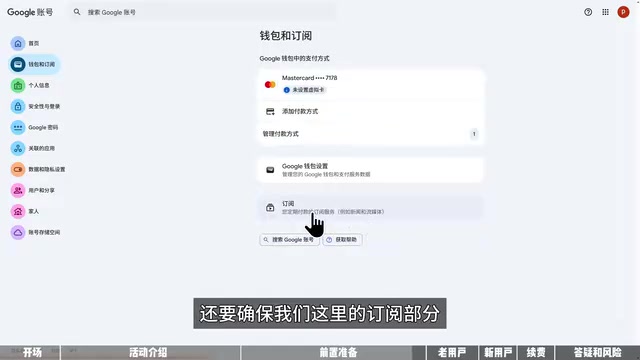
After successfully subscribing, the most critical step is canceling auto-renewal right away. The path is: "Manage your Google Account → Wallet and payments → Google One → Manage subscription → Cancel subscription." After canceling, your subscription will expire after one year, your membership benefits remain fully active in the meantime, and you eliminate the risk of being charged when it ends.
Common Risks and Recommendations
In response to frequently asked questions from the community, the creator offers two key reminders:
Don't use someone else's card. Purchasing or renting another person's card carries the risk of "one card, multiple bindings," which could get your subscription canceled. By comparison, getting your own Visa or Mastercard isn't difficult — with just a national ID card, you can open a Bybit Kazakhstan card; with a passport, you can open a Bybit Georgia card or a Starblue card, among others, all of which can be applied for online.
On the risk of account suspension. As of now, there have been no reported cases of a Gmail account being banned for claiming this promotion. Accounts that tend to get flagged are newly registered ones suspected of being bulk-created — which has nothing to do with this promotion. As a precaution, if you have a spare Google account, it's safer to use that one instead of your primary account.
It's worth noting that this kind of "free ride" approach — exploiting regional differences and switching payment profiles — operates in a gray area of platform rules. Google could adjust its policies or tighten verification (as seen with the re-verification requirement mentioned above) at any time. Whether to participate, and whether to use your main account, is a risk assessment each reader should make for themselves.
Related articles

MosMos: An AI Voice Writing Tool Built for the Entire Meeting Lifecycle
MosMos is an AI voice writing tool built for the full meeting lifecycle — ranked #2 on Product Hunt. It goes beyond dictation with style-aware drafting, a personal glossary, web search, speaker diarization, and structured meeting notes.
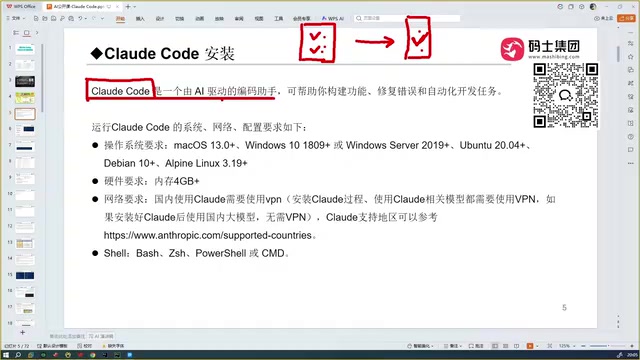
Getting Started with Claude Code: Capabilities and Installation Essentials for This AI Coding Assistant
Claude Code is Anthropic's AI coding agent that reads your full codebase, generates accurate code, and auto-debugs. Compare with Cursor, TRAE, Codex, plus key install requirements.

AINA: An AI Career Coach That Uses a Video Avatar to Uncover Your Job Search Blind Spots
AINA topped Product Hunt with its AI career coach that uses a video avatar to help job seekers find blind spots, polish their profile, and practice interviews.