Getting Started with Agent Skills: From Using AI to Developing Intelligent Agent Capabilities

Master Agent Skills to evolve from AI user to intelligent agent developer.
This article explains Agent Skills — the structured approach to packaging AI capabilities into reusable, extensible skill modules. It covers the four core components (SKILL.md, references, scripts, assets), how they map to human workflows, and how they differ from simple prompts. With practical examples using Claude Code and Codex, it guides developers from understanding to building their own Agent skill systems.
From "Using AI" to "Developing Agents"
As more and more people learn how to chat with large language models and write prompts, a new dividing line is emerging: Are you just using AI, or can you develop reusable, extensible Agent skill systems?
Agent Skills are the core concept at this dividing line. They upgrade AI from a "chat tool" to an intelligent agent with specific professional capabilities. Based on a hands-on tutorial from a Bilibili creator, this article breaks down the structure, principles, and customization methods of Agent Skills, helping you understand how to build your own skill system using tools like Claude Code and Codex.
The entire learning path really comes down to three things: understand Skills, customize Skills, and recommend Skills — progressing from easy to advanced, step by step.
Why "Agent" Instead of Simple Conversation?
To understand Agent Skills, you first need to understand the concept of an Agent itself. Traditional LLM interaction follows a "question and answer" pattern — the user asks a question, the model returns a result, and the interaction ends. An Agent, on the other hand, gives the LLM the ability to autonomously plan, call tools, and perform multi-step reasoning, enabling it to work like a "digital employee" — receiving a goal, breaking it down into tasks, invoking tools, verifying results, and iterating until the objective is achieved. This concept was first proposed in academia. Stanford University's 2023 "Generative Agents" paper and the viral AutoGPT project brought it into the mainstream. In 2024–2025, OpenAI, Anthropic, Google, and others integrated Agent capabilities into their products, moving Agents from experimental concepts to production-ready engineering. Agent Skills are the key design that makes this engineering capability "pluggable and reusable."
What Are Agent Skills: Understanding Through a "Professional Skills" Analogy
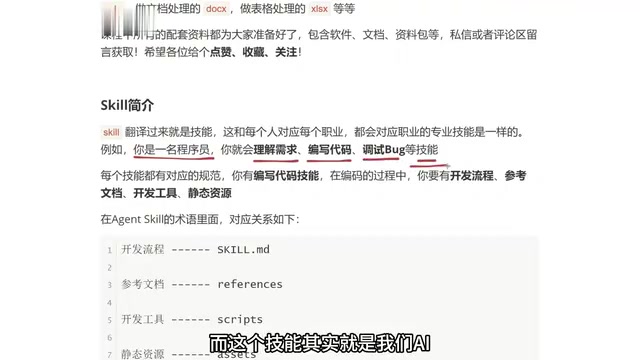
Skill — the term is quite intuitive. Every profession has its corresponding professional skills.
For example, if you're a student, you can write essays, solve math problems, and do English homework. If you're a programmer, you have skills like understanding requirements, writing code, and debugging. These skills belong to the capability set associated with your profession.
Agent Skills essentially transfer "human professional skills" onto AI agents. For every type of professional skill humans have, Agents can have a corresponding Skill.
The Four Components of a Skill
Every skill has a corresponding specification. Take a programmer's "write code" skill as an example — before actually doing the work, you need four things:
- Development workflow: Before writing code, you need to fully map out the business logic — what comes first, what comes next, and how different parts relate to each other.
- Reference documentation: This could be API docs, requirements specs, or any material you need to consult while implementing features.
- Development tools: Frontend developers use VS Code, Java developers use IntelliJ IDEA, doctors use surgical instruments — different professions need the right tools.
- Static assets: For example, images, audio, and video files needed when building a webpage.
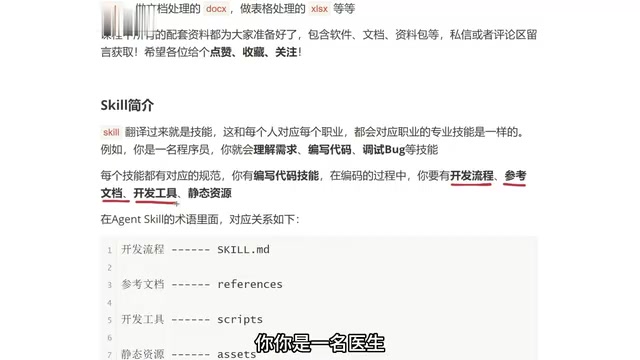
With these four things in place, you can actually deliver a project. Agent Skills are designed to abstract this complete "human workflow specification" into a machine-executable structure.
Agent Skill File Structure in Detail
Technical Mapping of the Four Components
The tutorial provides a very clear mapping that translates the four elements of human work into an Agent Skill directory structure:
| Human Workflow Element | Agent Skill Equivalent |
|---|---|
| Development workflow | SKILL.md file |
| Reference documentation | references directory |
| Development tools | scripts directory |
| Static assets | assets directory |
Bundle these into a folder, and you have a complete Agent Skill.
Only SKILL.md Is Required
Here's a key point to emphasize: not every file and folder is required — the only mandatory component is SKILL.md.
references, scripts, and assets should be added based on actual needs — sometimes you don't need any of them, sometimes you need all three. It depends on what your skill needs to accomplish.
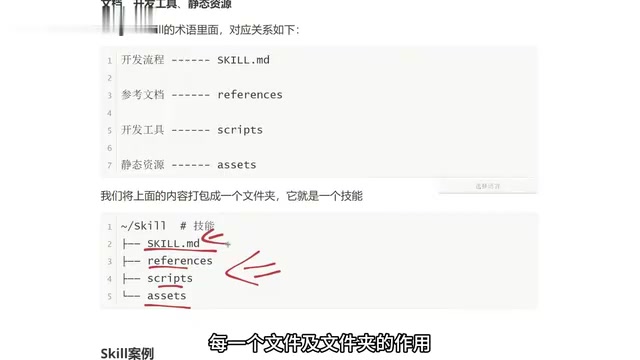
This "extend as needed" design philosophy is what makes Agent Skills flexible: simple tasks only need a single Markdown file, while complex tasks can mount scripts, documentation, and resources to form a fully functional capability package.
The references Directory: The Agent's Local Knowledge Base
The design philosophy of the references directory aligns with the widely adopted RAG (Retrieval-Augmented Generation) technique in the AI field. The core idea behind RAG is that an LLM's parametric knowledge has limitations in timeliness and accuracy, and dynamically retrieving from external knowledge bases during inference can significantly improve response accuracy and relevance. The references directory serves as a "local knowledge base" — place API documentation, requirement specs, design guidelines, and similar materials inside it, and the Agent will actively search these documents for necessary information when executing tasks. Compared to stuffing all knowledge into prompts (which is limited by the context window), this approach is more flexible and scalable, and it avoids the "attention dilution" problem caused by information overload.
The scripts Directory: Letting the Agent "Interact with the World"
The scripts directory stores scripts and tools that the Agent can execute, closely related to the Function Calling mechanism in the LLM domain. Function Calling was first introduced by OpenAI in June 2023, allowing LLMs to identify scenarios requiring external tool invocation during conversations and generate structured function call requests. Anthropic's Claude similarly supports Tool Use functionality. The scripts directory brings this capability to the file system level: the Agent can directly execute Python scripts, Node.js scripts, or Shell commands in the directory to perform operations like image processing, database queries, API calls, and file format conversions — things the LLM itself cannot do. This extends the Agent's capability boundary from "generating text" to "interacting with the world."
Inside SKILL.md: Metadata and Instructions
Metadata: The Skill's ID Card
Using a "restaurant marketing material design" Skill as an example, the top of SKILL.md contains metadata, with two core fields:
- Name: What this skill is called.
- Description: What it specifically does.
For instance, the description might read: "Generate brand-aligned marketing material design concepts for a specific restaurant. When the user says they want to create a certain type of material (poster, packaging, etc.), output the design concept for that material."
Metadata is how the Agent determines "when to invoke this skill" — the more precise the writing, the more accurate the trigger.
The Design Principle Behind Metadata: Declarative Configuration
The metadata design borrows from the "declarative configuration" philosophy in software engineering. In microservice architectures, each service has its own service description file (such as OpenAPI/Swagger specs) that tells callers "who I am, what I can do, and how to call me." SKILL.md metadata serves exactly the same role: the name is for indexing and referencing, and the description is for semantic matching. When an Agent faces a user request, it iterates through the metadata of all available Skills and uses semantic similarity to determine which Skill best fits the current task — a process similar to how an operating system selects a default program to open a file based on its extension. Therefore, the quality of the description directly determines the Skill's trigger accuracy, and it should include key verbs, usage scenarios, and output format information.
Instructions: The Skill's Execution Logic
Everything below the metadata is called Instructions. Just like every natural language sentence we send to an LLM in a regular chat is essentially an instruction.
In this example, the instructions section includes:
- Brand core elements: Brand name, style, IP mascot, primary colors, typography, etc.
- Task definition: When the user says they want to create a certain type of material, output the corresponding design aligned with the brand style.
- Output format: What the theme concept is, what the visual style is, what the composition looks like, and what the detailed recommendations are.
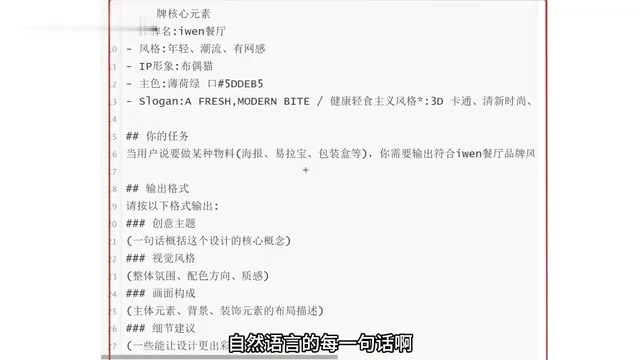
The more detailed the description, the more the generated content matches your expectations. This is precisely the value of Skill engineering.
How Are Agent Skills Different from Prompts?
At this point, many people might wonder: isn't this just a prompt?
Yes, SKILL.md does resemble a prompt, but its functionality far exceeds that of a prompt. The reason is that a Skill isn't just a single Markdown file — it can also mount references, scripts, and assets, extending its capabilities to include document retrieval, script execution, and resource utilization. This gives it a capability boundary and reusability far beyond a standalone prompt.
From a more fundamental perspective, prompt engineering is typically "one-off" — you carefully construct a prompt in a chat window, get satisfactory output, but may need to readjust next time. It's essentially a temporary optimization technique for single interactions. Skill engineering, on the other hand, introduces core software engineering principles: modularity, reusability, and version control. A Skill folder can be managed with Git, shared across teams, and installed or uninstalled like an npm package. More critically, by mounting a scripts directory, Skills can execute real system commands and scripts (such as Python scripts, Shell commands, and API calls), meaning they're no longer limited to the LLM's text generation capabilities but gain the ability to interact with external systems. This leap from "text instructions" to "executable capability packages" is the fundamental difference between the two.
Practical Application: Putting Agent Skills to Work
Once you've mastered the structure, Skills can be deployed in real-world scenarios. The tutorial provides a highly representative example:
"Create a promotional poster for Aven Restaurant's Wellington Braised Beef — only ¥38, first come first served."
With just a simple prompt, a properly configured Skill will generate poster concepts aligned with the brand style, positioning, target audience, and other dimensions.
Beyond marketing material design, the tutorial also recommends a set of high-frequency, practical Skills:
- Frontend page Skill: Quickly generate web interfaces
- PPT creation Skill: Automate presentation slides
- Document processing Skill: Batch process text documents
- Spreadsheet processing Skill: Structured data operations
Claude Code and Codex: The Best Runtime Environments for Skills
The reason these Skills can actually "get work done" is thanks to powerful runtime environments. Claude Code is Anthropic's command-line AI programming tool that allows developers to interact with the Claude model directly in the terminal — Claude can read project files, understand code context, execute commands, and modify files. It's essentially a programming Agent with file system access. Codex is OpenAI's similar product, also supporting autonomous development tasks within local code repositories. What these tools have in common is that they're not simple code completions — they're Agent-level tools capable of understanding complete project structures and performing multi-step operations. Agent Skills are designed as "capability expansion packs" for these tools — by loading different Skills, the same tool can handle professional tasks across different domains.
Combining these Skills with tools like Claude Code and Codex, you can build a reusable, extensible intelligent agent skill library — one-time configuration in exchange for long-term automation benefits.
Final Thoughts
The core idea behind Agent Skills is to structurally package the "complete human methodology" — workflows, documentation, tools, and resources — into capability packages that machines can understand and invoke. They're more powerful, more reusable, and more extensible than prompts.
For developers looking to advance from "using AI" to "developing Agents," understanding the structure of SKILL.md and mastering the mapping of the four components is the first step. The real key to turning AI into a "professional employee" lies in the customization and hands-on practice that follow.
Key Takeaways
Related articles

Chain of Thought Isn't Just for AI: How Humans Can Use CoT to Improve Thinking Quality
Chain of Thought isn't just a prompt trick for large models. Starting from a Hacker News discussion, this article analyzes why CoT works for human thinking too, breaks down actionable ways to transfer it, and highlights the key differences between human CoT and machine CoT.
Cloudflare Teams Up with OpenAI: Closi…
Cloudflare Teams Up with OpenAI: Closing the Loop from Vulnerability Discovery to Defense with AI
Cloudflare uses OpenAI Daybreak to investigate security vulnerabilities and generate reviewable remediation plans, while developers use Codex to boost coding efficiency and quality.

Orca Multi-Agent Orchestration in Practice: A Guide to Parallel Collaboration with Claude and Codex
Orca is Stable AI's free open-source agent workbench supporting 34 agents like Claude Code and Codex in parallel. Learn its Git worktree isolation, multi-model orchestration, and mobile management.