Getting Started with Claude Code: A Complete Guide from Installation to the Fifth Stage of AI Programming

A practical guide to Claude Code covering installation, configuration, and the five evolutionary stages of AI programming.
This article traces the five stages of AI programming tool evolution — from manual coding to conversational AI, IDE plugins, AI-native IDEs, and finally command-line agents like Claude Code. It explores AI's strengths in "0 to 1" project scaffolding versus its limitations in "1 to 100" complex iteration, discusses how developers should broaden their tech stack, and provides a detailed Claude Code installation and configuration guide including proxy troubleshooting tips.
The Five Evolutionary Stages of AI Programming Tools
From manually writing code to conversational AI programming, the evolution of programming tools has followed a clear trajectory. Looking back at this journey, we can roughly divide it into five stages.
The first stage was traditional programming, where developers relied entirely on writing code by hand. The second stage began in early 2023, when large models like ChatGPT emerged, allowing developers to converse with AI in a chat interface and copy code snippets into their development tools for debugging — still a fragmented workflow. ChatGPT was released by OpenAI in late November 2022, built on the GPT-3.5 large language model (LLM). Large language models are deep learning models based on the Transformer architecture that learn statistical patterns and semantic understanding from massive text datasets through pre-training. The "large" refers to parameter counts typically ranging from billions to hundreds of billions. ChatGPT's breakthrough was the introduction of RLHF (Reinforcement Learning from Human Feedback), which aligned model outputs more closely with human expectations. The success of this technical paradigm directly catalyzed rapid development in code generation — because programming languages are fundamentally structured languages, and large models demonstrated remarkable capabilities in code completion, generation, and debugging.
The third stage was the era of Copilot and domestic plugins, pioneered by GitHub Copilot, which could be installed directly in IDEs to enable code completion, comment inference, and snippet-level modifications. GitHub Copilot was first previewed in June 2021 and commercially launched in June 2022. It was the industry's first large-scale commercial AI code completion tool, based on OpenAI's Codex model (a code-fine-tuned version of GPT-3), generating real-time code suggestions by analyzing the developer's current code context. An IDE (Integrated Development Environment) is the core tool developers use daily to write, debug, and run code, with popular options including VS Code, JetBrains products, and others. Copilot's plugin-based integration into IDEs meant developers could receive AI assistance without switching windows — a quantum leap from the second stage's copy-paste workflow between browser and IDE. Domestic alternatives like Tongyi Lingma and Wenxin Quick Code quickly followed during this period.
The fourth stage saw the rise of AI-native IDEs like Cursor and Trae, which are essentially "deep agents" capable of directly manipulating project code for debugging and modification, though early versions had suboptimal context understanding. Cursor was developed by Anysphere, built as a deep modification of the open-source VS Code; ByteDance's Trae follows the same AI-native IDE approach. "AI-native" means AI capabilities aren't bolted on as plugins after the fact, but are deeply integrated at the architectural level across the entire workflow of editing, debugging, and project management. The "deep agent" concept mentioned here comes from the AI Agent paradigm — Agents can not only generate text but also autonomously plan tasks, invoke tools, execute operations, and iterate based on feedback. In programming contexts, this means AI can independently read project file structures, understand module dependencies, execute code modifications, and run tests. The size of the context window directly determines how much project information the Agent can "see." Early models had relatively small context windows (e.g., 4K-8K tokens), which is the technical root cause of the "suboptimal context understanding."
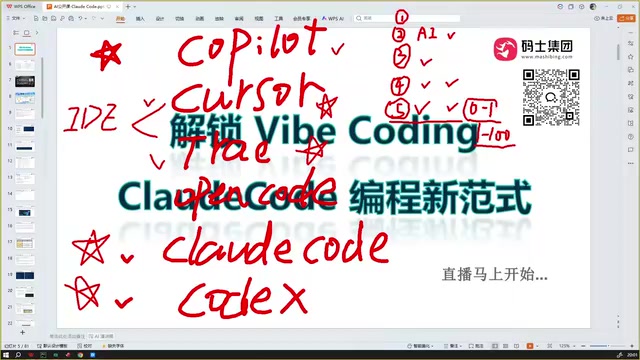
The fifth stage is the transformation happening right now, represented by tools like Claude Code, Codex, and the continuously iterating Cursor and Trae. These tools can directly debug and run code, submit and test based on requirements, support multi-turn interactions, and sometimes produce completely correct code in a single turn. Claude Code, released by Anthropic, is a command-line programming tool based on the Claude large model; Codex is OpenAI's programming Agent product. Both share the common feature of supporting "agentic coding" — where AI can autonomously execute multi-step operations: reading files, writing code, running commands, examining output, and fixing errors, forming a complete development loop. Multi-turn interaction means developers can progressively refine requirements as if conversing with a senior engineer, while the AI continuously optimizes code based on prior context in each round.
From 0 to 1 and From 1 to 100: The Capability Boundaries of AI Programming
Current AI programming tools already perform exceptionally well on "0 to 1" tasks. "0 to 1" means giving AI a detailed requirements document, and it can build out the complete foundational code framework for a project. Claude Code, Codex, Cursor, and Trae are all quite mature in this regard.
However, "from 1 to 100" remains the current weak spot of AI programming. Within existing technical frameworks, continuously filling in more business logic and finer details — involving multi-person collaboration, multi-module development, and cross-module integration — these complex scenarios are still difficult for AI to handle independently. In software engineering, "0 to 1" typically refers to the project initialization phase: setting up the technical architecture, creating the project skeleton code, configuring the development environment, and implementing core feature prototypes. This phase is characterized by relatively clear requirements, limited code volume, and few inter-module dependencies. "1 to 100" corresponds to the continuous iteration phase, involving fine-grained implementation of extensive business logic, edge case handling, performance optimization, merge conflicts during multi-person collaboration, API integration between microservices, database migrations, security audits, and other complex engineering challenges. The difficulty of these scenarios lies in the fact that context is scattered across multiple files or even multiple repositories, decisions often involve technical trade-offs, and the cost of errors escalates sharply with project scale. Current AI's context window and long-term memory capabilities remain limited, which is the deeper reason why "1 to 100" remains a weak spot.
Notably, the industry is evolving toward "proactive questioning in programming." Tools like Claude Code's Plan mode and Alibaba's QoderAd have begun actively asking users clarifying questions during the programming process: what approach do you prefer, what style do you want? Proactive Questioning is an important evolution in AI programming interaction paradigms. In the traditional model, developers need to provide complete, precise requirement descriptions all at once for AI to generate good code — placing high demands on prompt engineering skills. Proactive questioning allows AI to ask clarifying questions when it receives vague or incomplete requirements, such as technology stack preferences, code style conventions, and exception handling strategies. Claude Code's Plan mode generates an execution plan before coding, listing the files to be modified, implementation steps, and technical approach for the developer to review and adjust before execution. This model essentially simulates the requirements clarification process between product managers and developers in real teams, significantly reducing the risk of "rework caused by AI misunderstanding."
Will AI Replace Programmers?
Regarding the topic of "will AI replace programmers," this article offers an insightful assessment.
It's foreseeable that demand for junior and mid-level programmer positions may shrink significantly. But this doesn't mean a complete novice can create excellent projects out of thin air. Consider a real case where a product manager sought advice: this PM had strong business capabilities and understood requirements, but lacked the technical background needed for implementing detailed features from 1 to 100, hitting a wall at every turn.
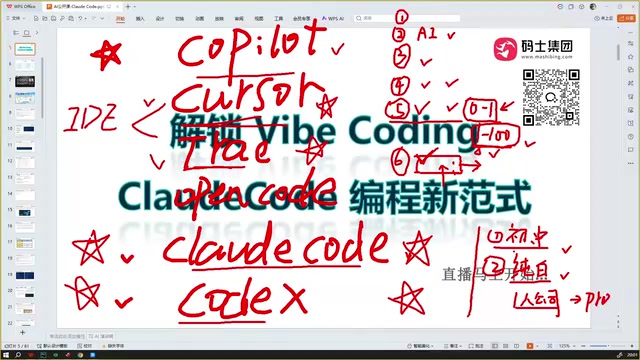
The core insight is: the future demands developers who are "broad in technical knowledge, though not necessarily deep." That is, you need to understand Java, Python, frontend development, cloud native, data analysis, mobile development, and other areas simultaneously. The traditional software industry typically sought "T-shaped talent" — deep expertise in one technical area with basic knowledge of related fields. But the proliferation of AI programming tools is reshaping this model. When AI can handle most concrete coding implementation, a developer's core value shifts to "technical decision-making" and "architectural judgment." For example: facing a data-intensive project, you need to judge whether to use a relational database or NoSQL, whether to introduce a message queue, whether the frontend should use React or Vue, and whether containerized deployment is needed. Cloud Native involves concepts like container orchestration (Kubernetes), microservices, and DevOps; data analysis may involve Pandas, SQL, and data visualization toolchains. When you understand a sufficiently broad tech stack, you can assess during conversations with AI whether its chosen technical framework is appropriate and whether it's heading in the right direction, enabling you to better harness AI for your project. This is the key capability for the "1 to 100" stage.
Token Cost Trends: Getting Cheaper and Cheaper
Regarding usage costs, a common misconception needs correcting. Many people worry that tokens will become more expensive as usage increases, but the actual trend is exactly the opposite — tokens will only get cheaper.
A token is the basic unit that large language models use to process text. In English, one token corresponds to roughly 4 characters or 0.75 words; in Chinese, one character typically maps to 1-2 tokens. The cost of AI programming tools is primarily determined by input tokens (code and requirement descriptions sent to the model) and output tokens (code and explanations generated by the model). The continued decline in token prices stems from multiple factors: on the hardware side, GPU computing costs decrease as NVIDIA releases new-generation chips; on the algorithmic side, technologies like MoE (Mixture of Experts), quantization compression, and Speculative Decoding dramatically improve inference efficiency; on the competitive side, open-source models like DeepSeekAd have broken the pricing power of closed-source models.
DeepSeek's pricing strategy is a prime example — its offerings effectively amount to permanent price cuts. DeepSeek-V3's API pricing was only a fraction (tens of times cheaper) compared to GPT-4's pricing at the time. This "price disruptor" strategy triggered an industry-wide wave of price reductions, making AI programming economically viable for large-scale daily use rather than just experimentation. DeepSeek series models are particularly recommended for use with Claude Code coding, offering outstanding cost-effectiveness and results. In just the past few months, AI programming code quality has evolved from "garbage code everywhere" to "remarkably excellent code" — a pace of improvement that is truly astonishing.
What Is Claude Code: Positioning and Core Features
A key concept needs clarification: Claude Code is not an IDE — it's a command-line tool.
This is fundamentally different from development tools like Trae and Cursor. Cursor and Trae are IDEs that can be directly downloaded, installed, and used for development; Claude Code is more of a tool that, once installed, can be used standalone or configured as a plugin within an IDE. CLI (Command Line Interface) is a way of interacting with a computer through text commands — users type instructions in a terminal, and the system returns text results. An IDE (Integrated Development Environment) provides a graphical code editor, debugger, project manager, version control integration, and other all-in-one development tools. As a CLI tool, Claude Code runs in Terminal (macOS/Linux) or CMD/PowerShell (Windows) and doesn't provide graphical features like syntax-highlighted editing interfaces or file tree browsing. However, it excels in being lightweight and flexible, and integrates more easily with existing development workflows (such as Git operations and CI/CD pipelines). More importantly, CLI tools can be invoked and orchestrated by other tools — for example, Claude Code can be integrated into VS Code, Cursor, and other IDEs as a backend engine, combining CLI flexibility with IDE visualization advantages. It primarily excels at coding, while also being capable of searching for information and generating documentation.
Claude Code Installation and Configuration Guide
System Requirements
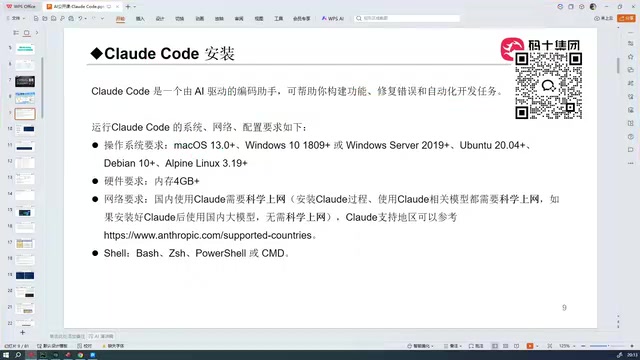
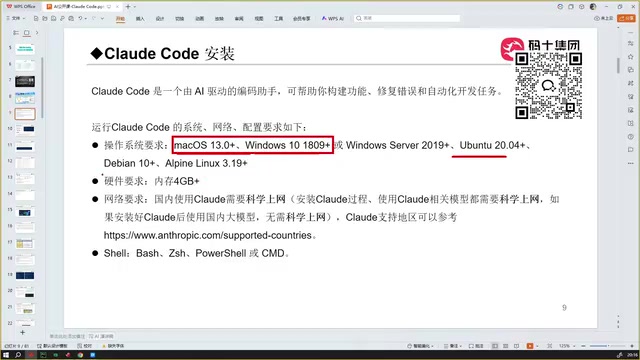
Claude Code supports macOS, Windows, and Linux. In practice, macOS and Windows are the most commonly used. On the hardware side, at least 4GB of RAM is required.
Installation Steps and Key Considerations
There are several critical points to note during installation:
- A VPN/proxy must be enabled during the installation phase; otherwise, the installation process will hang and throw errors
- The usage phase (conversational programming) does not require a VPN/proxy
- A Shell command-line interface is also needed, as it's used for both installation and interaction
On macOS or Linux, use the official installation command; on Windows, use the corresponding CMD command — simply copy and paste the official command. After successful installation, type claude in the command line and press Enter to access the working interface. If the installation process shows numerous red error messages, the installation has failed.
Troubleshooting Common VPN/Proxy Issues
Many beginners get stuck repeatedly at the installation step. Here's a practical troubleshooting method: first ping Google from the command line and confirm you're getting a response before proceeding.
There's a crucial detail here: even if your browser can access Google, pinging Google from the command line may still time out. This is because many VPN/proxy tools only proxy browser traffic by default and don't enable global proxy mode, so Shell command-line requests can't route through the proxy.
From a technical standpoint, VPN/proxy tools typically offer two proxy modes: system proxy and global proxy (also known as TUN mode). System proxy only routes traffic from applications that respect system proxy settings (mainly browsers), while many command-line tools (such as npm, pip, curl, etc.) don't read system proxy settings by default. Instead, they use environment variables (like HTTP_PROXY, HTTPS_PROXY) or their own configuration files for proxy settings. Global proxy/TUN mode intercepts all outbound traffic at the network layer (typically at the virtual network adapter level), ensuring all network requests — including those from the command line — go through the proxy.
The solution is to enable global proxy mode so that all network requests from the entire computer (including virtual machines) route through the proxy, allowing command-line installation requests to connect properly. Besides enabling global proxy, an alternative approach is to manually set proxy environment variables in the terminal, such as export https_proxy=http://127.0.0.1:port, but the global proxy method is more convenient and reliable.
Conclusion
Claude Code represents the mature form of AI programming's fifth stage. It can already excellently handle "0 to 1" project scaffolding, but for the complex business implementation of "1 to 100," it still relies on developers with broad technical vision to guide it.
For developers looking to get started, understanding the tool's positioning, correctly configuring the environment, and mastering global proxy techniques are the keys to taking the first step. The longer-term competitive advantage lies in continuously broadening your technical knowledge, making AI a truly powerful programming tool in your hands.
Related articles

Firebase AI Logic + Gemini Nano 4: A Practical Guide to Android AI Development
How Firebase AI Logic and Gemini Nano 4 help Android developers ship generative AI: App Check and prompt templates ensure security, hybrid routing cuts latency and cost, Spend Caps control budgets, and AI monitoring provides observability.

Microsoft AI Agent Breakthroughs: More Efficient, Better at Code and Weather Forecasting
Microsoft Research Focus Issue 97: ForkPilot cuts agent inference costs, Cabra reveals coding agents' code-understanding gap, Teletune learns workflows from logs, PBC improves extended forecasts, BioEMU-2 opens preview.

Prime Intellect Releases Prime Mega MoE: Trainable Fused MoE Kernel with 3.11x Forward Speedup
Prime Intellect releases Prime Mega MoE, adding backpropagation to DeepSeek's fused Mega MoE kernel for trainability. Up to 3.11x forward speedup and 34% faster Qwen3 MoE training steps in prime-rl.