Getting Started with Claude Code: A Practical Guide to the AI Coding Agent in Your Terminal

A practical guide to Claude Code, the terminal-based AI coding agent from Anthropic.
This guide explores Claude Code, Anthropic's terminal-based AI coding agent. Through a real demo of generating a playable Tetris game in 30 seconds, it highlights how Claude Code differs from traditional chat-based AI by working directly within your project. The article breaks down its three core capabilities — understanding unfamiliar projects, making precise requirement-driven modifications, and closed-loop execution and verification — making it valuable for beginners and experienced developers alike.
What Is Claude Code?
Many people know Claude as a chatbot, but Claude Code is far less familiar. In short, Claude Code is an AI programming tool developed by Anthropic that runs in a terminal environment. Its biggest difference from a regular chat-based AI is that it doesn't just offer suggestions — it can actually enter your project and complete full development tasks based on your real files.
It's worth explaining what "terminal environment" means here. The Terminal is a command-line interface where developers interact directly with the operating system. All professional-grade development toolchains — including Git version control, package managers (npm/pip), compilers, and automation scripts — run with the terminal at their core. Anthropic's decision to embed Claude Code in the terminal rather than build a standalone IDE plugin means it can directly invoke system-level commands, access the file system, and execute build processes, giving it far greater operational permissions and contextual awareness than a browser chat window. This is also a key battleground in the current AI coding tools competition: GitHub Copilot focuses on in-editor code completion, Cursor embeds AI into a full IDE, while Claude Code takes a more foundational and flexible terminal-based approach.
Think of it as a "digital coworker": it combines your current project files, directory structure, and command execution results to help you analyze code, modify files, verify execution, and participate in the full development lifecycle from requirements to iterative optimization. Behind this capability is an AI Agent architecture — unlike traditional single-turn Q&A, an Agent can autonomously plan task steps, invoke external tools, observe execution results, and adjust its next action accordingly. This "plan—execute—observe—adjust" loop (also known as the ReAct paradigm) enables Claude Code to handle complex multi-step development tasks rather than simply generating a block of text.
According to a demonstration by bilibili creator Teacher Xiaoyi, Claude Code currently ranks in the top tier of global AI coding tools. Anthropic is an AI safety company founded in 2021 by former OpenAI Research VP Dario Amodei and his sister Daniela Amodei. Their core philosophy is building safe, controllable AI systems. Their flagship Claude series of large language models excels particularly in code comprehension, long-context processing, and complex reasoning — Claude 3.5 Sonnet and the Claude 4 series have consistently ranked at the top of multiple programming benchmarks (such as SWE-bench and HumanEval). Claude Code essentially unleashes these models' powerful reasoning capabilities into real development environments through an Agent architecture.
30-Second Demo: Generating a Web Game from Scratch
To vividly demonstrate Claude Code's capabilities, here's a highly compelling example: in an open project folder, enter the Claude Code terminal interface via Win + R, then give it a requirement — "Create a Tetris game folder in this directory and generate a web-based Tetris game that's simple and playable."
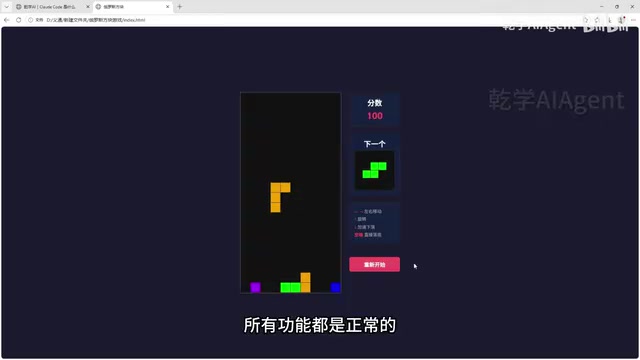
After approving its request to create the folder, a runnable web-based Tetris game was born in just twenty to thirty seconds. Double-clicking the HTML file opens it in the browser — left/right keys, up/down keys all work properly, and the line-clearing function is fully functional.
It's worth noting that generating such a game is far from simple text output. Claude Code needs to sequentially complete task planning: creating the directory structure, generating the HTML page framework, writing CSS styles, implementing JavaScript game logic (including block generation, collision detection, line-clearing logic, and a scoring system), and ensuring logical consistency across all modules. This is a classic demonstration of the "task decomposition and tool invocation" capabilities in Agent architecture.
The significance of this example is clear: a small game that might previously have taken a developer several days to complete was delivered as a playable product by Claude Code in just half a minute. This is exactly the kind of transformative change AI coding tools bring to traditional development workflows.
Core Differences Between Claude Code and Traditional Code Q&A
Understanding Claude Code's value hinges on comparing it with traditional "chat-style code Q&A."
Pain Points of the Traditional Approach
When using web-based or app-based AI assistants, the typical workflow goes like this: you copy code, describe the problem, paste it to the AI, the AI returns suggestions, and then you manually apply those changes back to your project one by one. This process involves extensive copy-pasting and context switching, which is inefficient and error-prone.
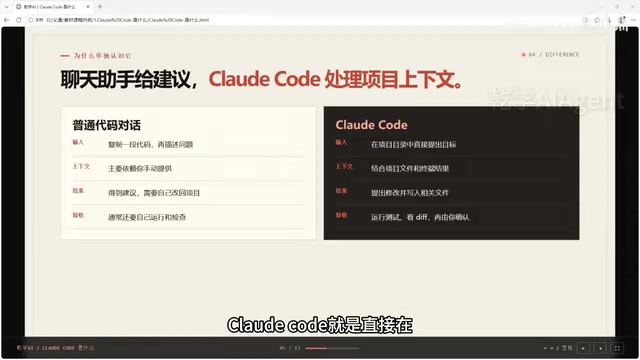
More critically, traditional chat-based AI can only see the small snippet of code you paste to it, lacking a holistic understanding of the entire project structure. A modification to one function might involve dependency relationships across multiple files, but the AI in the chat window knows nothing about this — its suggestions are often "locally correct but globally broken."
How Claude Code Optimizes the Workflow
Claude Code works directly in your project directory. It can freely access any files and relevant context you need, directly propose and execute modifications, and run commands for verification.
One of the technical foundations for this capability is Claude's ultra-long context window. Claude 3.5 and subsequent versions support context lengths of up to 200K tokens, meaning it can load dozens of source code files at once for comprehensive analysis. In comparison, early GPT-3.5 only supported 4K tokens. The extended context enables Claude Code to understand inter-file dependencies, trace function call chains, and identify the project's overall architectural patterns, rather than viewing individual code snippets in isolation.
In other words, the core difference lies in deep workflow integration: Claude Code participates in the complete code lifecycle from thinking, generating code, modifying code, to iterative optimization. The code it generates is more comprehensive and better formatted, and it moves swiftly from execution verification to problem discovery to final modification.
Three Core Capabilities of Claude Code
1. Understanding Unfamiliar Projects
Before taking over a new project, you can have Claude Code analyze it first. Whether you can't find the project's entry point, page locations, or where data request files are — you can have it quickly locate them for you.
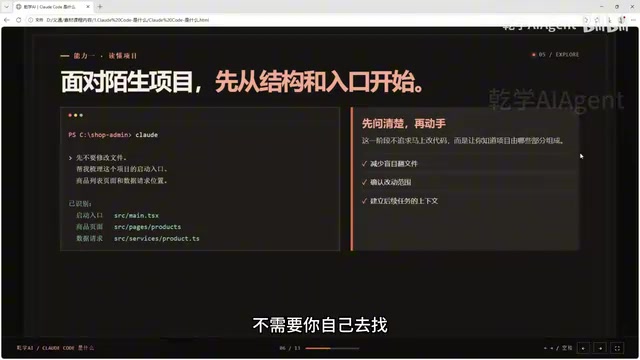
The benefit of this approach is: first determine the project's overall structure, then decide what to modify. Especially when learning a new project or inheriting old code, you no longer need to spend extensive time exploring on your own or rely on a colleague's handoff notes. For "Legacy Code" that lacks documentation and has been maintained by multiple people, this capability is particularly valuable — according to industry surveys, developers spend an average of 58% of their working time understanding existing code rather than writing new code.
2. Precise Modifications Based on Requirements Files
When requirements are clear, you can have Claude Code generate a requirements file specifying the desired outcome, parts that must remain unchanged, and acceptance criteria. This kind of structured summary not only makes Claude Code more precise and faster when locating and modifying components later, but also gives you clear objectives when reviewing the project yourself.
This approach essentially borrows from Requirements-Driven Development in software engineering and combines it with AI's execution capabilities. The requirements file serves as a "contract" between human and AI, defining input conditions, expected outputs, and constraint boundaries, thereby significantly reducing rework caused by AI misunderstandings.
3. Closed-Loop Execution and Verification
This is Claude Code's most critical capability. It can execute existing commands in your project and review the output. If it finds issues, it takes the error messages back to the task for analysis, proposes modifications, executes them with your approval, and continues optimizing. Through this "execute—verify—modify" loop, a complete project task can be progressively driven to completion.
This closed-loop capability is technically known as "Tool-Augmented Reasoning." Traditional large language models can only generate text and cannot verify whether the code they output actually runs; Claude Code, by invoking terminal commands, obtains real runtime feedback and incorporates that feedback into the next round of reasoning. This "grounding" mechanism dramatically improves the reliability of code generation, transforming AI from "armchair strategist" to "hands-on practitioner."
Who Should Use Claude Code?
Regardless of your skill level, Claude Code has relevant use cases:
- Programming beginners: Learning project structure? Have it explain entry points and startup procedures to lower the learning curve.
- Independent developers: Hand off a small feature for it to help complete, dramatically boosting development efficiency.
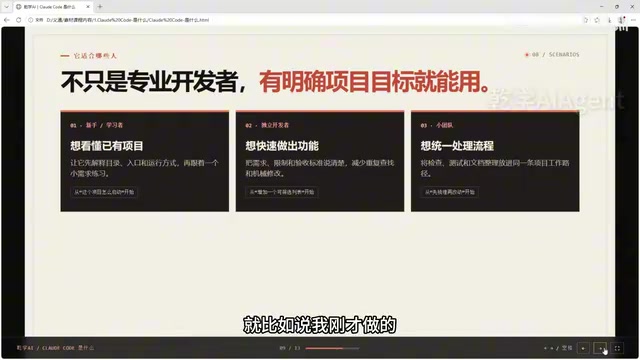
- Team developers: Incorporate documentation checks and code organization into unified workflows to standardize collaboration.
The common thread across these scenarios is having a clear project goal. Even without a coding background, as long as you're interested in programming, you can use Claude Code to efficiently and systematically create your own programs.
However, one important reminder: Claude Code can work within your project, but it can't make final judgments for you. Business logic and requirements direction still need your personal confirmation. It's an assistant, not a decision-maker. This reflects Anthropic's consistently emphasized "Human-in-the-Loop" philosophy — AI handles execution and suggestions, while humans retain ultimate decision-making authority and value judgment. This cautious approach is especially important in scenarios involving data security, core business logic, and user privacy.
Getting Started: Begin with Small Tasks
If you want to start using Claude Code, it's best to begin with a small task with a well-defined scope. For example, first have it analyze the project structure without modifying any files. Once you understand the results, move into the specific stages of installation, configuration, and hands-on practice.
In one sentence: Claude Code is a terminal-based agent that works within your project — it can read the project, modify files, run verifications, and present the results for your review.
As AI coding tools mature, "natural language engineer" is becoming a skill label for a new era. This concept reflects a fundamental paradigm shift underway in the software development industry — traditional programming requires developers to precisely master a programming language's syntax and semantics, while AI coding tools are shifting the core programming skill from "writing code" to "describing requirements." This aligns with the Low-Code/No-Code movement but goes further: low-code platforms typically lower the barrier through visual drag-and-drop, while tools like Claude Code allow users to drive complete development workflows directly with natural language. According to GitHub's 2024 survey, developers using AI coding tools reported an average productivity increase of 55% and code writing speeds improved by over 46%. Mastering terminal-based AI coding tools like Claude Code may well be the lowest barrier for ordinary people to enter the world of programming.
Related articles

Chain of Thought Isn't Just for AI: How Humans Can Use CoT to Improve Thinking Quality
Chain of Thought isn't just a prompt trick for large models. Starting from a Hacker News discussion, this article analyzes why CoT works for human thinking too, breaks down actionable ways to transfer it, and highlights the key differences between human CoT and machine CoT.
Cloudflare Teams Up with OpenAI: Closi…
Cloudflare Teams Up with OpenAI: Closing the Loop from Vulnerability Discovery to Defense with AI
Cloudflare uses OpenAI Daybreak to investigate security vulnerabilities and generate reviewable remediation plans, while developers use Codex to boost coding efficiency and quality.

Orca Multi-Agent Orchestration in Practice: A Guide to Parallel Collaboration with Claude and Codex
Orca is Stable AI's free open-source agent workbench supporting 34 agents like Claude Code and Codex in parallel. Learn its Git worktree isolation, multi-model orchestration, and mobile management.