Getting Started with Claude Code: AI Programming Tools Comparison & Core Principles Explained

A comprehensive guide comparing Claude Code, Cursor, and Codex with AI Coding principles and Vibe Coding practices.
This guide explores the evolution from traditional IDEs to terminal AI tools, compares Claude Code, Cursor, and Codex across key dimensions, explains four core AI Coding principles, and introduces Vibe Coding as an immersive flow-state development approach. It helps developers choose the right tool for their use case while maintaining quality through human-AI collaboration.
The Evolution of AI Programming: From Traditional IDEs to the Terminal AI Era
AI Coding—using large language models to assist programming or automatically generate code—is profoundly reshaping the software development landscape. Developers can describe requirements in natural language and let AI handle the coding work, dramatically boosting development efficiency.
Looking back at the evolution of programming tools, we can identify three major phases:
- Traditional IDE Era: Classic tools like Eclipse and IntelliJ IDEA, where developers wrote all code manually
- IDE + AI Plugin Era: AI plugins integrated into existing IDEs, providing intelligent suggestions and code completion
- Terminal AI Era: Describing requirements directly in natural language, with AI automatically producing code
The core value of traditional IDEs (Integrated Development Environments) lies in consolidating compilers, debuggers, version control, and other tools into a unified interface, enhancing productivity through syntax highlighting, code navigation, and refactoring features. Representative tools from the IDE + AI plugin phase include GitHub Copilot (based on the OpenAI Codex model) and TabNine, which leverage language models trained on massive code corpora to provide real-time completion suggestions as developers type. The fundamental shift in the Terminal AI era is the transformation of the interaction paradigm—from developer-led coding with AI-assisted completion, to developer-described intent with AI-led generation. This relies on a qualitative leap in large language models' capabilities in code understanding, generation, and reasoning.
Entering the Terminal AI era marks the official beginning of the AI Coding domain.
Four Core Principles of AI Coding
Human-AI Collaboration, Not Complete Delegation
AI Coding emphasizes a "half-human, half-AI" collaborative model. Humans operate at a higher level to ensure project quality—handling architecture design, technology selection, and business logic planning—while AI serves as an assistant taking on general coding tasks. With AI support, the coding barrier is lowered, making it easier for newcomers to get started on projects.
Balancing Efficiency and Quality
AI doesn't just speed up coding—it also helps check code style, identify potential errors, and even fix bugs, thereby ensuring overall code quality.
A Continuously Evolving Ecosystem
Both AI models and AI IDE tools are constantly iterating and upgrading. The collaboration patterns between developers and AI are also dynamically evolving—from simple Q&A in the beginning, to structured prompt instructions later on. Regardless of the approach, maintain a cautious attitude toward AI: treat it as an assistant to follow, not a master to blindly obey.
Clear Division of Responsibilities
AI Coding isn't about letting AI replace you in writing code—it's about you and AI collaborating together. You're responsible for clearly stating "what to do" and "how to do it," while AI handles coding, documentation lookup, and running tests. The final results are your responsibility to review.
Vibe Coding: The Ultimate Immersive Programming Experience
What is Vibe Coding?
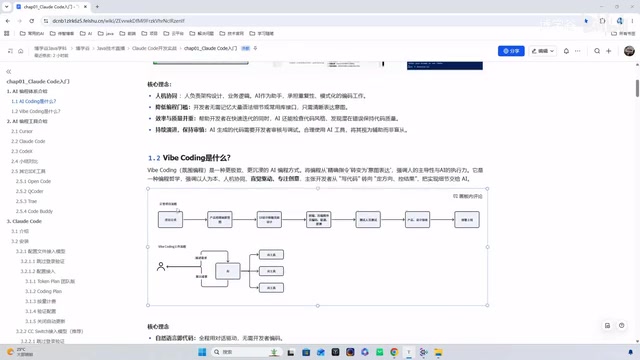
Vibe Coding is a specific development style under the AI Coding philosophy that pursues "feeling-driven" and "flow-state development." It pushes human-AI collaboration to the extreme—developers follow their intuition, fully immersed in describing intent through natural language, letting AI drive the entire development process.
The concept of "flow" mentioned here originates from psychologist Mihaly Csikszentmihalyi's research, referring to the mental state when a person is completely immersed in an activity—attention is highly focused, the sense of time disappears, and creativity peaks. In traditional programming, frequent compilation errors, environment configuration issues, and debugging processes constantly interrupt flow state. Cognitive science research shows that it takes an average of 23 minutes to regain deep focus after a single interruption. Vibe Coding maximizes the duration of flow state by delegating technical implementation details to AI, allowing developers to remain at the creative expression level.
Here's an example: Suppose you're a product manager with some product ideas and want to quickly produce a visual prototype. You describe your requirements to AI, and it rapidly generates an interface. Seeing the results sparks new ideas—"the page would look better with warmer tones," "the button click sound should be softer"—and you feed these adjustments back to AI. This cycle continues until you produce a satisfactory product.

Key Characteristics of Vibe Coding
Intuition-Driven: "Intuition" here means your feelings—what the page should look like, that interactions should be simple and comfortable, that the style should lean warm. These vague but directional descriptions are something AI can understand and implement.
Atmosphere Creation: Find a quiet, focused environment, play some pleasant music, and get yourself into a creative state. A good atmosphere helps sustain creative output.
Rapid Iteration: Requirements → Generation → Execution → Feedback → Correction—the entire cycle is extremely fast.
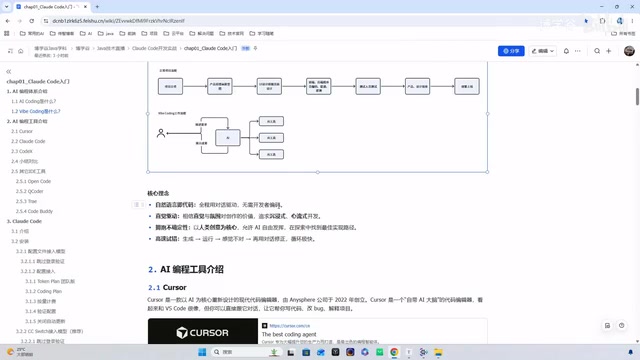
Immersive Flow Development: In traditional programming, your train of thought is often interrupted by bugs—you just had an inspiration, then suddenly an error appears. After fixing it, you have to reorganize your thoughts, which can easily lead to frustration. Vibe Coding keeps you focused on expressing ideas while AI handles implementation. You only need to make fine adjustments, staying in "creation mode" rather than "bug-fixing mode" throughout.
AI Coding vs. Vibe Coding: Use Case Comparison
| Dimension | AI Coding | Vibe Coding |
|---|---|---|
| Use Cases | Production-level features, team collaboration | Personal projects, creative exploration |
| Risk Control | Requires code auditing, lower risk | Can choose to trust AI, may produce "black-box code" |
| Core Advantage | Handling complex logic | Rapid prototype validation |
"Black-box code" here refers to code whose internal implementation logic the developer cannot fully understand. In Vibe Coding mode, since developers focus on describing intent rather than reviewing implementation details, AI-generated code may contain unexpected implementation approaches, potential performance issues, or security vulnerabilities. This is acceptable in personal prototype projects but requires additional code review processes to mitigate risks in production environments.
Horizontal Comparison of Mainstream AI Programming Tools
Three Major Tools: Claude Code, Cursor, and Codex
Cursor: One of the first AI IDE tools to gain popularity, built on VS Code, allowing VS Code users to switch over almost seamlessly. Powerful features make it especially popular among frontend developers, with Composer mode supporting multi-file refactoring.
Claude Code: A command-line CLI tool from Anthropic, and the protagonist of this course. Terminal operations feel more natural to programmers, with support for up/down arrow keys to browse command history. Its biggest highlights include 200K token context support, multi-agent collaboration, and project-level refactoring capabilities. It can be embedded in any software that supports a terminal.
Tokens are the basic units that large language models use to process text—one English word typically corresponds to 1-2 tokens, and Chinese characters approximately 1-2 tokens. A 200K token context window means Claude Code can read and understand approximately 150,000 words of code and documentation at once—equivalent to the complete codebase of a medium-sized project. By comparison, early GPT-3.5 only supported 4,096 tokens, and the initial version of GPT-4 supported 8,192 tokens. A larger context window enables AI to understand cross-file dependencies and grasp overall project architecture, making more accurate decisions during project-level refactoring rather than being limited to individual functions or file fragments.
Multi-Agent collaboration refers to decomposing complex tasks among multiple specialized AI agents, each responsible for specific duties while coordinating with each other. In Claude Code's context, this might manifest as: one agent understanding requirements and formulating an implementation plan, another writing code, and a third reviewing code quality and running tests. This architecture draws from the divide-and-conquer approach and microservices philosophy in software engineering, improving overall output quality through role specialization. Compared to a single model handling all tasks, multi-agent systems can better handle complex engineering tasks requiring multi-step reasoning—for example, simultaneously considering code logic correctness, test coverage, and performance impact during refactoring.
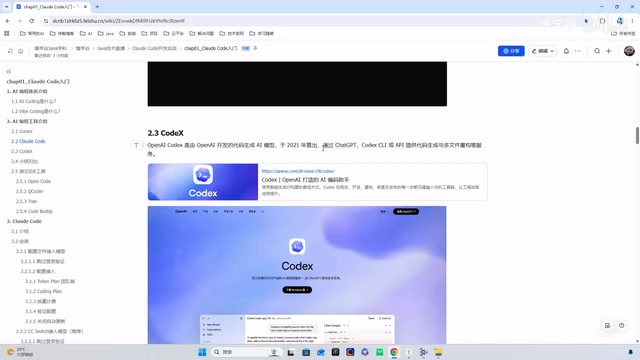
Codex: A coding tool from OpenAI. The earliest version was used for GPT-3 model training, then the API was deprecated. Later, the brand name was revived with a second-generation lightweight open-source agent, deeply integrated with GPT.
Architectural Differences Between CLI and IDE Tools
CLI (Command Line Interface) tools and IDE tools represent two different software interaction philosophies. CLI tools follow the Unix design philosophy—each tool does one thing well, achieving complex functionality through pipes and composition. Claude Code's advantages as a CLI tool include: seamless integration with existing terminal workflows (working alongside commands like git, docker, make), support for scripting and automated invocation, and no binding to a specific editor ecosystem. Cursor's advantages as an IDE tool include providing visual code diff comparisons, inline suggestions, and graphical operation interfaces that reduce cognitive load. The two are not mutually exclusive—Claude Code can be embedded as a plugin in IDEs like VS Code, combining CLI flexibility with IDE visualization.
Key Dimension Comparison
| Dimension | Claude Code | Cursor | Codex |
|---|---|---|---|
| Form Factor | CLI + IDE Plugin + Web | IDE | CLI + IDE Plugin + Web |
| Core Positioning | Deep reasoning | Code enhancement | Open-source & lightweight |
| Context Window | 200K tokens | Smaller | Medium |
| Pricing | Most expensive (can integrate domestic models to reduce cost) | Paid | Paid |
| Best For | Large project development | Frontend/full-stack development | ChatGPT subscribers |
Other Notable AI Programming Tools
Beyond the three major tools, several others are worth noting:
- Open Code: A terminal CLI tool positioned against Claude Code, with built-in free models—ideal for budget-conscious developers
- QCoder: An IDE tool from Alibaba
- Trae: ByteDance's AI programming product
- CodeBuddy: Tencent's AI programming tool
These domestic tools integrate Chinese models like Kimi and DeepSeekAd, though usage may require queuing. Kimi (Moonshot AI) and DeepSeek are representatives of Chinese LLMs in the code generation domain. The DeepSeek-Coder series performs excellently on multiple code benchmarks (such as HumanEval and MBPP), and its open-source strategy allows developers to deploy locally, addressing data security and network latency concerns. Alibaba's Qwen series is also continuously optimizing for code tasks. The core value of domestic tools integrating these models includes: reduced API call costs (domestic model pricing is typically 1/5 to 1/10 of overseas models), lower network latency (no cross-border access needed), and compliance with enterprise data regulations. However, there remains a gap compared to Claude and GPT-4 in complex reasoning and long-context processing capabilities.
Summary: How to Choose the Right AI Programming Tool
There's no absolute winner when choosing AI programming tools—the key is matching your use case:
- Team-level production development: Prioritize Claude Code—its deep reasoning and long-context capabilities suit complex projects
- Daily coding enhancement: Cursor is most friendly for VS Code users with the lowest learning curve
- Personal creative exploration: Try Vibe Coding mode with any tool to quickly validate ideas
- Limited budget: Claude Code supports integrating domestic models to reduce costs, and tools like Open Code offer free models
Regardless of which tool you choose, the core principle remains: AI is your assistant, not your replacement. Clearly communicating requirements, maintaining quality control, and continuous learning—these are the core competencies for developers in the AI era.
Related articles

Reddit Discussion: Real-World AI Agent Use Cases Shared for Business School Classrooms
A Reddit business school lecturer seeks real AI Agent use cases for classroom teaching. This article compiles typical AI Agent applications in professional and personal scenarios and offers three analytical dimensions for selecting classroom cases, helping readers understand the practical value and limitations of AI Agents.

Multi-LLM Provider API Integration: Standardization Challenges and Compliance Headaches
Explore the current state and challenges of multi-LLM provider API standardization, analyze enterprise data compliance pain points, and share community practices and router limitations for data governance in multi-model architectures.

Binance Halts Withdrawals as Hackers Suspected of Stealing Billions in Crypto
Binance paused withdrawals Thursday after a suspected cyberattack, with some estimates claiming billions in crypto stolen. This article reviews the incident, the uncertainty of loss estimates, and the custody trust paradox facing centralized exchanges.